
Amazon Basics ABMT1000
Посібник користувача інтерактивного джерела безперебійного живлення Amazon Basics Line Interactive 1000VA/550W
Model: ABMT1000
вступ
This manual provides essential information for the safe and efficient operation of your Amazon Basics Line Interactive Uninterruptible Power Supply (UPS) 1000VA/550W. A UPS provides battery backup power and surge protection for connected electronic devices, safeguarding against power outages, surges, and fluctuations. Please read this manual thoroughly before installation and use, and retain it for future reference.

Image: The Amazon Basics Line Interactive UPS 1000VA/550W positioned on a desk, providing power protection for a computer setup.
Важливі інструкції з безпеки
Please adhere to these safety guidelines to prevent injury or damage to the UPS and connected equipment:
- Цей ДБЖ призначений лише для використання в приміщенні.
- Do not install the UPS in direct sunlight, near heat-emitting appliances, or in areas with excessive humidity or dust.
- Переконайтеся, що ДБЖ підключено до заземленої розетки змінного струму.
- Не відкривайте ДБЖasing. Усередині немає деталей, які може обслуговувати користувач. Звертайтеся до кваліфікованого сервісного персоналу з усіх питань щодо обслуговування.
- Risk of electric shock. Do not connect or disconnect the UPS during a thunderstorm.
- The battery inside the UPS is not user-replaceable. Attempting to replace the battery yourself may void the warranty and pose a safety risk.
- In case of fire, use a dry chemical fire extinguisher. Water may cause electrical hazards.
Вміст упаковки
Перевірте наявність усіх предметів у вашій упаковці:
- Amazon Basics Line Interactive UPS 1000VA/550W Unit
- Кабель зв'язку USB
- Посібник користувача (цей документ)

Image: USB Communication Cable included with the UPS.
Продукт закінченийview
Передня панель

Зображення: спереду view of the Amazon Basics Line Interactive UPS 1000VA/550W, showing the power button, mute button, and LED indicators.
- Кнопка живлення: Press to turn the UPS ON or OFF.
- Кнопка вимкнення звуку: Press to silence audible alarms.
- Світлодіодні індикатори:
- ОНЛАЙН: Illuminates when the UPS is providing utility power to connected devices.
- НА БАТАРЕЇ: Illuminates when the UPS is operating on battery power.
- AVR (автоматичний томtage Регламент): Illuminates when the UPS is correcting minor voltage fluctuations without switching to battery power.
- ПЕРЕВАНТАЖЕННЯ: Illuminates if connected equipment exceeds the UPS's capacity.
Задня панель
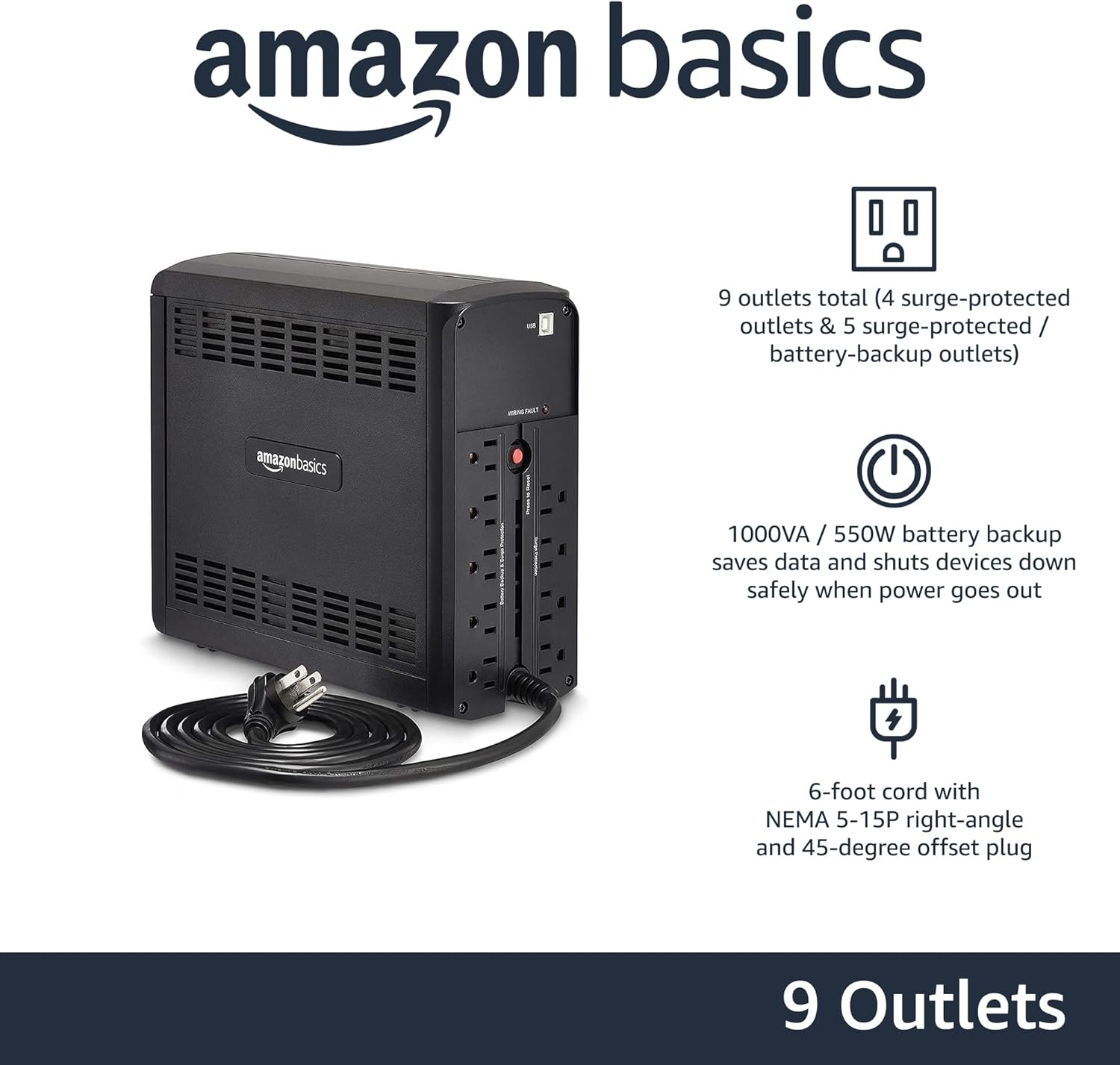
Зображення: Задня частина view of the Amazon Basics Line Interactive UPS 1000VA/550W, displaying the power cord, battery backup outlets, and surge-only outlets.
- Розетки з резервним живленням від батареї та захистом від перенапруги (5 розетки): These outlets provide both battery backup power during outages and surge protection. Connect critical devices such as computers, monitors, and network equipment here.
- Surge Protected Outlets (4 outlets): These outlets provide surge protection only. Connect non-critical devices like printers or scanners here.
- Порт зв'язку USB: Connects to a computer for power management software (e.g., CyberPower PowerPanel Personal).
- Вхідний шнур живлення змінного струму: Підключає ДБЖ до розетки.
Налаштування
- Розпакуйте та перевірте: Carefully remove the UPS from its packaging. Inspect for any shipping damage. If damage is found, do not use the unit and contact customer support.
- Початковий заряд батареї: Before initial use, connect the UPS to a standard wall outlet and allow it to charge for at least 8 hours. This ensures the battery is fully charged and ready to provide optimal backup power. The UPS will charge whether it is turned ON or OFF.
- Підключіть пристрої:
- Plug critical equipment (e.g., computer, monitor, router) into the Акумуляторні розетки та розетки із захистом від перенапруги.
- Plug non-critical equipment (e.g., printer, desk lamp) у Розетки із захистом від перенапруги.
- Увага: Do not plug laser printers into battery backup outlets, as their high power draw can overload the UPS.
- Підключення до комп'ютера (необов'язково): Use the provided USB cable to connect the UPS's USB port to your computer's USB port. This allows for power management software installation, enabling features like automatic shutdown during extended power outagес.
- Увімкнення: Press and hold the Power Button on the front panel for approximately 2 seconds until you hear a beep and the UPS powers on.
Інструкція з експлуатації
Turning the UPS On/Off
- Увімкнути: Press and hold the Power Button for 2 seconds. The UPS will beep, and the ONLINE LED will illuminate.
- Вимикати: Press and hold the Power Button for 2 seconds. The UPS will beep, and all LEDs will turn off.
Understanding LED Indicators and Alarms
- ONLINE (Green LED): Solid green indicates the UPS is receiving utility power and providing it to connected devices.
- ON BATTERY (Yellow LED): Solid yellow indicates the UPS is supplying battery power. An audible alarm will sound (beeping every 10 seconds).
- AVR (Yellow LED): Solid yellow indicates the UPS is automatically regulating input voltage без використання акумулятора.
- OVERLOAD (Red LED): Solid red indicates that the connected load exceeds the UPS's capacity. An audible alarm will sound continuously. Immediately disconnect non-essential equipment from the battery backup outlets until the alarm stops.
- Низький заряд батареї: When the UPS is on battery power and the battery level is low, the ON BATTERY LED will flash, and the alarm will beep more frequently (every 1 second).
- Вимкнути сигнал тривоги: Press the Mute Button to silence audible alarms. The alarm will reactivate if the condition changes (e.g., low battery).
Час роботи від батареї
The battery runtime depends on the power consumption of the connected devices. For this 1000VA/550W model:
- At half load (500VA/275W), the UPS provides approximately 7 хвилин of backup power.
- At full load (1000VA/550W), the UPS provides approximately 1 хвилина of backup power.
It is recommended to save your work and safely shut down your computer during a power outage, щоб запобігти втраті даних.
Технічне обслуговування
Догляд за акумулятором
- To maintain optimal battery life, keep the UPS connected to an AC outlet at all times.
- Якщо ДБЖ зберігається протягом тривалого періоду, заряджайте акумулятор кожні три місяці протягом щонайменше 8 годин, щоб запобігти його деградації.
- Batteries have a finite lifespan and will eventually require replacement. If you notice a significant decrease in runtime, contact Amazon Basics customer support for guidance on battery replacement options.
прибирання
- Always unplug the UPS from the wall outlet before cleaning.
- Use a soft, dry cloth to wipe the exterior surfaces of the UPS.
- Do not use liquid or aerosol cleaners, as they may contain flammable substances or cause electrical shock.
Усунення несправностей
| проблема | Можлива причина | Рішення |
|---|---|---|
| ДБЖ не вмикається. | Акумулятор розряджений або не підключений. | Connect the UPS to an AC outlet and allow it to charge for 8 hours. Ensure the power cord is securely plugged in. |
| UPS is beeping continuously and OVERLOAD LED is on. | Too many devices connected to battery backup outlets. | Disconnect non-essential equipment from the battery backup outlets until the alarm stops. Ensure total load does not exceed 550W. |
| ДБЖ часто перемикається в режим роботи від батареї. | Unstable utility power or voltage коливання. | This is normal operation for a line interactive UPS. The AVR function is working. If it happens excessively, consult an electrician about your home's wiring. |
| Короткий час роботи від батареї. | Акумулятор старий або не повністю заряджений. | Ensure the battery is fully charged (8 hours). If the battery is several years old, it may need replacement. Contact Amazon Basics support. |
| ДБЖ не забезпечує живлення підключених пристроїв. | UPS is off, or outlets are surge-only. | Ensure the UPS is turned on. Verify devices are plugged into the correct battery backup outlets. |
Технічні характеристики
| Особливість | Деталь |
|---|---|
| Номер моделі | ABMT1000 |
| Ємність | 1000ВА / 550Вт |
| Вхідний об'ємtage | 120 Вольт змінного струму |
| Розетки | 9 total (5 Battery Backup & Surge Protected, 4 Surge Protected) |
| Тип батареї | Герметичний свинцево-кислотний |
| Типовий час перезарядки | Від 8 годин до 90% потужності |
| Розміри (Д x Ш x В) | 10.2 x 3.9 x 9 дюйми (25.91 x 9.91 x 22.86 см) |
| вага | 15 фунта (6.8 кг) |
| Колір | чорний |

Image: Diagram showing the dimensions of the Amazon Basics Line Interactive UPS 1000VA/550W.
Гарантія та підтримка
This Amazon Basics UPS is backed by a limited 1-year warranty, which includes the battery. For warranty claims, technical support, or questions regarding battery replacement, please contact Amazon Basics customer support through the Amazon webсайт або ваша платформа для покупок.
For the most up-to-date support information, please visit the official Amazon Basics support page or refer to your purchase documentation.
Ask a question about this manual
Ask about setup, troubleshooting, compatibility, parts, safety, or missing instructions. Manuals+ will review the question and use this page’s manual context to help answer it.