
1. Продукт закінчивсяview
The MEAN WELL HDR-150-24 is a 150W Ultra Slim Step Shape DIN Rail Power Supply designed for industrial control applications. It provides a stable +24V DC output at 6.25 Amps, converting AC input power efficiently. Its compact design allows for easy integration into control cabinets and systems.

Малюнок 1: Спереду view of the HDR-150-24 DIN Rail Power Supply.
2. Технічні характеристики
| Особливість | опис |
|---|---|
| Номер моделі | HDR-150-24 |
| Вхідний об'ємtage | 100-240 В змінного струму (50/60 Гц) |
| Вихідний випtage | 24 В постійного струму |
| Вихідний струм | 6.25 Amps |
| Вихідна потужність | 150 Вт |
| Розміри | 4 x 5 x 4 дюйми (приблизно) |
| вага | 0.31 кілограма |
| Монтаж | DIN-рейка |
| Охолодження | Passive (vented enclosure) |
| Індикатори | Світлодіод DC OK |
| Регульованість | Вихід обtage adjustable via potentiometer |
3. Інформація про безпеку
Please read and understand all safety instructions before installing or operating the power supply. Failure to follow these instructions may result in electric shock, fire, or serious injury.
- Кваліфікований персонал: Встановлення та обслуговування повинні виконуватися лише кваліфікованими фахівцями.
- Контрольоване середовище: This device is intended for use in a controlled environment.
- Відключення живлення: Завжди відключайте живлення перед будь-яким встановленням, підключенням або технічним обслуговуванням.
- Правильне заземлення: Переконайтеся, що джерело живлення належним чином заземлено, щоб запобігти ураженню електричним струмом.
- Вентиляція: Maintain adequate clearance around the unit for proper passive cooling. Do not block ventilation holes.
- Крутний момент клеми: Ensure all terminal screws are tightened to the specified torque (typically 3.0 Lb-In for input/output terminals) to prevent loose connections and overheating.
4. Налаштування
4.1 Монтаж
The HDR-150-24 is designed for mounting on a standard DIN rail. Locate the DIN rail clip on the back of the unit. To mount, hook the top edge of the power supply onto the DIN rail, then push the bottom edge firmly until it clicks into place. To remove, pull down the release lever at the bottom of the clip and lift the unit off the rail.
4.2 Електропроводка
Refer to the wiring diagram below for proper connection of input and output terminals. Ensure all wires are stripped to the appropriate length and securely inserted into the screw terminals before tightening.
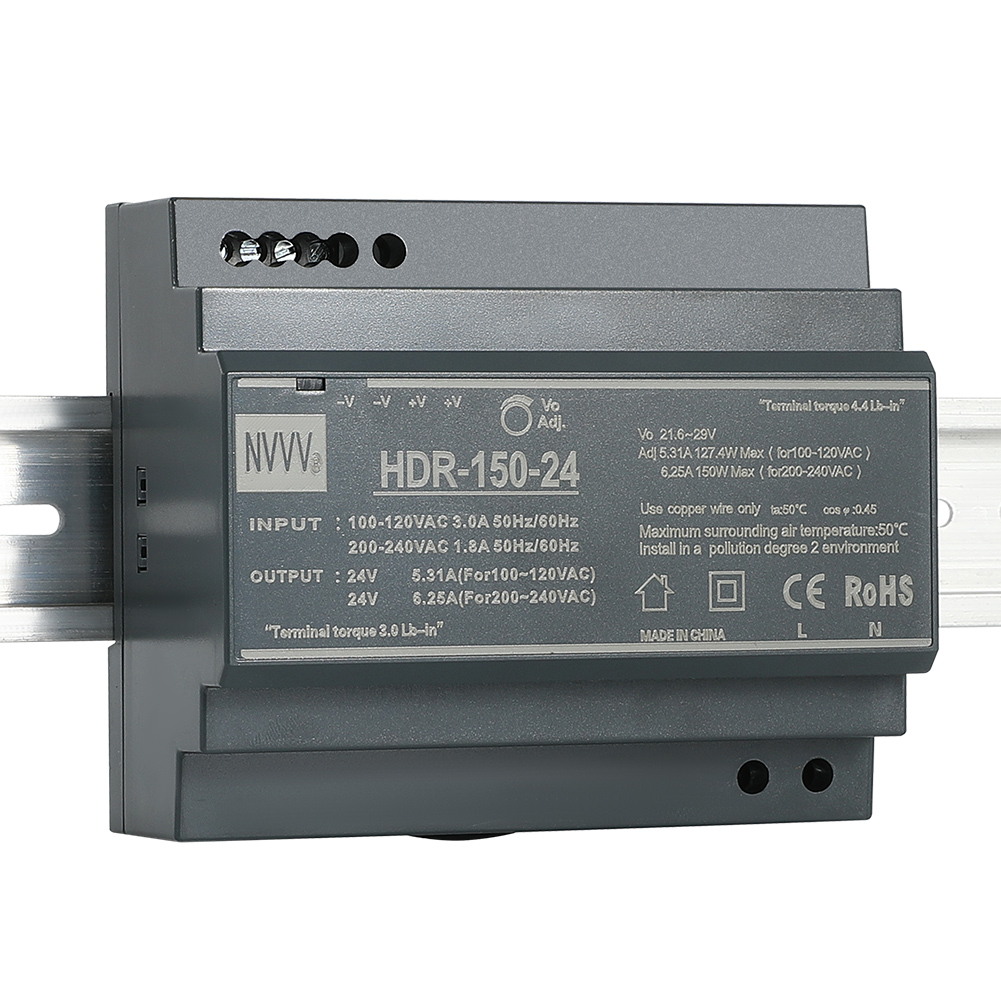
Figure 2: Wiring Diagram for HDR-150-24. Input terminals (L, N, PE) are at the bottom, and output terminals (+V, -V) are at the top. An adjustable potentiometer is also visible.
- Вхідні з'єднання: Connect the AC Line (L), Neutral (N), and Protective Earth (PE) wires to the corresponding input terminals.
- Вихідні з'єднання: Connect the positive (+V) and negative (-V) DC load wires to the corresponding output terminals. The unit provides multiple output terminals for convenience.
4.3 Вихідний томtage Регулювання
Вихідний обtage can be finely adjusted using the potentiometer located on the front panel. Use a small screwdriver to turn the potentiometer clockwise to increase the voltage or counter-clockwise to decrease it. Always verify the output voltage with a multimeter after adjustment.
Video 1: This video demonstrates the physical features, unboxing, and basic wiring of the HDR-150-24 DIN Rail Power Supply, including the terminal connections and voltage регулювання.
5. Інструкція з експлуатації
Після правильного встановлення та підключення блок живлення готовий до роботи.
- Увімкнення: Apply AC input power to the L and N terminals.
- DC OK Indicator: Observe the 'DC OK' LED on the front panel. A green light indicates that the output voltage знаходиться в межах нормального робочого діапазону.
- Вимкнення живлення: Disconnect the AC input power to shut down the unit.
6. Технічне обслуговування
To ensure optimal performance and longevity of your HDR-150-24 power supply, follow these maintenance guidelines:
- Регулярна перевірка: Periodically inspect the unit for any signs of damage, loose connections, or excessive dust accumulation.
- Прибирання: If dust accumulates, gently clean the ventilation holes and the unit's surface with a soft, dry cloth or compressed air. Ensure power is disconnected before cleaning.
- Умови навколишнього середовища: Забезпечте дотримання заданих температурних та вологісних умов у робочому середовищі, щоб запобігти передчасному виходу з ладу.
7. Вирішення проблем
If you encounter issues with your power supply, refer to the following troubleshooting steps:
- No Power / No DC OK LED:
- Check the AC input power source and connections.
- Переконайтеся, що вхідний обсягtage знаходиться в межах зазначеного діапазону (100-240 В змінного струму).
- Inspect for any tripped circuit breakers or blown fuses in the input line.
- Немає вихідного обсягуtage / DC OK LED Off:
- Check the output connections for shorts or open circuits.
- Ensure the load connected does not exceed the power supply's maximum output current (6.25A) or power (150W). Overload protection may have activated.
- If the unit has been overloaded, disconnect the load, power cycle the unit, and re-test with a reduced load.
- Неправильний вихідний гучністьtage:
- Використовуйте мультиметр, щоб виміряти вихідний об’ємtage.
- Відрегулюйте вихідну гучністьtage potentiometer as described in Section 4.3.
8. Гарантія та підтримка
The MEAN WELL HDR-150-24 power supply comes with a standard manufacturer's warranty. For warranty claims, technical support, or service inquiries, please contact your authorized MEAN WELL distributor or visit the official MEAN WELL webсайт для контактної інформації.
9. Додаткові ресурси
Video 2: This video provides a comprehensive full view of the product, highlighting its design and features.