
1. Важливі інструкції з техніки безпеки
Please read all instructions carefully before using the UNIC UC28+ projector. Keep this manual for future reference.
- Джерело живлення: Use only the specified power adapter. Ensure the power outlet voltagвідповідає вимогам проектора.
- Вентиляція: Не блокуйте вентиляційні отвори. Забезпечте достатній простір навколо проектора для належної циркуляції повітря, щоб запобігти перегріву.
- Тепло: Проектор lamp generates heat. Avoid touching the lens or ventilation areas immediately after use.
- вологість: Do not expose the projector to rain, moisture, or immerse it in water. Keep liquids away from the device.
- Прибирання: Від’єднайте проектор від мережі перед чищенням. Використовуйте м’яку суху тканину. Не використовуйте рідкі або аерозольні засоби для чищення.
- Безпека очей: Не дивіться безпосередньо в об'єктив проектора, коли він увімкнений.amp увімкнено. Яскраве світло може пошкодити очі.
- Розміщення: Розмістіть проектор на стійкій, рівній поверхні. Уникайте розміщення його під прямими сонячними променями або поблизу джерел тепла.
- Обслуговування: Не намагайтеся самостійно обслуговувати цей виріб. Зверніть усі послуги до кваліфікованого обслуговуючого персоналу.
2. Продукт закінчивсяview
The UNIC UC28+ is a portable LED projector designed for home cinema and entertainment. It supports a native resolution of 1920x1080 and offers multiple input options for versatile connectivity.
2.1 Компоненти проектора

Зображення 1: Топ view of the UNIC UC28+ projector. This image displays the manual control buttons located on the top panel, including 'ENTER', navigation arrows, 'INPUT' for source selection, and 'ESC' for exiting menus. The focus ring is also visible at the front.

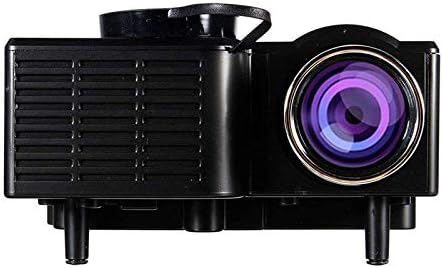
Зображення 2: Спереду і збоку view of the UNIC UC28+ projector. This image highlights the main projection lens and the ventilation grilles on the side, essential for heat dissipation during operation.
Зображення 3: сторона view of the UNIC UC28+ projector. This image clearly shows the various input ports available: HDMI, USB, AV, SD card slot, and VGA, providing multiple options for connecting external devices.
3. Налаштування
3.1 Вміст упаковки
- UNIC UC28+ LED Projector
- Адаптер живлення
- Пульт дистанційного керування
- AV-кабель
- Посібник користувача
3.2 Розміщення проектора
Position the projector on a stable, flat surface. Ensure the projection surface (screen or wall) is clean and smooth. The optimal projection distance will vary based on desired screen size. Adjust the projector's angle to achieve a rectangular image.
3.3 Підключення живлення
- Підключіть адаптер живлення до вхідного порту живлення проектора.
- Підключіть адаптер живлення до відповідної електричної розетки.
- Індикатор живлення на проекторі засвітиться.
3.4 Підключення пристроїв введення
The UC28+ supports various input sources:
- HDMI: Connect a device (e.g., laptop, Blu-ray player, gaming console) using an HDMI cable to the HDMI port.
- USB: Вставте флеш-накопичувач USB у порт USB, щоб відтворити медіафайли files безпосередньо.
- AV: Use the provided AV cable to connect older devices (e.g., DVD player, VCR) to the AV port.
- SD-карта: Insert an SD card into the SD card slot to play media files.
- VGA: Connect a computer or laptop using a VGA cable to the VGA port.

Зображення 4: Connectivity diagram for the UNIC UC28+ projector. This illustration demonstrates how various external devices such as computers, gaming consoles, smartphones, and media players can be connected to the projector using its multiple input options.
3.5 Налаштування фокусу
After powering on and selecting an input source, rotate the focus ring located around the lens until the projected image appears clear and sharp.
4. Інструкція з експлуатації
4.1 Увімкнення/вимкнення
- Увімкнення: Натисніть кнопку живлення на проекторі або пульті дистанційного керування. Проектор увімкнеться, іamp буде висвітлюватися.
- Вимкнення живлення: Press the power button again. The projector will initiate a shutdown sequence. Allow the projector to cool down completely before unplugging or moving it.
4.2 Вибір джерела вхідного сигналу
Press the 'INPUT' button on the projector or remote control to cycle through available input sources (HDMI, USB, AV, SD, VGA). Select the source corresponding to your connected device.
4.3 Навігація по меню
Use the navigation arrows on the projector or remote control to move through menu options. Press 'ENTER' to confirm a selection and 'ESC' to go back or exit the menu.
4.4 Основні налаштування
- Режим зображення: Налаштуйте яскравість, контрастність, колір та різкість.
- Співвідношення сторін: Select between 16:9, 4:3, or Auto to match your content.
- звук: Adjust volume or mute the audio output.
5. Технічне обслуговування
Регулярне технічне обслуговування забезпечує оптимальну продуктивність та подовжує термін служби вашого проектора.
- Очищення лінз: Use a soft, lint-free cloth or lens cleaning paper to gently wipe the lens. Avoid abrasive materials or excessive pressure.
- Очищення корпусу проектора: Протріть зовнішню частину проектора м’якою сухою тканиною. Не використовуйте агресивні хімікати або розчинники.
- Вентиляція: Periodically check and clean the ventilation grilles to prevent dust buildup, which can impede airflow and cause overheating. Use a soft brush or compressed air.
- Зберігання: When not in use for extended periods, store the projector in a cool, dry, dust-free environment. Use the original packaging or a protective case.
6. Вирішення проблем
Якщо у вас виникли проблеми з проектором, зверніться до наступних поширених проблем та способів їх вирішення:
| проблема | Можлива причина | Рішення |
|---|---|---|
| Немає живлення | Кабель живлення відключено, проблема з розеткою | Перевірте підключення кабелю живлення. Спробуйте іншу розетку. |
| Немає зображення | Incorrect input source, cable not connected, device not powered on | Select correct input source. Ensure all cables are securely connected. Power on the source device. |
| Розмите зображення | Focus not adjusted, incorrect projection distance | Adjust the focus ring. Reposition the projector for optimal distance. |
| Немає звуку | Volume too low, audio cable disconnected, source device muted | Increase projector volume. Check audio cable connections. Unmute source device. |
| Попередження про перегрів | Заблокована вентиляція, тривале використання | Ensure ventilation openings are clear. Allow the projector to cool down. |
7. Технічні характеристики
| Особливість | Деталь |
|---|---|
| Бренд | UNIC |
| Номер моделі | UC28+ |
| Тип дисплея | LED |
| Рідна роздільна здатність | 1920 x 1080 пікселів |
| Максимальна роздільна здатність дисплея | 1920 x 1080 пікселів |
| Яскравість | 400 люменів |
| Технологія підключення | HDMI, USB, AV, SD, VGA |
| Форм-фактор | Портативний |
| Тип монтажу | Настільне кріплення |
| Споживана потужність | 70 Вт |
8. Гарантія та підтримка
For warranty information or technical support, please refer to the warranty card included with your product or contact the retailer where the product was purchased. Keep your proof of purchase for warranty claims.