
1. Вступ
Дякуємо за покупкуasing the UHAPPY U18 Portable Mini HD LED Projector. This manual provides essential information for the safe and efficient operation of your device. Please read it thoroughly before use and retain it for future reference.
Техніка безпеки
- Не дивіться безпосередньо в об'єктив проектора, коли він увімкнений.amp увімкнено.
- Забезпечте належну вентиляцію навколо проектора, щоб запобігти перегріванню.
- Не піддавайте проектор впливу дощу або вологи.
- Використовуйте лише адаптер живлення, що постачається з проектором.
- Не намагайтеся самостійно відкривати або ремонтувати проектор. Звертайтеся до кваліфікованого персоналу для проведення будь-яких технічних робіт.
2. Продукт закінчивсяview
Familiarize yourself with the components and ports of your UHAPPY U18 projector.
Вміст упаковки
The following items are included in your projector package:

Image: Contents of the UHAPPY U18 projector package, including the projector, power adapter, AV cable, remote control, and user manual.
- UHAPPY U18 Mini LED Projector
- Адаптер живлення
- AV-кабель
- Пульт дистанційного керування
- Посібник користувача (цей документ)
Компоненти та порти проектора

Зображення: Зображення з кутом зверху вниз view of the UHAPPY U18 projector, highlighting the lens, focus adjustment, and control panel.

Зображення: Верх view of the UHAPPY U18 projector, showing the integrated control buttons.

Зображення: спереду view of the UHAPPY U18 projector, focusing on the projection lens.
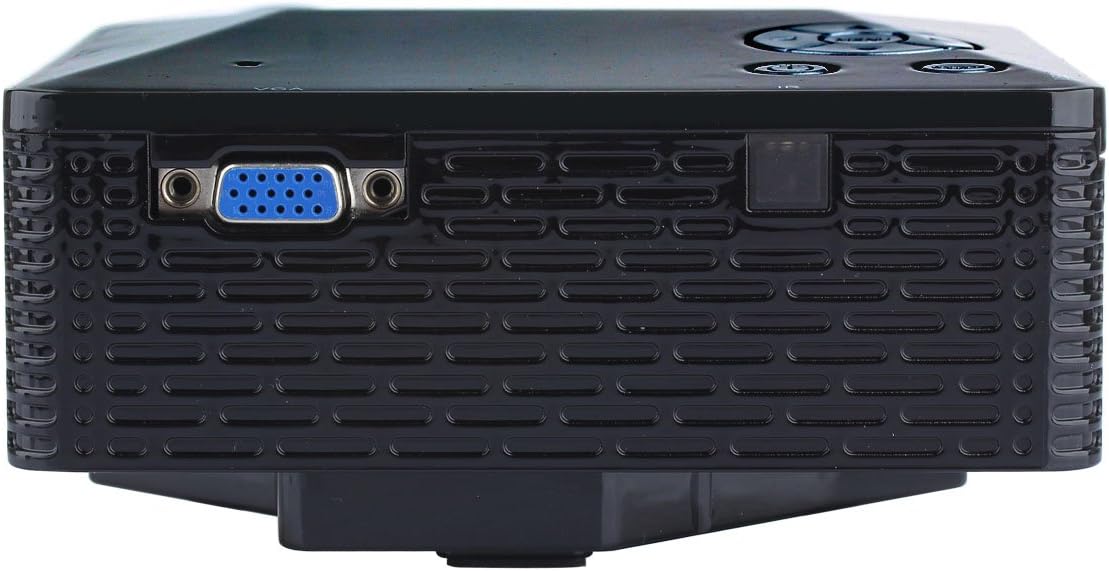
Зображення: Збоку view of the UHAPPY U18 projector, illustrating the VGA input port.
The projector features various input ports for connectivity:
- Вхід через HDMI: For connecting devices like laptops, gaming consoles, or media players.
- Порт USB: For connecting USB storage devices to play media directly.
- Слот для SD-карти: For inserting SD memory cards to play media directly.
- AV вхід: For connecting older devices using the included AV cable.
- Вхід VGA: For connecting computers or laptops with a VGA output.
- DC-IN: Порт введення живлення.
- Вихід для навушників: Для підключення зовнішніх аудіопристроїв або навушників.
- Ручка фокусування: Located near the lens for adjusting image clarity.
3. Налаштування
3.1 Розміщення
Place the projector on a stable, flat surface. Ensure there is adequate space around the projector for ventilation. The ideal projection distance is between 1 to 4 meters, yielding an image size of 20 to 80 inches.
3.2 Підключення живлення
- Connect the power adapter to the DC-IN port on the projector.
- Підключіть адаптер живлення до відповідної електричної розетки.
3.3 Підключення пристроїв введення
Choose the appropriate cable and port based on your source device:
- HDMI: Connect an HDMI cable from your device (e.g., laptop, DVD player) to the projector's HDMI port.
- VGA: Connect a VGA cable from your computer to the projector's VGA port.
- AV: Use the provided AV cable to connect devices with AV output (e.g., older DVD players, set-top boxes) to the projector's AV port.
- USB/SD-карта: Вставте USB-накопичувач у USB-порт або SD-карту у гніздо для SD-картки.
4. Інструкція з експлуатації
4.1 Увімкнення/вимкнення
- Щоб увімкнути: Press the power button on the projector or the remote control. The LED indicator will light up.
- Щоб вимкнути: Press the power button again. It is recommended to allow the projector to cool down for a few minutes before unplugging it.
4.2 Вибір джерела
After powering on, you may need to select the input source:
- Press the 'Source' button on the projector or the remote control.
- Use the navigation buttons to select the desired input (HDMI, VGA, AV, USB, SD) and press 'OK' or 'Enter'.
4.3 Налаштування фокусу
If the projected image appears blurry:
- Rotate the focus knob located near the projector lens until the image becomes clear and sharp.
4.4 Навігація по меню
Use the 'Menu' button on the projector or remote to access settings. Use the navigation arrows to move through options and 'OK' or 'Enter' to confirm selections. The projector supports multiple languages including English, Czech, Slovak, Danish, German, Spanish, French, Croatian, Italian, Hungarian, Dutch, Norwegian, Polish, Portuguese, Romanian, Slovene, Serbian, Finnish, Swedish, Bulgarian, Greek, Russian, and Chinese.
4.5 Підтримувані медіаформати
When playing media directly from USB or SD card, the projector supports the following formats:
- зображення: BMP, JPEG, PNG
- Відео: MPEG1, MPEG2, MPEG4, RM, RMVB, AVI, FLV, WMV
5. Технічне обслуговування
5.1 Очищення об'єктива
Використовуйте м’яку тканину без ворсу, спеціально призначену для оптичних лінз, щоб обережно протерти об’єктив проектора. Уникайте використання абразивних матеріалів або агресивних хімікатів.
5.2 Генеральне прибирання
Wipe the projector's exterior with a soft, dry cloth. Do not use liquid cleaners directly on the device. Ensure ventilation openings are free from dust and obstructions.
5.3 Зберігання
When not in use, store the projector in a cool, dry place, away from direct sunlight and extreme temperatures. It is advisable to cover the lens to protect it from dust.
6. Вирішення проблем
Якщо у вас виникли проблеми з проектором, зверніться до наступних поширених проблем та способів їх вирішення:
| проблема | Можлива причина | Рішення |
|---|---|---|
| На екрані немає зображення | Вибрано неправильне джерело вхідного сигналу Послаблене з’єднання кабелю Вихідний пристрій не ввімкнено | Виберіть правильне джерело вхідного сигналу. Перевірте всі кабельні з'єднання. Переконайтеся, що пристрій-джерело увімкнено та видає сигнал. |
| Зображення розмите | Фокус не налаштовано | Rotate the focus knob until the image is clear. |
| Ні звуку | Надто низька гучність External audio device not connected Налаштування аудіовихідного пристрою | Збільште гучність проектора. Connect external speakers/headphones to the audio output. Check audio settings on your source device. |
| Проектор перегрівається та вимикається | Заблокована вентиляція Тривале використання в жаркому середовищі | Переконайтеся, що вентиляційні отвори вільні. Allow the projector to cool down. Operate in a well-ventilated area. |
7. Технічні характеристики
Technical specifications for the UHAPPY U18 Portable Mini HD LED Projector:
- Система зображень: ЖК
- Рідна роздільна здатність: 320x240
- Lamp: LED
- Термін служби світлодіодів: 20,000 години
- Яскравість: 60 LM
- Контраст: 300:1
- Об'єктив: F=125
- Розмір зображення: 20-80 дюймів
- Відстань проекції: 1-4 метри
- Режим проекції: Передня проекція
- Режим роботи: Ручне/Дистанційне керування
- Вхідні клеми: AV, VGA, USB, SD, HDMI
- Вихід: Навушники
- Потужність: 24 Вт
- колір: 16.77 мільйонів кольорів
- Доповідач: 1.0 Вт*2
- Робоча температура: 10-35°C
- Розміри: 135 x 132 x 52 мм
- вага: 0.44 кг
8. Гарантія та підтримка
This product is manufactured by Generic. For warranty information and technical support, please refer to the documentation provided at the time of purchase or contact your retailer. Keep your purchase receipt as proof of purchase.