
1. Вступ
The Divoom Macchiato is a palm-sized, portable Bluetooth speaker with an integrated FM radio tuner, designed to deliver high-quality audio in a compact form factor.
2. Вміст упаковки
Будь ласка, поставте позначку у відповідному полі для наступних пунктів:
- Divoom Macchiato Bluetooth Speaker
- USB-кабель для зарядки
- Посібник користувача
- (Додаткові аксесуари можуть відрізнятися залежно від регіону)
3. Продукт закінчивсяview
Ознайомтеся з компонентами та елементами керування динаміка.
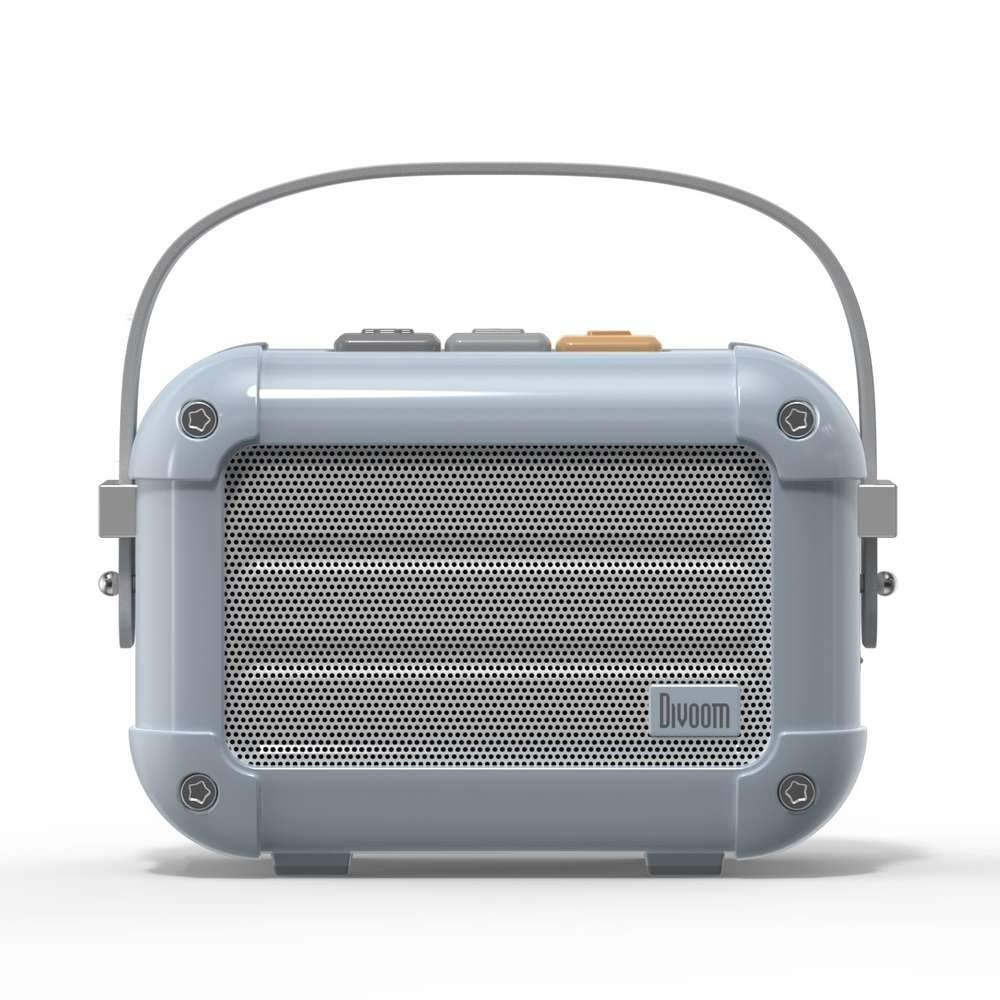
Малюнок 3.1: Спереду view of the Divoom Macchiato Bluetooth Speaker in blue.
3.1 Елементи керування та порти
The Divoom Macchiato speaker features intuitive controls for easy operation.
- Верхні кнопки: Typically control power, volume, track navigation, and mode selection (e.g., Bluetooth, FM).
- Порт зарядки: Usually a USB Type-C port for charging the device.
- Слот для картки TF: Allows playback of music directly from a TF (MicroSD) card.
- FM антена: An extendable antenna for improved FM radio reception.

Малюнок 3.2: Задня частина view of the Divoom Macchiato Bluetooth Speaker, showing the charging port and TF card slot.
4. Налаштування
4.1 Увімкнення/вимкнення живлення
- Щоб увімкнути: Press and hold the power button (usually one of the top buttons) for approximately 2-3 seconds until you hear an audible cue or see an indicator light.
- Щоб вимкнути: Press and hold the power button for approximately 2-3 seconds until you hear an audible cue or the indicator light turns off.
4.2 Створення пари Bluetooth
- Ensure the speaker is powered on and in Bluetooth pairing mode. The indicator light will typically blink rapidly.
- На вашому мобільному пристрої (смартфоні, планшеті тощо) увімкніть Bluetooth.
- шукати "Divoom Macchiato" in the list of available Bluetooth devices.
- Select "Divoom Macchiato" to connect. Once connected, the speaker will provide an audible confirmation, and the indicator light will turn solid.
Примітка: Після ввімкнення динамік автоматично спробує повторно підключитися до останнього сполученого пристрою.
4.3 Налаштування FM-радіо
- Повністю розгорніть FM-антену для оптимального прийому.
- Switch the speaker to FM radio mode using the mode button (refer to your specific model's button layout).
- Use the track navigation buttons (usually +/-) to scan for available FM stations.
- Some models may allow saving favorite stations; refer to your specific model's instructions for details.
5. Інструкція з експлуатації
5.1 Music Playback (Bluetooth/TF Card)
- Відтворення/пауза: Натисніть кнопку відтворення/паузи (часто інтегровану з кнопкою живлення або спеціальною кнопкою).
- Регулювання гучності: Використовуйте кнопки збільшення гучності (+) та зменшення гучності (-).
- Наступний трек: Press and hold or short press the next track button (often the + button).
- Попередній трек: Press and hold or short press the previous track button (often the - button).
- Відтворення TF карти: Вставте TF карту з MP3 files into the TF card slot. The speaker should automatically switch to TF card mode or require manual selection via the mode button.
5.2 App Features (if applicable)
For enhanced functionality, download the Divoom companion app from your device's app store. The app may offer features such as:
- Customizing sound profiles.
- Accessing additional audio sources.
- Managing FM radio stations.
- Оновлення прошивки.
6. Технічне обслуговування
- Прибирання: Використовуйте м’яку суху тканину для очищення поверхні динаміка. Не використовуйте абразивні засоби для чищення або розчинники.
- Зберігання: Зберігайте динамік у прохолодному, сухому місці, подалі від прямих сонячних променів та екстремальних температур.
- Догляд за акумулятором: Щоб подовжити термін служби акумулятора, уникайте частого повного розряджання акумулятора. Регулярно заряджайте динамік, навіть якщо він не використовується протягом тривалого часу.
- Водонепроникність: This model is NOT waterproof. Avoid exposure to water or high humidity.
7. Вирішення проблем
| проблема | Рішення |
|---|---|
| Динамік не вмикається. | Переконайтеся, що акумулятор заряджений. Підключіть динамік до джерела живлення за допомогою USB-кабелю для заряджання. |
| Не вдається підключитися через Bluetooth. |
|
| Немає звуку або гучність низька. |
|
| Поганий прийом FM-радіо. |
|
8. Технічні характеристики
| Особливість | Деталь |
|---|---|
| Номер моделі | МАККІАТО |
| Бренд | Divoom |
| Технологія підключення | Bluetooth |
| Технологія бездротового зв'язку | Bluetooth |
| Максимальна вихідна потужність динаміка | 6 Вт |
| Тип динаміка | Саундбар |
| Тип монтажу | Настільне кріплення |
| Рекомендоване використання продукту | музика |
| Спосіб контролю | Голос |
| Водостійкий | FALSE (Not Waterproof) |
9. Гарантія та підтримка
For warranty information and customer support, please refer to the documentation included with your product or visit the official Divoom webсайт. Зберігайте чек про покупку як підтвердження покупки для гарантійних претензій.