
1. Вступ
This manual provides detailed instructions for the installation, operation, and maintenance of your Anlapus FULL HD 1080P H.265+ Surveillance Kit. This system includes an 8-channel DVR with a pre-installed 1TB hard drive, 4 bullet cameras, and 4 dome cameras, designed to provide comprehensive security monitoring for your property.

Figure 1.1: Anlapus 8-channel DVR surveillance system components.
2. Вміст упаковки
Перевірте, чи всі перелічені нижче предмети входять до вашої упаковки. Якщо будь-які предмети відсутні або пошкоджені, зверніться до служби підтримки клієнтів.
- 1x 8-Channel DVR (with 1TB HDD pre-installed)
- 4x 1080P Bullet Surveillance Cameras
- 4x 1080P Dome Surveillance Cameras
- 8x 60ft BNC Video Cables
- 3x Power Adapters (12V 2A)
- 2x 1-to-4 Power Splitters
- 1x USB миша
- 1x Інструкція з експлуатації (цей документ)
- 8x Mounting Screw Bags
- 8x попереджувальні наклейки

Figure 2.1: Contents of the Anlapus surveillance kit package.
3. Особливості продукту
- Роздільна здатність Full HD 1080P: Captures clear and detailed images with 2.0-megapixel quality.
- Розширене стиснення відео H.265+: Зменшує file sizes by up to 50% compared to H.264, allowing for longer recording times and more efficient storage.
- Покращене нічне бачення: Equipped with 24 IR LEDs and an IR-CUT filter, providing clear black and white night vision up to 24 meters (80 feet).
- Клас захисту від атмосферних впливів IP66: Cameras are designed for both indoor and outdoor use, capable of withstanding various extreme weather conditions.
- Виявлення руху та сповіщення: Configurable motion detection zones with instant email alerts and push notifications to your smartphone.
- Кілька режимів запису: Supports 24/7 continuous recording, motion-activated recording, scheduled recording, and manual recording.
- Віддалений доступ: View прямі трансляції та записані відеоtage from anywhere using the free mobile application on your smartphone or tablet.
- Pre-installed 1TB Hard Drive: Ready for immediate use, eliminating the need to purchase and install a separate hard drive.

Figure 3.1: Day and Night Vision.
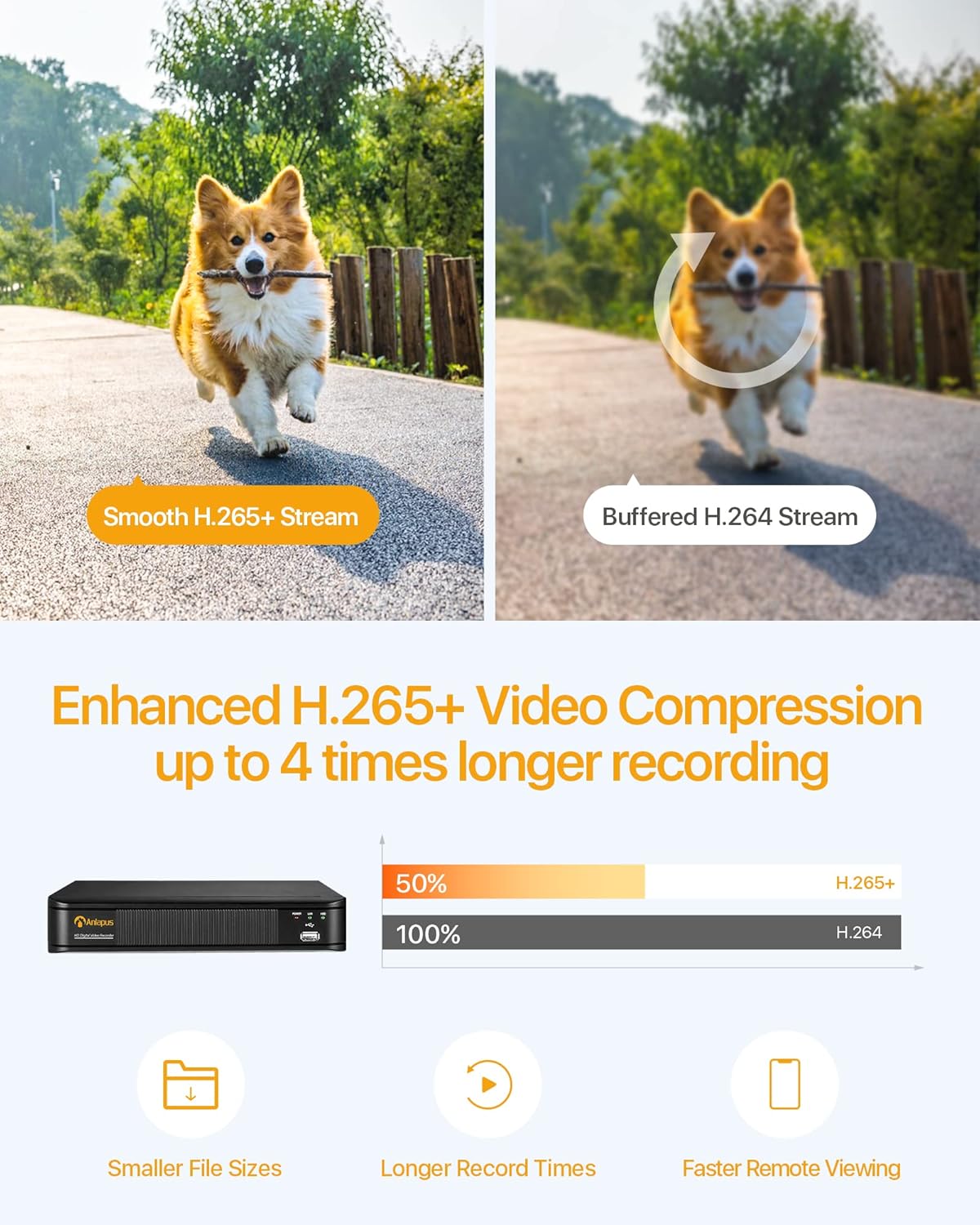
Figure 3.2: H.265+ Video Compression Benefits.

Figure 3.3: Day and Night Surveillance Example.

Figure 3.4: All-Weather Protection and Applications.
4. Системні компоненти понадview
4.1 DVR (Digital Video Recorder)
The DVR is the central unit for recording, storing, and managing video footage from all connected cameras. It features multiple video input ports, audio input/output, VGA and HDMI outputs for display, and USB ports for mouse control and data backup.
4.2 Surveillance Cameras
The kit includes both bullet and dome cameras. Both types offer 1080P resolution, night vision capabilities, and IP66 weatherproof housing. Bullet cameras are typically used for directional surveillance, while dome cameras offer a more discreet appearance and are often vandal-resistant.

Figure 4.1: Camera and DVR Connection Diagram.
5. Посібник із налаштування
5.1 Початкове підключення
- Підключення камер: Use the provided BNC video cables to connect each camera to the 'VIDEO IN' ports on the back of the DVR.
- Камери живлення: Use the power adapters and 1-to-4 power splitters to provide power to all cameras.
- Connect DVR to Display: Connect the DVR to a monitor or TV using either an HDMI or VGA cable.
- Connect DVR to Network: Connect the DVR's 'NETWORK' port to your router using an Ethernet cable for remote access.
- Підключення USB-миші: Plug the USB mouse into one of the DVR's USB ports for navigation.
- Увімкнення відеореєстратора: Connect the DVR to its power adapter and plug it into an electrical outlet. The system will boot up.

Figure 5.1: Simple Connection for Mobile Access.
5.2 Налаштування мобільного застосунку
- Завантажити додаток: шукати the official Anlapus security app on Google Play Store or Apple App Store and install it on your smartphone.
- Реєстрація облікового запису: Open the app and follow the on-screen instructions to register a new user account.
- Додати пристрій: Scan the QR code displayed on your DVR's monitor or manually enter the device ID to add your DVR to the app.
- View Камери: Після додавання ви можете view прямі трансляції з ваших камер та доступ до записаних продуктівtage дистанційно.
6. Інструкція з експлуатації
6.1 Режими запису
Your DVR supports several recording modes:
- Continuous Recording (24/7): Records continuously, overwriting the oldest footagе., коли жорсткий диск заповнений.
- Запис виявлення руху: Запис відбувається лише при виявленні руху, що економить місце для зберігання.
- Запланований запис: Встановіть конкретний час для запису.
- Ручний запис: Start and stop recording manually.
Configure these settings via the DVR's main menu using the USB mouse.

Figure 6.1: 24/7 Recording View.
6.2 Виявлення руху та сповіщення
The system can be configured to detect motion and send alerts:
- Configure Detection Zones: In the DVR settings, define specific areas within the camera's view для виявлення руху.
- Set Sensitivity: Налаштуйте чутливість виявлення руху, щоб мінімізувати хибні тривоги.
- Увімкнути сповіщення: Activate email alerts and push notifications through the DVR settings and mobile app. When motion is detected, you will receive an alert on your smartphone.

Figure 6.2: Motion Detection and Smartphone Alert.

Figure 6.3: Smart Motion Detection Features.
6.3 Remote Access & Playback
Access your surveillance system from anywhere:
- Жити View: Open the mobile app to view live video streams from all connected cameras.
- Відтворення: Use the app's playback function to review записаний footage stored on the DVR's hard drive. You can select specific dates and times.
- Багатопристрої Viewing: The system supports simultaneous viewing on multiple devices, including smartphones, tablets, and desktop computers.

Figure 6.4: Mobile App Playback Interface.

Figure 6.5: Multi-Device Remote Viewінж.
7. Технічне обслуговування
- Чисті камери: Періодично очищуйте об'єктиви камери м'якою губкоюamp тканиною, щоб забезпечити чітке зображення. Уникайте абразивних засобів для чищення.
- Перевірте кабелі: Ensure all cables are securely connected and free from damage. Replace any damaged cables immediately.
- Вентиляція відеореєстратора: Ensure the DVR is placed in a well-ventilated area to prevent overheating. Keep vents clear of obstructions.
- Оновлення прошивки: Перевірте виробника webперіодично перевіряйте сайт на наявність оновлень прошивки для забезпечення оптимальної продуктивності та безпеки.
- Резервне копіювання даних: Регулярно створюйте резервні копії важливих файлівtage from the DVR's hard drive to an external USB device.

Figure 7.1: USB Data Backup.
8. Вирішення проблем
- Немає відеосигналу: Check all cable connections between cameras and DVR, and between DVR and display. Ensure cameras and DVR are powered on.
- Погана якість зображення: Clean camera lenses. Ensure cameras are properly focused (if adjustable). Check cable integrity.
- Без віддаленого доступу: Verify the DVR is connected to the internet. Check network settings on the DVR and ensure your router is functioning correctly. Confirm the mobile app is properly configured and the device is added.
- Виявлення руху не працює: Review motion detection settings in the DVR menu. Adjust sensitivity and detection zones. Ensure alerts are enabled in both DVR and mobile app settings.
- DVR не записує: Check hard drive status in DVR settings. Ensure recording schedules or motion detection settings are correctly configured.
For further assistance, please refer to the support section or contact customer service.
9. Технічні характеристики
| Бренд | Анлапус |
| Номер моделі | AJ-AM8A4B-4W441E-106202S |
| Роздільна здатність відео | 1080p Full HD |
| Стиснення відео | H.265 + |
| Канали DVR | 8 каналів |
| Ємність зберігання | Жорсткий диск на 1 ТБ (попередньо встановлений) |
| Тип камери | Bullet and Dome Cameras |
| Діапазон нічного бачення | До 24 метрів (80 фути) |
| Рейтинг погодостійкості | IP66 |
| Технологія підключення | Провідний |
| Джерело живлення | Cable Electric (12 Volts DC) |
| Розміри продукту (Д x Ш x В) | 19.99 x 19.99 x 19.99 cm (DVR) |
| Вага товару | 7.36 kilograms (total package) |
| Виробник | Анлапус |
10. Гарантія та підтримка
The manufacturer, ZOSI (parent company of Anlapus), provides the following support and warranty:
- 30-денна гарантія задоволення: If you are not satisfied, you may be eligible for a refund or exchange within 30 days.
- Довічна технічна допомога: Comprehensive technical support is available for the lifetime of the product.
- 2-річна гарантія: На продукт надається 2-річна гарантія від виробничих дефектів.
For technical support or warranty claims, please refer to the contact information provided with your product packaging or visit the official Anlapus/ZOSI webсайт.