
вступ
This manual provides comprehensive instructions for the Xgody 9-inch GPS Navigation System X4. Please read this manual carefully before using your device to ensure proper operation and to maximize its features. This system is designed to assist with navigation for various vehicle types, including cars, trucks, buses, and bicycles.
Комплектація та налаштування
Перш ніж почати, переконайтеся, що всі елементи присутні в упаковці:
- Xgody 9-inch GPS Navigation Device
- USB кабель
- Кріплення присоски
- Car Charger (12-36V/2A)
- Інструкція з експлуатації
- Захисний футляр
Монтаж пристрою: Attach the suction cup mount to a clean, smooth surface on your dashboard or windshield. Ensure the device is securely fastened and does not obstruct your view of the road. Connect the GPS device to the mount.
Зарядка пристрою: Connect the car charger to your vehicle's power outlet and to the GPS device's charging port. The device has a built-in Li-ion rechargeable 2000mAh battery, providing approximately 1 hour of working time. Full charging typically takes 2-3 hours.

Image: Package contents of the Xgody 9-inch GPS Navigation System X4, including the device, USB cable, suction cup, car charger, manual, and protective case.

Image: The Xgody 9-inch GPS Navigation System X4 mounted on a dashboard inside a truck, displaying a navigation route.
Початкове ввімкнення та налаштування
Press and hold the power button to turn on the device. Follow the on-screen prompts to select your language, time zone, and initial map settings. Ensure the device has a clear view неба для оптимального отримання сигналу GPS.
Video: An official product video demonstrating the Xgody 9-inch GPS navigation system, highlighting its features, voice broadcast, and user interface for various vehicle types.
Інструкція з експлуатації
The Xgody X4 features a 9-inch capacitive touchscreen for intuitive control. The main menu provides access to various functions including Navigation, System Info, RMVB Player, Video, FM, Settings, Music, Games, Photo, and Tools.
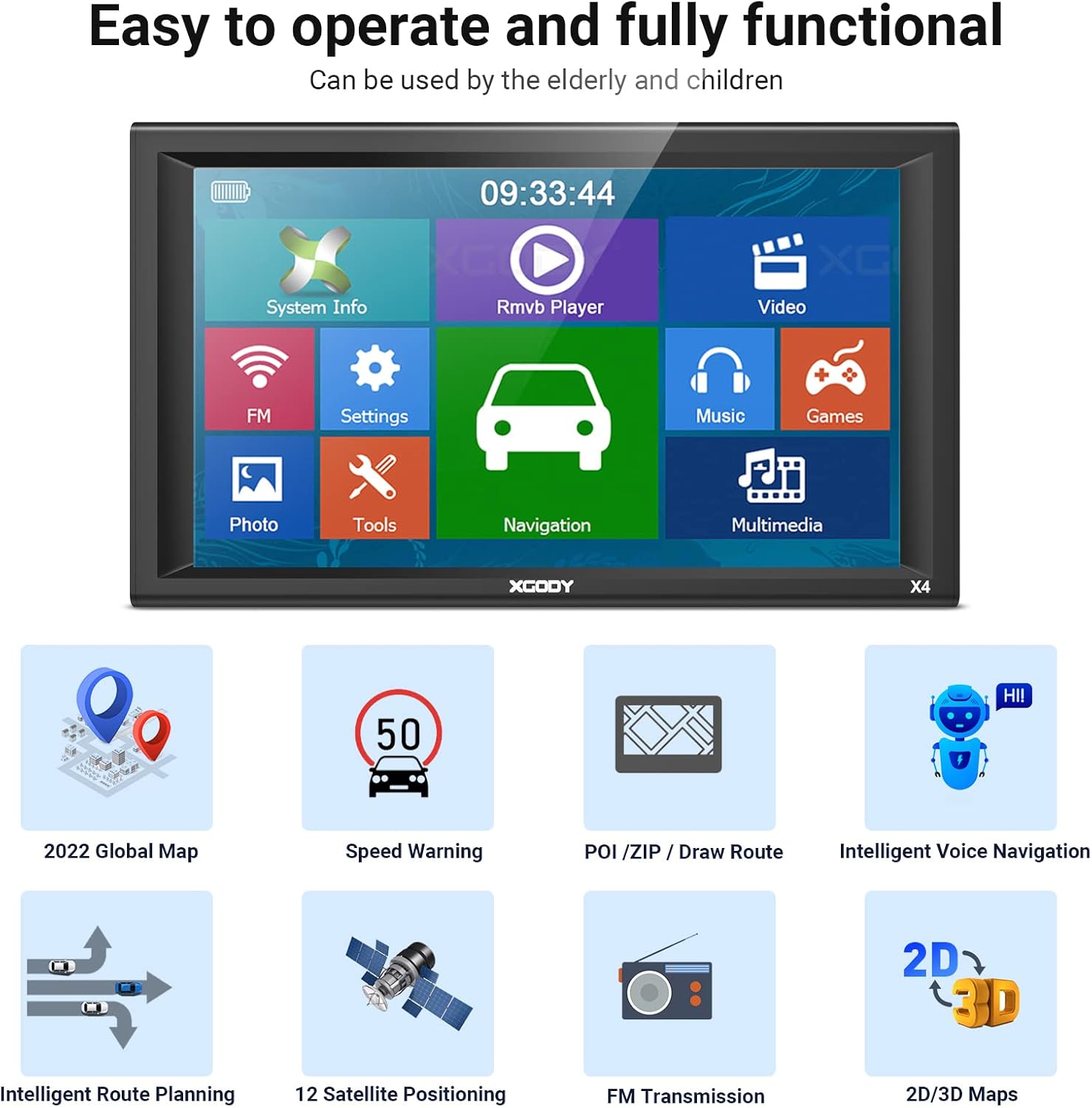
Image: The main menu screen of the Xgody 9-inch GPS, showing icons for System Info, RMVB Player, Video, FM, Settings, Music, Games, Photo, Tools, and Navigation.
Функції навігації
- Планування маршруту: Enter your destination, and the system will calculate the optimal route.
- Голосові підказки: Receive clear, spoken turn-by-turn directions.
- Попередження про швидкість: Alerts you when exceeding speed limits.
- POI (Points of Interest): Find nearby gas stations, restaurants, and other important locations.
- 2D/3D Maps: Switch between two-dimensional and three-dimensional map views for better spatial understanding.
- Truck Customization: Input your truck's dimensions (length, width, height, axles, weight) to receive routes that avoid low bridges, weight restrictions, and other truck-specific hazards.

Image: A detailed navigation screen on the Xgody GPS, showing a turn instruction, distance to next turn, estimated arrival time, and nearby gas stations.

Image: A screen demonstrating the truck customization feature, allowing users to input vehicle dimensions and weight to optimize routes for trucks, buses, and other large vehicles.
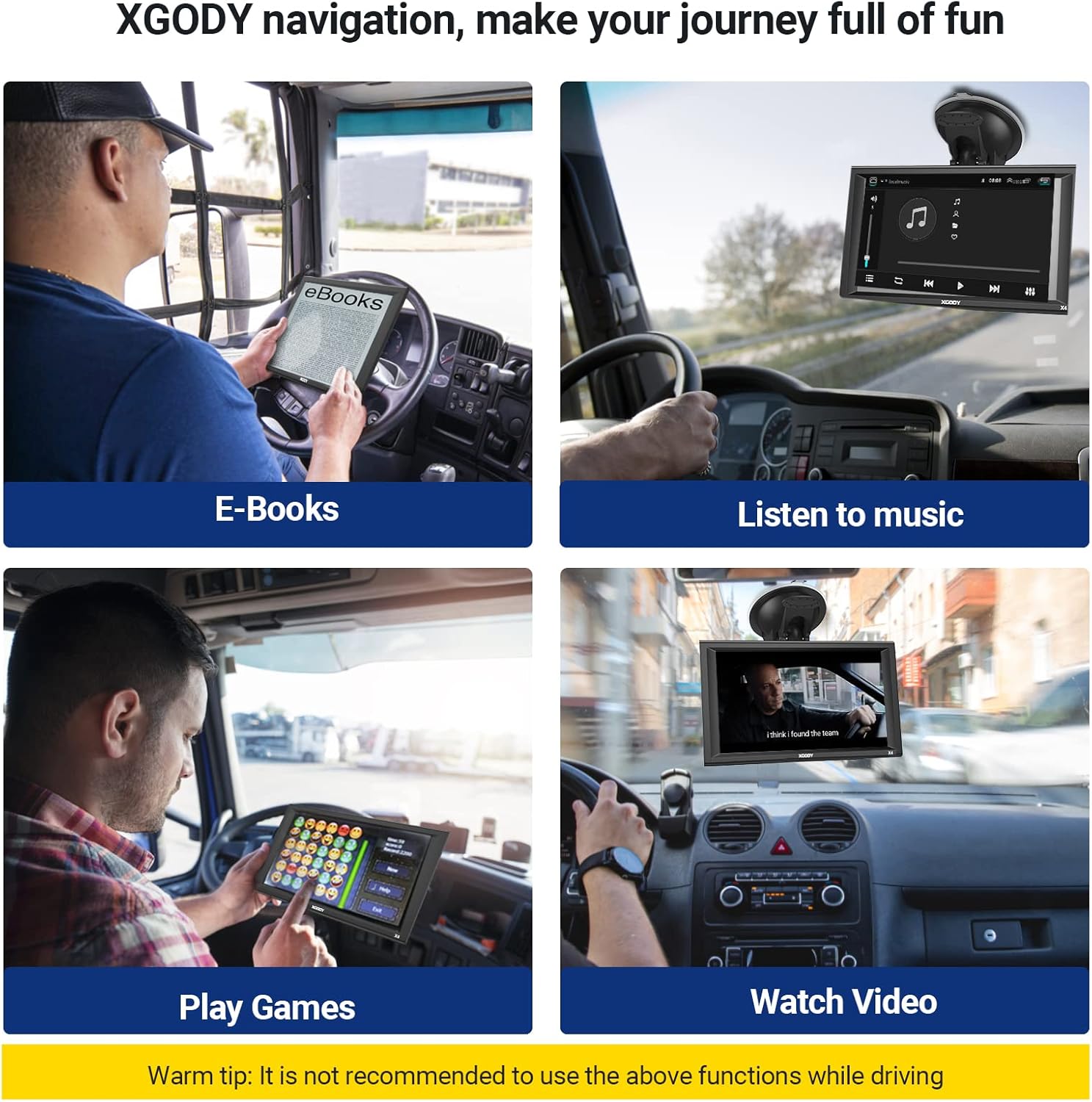
Image: Four panels illustrating entertainment features of the Xgody GPS: E-books, Music, Games, and Video playback. A warning advises against using these functions while driving.
Технічне обслуговування
To ensure the longevity and optimal performance of your Xgody GPS, follow these maintenance guidelines:
- Оновлення карти: The device supports lifetime map updates. Regularly check for and install the latest map data to ensure accurate navigation. Instructions for updating maps are typically found in the device's settings or on the manufacturer's webсайт.
- Догляд за екраном: The 9-inch capacitive touchscreen should be cleaned with a soft, lint-free cloth. Avoid using harsh chemicals or abrasive materials that could damage the screen.
- Догляд за акумулятором: To prolong battery life, avoid exposing the device to extreme temperatures. Charge the device fully before long trips and avoid completely draining the battery frequently.
- Зберігання: When not in use for extended periods, store the device in a cool, dry place, preferably in its protective case.

Image: A screen showing the map downloading process for the Xgody GPS, indicating that the device offers free lifetime map updates.
Усунення несправностей
If you encounter issues with your Xgody GPS, refer to the following common problems and solutions:
- Пристрій не вмикається:
- Ensure the device is fully charged or connected to the car charger.
- Check the car charger connection and the vehicle's power outlet.
- Try a soft reset by pressing and holding the power button for 10-15 seconds.
- Немає сигналу GPS:
- Переконайтеся, що пристрій чистий view of the sky, away from tall buildings or dense foliage.
- Перемістіть транспортний засіб на відкриту місцевість.
- Allow several minutes for the device to acquire a signal after power-on.
- Inaccurate Routing or Map Errors:
- Verify that the map data is up-to-date. Perform a map update if available.
- Check your vehicle type settings (car, truck, bus) to ensure routes are calculated correctly for your specific vehicle.
- Ensure all truck-specific parameters (height, weight, etc.) are accurately entered.
- Низька гучність:
- Adjust the volume settings within the device's menu.
- Ensure the FM transmitter function (if enabled) is correctly configured with your vehicle's radio.
- Mount Not Sticking:
- Clean the mounting surface and the suction cup thoroughly.
- Ensure the surface is smooth and non-porous.
- Apply slight moisture to the suction cup before attaching.
- Screen Unresponsive or Flickering:
- Перезапустіть пристрій.
- Переконайтеся, що екран чистий і не містить сміття.
- Якщо екран фізично пошкоджено, зверніться до служби підтримки клієнтів.
Технічні характеристики
| Особливість | Деталь |
|---|---|
| Бренд | Xgody |
| Модель | X4 |
| Розмір екрана | 9 дюймів |
| Тип дисплея | ЖК |
| роздільна здатність | 800 х 480 |
| Тип сенсорного екрана | Ємнісні |
| GPS модуль | High Sensitive GPS Receiver |
| Пам'ять (RAM) | 256 МБ |
| Internal Memory (ROM) | 8 ГБ |
| Слот SD | Micro SD socket, MAX 32GB |
| Підключення | USB (2.0 USB slot) |
| Bluetooth & AV-IN | немає |
| Акумулятор | Built-in Li-ion Rechargeable 2000mAh |
| Час роботи | Приблизно 1 година |
| Час зарядки | 2-3 годин |
| Вхід для автомобільного зарядного пристрою | 12-36 В/2 А |
| Supported Navigation System | GPS |
| Тип обслуговування автомобіля | Bicycle, Bus, Car, Truck |
| Підтримувані формати відео | ASF, AVI, WMV, 3GP, MP4, RMVB |
| Розміри предмета (Д x Ш x В) | 9.07 см (Д) x 5.51 см (Ш) x 0.58 см (В) |
Інформація про гарантію
For detailed warranty information regarding your Xgody 9-inch GPS Navigation System X4, please refer to the documentation included in your product packaging or visit the official Xgody webсайт. Гарантійні умови можуть відрізнятися залежно від регіону та дати придбання.
Підтримка клієнтів
If you require further assistance, technical support, or have questions not covered in this manual, please contact Xgody customer service. Contact details can typically be found on the manufacturer's official webсайті або на упаковці продукту.
Щоб знайти онлайн-ресурси, ви можете відвідати Xgody brand store on Amazon or the official Xgody webсайт.