
1. Вступ
This manual provides detailed instructions for the installation, operation, maintenance, and troubleshooting of the SEAFRONT SKI780 VFD Inverter Frequency Converter. This device is designed for precise motor speed control in various industrial and commercial applications. Please read this manual thoroughly before installation and operation to ensure safe and efficient use of the product.

Рисунок 1: Загальні положення view of the SEAFRONT SKI780 VFD Inverter Frequency Converter.
2. Інформація про безпеку
Завжди дотримуйтесь наступних запобіжних заходів, щоб запобігти травмуванню або пошкодженню обладнання:
- Ensure that installation and wiring are performed by qualified personnel only.
- Disconnect all power sources before performing any wiring, maintenance, or inspection.
- Переконайтеся, що вхідний обсягtage відповідає характеристикам інвертора.
- Do not touch electrical components immediately after power-off, as residual voltage may be present. Wait at least 5 minutes.
- Install the inverter in a clean, dry, and well-ventilated environment, away from direct sunlight, corrosive gases, and flammable materials.
- Забезпечте належне заземлення обладнання.
3. Продукт закінчивсяview
The SEAFRONT SKI780 VFD Inverter is a versatile device offering advanced control features for various motor applications.
Ключові характеристики:
- Integrated synchronous control and proportional timing control.
- Six speed control modes for automatic operation.
- Ability to lock all or part of the keys (analog potentiometer unlocked).
- Normally open relay and two high configuration outputs with 100 optional channels.
- Integrated user-defined counter/meter.
- 0-100% adjustable torque output at zero speed, with zero-speed brake function.
- V/F control and output torsion control.
- Integrated communication interface.
- Equipped with a speed potentiometer and an external panel.
- Five opto-isolated digital inputs, 100 optional channels.
- One analog input, two analog output channels.
- Textile pendulum frequency function, suitable for textile equipment.

Малюнок 2: Спереду view of the inverter showing the control panel and terminals.
4. Технічні характеристики
| Специфікація | Значення |
|---|---|
| Номер моделі | SKI780-0D75G-1 |
| Бренд | SEAFRONT |
| Вхідний об'ємtage | 220 вольт (перемінний струм) |
| Вихідний випtage | 220 вольт (перемінний струм) |
| Вихідна потужність | 750 Вт |
| Пікова вихідна потужність | 1500 Вт |
| Inverter Power (VA) | 2200 В.А |
| Форма вихідного сигналу | Модифікована синусоїда |
| Розміри (Д x Ш x В) | 14.2L x 11W x 8.5H centimeters (5.6 x 4.3 x 3.3 inches) |
| Кількість розеток | 1 |
| Джерело живлення | Vehicle DC Power Socket (Note: Product description indicates AC input) |
| Країна походження | Китай |
| GTIN/UPC | 736342831933 |

Figure 3: Dimensions of the SKI780 VFD Inverter.
5. Налаштування
Careful installation and wiring are crucial for the proper functioning of the VFD inverter.
5.1 Монтаж
- Mount the inverter vertically on a stable, non-flammable surface.
- Забезпечте достатній простір навколо пристрою для належної вентиляції та відведення тепла.
- Avoid mounting in areas with excessive vibration, dust, or moisture.
5.2 Електропроводка
Refer to the wiring diagram provided with your specific unit for detailed connections. General wiring steps include:
- Power Input (L, N): Connect the main AC power supply to the L and N terminals. Ensure correct voltage (220 В змінного струму).
- Вихідна потужність двигуна (U, V, W): Connect the three-phase motor leads to the U, V, and W terminals.
- Заземлення (PE): Connect the ground wire to the PE terminal for safety.
- Brake Resistor (P+, PB): If a brake resistor is used, connect it to the P+ and PB terminals.
- Термінали управління: Connect external control signals (digital inputs, analog inputs, relay outputs) to the respective terminals as per your application requirements.

Figure 4: Close-up of the inverter's terminal block for wiring connections.
5.3 External Panel Compatibility
If using an external control panel, ensure it is compatible with the inverter. The new panel design is specifically for new inverter models.

Figure 5: Correct connection of a new external panel to the inverter.
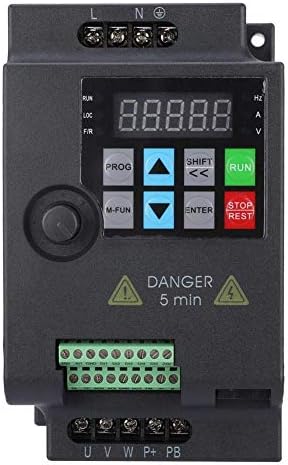
Figure 6: Incorrect connection of an old external panel to the inverter. Ensure panel compatibility.
6. Інструкція з експлуатації
The inverter features a control panel for setting parameters and operating the motor.
6.1 Панель керування надview
Панель керування зазвичай включає:
- Дисплей: Shows frequency, voltage, струм та інші параметри.
- Кнопка PROG: Вхід/вихід з режиму налаштування параметрів.
- M-FUN Button: Multi-function button, often used for quick access to common functions.
- Стрілки вгору/вниз: Навігація по меню та налаштування значень параметрів.
- SHIFT/Left/Right Arrows: Move cursor or change digits during parameter entry.
- Кнопка ENTER: Confirms selections and saves parameter changes.
- Кнопка RUN: Запускає двигун.
- Кнопка СТОП/СКИДАННЯ: Stops the motor or resets fault conditions.
6.2 Основна операція
- Увімкнення: Apply power to the inverter. The display will light up.
- Встановити частоту: Use the Up/Down arrows or the external potentiometer to set the desired output frequency.
- Запуск двигуна: Натисніть БІГАТИ кнопку для запуску двигуна. Двигун розганятиметься до встановленої частоти.
- Зупинити двигун: Натисніть СТОП/СКИНУТИ button to stop the motor. The motor will decelerate and stop.
6.3 Налаштування параметрів
Щоб налаштувати розширені параметри:
- Натисніть ПРОГ кнопку для входу в режим налаштування параметрів.
- Використовуйте стрілки вгору/вниз для навігації між групами параметрів та окремими параметрами.
- Прес ENTER щоб вибрати параметр.
- Use the Up/Down arrows and SHIFT buttons to adjust the parameter value.
- Прес ENTER щоб зберегти нове значення.
- Прес ПРОГ щоб вийти з режиму налаштування параметрів.
7. Технічне обслуговування
Регулярне технічне обслуговування забезпечує довговічність та надійну роботу вашого частотно-регульованого інвертора.
- Прибирання: Periodically clean the inverter's exterior and ventilation openings to prevent dust accumulation. Use a soft, dry cloth. Do not use liquid cleaners.
- Огляд: Regularly inspect wiring connections for tightness and signs of damage or corrosion. Check for any unusual noises or odors during operation.
- Вентилятори охолодження: Ensure cooling fans are operating correctly and are free from obstructions. Replace noisy or faulty fans.
- Умови навколишнього середовища: Переконайтеся, що температура та вологість робочого середовища залишаються в межах зазначених діапазонів.
- Термін служби конденсатора: Electrolytic capacitors have a finite lifespan. Consider professional inspection and replacement after several years of continuous operation.
8. Вирішення проблем
У цьому розділі наведено рішення поширених проблем, з якими ви можете зіткнутися.
| проблема | Можлива причина | Рішення |
|---|---|---|
| Інвертор не вмикається | No input power; Blown fuse; Faulty wiring | Перевірте блок живлення; замініть запобіжник; перевірте з'єднання проводів. |
| Мотор не працює | Incorrect parameters; Motor wiring error; Overload | Check frequency and control parameters; Verify motor wiring (U, V, W); Reduce motor load. |
| Замикання через перевантаження по струму (OC) | Sudden load change; Short circuit in motor; Acceleration/deceleration time too short | Check motor and load; Increase acceleration/deceleration time parameters. |
| Переволtagрозлом (OV) | Вхідний обtage too high; Regeneration during deceleration | Перевірити вхідний обсягtage; Increase deceleration time; Install a brake resistor if necessary. |
| Undervoltagрозлом (UV) | Вхідний обtage too low; Power supply instability | Перевірити вхідний обсягtagе. Забезпечте стабільне електропостачання. |
| Несправність перегріву (OH) | Poor ventilation; Ambient temperature too high; Fan failure | Improve ventilation; Reduce ambient temperature; Check and replace cooling fan. |
For persistent issues or faults not listed, please contact technical support.
9. Підтримка
For technical assistance, product inquiries, or service requests, please contact SEAFRONT customer support through your purchase channel or the official SEAFRONT website. Please have your model number (SKI780-0D75G-1) and serial number ready when contacting support.