
1. Вступ
This manual provides detailed instructions for the setup, operation, and maintenance of your Zerone Digital Alarm Clock, Model Zeronek1gfg26oth-02. Please read this manual thoroughly before using the product to ensure proper function and longevity.
2. Інформація щодо безпеки та запобіжні заходи
- Use the clock in a dry environment. Avoid prolonged exposure to wet conditions, high temperatures, or areas with rapid temperature changes.
- Поводьтеся з годинником обережно, щоб запобігти його пошкодженню.
- When using batteries, ensure they are high-quality AAA alkaline batteries. If the display dims or blinks, replace the batteries promptly. Prevent battery leakage by replacing old batteries.
- If the clock is not powered, verify that batteries are correctly inserted or the USB power source is connected.
- When using a USB power adapter, ensure it is a compatible DC 5V/500mA adapter.
3. Вміст упаковки
Upon opening the package, please verify that all accessories are present:
- Digital Wooden Clock (1 pc)
- User's Manual (1 pc)
- USB Charging Cable (1 pc)
4. Продукт закінчивсяview
The Zerone Digital Alarm Clock features a modern cube design with an LED display that shows time and temperature. It includes multiple alarm settings and adjustable brightness.

малюнок 4.1: Фронт view of the Zerone Digital Alarm Clock displaying the time.

малюнок 4.2: Key features indicated by icons: Clock, Alarm, Thermometer, and Sound Control.
4.1. Компоненти та кнопки
The clock features a minimalist design with control buttons located on the back panel.
- Кнопка SET: Використовується для введення та підтвердження налаштувань.
- Кнопка ВВЕРХ: Used to increase values or navigate settings.
- Кнопка ВНИЗ: Used to decrease values or navigate settings. Also controls sound control mode.
- Кнопка скидання: A small recessed button to reset the clock to factory defaults.
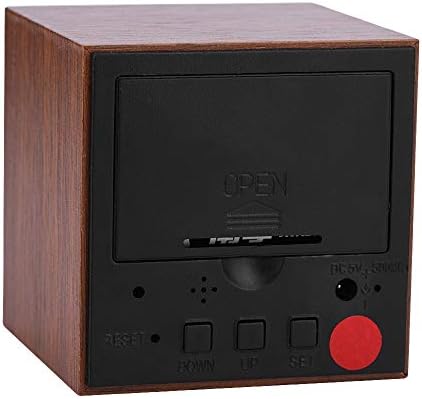
малюнок 4.3: Задня view of the clock with the battery cover closed, showing the USB power input and control buttons.
5. Налаштування
5.1. Живлення годинника
The clock can be powered by either 3 AAA batteries or a DC 5V/500mA USB power supply.
- Потужність батареї: Open the battery compartment cover on the back of the clock. Insert 3 AAA alkaline batteries, ensuring correct polarity (+/-). Close the cover securely.
- Потужність USB: Connect the provided USB charging cable to the DC 5V/500mA port on the back of the clock and plug the other end into a compatible USB power adapter (not included) or a USB port.
Note: When powered by batteries, the sound control mode is recommended to conserve power. The display will not show continuously in this mode.
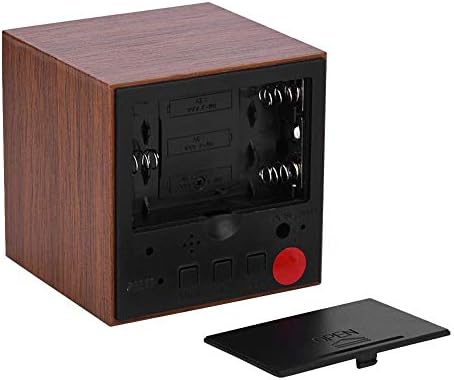
малюнок 5.1: Задня view with the battery compartment open, showing slots for 3 AAA batteries.
6. Інструкція з експлуатації
6.1. Режими відображення
The clock has two main display modes:
- DP-1: Displays Time, Temperature, Year, Month, and Date in a rotating sequence.
- DP-2: Displays Time continuously.
Щоб перемикатися між DP-1 та DP-2, натисніть кнопку НАБІР кнопку коротко.
6.2. Встановлення часу та дати
Щоб увійти в режим налаштування, натисніть і утримуйте НАБІР button for 3 seconds. The display will show the first setting item (YEAR) flashing.
- Поки елемент блимає, скористайтеся UP or ВНИЗ кнопки для налаштування значення.
- Натисніть НАБІР button briefly to move to the next setting item.
- The setting sequence is: YEAR → MONTH → DATE → 12/24H Format → HOUR → MINUTE → ALARM 1 (AL1) → ALARM 2 (AL2) → ALARM 3 (AL3).
- After setting the last item (AL3), the clock will exit the setting mode automatically.
6.3. Встановлення будильників
The clock supports three independent alarms (AL1, AL2, AL3). Each alarm sounds for 1 minute.
- Enter the setting mode by pressing and holding the НАБІР кнопку протягом 3 секунд.
- Прес НАБІР repeatedly until you reach the AL1, AL2, or AL3 setting.
- When the alarm hour or minute is flashing, use the UP or ВНИЗ кнопки, щоб встановити потрібний час будильника.
- Прес НАБІР щоб підтвердити та перейти до наступного налаштування будильника або вийти.
6.4. Регулювання яскравості
The clock offers three levels of brightness (L1, L2, L3), with L3 being the brightest and L1 the dimmest. Additionally, the display automatically reduces brightness by half between 18:00 (6 PM) and 07:00 (7 AM).
- Натисніть і утримуйте UP button for 3 seconds to enter brightness adjustment mode. The current brightness level (e.g., "L3") will be displayed.
- Використовуйте UP or ВНИЗ buttons to cycle through the brightness levels (L1, L2, L3).
- Once the desired brightness is set, press and hold the UP button for 3 seconds again to exit brightness adjustment mode.
6.5. Activating Sound Control Mode
Sound control mode (power-saving mode) is recommended when the clock is powered by batteries. In this mode, the display turns off and activates when a sound is detected (e.g., a clap or tap).
To toggle sound control mode:
- Натисніть ВНИЗ кнопку коротко.
- "ON:SD" indicates sound control is active.
- "--:SD" indicates sound control is off, and the display will remain continuously on (if in DP-2 mode).
6.6. Switching Temperature Unit (Celsius/Fahrenheit)
The clock supports both Celsius (C) and Fahrenheit (F) temperature displays.
To switch the temperature unit:
- Натисніть UP button briefly. The display will toggle between "--:C" (Celsius) and "--:F" (Fahrenheit).
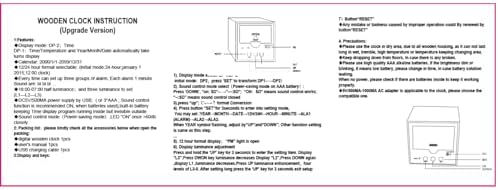
малюнок 6.1: Reference image of the original instruction sheet.
7. Технічне обслуговування
- Протирайте годинник м’якою сухою тканиною. Не використовуйте абразивні засоби для чищення або розчинники.
- Avoid exposing the clock to water or excessive moisture, as this can damage the internal circuitry.
- Якщо годинник не використовуватиметься протягом тривалого часу, вийміть батарейки, щоб запобігти їх витіканню.
8. Вирішення проблем
| проблема | Можлива причина | Рішення |
|---|---|---|
| Display is dim or blinking. | Низький заряд батареї. | Replace AAA batteries or connect to USB power. |
| Display is off, no time shown. | Sound control mode is active and no sound detected; no power. | Tap the clock or make a sound to activate display. Check battery installation or USB power connection. Disable sound control mode by pressing ВНИЗ button until "--:SD" is shown. |
| Годинник не реагує на натискання кнопок. | Temporary software glitch or improper operation. | Use a thin object (like a paperclip) to press the recessed СКИДАННЯ button on the back of the clock. This will restore default settings. |
| Time or date is incorrect after power loss. | Batteries removed or depleted while USB power was disconnected. | Перевстановіть час і дату, дотримуючись інструкцій у розділі 6.2. |
9. Технічні характеристики
| Особливість | Специфікація |
|---|---|
| Бренд | Zerone |
| Номер моделі | Zeronek1gfg26oth-02 |
| матеріал | MDF, PVC |
| Колір | Коричневий |
| Тип дисплея | Цифровий світлодіод |
| Розміри продукту | 6 x 6 x 6 cm (2.36"W x 2.36"H) |
| Вага товару | 3.87 унції |
| Джерело живлення | 3 x AAA Batteries (not included) OR DC 5V/500mA USB |
| Рівні яскравості | 3 (L1, L2, L3) |
| Функція сигналізації | Yes, 3 groups of alarms |
| Відображення температури | Yes (Celsius/Fahrenheit) |
| Формат часу | 12-hour or 24-hour mode |
| Особливості | Voice Control Mode, Automatic Half Luminance (18:00-07:00) |

малюнок 9.1: Dimensions of the Zerone Digital Alarm Clock.
10. Гарантія та підтримка
Щоб отримати інформацію про гарантію або технічну підтримку, зверніться до упаковки продукту або до продавця, у якого було придбано продукт. Зберігайте чек про покупку як підтвердження покупки.