
1. Вступ
The MOXA MGate MB3660-16-2DC is a high-performance 16-port Modbus gateway designed for converting between Modbus TCP and Modbus RTU/ASCII protocols. This device facilitates seamless communication between Modbus TCP hosts and Modbus RTU/ASCII serial devices. It features dual DC power inputs for enhanced reliability and redundancy, making it suitable for critical industrial automation applications.
This manual provides essential information for the proper installation, configuration, operation, and maintenance of your MGate MB3660-16-2DC gateway.
2. Інформація про безпеку
Please read and understand all safety instructions before operating the device. Failure to do so may result in injury or damage to the equipment.
- Переконайтеся, що блок живлення обtage matches the device's requirements (dual DC input).
- Disconnect power before performing any installation or maintenance procedures.
- Встановіть пристрій у добре провітрюваному приміщенні, щоб запобігти перегріву.
- Уникайте впливу вологи, екстремальних температур або агресивних середовищ на пристрій.
- Встановлення та обслуговування повинні виконувати лише кваліфіковані фахівці.
3. Вміст упаковки
Переконайтеся, що ваш пакет містить такі елементи:
- MOXA MGate MB3660-16-2DC Modbus Gateway
- Посібник із швидкого встановлення
- Гарантійний талон
- Клемна колодка для введення живлення
- DIN-rail mounting kit (if applicable)
If any of these items are missing or damaged, please contact your sales representative immediately.
4. Опис обладнання
The MGate MB3660-16-2DC features multiple ports and indicators for easy setup and monitoring.
4.1 Передня панель
The front panel typically includes LED indicators for power, network activity, and serial port status.
- Світлодіод PWR1/PWR2: Indicates status of primary/secondary DC power input.
- Індикатор ПОМИЛКИ: Вказує на системні помилки або попередження.
- Світлодіоди LAN1/LAN2: Indicate Ethernet link and activity.
- Serial Port LEDs (1-16): Indicate data transmission/reception on each serial port.
4.2 Rear/Side Panels
These panels house the connection ports:
- Споживана потужність: Dual DC power input terminal blocks for redundant power.
- Порти Ethernet: RJ45 ports for Modbus TCP network connection.
- Послідовні порти: 16 DB9 or terminal block connectors for Modbus RTU/ASCII devices.
- Кнопка скидання: Для відновлення заводських налаштувань.
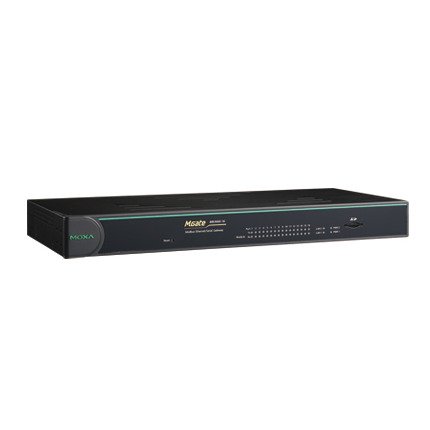
Малюнок 1: Спереду view of the MOXA MGate MB3660-16-2DC Modbus Gateway, showing LED indicators and general form factor.
5. Налаштування
5.1 Монтаж
The MGate MB3660-16-2DC can be mounted on a DIN-rail or wall-mounted using the provided kit.
- Монтаж на DIN-рейку: Attach the DIN-rail clip to the back of the device and snap it onto a standard DIN-rail.
- Настінне кріплення: Secure the wall-mount plates to the device, then use screws to fix the device to a wall or panel.
5.2 Підключення живлення
Connect two independent DC power sources to the dual power input terminal blocks for redundancy. Ensure correct polarity.
- Connect the positive (+) wire to the V+ terminal.
- Connect the negative (-) wire to the V- terminal.
- Connect the ground wire to the ⊗ terminal.
5.3 Мережеве підключення
Connect the Ethernet ports to your Modbus TCP network using standard RJ45 Ethernet cables.
5.4 Serial Device Connection
Connect your Modbus RTU/ASCII serial devices to the 16 serial ports. Configure the serial port settings (baud rate, data bits, parity, stop bits, mode) via the device's web console or utility to match your serial devices.
5.5 Початкова конфігурація
Доступ до пристрою web-based management interface by connecting a computer to the same network segment and entering the default IP address (refer to the Quick Installation Guide for the default IP). Configure network settings, Modbus mapping, and serial port parameters as required for your application.
6. Керування шлюзом
Once configured, the MGate MB3660-16-2DC operates as a transparent Modbus gateway, converting requests between Modbus TCP masters and Modbus RTU/ASCII slaves.
6.1 Modbus Communication Flow
- Modbus TCP master sends a request to the gateway's IP address and configured TCP port.
- The gateway translates the Modbus TCP request into a Modbus RTU/ASCII request.
- The gateway sends the serial request to the designated Modbus RTU/ASCII slave device via the appropriate serial port.
- The slave device responds to the gateway.
- The gateway translates the serial response back to Modbus TCP and forwards it to the Modbus TCP master.
6.2 Стан моніторингу
Regularly check the LED indicators on the front panel to monitor the device's operational status:
- PWR1/PWR2: Should be solid green when power is supplied.
- ПОМИЛКА: Should be off during normal operation. A red light indicates an error.
- Світлодіоди локальної мережі: Solid green for link, blinking for activity.
- Serial Port LEDs: Blink when data is being transmitted or received on that port.
7. Технічне обслуговування
To ensure optimal performance and longevity of your MGate MB3660-16-2DC, follow these maintenance guidelines:
- Прибирання: Periodically clean the device's exterior with a soft, dry cloth. Do not use liquid or aerosol cleaners.
- Оновлення прошивки: Check the MOXA website for the latest firmware versions. Apply updates as recommended to enhance features and security.
- Екологічна перевірка: Переконайтеся, що температура та вологість робочого середовища залишаються в межах заданих діапазонів.
- Перевірка кабелю: Regularly inspect all connected cables for damage or loose connections.
8. Вирішення проблем
У цьому розділі наведено рішення поширених проблем, з якими ви можете зіткнутися.
| проблема | Можлива причина | Рішення |
|---|---|---|
| Device not powering on (PWR LEDs off) | No power supply; faulty power adapter; incorrect wiring. | Check power connections and source; verify power adapter functionality. |
| No network connectivity (LAN LEDs off) | Faulty Ethernet cable; incorrect network settings; switch/router issue. | Check Ethernet cable; verify IP settings; test with another network port. |
| Збій послідовного зв'язку | Incorrect serial port settings (baud rate, parity); wrong wiring; slave device issue. | Verify serial port settings match slave device; check serial cable wiring; test slave device independently. |
| FAULT LED is red | System error; hardware malfunction. | Consult the product manual for specific FAULT codes or contact technical support. Try power cycling the device. |
8.1 Скидання до заводських налаштувань
If issues persist, you may need to perform a factory reset. Locate the reset button (usually a small pinhole) and press it for 5-10 seconds while the device is powered on. This will restore all settings to their default values.
9. Технічні характеристики
| Особливість | Специфікація |
|---|---|
| Модель | MGate MB3660-16-2DC |
| Послідовні порти | 16 (RS-232/422/485, software selectable) |
| Порти Ethernet | 2 x 10/100BaseT(X) auto-sensing RJ45 (typically for redundancy) |
| Підтримувані протоколи | Modbus TCP, Modbus RTU, Modbus ASCII |
| Вхідна потужність | Dual DC Power Input (e.g., 12-48 VDC, specific range may vary by model revision) |
| Надмірність | Dual power inputs |
| Робоча температура | Typically -40 to 75°C (Industrial Grade) |
| Температура зберігання | Typically -40 to 85°C |
| Вологість | Від 5 до 95% RH (без конденсації) |
| Розміри (Ш x Г x В) | Specific dimensions vary, refer to product datasheet for exact measurements. |
| вага | Приблизно 22 фунтів (10 кг) |
| Виробник | MOXA |
10. Гарантія та підтримка
10.1 Гарантія на виріб
MOXA products typically come with a standard manufacturer's warranty. Please refer to the warranty card included in your package or visit the official MOXA website for detailed warranty terms and conditions specific to the MGate MB3660-16-2DC.
10.2 Технічна підтримка
For technical assistance, troubleshooting, or further inquiries, please contact MOXA's technical support team. Support resources, including FAQs, drivers, and documentation, are available on the official MOXA webсайт.
- MOXA Webсайт: www.moxa.com
- Контактна особа служби підтримки: Refer to the 'Support' section on the MOXA webсайт для регіональної контактної інформації.