
1. Вступ
The Zoom GCE-3 is a compact USB Audio Interface designed to provide access to an extensive collection of guitar and bass effects, amplifiers, and cabinets through the Zoom Guitar Lab software. This device integrates a powerful Digital Signal Processor (DSP) to offload processing from your computer, ensuring low-latency performance for recording and practice. This manual provides essential information for setting up, operating, and maintaining your GCE-3 unit.
2. Продукт закінчивсяview
2.1 Основні характеристики
- Palm-sized audio interface with free download of Zoom Guitar Lab Mac/Windows software.
- Access to dozens of high-quality guitar effects and artist patches.
- Built-in DSP for circuit emulation of Zoom G-Series and B-Series pedals.
- USB-C port for connection to computer.
- Standard Guitar input, Aux input, and stereo headphone output with volume control.
2.2 Що в коробці
- Zoom GCE-3 Compact USB Audio Interface
- Steinberg Cubase LE license
- Протиковзка прокладка
- USB -кабель (тип А - С)
- Посібник (цей документ)
2.3 Продукт Views
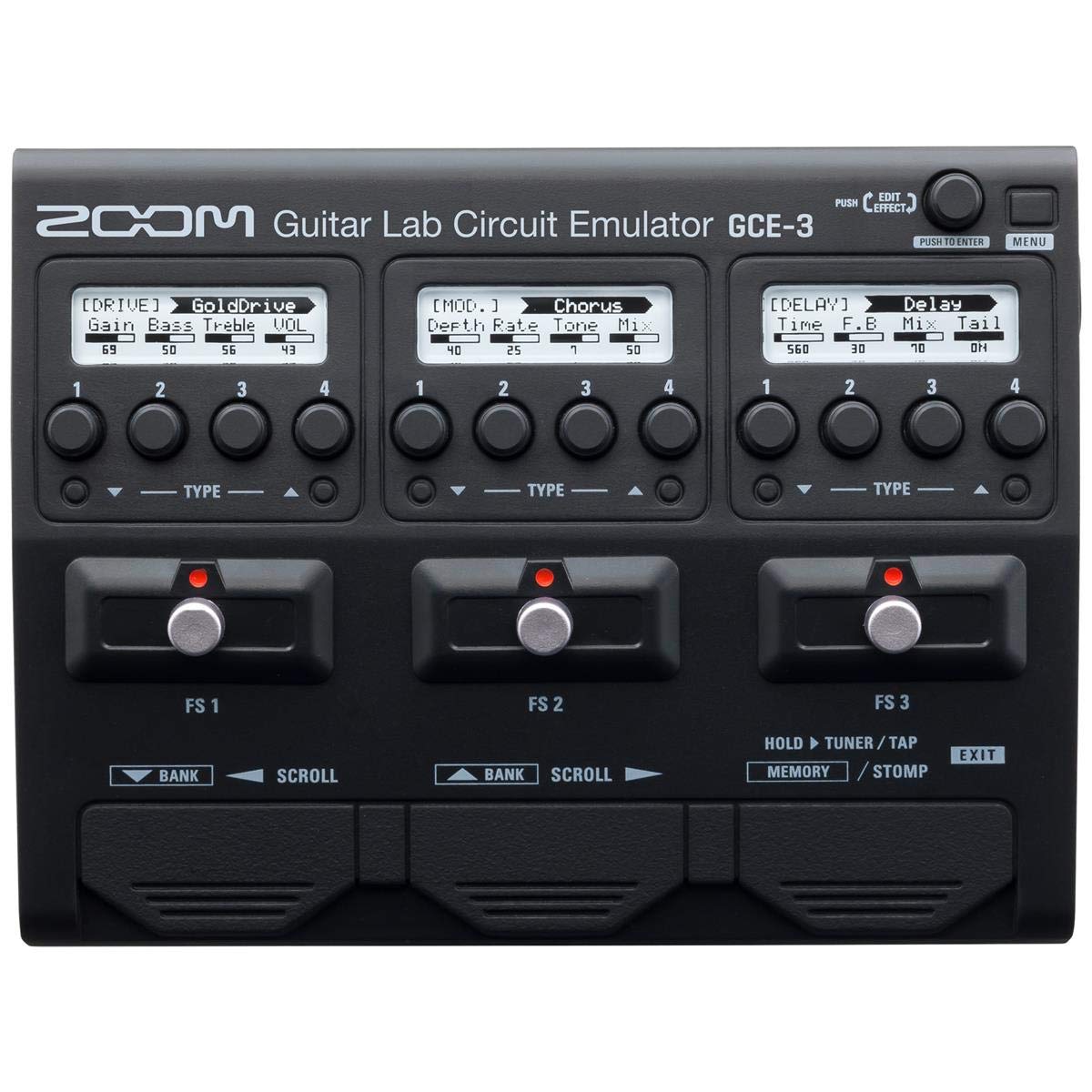


3. Налаштування
3.1 Встановлення програмного забезпечення
- Download the latest Zoom Guitar Lab software for your operating system (Mac or Windows) from the official Zoom webсайт.
- Install the software by following the on-screen instructions. This typically includes installing necessary drivers for the GCE-3.
- Install the included Steinberg Cubase LE software if desired, using the provided license.
3.2 Підключення апаратного забезпечення
- Підключення до комп'ютера: Use the supplied USB-C cable to connect the GCE-3 to a USB port on your computer. The GCE-3 is bus-powered via USB-C, so no external power adapter is typically required.
- Підключити інструмент: Plug your guitar or bass into the INPUT jack on the side of the GCE-3.
- Підключити навушники: For monitoring, plug your headphones into the PHONES jack. Adjust the volume using the dedicated VOLUME control.
- Connect External Audio (Optional): If you wish to play along with backing tracks, connect an external audio player (e.g., smartphone, MP3 player) to the AUX IN jack. The audio from the AUX IN will be routed to your headphones but will not be recorded by your computer.
3.3 Початкове ввімкнення
Once connected via USB, the GCE-3 will power on automatically. The power indicator LED will illuminate. Launch the Zoom Guitar Lab software on your computer. The software should detect the GCE-3 and begin loading its effects and patches.
Відео 1: Оверview of the Zoom GCE-3 USB Audio Interface, demonstrating its compact size, connectivity, and integration with Guitar Lab software for accessing various effects and amp моделі.
4. Інструкція з експлуатації
4.1 Using Zoom Guitar Lab Software
The GCE-3 functions as a hardware interface for the Zoom Guitar Lab software. All effect selection, parameter editing, and patch management are performed within the software interface on your computer. The GCE-3's built-in DSP handles the audio processing, freeing up your computer's resources.
- Device Emulation: Within Guitar Lab, you can select to emulate various Zoom multi-effects processors such as the G5n, G3Xn, G3n, and B3n. This provides access to the specific amp models, artist effects, DSP algorithms, and patches associated with those units.
- Вибір ефекту: Browse through a wide array of effects including:
- Динаміка: Compressors, noise gates.
- Фільтр: Wah, equalizers.
- Диск: Distortion, overdrive, fuzz, boosters.
- Amp: різноманітні amplifier models (e.g., MS 800, FD TWNR, UK 30A).
- Кабінет: Speaker cabinet simulations (e.g., MS4x12, FD2x12).
- Модуляція: Chorus, flanger, phaser, tremolo.
- Звукові ефекти: Special effects.
- Затримка: Various delay types.
- Реверберація: Various reverb types.
- Редагування патча: Create, edit, and save custom patches by combining different effects, amps, and cabinets. Adjust parameters for each effect to fine-tune your sound.
- Запис: Connect the GCE-3 to your Digital Audio Workstation (DAW) software (e.g., Cubase LE, Ableton Live, Reaper). The GCE-3 will appear as an audio input device. You can record your guitar with the processed effects or record a dry signal and apply effects later within your DAW.
4.2 Моніторинг
The GCE-3 provides direct monitoring through its headphone output. This allows you to hear your instrument with effects in real-time, without latency from your computer's audio processing. The dedicated VOLUME control adjusts the headphone output level.
5. Технічне обслуговування
To ensure the longevity and optimal performance of your Zoom GCE-3, follow these maintenance guidelines:
- Прибирання: Використовуйте м’яку суху тканину для очищення зовнішньої частини пристрою. Не використовуйте абразивні засоби для чищення, розчинники чи віск.
- Зберігання: Зберігайте пристрій у прохолодному, сухому місці, подалі від прямих сонячних променів, екстремальних температур та високої вологості.
- Обробка: Avoid dropping the unit or subjecting it to strong impacts. Handle cables carefully to prevent damage to the ports.
- Оновлення програмного забезпечення: Regularly check the Zoom website for updates to the Guitar Lab software and GCE-3 firmware to ensure you have the latest features and bug fixes.
6. Вирішення проблем
If you encounter issues with your GCE-3, refer to the following common troubleshooting steps:
- Немає живлення: Ensure the USB-C cable is securely connected to both the GCE-3 and your computer. Try a different USB port or cable. Verify your computer's USB port is providing sufficient power.
- Not Recognized by Computer/Guitar Lab:
- Confirm that the Zoom GCE-3 drivers are correctly installed. Reinstall them if necessary.
- Restart your computer and the Guitar Lab software.
- Check your computer's device manager (Windows) or System Information (Mac) to see if the GCE-3 is listed as a connected audio device.
- Немає звуку:
- Verify all cables (instrument, headphones, USB) are securely connected.
- Check the headphone VOLUME control on the GCE-3.
- Ensure the correct input/output device is selected in your DAW or computer's sound settings.
- Within Guitar Lab, confirm that effects are active and not bypassed, and output levels are set appropriately.
- Проблеми із затримкою: The GCE-3's DSP is designed for near-zero latency. If you experience noticeable latency, ensure you are monitoring directly through the GCE-3's headphone output and not through your computer's software monitoring. Adjust buffer sizes in your DAW settings if necessary.
- Програмні збої: If Guitar Lab behaves unexpectedly, try closing and reopening the application. Ensure your software and firmware are up to date.
Для отримання додаткової допомоги, будь ласка, зверніться до офіційної служби підтримки Zoom. website or consult the comprehensive online manual for the Zoom Guitar Lab software.
7. Технічні характеристики
| Бренд | Збільшити |
| Номер моделі | GCE-3 |
| Сумісні пристрої | Персональний комп'ютер |
| Підтримуване програмне забезпечення | Zoom Guitar Lab |
| Технологія підключення | USB |
| Кількість каналів | 3 |
| Операційна система | Windows, macOS |
| Аудіо вхід | USB |
| Максимум Sample Rate | 44.1 кГц |
| Вага товару | 260 грамів |
| UPC | 884354020361 |
8. Гарантія та підтримка
8.1 Гарантія на виріб
The Zoom GCE-3 comes with a 1 рік гарантії на заміну from the date of purchase. This warranty covers defects in materials and workmanship under normal use. For specific terms and conditions, please refer to the warranty information provided with your product or visit the official Zoom webсайт.
8.2 Підтримка клієнтів
For technical support, product registration, or further inquiries, please visit the official Zoom North America webсайт:
You can also find FAQs, driver downloads, and additional resources on their support pages.