
1. Вступ
This manual provides detailed instructions for the Redragon K503 Gaming Keyboard. Please read this guide thoroughly to ensure proper setup, operation, and maintenance of your device. The Redragon K503 is a multimedia gaming keyboard featuring RGB LED backlighting and a comfortable wrist rest, designed for use with Windows and MacOS PC systems.
2. Налаштування
2.1 Вміст упаковки
- Redragon K503 Gaming Keyboard
- USB-кабель (інтегрований)
2.2 Підключення клавіатури
- Знайдіть вільний порт USB на комп’ютері.
- Підключіть USB-роз'єм клавіатури Redragon K503 до USB-порту.
- Your operating system (Windows or MacOS) should automatically detect and install the necessary drivers. No additional software installation is typically required for basic functionality.
- The keyboard's RGB backlighting will illuminate upon successful connection.
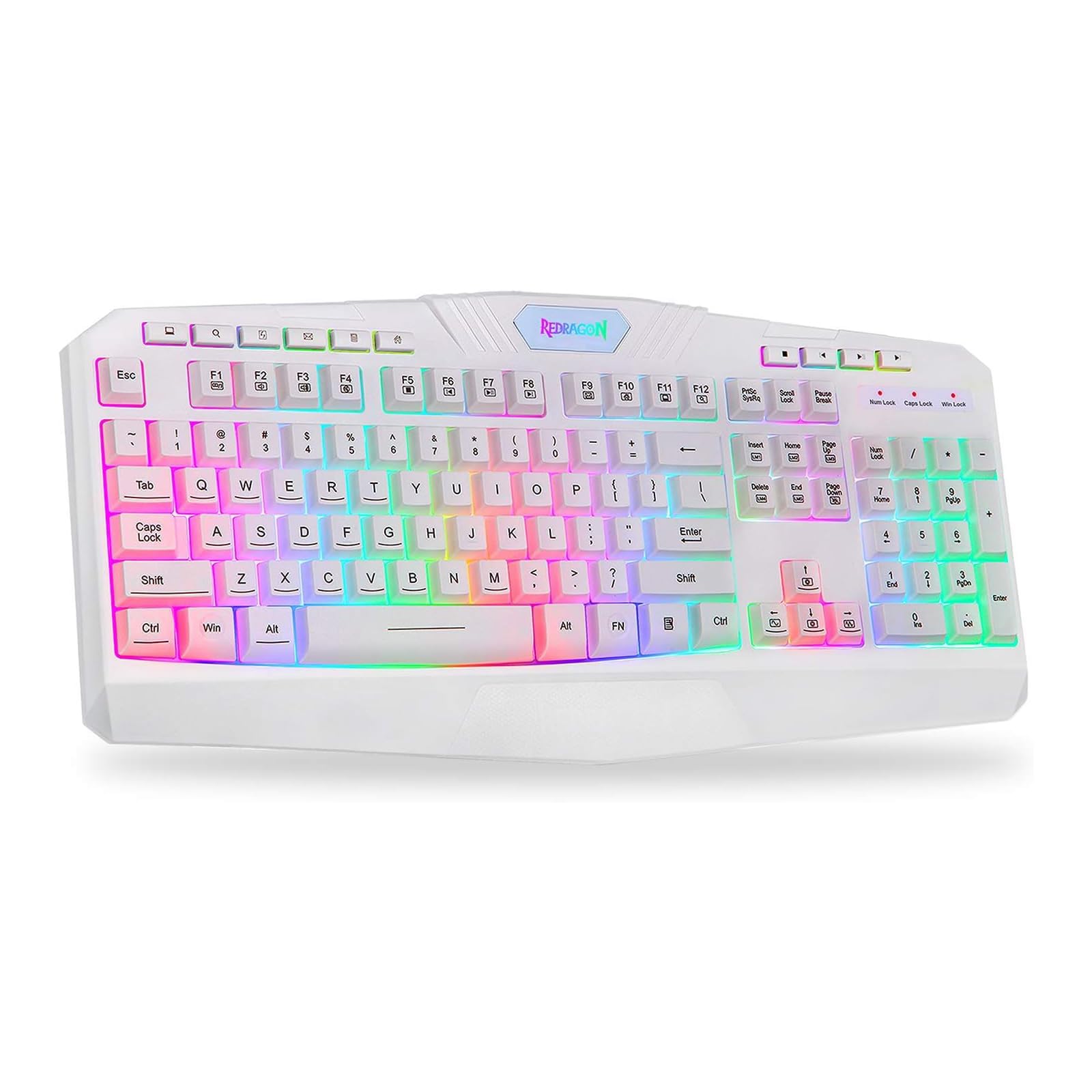
This image shows the Redragon K503 Gaming Keyboard, highlighting its full layout and white finish. The keys feature RGB backlighting, visible around the keycaps.
3. Інструкція з експлуатації
3.1 Основні функції
The Redragon K503 functions as a standard QWERTY keyboard for typing and input. All standard keys operate as labeled.
3.2 мультимедійних клавіш
The keyboard includes dedicated multimedia keys for convenient control of media playback and system functions. These keys are typically located above the function keys (F1-F12) or integrated with them via the 'Fn' key. Common functions include:
- Регулювання гучності: Increase, decrease, or mute audio.
- Відтворення мультимедіа: Play/pause, stop, previous track, next track.
- Web Браузер: Запуск за замовчуванням web браузер.
- Електронна пошта: Launch default email client.
3.3 RGB-світлодіодне підсвічування
The K503 features customizable RGB LED backlighting. The lighting modes and brightness can be adjusted directly on the keyboard using specific key combinations. Refer to the keycap legends for specific lighting control keys, often involving the 'Fn' key combined with other function keys (e.g., Fn + Scroll Lock, Fn + Home/End, or dedicated lighting keys).
- Зміна режимів освітлення: Press the designated key combination to cycle through various lighting effects (e.g., static, breathing, wave).
- Регулювання яскравості: Use the specified key combination to increase or decrease the backlight intensity.
- Зміна кольорів: Some modes allow for color customization using specific key presses.
4. Технічне обслуговування
4.1 Очищення клавіатури
Щоб підтримувати оптимальну продуктивність і зовнішній вигляд, регулярно очищуйте клавіатуру:
- Від’єднайте клавіатуру від комп’ютера перед чищенням.
- Злегка протріть м’якою тканиною без ворсу dampводою або м’яким миючим розчином, щоб протерти ковпачки клавіш і поверхню.
- Для видалення пилу та сміття між клавішами використовуйте стиснене повітря.
- Не використовуйте агресивні хімікати, абразивні засоби для чищення та не занурюйте клавіатуру в рідину.
5. Вирішення проблем
5.1 Клавіатура не реагує
- Переконайтеся, що USB-кабель надійно підключено як до клавіатури, так і до комп’ютера.
- Спробуйте підключити клавіатуру до іншого USB-порту на комп'ютері.
- Перевірте клавіатуру на іншому комп’ютері, щоб визначити, чи проблема пов’язана з клавіатурою, чи з USB-портом/драйверами комп’ютера.
- Перезавантажте комп'ютер.
5.2 Підсвічування не працює або працює неправильно
- Check if the backlighting has been turned off or set to the lowest brightness level using the keyboard's lighting control keys.
- Переконайтеся, що клавіатура правильно підключена до комп'ютера.
- If a specific key's backlight is not working, it may indicate a hardware issue.
5.3 Specific Keys Not Functioning
- Clean around and under the affected keycap to remove any debris that might be obstructing its movement.
- If the issue persists, it may indicate a hardware malfunction.
6. Технічні характеристики
| Бренд | Редрагон |
| Номер моделі | K503W-RGB |
| Технологія підключення | USB |
| Сумісні пристрої | PC (Windows, MacOS) |
| Опис клавіатури | Мультимедіа |
| Особливість | Lighting (RGB LED Backlit) |
| Колір | Білий |
| Розміри продукту | 17.6 см (Д) x 7.9 см (Ш) x 1.2 см (В) |
| матеріал | Акрилонітрил бутадієн стирол |
| Включені компоненти | USB кабель |
7. Інформація про гарантію
Redragon products are typically covered by a limited manufacturer's warranty. The specific terms and duration of the warranty may vary by region and retailer. Please retain your proof of purchase for warranty claims. For detailed warranty information, refer to the warranty card included with your product or visit the official Redragon webсайт.
8. Підтримка клієнтів
If you encounter any issues not covered in this manual or require further assistance, please contact Redragon customer support. Contact information can usually be found on the official Redragon website or on the product packaging. When contacting support, please have your product model number (K503) and proof of purchase ready.


