
1. Інформація про безпеку
Будь ласка, уважно прочитайте всі інструкції перед складанням та використанням. Зберігайте цей посібник для подальшого використання.
- Необхідна збірка: This desk requires self-assembly. Follow the provided assembly instructions meticulously to prevent injuries.
- Обмеження ваги: This desk is not designed to carry heavy objects. The maximum weight capacity is approximately 17 kg (37.5 lbs) to ensure stability.
- Нагляд: Children should be supervised while using the desk, especially during adjustments.
- Розміщення: Поставте стіл на рівну, стійку поверхню.
2. Продукт закінчивсяview
The TecTake Children's Desk is designed to provide a comfortable and adaptable workspace for various activities such as drawing, homework, and crafts. Its thoughtful design allows for height and tilt adjustments to suit the user's needs.
Ключові характеристики:
- Tilting Desktop: The work surface can be tilted to provide an ergonomic position for different tasks.
- Регульована висота: The desk legs are adjustable in 7 steps, allowing the desk to grow with your child.
- Integrated Drawer: A convenient drawer provides storage for school supplies, drawing materials, and other items.
- Removable Stopper Strips: Two removable stopper strips on the lower edge of the desktop prevent materials from sliding off when the surface is tilted.
- Стабільна конструкція: Built with robust materials for durability and stability during daily use.
- Закруглені кути: The desktop features rounded corners for enhanced safety.
- Легко чистити: The surface is washable with a damp тканина.

Figure 1: TecTake Children's Desk, showcasinйого дизайн та особливості.

Малюнок 2: Закінченоview of key features including adjustable height, tilting desktop, and storage.
3. Налаштування
The desk comes with detailed assembly instructions in the package. Please refer to the included manual for step-by-step guidance on assembling your TecTake Children's Desk.
Етапи загального складання:
- Розпакуйте всі компоненти та перевірте їх зі списком деталей у доданому посібнику.
- Assemble the main frame structure using the provided hardware.
- Attach the desktop to the frame, ensuring the tilting mechanism is correctly installed.
- Install the storage drawer and stopper strips.
- Перед використанням переконайтеся, що всі гвинти та кріплення надійно затягнуті.

Figure 3: The desk's flexible design allows for various adjustments to suit user needs.
4. Інструкція з експлуатації
4.1 Регулювання висоти столу
- Locate the height adjustment mechanisms on the desk legs.
- Carefully loosen the fasteners or pins that secure the legs at their current height.
- Adjust the desk to one of the 7 available height positions (from approximately 63 cm to 94 cm).
- Ensure both sides are adjusted to the same height and securely fasten the mechanisms before use.
4.2 Tilting the Desktop
- The desktop features a tilting mechanism for ergonomic positioning.
- To tilt, lift the desktop slightly and adjust it to the desired angle.
- Ensure the desktop is securely locked into place at the chosen angle.
- Utilize the two removable stopper strips to prevent items from sliding off the tilted surface.
4.3 Using the Storage Drawer
- The integrated drawer provides convenient storage.
- Pull the drawer out to access its contents.
- Push the drawer back in until it is fully closed to keep items secure and maintain a tidy workspace.
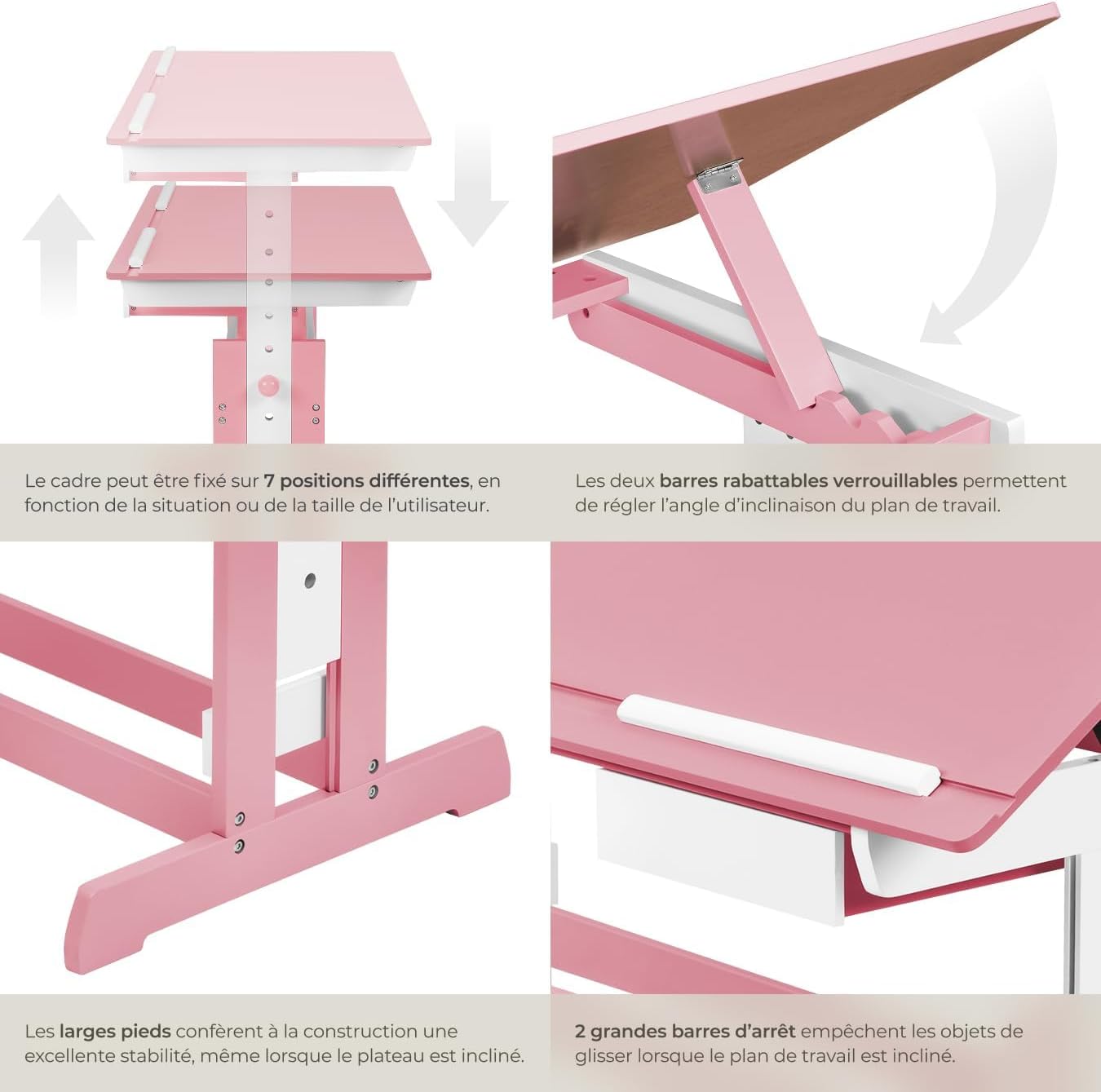
Figure 4: Close-up of the height adjustment and tilting mechanism.
5. Технічне обслуговування
- Прибирання: Протріть поверхні столу рекламоюamp тканиною. Уникайте абразивних засобів для чищення або агресивних хімічних речовин, які можуть пошкодити покриття.
- Огляд: Періодично перевіряйте всі гвинти та кріплення, щоб переконатися, що вони міцно затягнуті. За потреби підтягуйте.
- Уникайте надмірної вологи: Do not expose the desk to excessive moisture or direct sunlight for prolonged periods to prevent warping or discoloration.
6. Вирішення проблем
If you encounter any issues with your TecTake Children's Desk, please refer to the following common solutions:
- Коливання столу: Ensure the desk is placed on a level surface. Check that all assembly screws and bolts are securely tightened.
- Складність регулювання висоти/нахилу: Verify that no obstructions are present in the adjustment mechanisms. Ensure fasteners are sufficiently loosened before attempting to adjust.
- Частини відсутні або пошкоджені: If any parts are missing or damaged upon arrival, please contact TecTake customer support for assistance.
7. Технічні характеристики
| Особливість | Специфікація |
|---|---|
| Бренд | ТекТейк |
| Номер моделі | 800117 |
| Розміри робочої поверхні | Приблизно 109 x 55 см (43 x 21.7 дюймів) |
| Діапазон регулювання висоти | Approx. 63 cm to 94 cm (24.8 to 37 inches) in 7 steps |
| Drawer Interior Dimensions (HxWxD) | Приблизно 6 x 27 x 22 см (2.4 x 10.6 x 8.7 дюйма) |
| вага | прибл. 17 кг (37.5 фунта) |
| матеріал | Plywood (lacquered) / Metal |
| Особливість | Adjustable, Tilting Desktop |
| Інструкція по догляду | Витріть з рекламоюamp тканина |

Figure 5: Detailed dimensions and technical specifications of the desk.
8. Гарантія та підтримка
For warranty information, product support, or to order replacement parts, please refer to the documentation included with your purchase or visit the official TecTake webсайт. Будь ласка, підготуйте номер вашої моделі (800117) та дату покупки, коли звертаєтесь до служби підтримки.