
вступ
This manual provides essential information for the safe and effective use of your Canon PowerShot SX740 HS Digital Camera. Please read it thoroughly before operating the camera to ensure proper handling and to maximize its features. The Canon PowerShot SX740 HS is a compact digital camera featuring a 20.3-megapixel CMOS sensor, 40x optical zoom, 4K video recording capabilities, and built-in Wi-Fi and Bluetooth connectivity.

Малюнок 1: Спереду view of the Canon PowerShot SX740 HS Digital Camera with the lens retracted.
Що в коробці
Перевірте, чи всі наступні елементи входять до вашої упаковки:
- Цифровий фотоапарат Canon PowerShot SX740 HS
- NB-13L Lithium-Ion Battery Pack
- CB-2LH Battery Charger
- Ремінець на зап'ясті
- Кабель HDMI
- Штатив
- SanDisk 64GB SDHC Memory Card
- Premium Camera Case
- Високошвидкісний USB-зчитувач карток
Налаштування
1. Заряджання та встановлення акумулятора
- Insert the NB-13L battery into the CB-2LH charger.
- Plug the charger into a power outlet. The charging indicator light will show the charging status.
- Після повного заряду вийміть акумулятор із зарядного пристрою.
- Відкрийте кришку відсіку для батареї на нижній панелі камери.
- Insert the charged battery into the compartment, ensuring correct orientation. Close the cover securely.
2. Вставлення карти пам'яті
- Відкрийте кришку гнізда для карти пам'яті, яка зазвичай розташована поруч із відсіком для батареї.
- Insert the SDHC memory card with the label facing the front of the camera until it clicks into place.
- Закрийте кришку гнізда для карти пам’яті.
3. Початкове увімкнення та основні налаштування
- Натисніть кнопку живлення, щоб увімкнути камеру.
- Дотримуйтесь підказок на екрані, щоб встановити дату, час і мову.
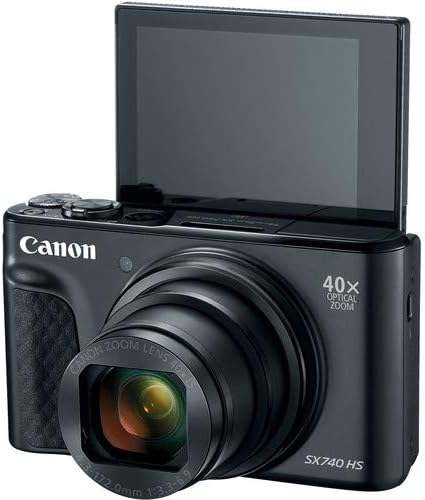
Малюнок 2: Спереду view of the camera with the LCD screen tilted upwards, ready for use.
Керування камерою
1. Увімкнення/вимкнення живлення
Натисніть ПОТУЖНІСТЬ кнопка, розташована у верхній частині камери, щоб увімкнути або вимкнути її.
2. Режими зйомки
The camera offers various shooting modes. Use the mode dial or menu options to select:
- Автоматичний режим: For simple point-and-shoot operation, where the camera automatically adjusts settings.
- Програмний (P) режим: Дозволяє більше контролювати налаштування, поки камера встановлює експозицію.
- Сюжетні режими: Optimized settings for specific scenarios like portraits, landscapes, or night scenes.
- Feature Assistant: Provides on-screen explanations to help you understand and use various camera features.
3. Операція масштабування
The camera features a 40x optical zoom lens. Use the zoom lever around the shutter button to zoom in (telephoto) or out (wide-angle). Digital zoom can extend the range further, but may reduce image quality.

Малюнок 3: Спереду view of the camera with the lens extended for zooming.
4. Фокусування
The camera primarily uses autofocus. Point the camera at your subject and half-press the shutter button to focus. The focus frame will appear on the LCD screen. For specific situations, manual focus options may be available in the menu.
5. Запис відео
To record videos, switch to video mode (if available via a dedicated button or mode dial) or press the dedicated movie recording button. The camera supports 4K video capture. Press the button again to stop recording.
6. Using the Tilting LCD Screen
The 3.0-inch LCD screen can tilt 180 degrees, allowing for easy framing of selfies or shots from various angles. Adjust the screen to your desired position.

Малюнок 4: Задня частина view of the camera, displaying the LCD screen and control layout.
7. Підключення через Wi-Fi та Bluetooth
The camera features built-in Wi-Fi and Bluetooth for connecting to compatible mobile devices. Download the Canon Camera Connect app to your smartphone or tablet to transfer images, remotely control the camera, and share photos.
- Enable Wi-Fi or Bluetooth in the camera's menu.
- Open the Canon Camera Connect app on your mobile device and follow the pairing instructions.
Технічне обслуговування
1. Очищення камери
- Об'єктив: Use a soft, lint-free cloth or a lens brush to gently remove dust. For smudges, use a specialized lens cleaning solution and cloth. Avoid touching the lens directly with your fingers.
- РК-екран: Wipe gently with a soft, dry cloth. Do not use harsh chemicals.
- Корпус камери: Use a soft, dry cloth to wipe away dust and dirt.
2. Догляд за акумулятором
- Зберігайте батареї в прохолодному сухому місці, коли вони не використовуються.
- Уникайте частого повного розряджання акумулятора, щоб продовжити термін його служби.
- Remove the battery from the camera if it will not be used for an extended period.
3. Зберігання
When storing the camera for long periods, ensure it is clean, dry, and stored in a protective case to prevent dust and damage. Remove the battery and memory card.
Усунення несправностей
Якщо у вас виникли проблеми з камерою, зверніться до наступних поширених рішень:
- Камера не вмикається: Ensure the battery is fully charged and correctly inserted. Try a different charged battery if available.
- Помилка карти пам'яті: Check if the memory card is inserted correctly. Format the card (this will erase all data) if the error persists, or try a different compatible SDHC card.
- Зображення розмиті: Ensure the lens is clean. Check your focus settings and make sure the camera has successfully focused on your subject before taking the shot. Use optical image stabilization for handheld shots.
- Wi-Fi/Bluetooth connection issues: Ensure Wi-Fi/Bluetooth is enabled on both the camera and your mobile device. Restart both devices and try pairing again. Confirm the Canon Camera Connect app is up to date.
- Спалах не спрацьовує: Check the flash mode settings. Ensure the flash is popped up if it's a manual pop-up type.
For more complex issues or persistent problems, please consult the official Canon support webсайту або зв’яжіться зі службою підтримки клієнтів.
Технічні характеристики
| Особливість | Специфікація |
|---|---|
| Назва моделі | PowerShot SX740 HS |
| Роздільна здатність фотодатчика | 20.3 мегапікселів |
| Оптичний зум | 40x |
| Формат захоплення відео | 4K |
| Процесор зображень | Canon DIGIC 8 |
| Підключення | Bluetooth, HDMI, USB, Wi-Fi |
| Тип дисплея | Tilting LCD |
| Стабілізація зображення | Оптичний |
| Тип батареї | Літій-іонний (NB-13L) |
| Сумісна пам'ять | SDHC (up to 64 GB) |
| Безперервна зйомка | 10 кадрів в секунду |
| Підтримується File Формат | JPEG, RAW |
Гарантія та підтримка
Your Canon PowerShot SX740 HS Digital Camera is covered by a manufacturer's warranty. Please refer to the warranty card included with your product for specific terms and conditions. For technical support, service, or additional information, please visit the official Canon webсайт або зверніться безпосередньо до служби підтримки клієнтів Canon. Зберігайте чек про покупку як підтвердження покупки для гарантійних претензій.
Інтернет-ресурси: Canon USA Official Webсайт