
1. Вступ
The nJoy Aten Pro 1000VA is an advanced Uninterruptible Power Supply (UPS) designed to provide reliable power protection for sensitive electronic equipment. This online double-conversion UPS ensures a continuous, clean power supply, safeguarding your devices against power outages, томtage fluctuations, and surges. It features a pure sine wave output, an LCD display for real-time status, and communication ports for comprehensive management.
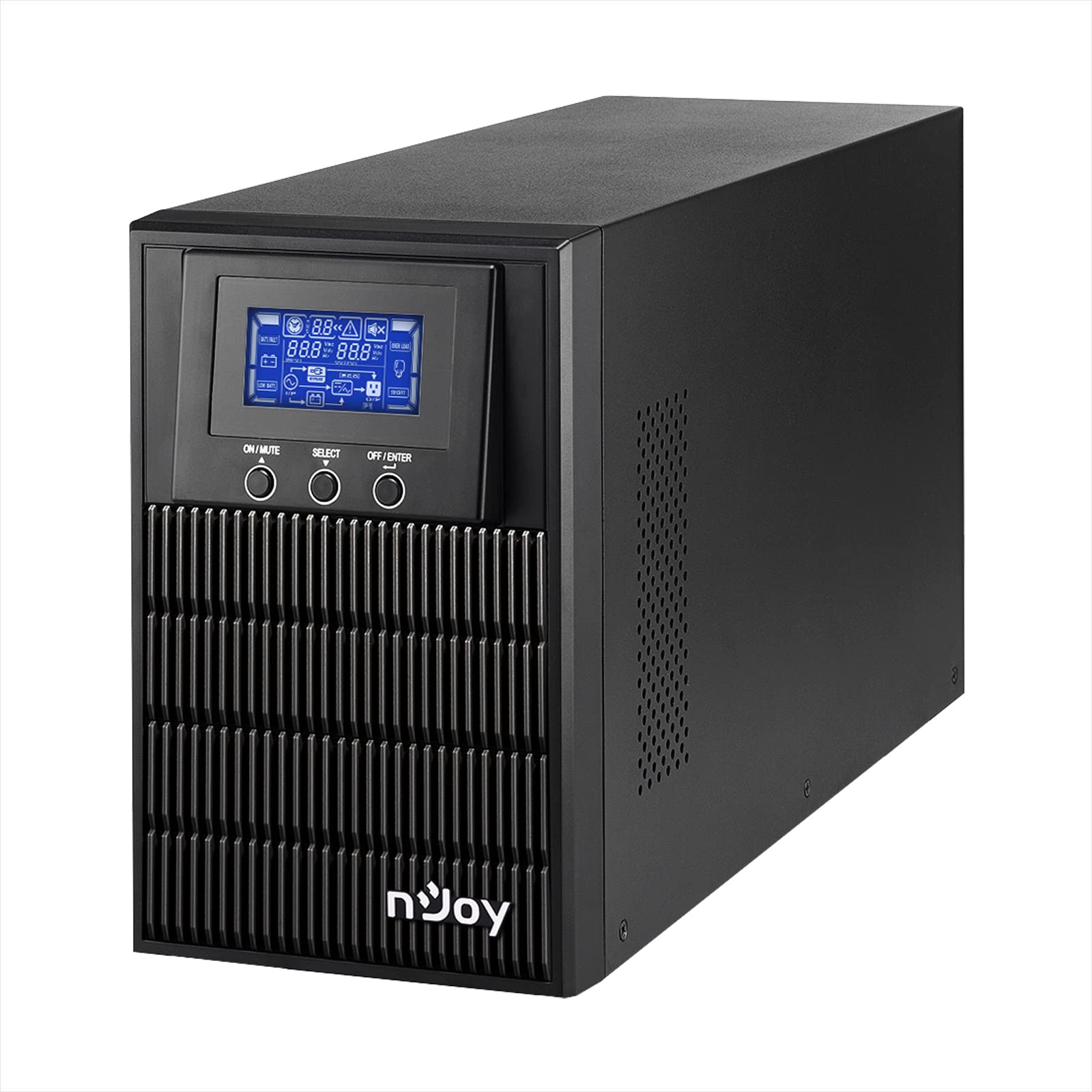
Figure 1: nJoy Aten Pro 1000VA UPS Front View
This image shows the front of the nJoy Aten Pro 1000VA UPS, highlighting its compact tower design and the integrated LCD display panel with control buttons.

Рисунок 2: Ключові характеристикиview
This image visually summarizes the main features of the nJoy Aten Pro 1000VA UPS, including its online double-conversion technology, 1000VA/900W capacity, dual 12V@9.0Ah batteries, USB interface, LCD display, pure sine wave output, and SNMP capability.
2. Інформація про безпеку
Please read and follow all safety instructions carefully before installing, operating, or maintaining the UPS.
- Цей ДБЖ призначений лише для використання в приміщенні.
- Не відкривайте ДБЖasing. Усередині немає деталей, які може обслуговувати користувач. Звертайтеся до кваліфікованого сервісного персоналу з усіх питань щодо обслуговування.
- Ensure the UPS is connected to a properly grounded AC power outlet.
- Do not block ventilation openings. Maintain adequate airflow around the UPS.
- Avoid placing the UPS in direct sunlight, near heat sources, or in environments with excessive dust, humidity, or corrosive substances.
- Від’єднайте ДБЖ від джерела змінного струму перед виконанням будь-якого технічного обслуговування або очищення.
- Батарейки можуть становити ризик ураження електричним струмом та високого струму короткого замикання. Дотримуйтесь наступних запобіжних заходів:
- Зніміть годинник, кільця та інші металеві предмети.
- Використовуйте інструменти з ізольованими ручками.
- Одягніть гумові рукавички та черевики.
3. Характеристики та компоненти продукту
The nJoy Aten Pro 1000VA UPS is equipped with several features and ports for optimal performance and connectivity.
3.1 Передня панель

Рисунок 3: Передня панель зверхуview
This image displays the front panel of the UPS, showing the LCD screen that provides real-time status updates and the three control buttons: ON/MUTE, SELECT, and OFF/ENTER.
- РК-дисплей: Shows real-time status information such as AC mode, battery mode, charge level, battery level, input voltage, об'єм виходуtage, overload, fault, and low battery.
- ON/MUTE Button: Powers on the UPS or mutes the alarm.
- Кнопка ВИБІР: Navigates through LCD display menus.
- OFF/ENTER Button: Powers off the UPS or confirms selections.
3.2 Задня панель

Рисунок 4: З’єднання на задній панелі
This image illustrates the rear panel of the UPS, detailing the various connection ports and components, including RS232, Schuko outputs, circuit breaker, intelligent slot, USB, and AC input.
- Інтерфейс RS232: Для послідовного зв'язку з комп'ютером.
- Schuko Outputs (3): Connect your critical devices here for battery backup and surge protection.
- Автоматичний вимикач: Забезпечує захист від перевантаження.
- Intelligent Slot (SNMP): For optional SNMP card for network management.
- Інтерфейс USB: Для зв'язку з комп'ютером через USB.
- Вхід змінного струму: Connect the UPS to the main AC power supply.
4. Інструкції з налаштування
4.1 Розпакування та перевірка
- Carefully unpack the UPS and inspect it for any shipping damage. If any damage is found, do not install the unit and contact your dealer.
- Verify that all accessories are included: UPS unit, USB cable, RS232 cable, and user manual.
4.2 Розміщення
- Place the UPS in a clean, dry, and temperature-controlled environment.
- Забезпечте достатній зазор (щонайменше 20 см) навколо ДБЖ для належної вентиляції.
- Avoid placing the UPS near water or excessive humidity.
4.3 Початкове заряджання
- Before initial use, connect the UPS to a standard AC power outlet for at least 4 hours to ensure the batteries are fully charged. This will maximize battery runtime.
4.4 Підключення обладнання
- Connect your computer, monitor, and other critical devices to the Schuko output receptacles on the rear panel of the UPS.
- Do not connect laser printers or strip heaters to the UPS outputs, as these devices can draw significant power and overload the UPS.
- Підключіть ДБЖ до настінної розетки за допомогою шнура живлення, що входить до комплекту.
4.5 Встановлення програмного забезпечення (необов'язково)
For advanced monitoring and management, install the UPS management software on your computer.

Figure 5: UPS Management Software
This image shows a graphical representation of the UPS management software interface, illustrating its capabilities for monitoring UPS status, scheduling operations, and configuring settings across various operating systems like Mac OS, Linux, and Windows.
- Connect the UPS to your computer using either the USB or RS232 cable.
- Install the provided management software (compatible with Mac OS, Linux, Windows).
- The software allows for:
- Real-time status visualization.
- Scheduling of power on/off and battery tests.
- Comprehensive UPS configuration.
5. Інструкція з експлуатації
5.1 Увімкнення/вимкнення ДБЖ
- Увімкнути: Натисніть і утримуйте УВІМК./ВИМК button until you hear a beep. The UPS will perform a self-test and then enter AC mode.
- Вимикати: Натисніть і утримуйте ВИМК/ВВІД button until the UPS powers down.
5.2 Інформація про РК-дисплей
РК-дисплей надає важливу інформацію про стан ДБЖ. Використовуйте ВИБРАТИ button to cycle through different display modes.
- Режим змінного струму: Показує, що ДБЖ працює від мережі.
- Режим батареї: Indicates the UPS is operating on battery power (during an outagд).
- Рівень заряду: Shows the current load percentage.
- Рівень заряду батареї: Displays the remaining battery capacity.
- Вхідний об'ємtage: Current incoming AC voltage.
- Вихідний випtage: Current outgoing AC voltage.
- Перевантаження: Indicates connected equipment exceeds UPS capacity.
- Несправність: Indicates a system error.
- Низький заряд батареї: Warning that battery power is critically low.
5.3 Екорежим
The Eco Mode feature helps reduce energy consumption. When the input voltage is within the acceptable range, the UPS will bypass the inverter and directly supply power from the utility, increasing energy efficiency. This mode can be configured via the management software.

Figure 6: Key Operational Features
This image highlights three core operational features of the UPS: Pure Sine Wave output for clean power, Zero Transfer Time for seamless power transition, and Eco Mode for energy efficiency.
6. Технічне обслуговування
6.1 Догляд за батареєю та її заміна
- The UPS uses sealed lead-acid batteries (2 x 12V/9Ah). These batteries are designed for a specific lifespan.
- To maximize battery life, ensure the UPS is always connected to AC power to keep the batteries charged.
- Batteries are user-replaceable by qualified personnel only. Contact NJOY support or a certified technician for battery replacement.
- Утилізуйте старі батареї відповідно до місцевих правил.
6.2 Очищення
- Ensure the UPS is turned off and disconnected from AC power before cleaning.
- Використовуйте м’яку суху тканину для протирання зовнішньої поверхні ДБЖ.
- Не використовуйте рідкі та аерозольні миючі засоби.
- Періодично очищуйте вентиляційні отвори, щоб запобігти накопиченню пилу.
7. Вирішення проблем
If the UPS is not operating correctly, refer to the following table for common issues and solutions.
| проблема | Можлива причина | Рішення |
|---|---|---|
| ДБЖ не вмикається. | No AC input power; Low battery. | Ensure the power cord is securely connected. Allow the UPS to charge for at least 4 hours. |
| UPS is in battery mode frequently. | Unstable AC input power; High sensitivity setting. | Check the utility power quality. Adjust the UPS input voltage sensitivity via software if necessary. |
| Overload warning on LCD. | Too many devices connected; Connected devices draw too much power. | Disconnect non-essential equipment. Ensure total load does not exceed 900W. |
| Короткий час роботи від батареї. | Акумулятори не повністю заряджені; термін служби акумуляторів добігає кінця. | Allow the UPS to charge for 24 hours. Consider battery replacement if batteries are old. |
| UPS emits continuous alarm. | Overload; Battery fault; System fault. | Check LCD for specific error codes. Reduce load. If alarm persists, contact support. |
For issues not listed here, or if problems persist, please contact NJOY customer support.
8. Технічні характеристики
Detailed technical specifications for the nJoy Aten Pro 1000VA UPS.
| Особливість | Специфікація |
|---|---|
| Номер моделі | PWUP-OL100AP-AZ01B |
| Ємність | 1000 ВА / 900 Вт |
| Тип ДБЖ | On-line Double Conversion |
| Номінальна вхідна обtage | 110 – 300 В змінного струму |
| Номінальна вих. Обtage | 230 Vac (± 1% in battery mode) |
| Діапазон частот | 40 Гц ~ 70 Гц |
| Вихідні розетки | 3 х Шуко |
| Час передачі (від змінного до постійного струму) | Нуль |
| Час перемикання (з інвертора на байпас) | 4 мс |
| Комунікаційні порти | USB, RS232 (Optional: Smart SNMP card) |
| Робоча температура | 0 ~ 40 °C |
| Ефективність | до 90% |
| Тип батареї | 2 x 12V/9Ah Sealed Lead-Acid |
| Розміри (Д x Ш x В) | 28.2 х 14.5 х 22 см |
| вага | 7 кілограма |
8.1 Runtime Chart
The following chart illustrates the approximate battery runtime based on the connected load.
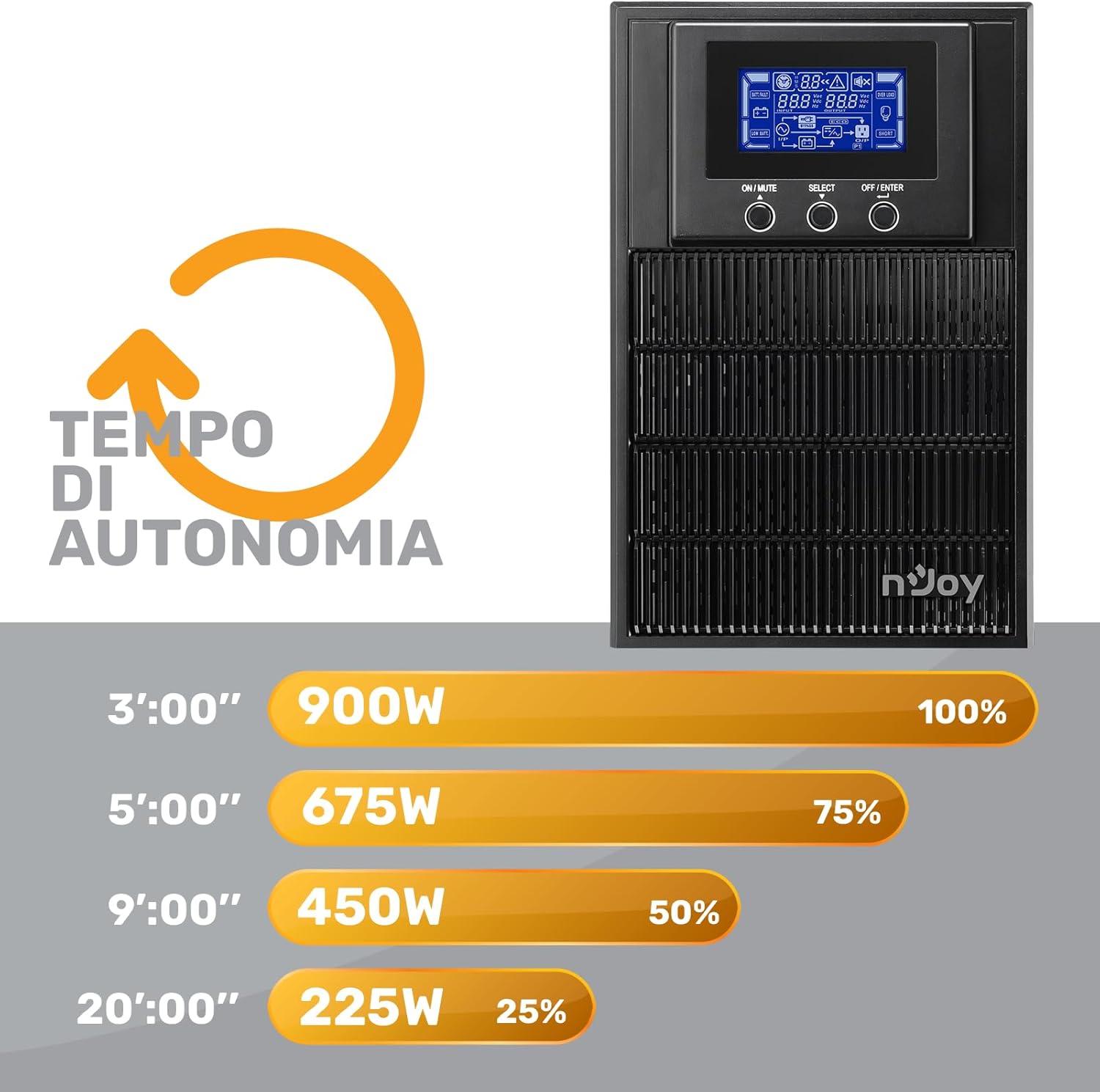
Figure 7: Battery Runtime vs. Load
This graph shows the estimated battery runtime in minutes for the nJoy Aten Pro 1000VA UPS at different load percentages. Для ексample, at 100% load (900W), the runtime is approximately 3 minutes, while at 25% load (225W), it can last up to 20 minutes.
- 100% Load (900W): Approximately 3 minutes
- 75% Load (675W): Approximately 5 minutes
- 50% Load (450W): Approximately 9 minutes
- 25% Load (225W): Approximately 20 minutes
9. Гарантія та підтримка
NJOY provides a comprehensive warranty and dedicated customer support for the Aten Pro series.
- Гарантійний термін: The nJoy Aten Pro UPS comes with a Гарантія 3 рік. Batteries are covered by a Гарантія 1 рік.
- Підтримка клієнтів: Our professional customer service team is available to provide prompt and quality assistance. If you require help or support before, during, or after your purchase, please do not hesitate to contact NJOY customer service. Refer to your product packaging or the NJOY official webсайт для отримання конкретних контактних даних.