
вступ
Thank you for choosing the SIMOLIO Kids Wireless Headphones Model JH-711. This manual provides essential information for the proper setup, operation, and maintenance of your headphones. Please read it carefully to ensure safe and optimal use.
Особливості продукту
- 3-Level Volume Limiting: Protects children's hearing with switchable volume limits (75dB for toddlers, 85dB for kids, 94dB for adults). This feature is active in both wired and wireless modes.
- Шумоізоляція: Over-ear design provides passive noise reduction, helping to block external sounds for improved listening focus.
- Wireless & Wired Modes: Offers Bluetooth connectivity for wireless use and includes a 3.5mm audio cable for wired connection when the battery is depleted or for non-Bluetooth devices.
- Вбудований мікрофон: Enables hands-free calling and voice chat.
- Audio Sharing Port: Allows another headphone to connect and share audio from the same device.
- Durable & Flexible Design: Constructed with memory stainless steel strips in the headband for impressive durability and flexibility, designed to withstand active use. Earmuffs feature an anti-shedding design.
- Складаний та компактний: Easy to fold and store in the included EVA carrying case, ideal for travel and school.
- Тривалий термін служби батареї: До 15 годин відтворення на одному заряді.

The headphones feature a 3-level volume limiter to protect hearing, adjustable for toddlers, kids, and adults.
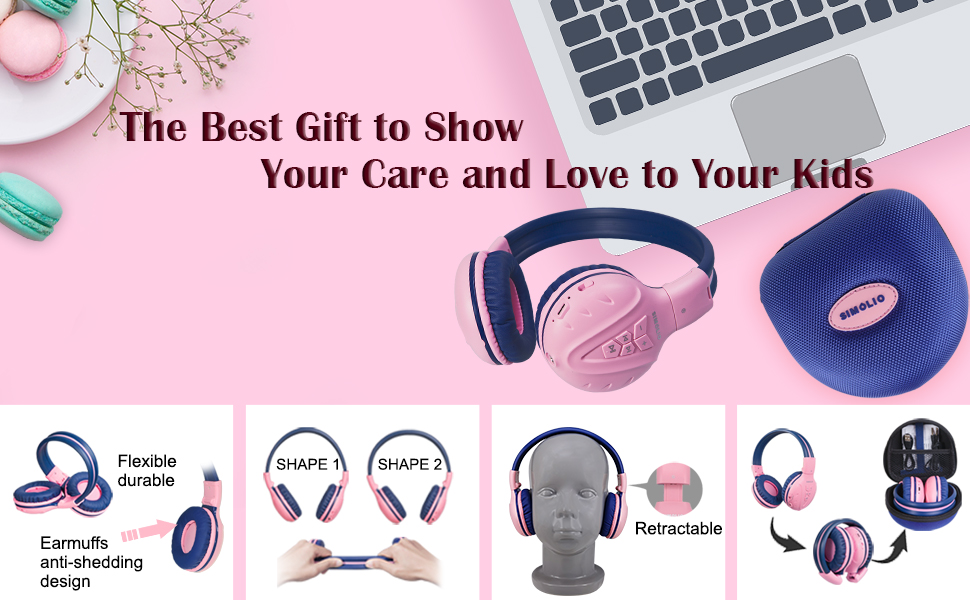
The flexible and durable design allows the headphones to withstand bending and twisting.
Що в коробці
Пакет включає наступні предмети:
- SIMOLIO Kids Wireless Headphones JH-711
- Зарядний кабель (USB)
- AUX-кабель (аудіокабель 3.5 мм)
- Посібник користувача
- Carrying EVA Case
Налаштування
1. Зарядка навушників
Before first use, fully charge the headphones. Connect the provided USB charging cable to the charging port on the headphones and to a USB power source (e.g., computer, wall adapter). The LED indicator will show charging status and turn off when fully charged.
2. Підключення Bluetooth
- Переконайтеся, що навушники вимкнені.
- Press and hold the Multi-Function Button (MFB) until the LED indicator flashes blue and red alternately, indicating pairing mode.
- На своєму пристрої (смартфоні, планшеті тощо) увімкніть Bluetooth та виконайте пошук доступних пристроїв.
- Select "SIMOLIO JH-711" from the list of devices.
- Після підключення світлодіодний індикатор повільно блиматиме синім.
3. Дротове підключення
To use the headphones in wired mode, connect one end of the 3.5mm AUX cable to the audio jack on the headphones and the other end to the audio output of your device. The headphones will automatically switch to wired mode, even if the battery is dead.

The headphones support both wireless Bluetooth mode and wired mode via the included AUX cable.
4. Volume Limiter Adjustment
Locate the 3-level volume limiter switch on the headphones. Adjust the switch to the desired maximum volume level:
- 75dB (S): Recommended for toddlers or very quiet environments.
- 85dB (M): Recommended for children in general listening environments.
- 94dB (L): Recommended for adults or noisy environments.

Adjust the physical switch to select the appropriate volume limit.
5. Using the Sharing Port
The headphones feature an additional sharing jack on the right side. To share audio, plug another headphone into this port. This allows two users to listen to the same audio source simultaneously.

Connect another headphone to the sharing port to share audio with a friend.
Інструкція з експлуатації
1. Увімкнення/вимкнення живлення
- Увімкнення: Натисніть і утримуйте багатофункціональну кнопку (МФБ) приблизно 3 секунди, доки не засвітиться світлодіодний індикатор.
- Вимкнення живлення: Натисніть і утримуйте багатофункціональну кнопку (МФБ) приблизно 3 секунди, поки світлодіодний індикатор не згасне.
2. Відтворення музики
- Відтворення/пауза: Коротке натискання MFB.
- Наступний трек: Короткочасно натисніть кнопку «+».
- Попередній трек: Короткочасно натисніть кнопку «-».
- Збільшення гучності: Довго натискайте кнопку «+».
- Зменшення гучності: Довго натискайте кнопку «-».
3. Керування викликами
When connected via Bluetooth:
- Відповісти/закінчити виклик: Коротке натискання MFB.
- Відхилити виклик: Тривале натискання багатофункціональної кнопки (МФБ).

Вбудований мікрофон дозволяє здійснювати дзвінки в режимі hands-free.
Технічне обслуговування
- Протирайте навушники м’якою сухою тканиною. Не використовуйте абразивні засоби для чищення або розчинники.
- Уникайте впливу екстремальних температур, вологості або прямих сонячних променів на навушники.
- Store the headphones in the provided EVA carrying case when not in use to protect them from dust and damage.
- Не намагайтеся розбирати або модифікувати навушники, оскільки це призведе до анулювання гарантії та може призвести до пошкодження.

The headphones fold compactly and fit into the included EVA case for easy storage and transport.
Усунення несправностей
| проблема | Можлива причина | Рішення |
|---|---|---|
| Навушники не вмикаються. | Низький заряд батареї. | Повністю зарядіть навушники. |
| Не вдається підключитися через Bluetooth. | Навушники не в режимі сполучення; Bluetooth пристрою вимкнено; занадто далеко від пристрою. | Ensure headphones are in pairing mode (flashing red/blue). Turn on device Bluetooth. Move headphones closer to device (within 9 meters). |
| Немає звуку в бездротовому режимі. | Гучність занадто низька; немає підключення; на пристрої вибрано неправильний аудіовихід. | Increase headphone and device volume. Re-pair headphones. Check device audio settings. |
| Немає звуку в дротовому режимі. | AUX cable not fully inserted; cable damaged; device volume too low. | Ensure AUX cable is securely connected at both ends. Try a different AUX cable. Increase device volume. |
Технічні характеристики
| Особливість | Деталь |
|---|---|
| Назва моделі | Kids Bluetooth Headphones JH-711 |
| Технологія підключення | Бездротовий (Bluetooth), дротовий (роз'єм 3.5 мм) |
| Версія Bluetooth | 4.0 |
| Діапазон Bluetooth | 9 метрів |
| Контроль шуму | Звукоізоляція |
| Чутливість | 94 дБ (макс.) |
| Термін служби батареї | 15 години |
| Час зарядки | 3 години |
| Вага товару | 187 грамів (6.6 унції) |
| Розміри продукту | 5.51 x 3.15 x 5.31 дюймів |
| матеріал | Nylon, Stainless Steel (headband) |
| Матеріал футляра для перенесення | EVA |
| Особливості | 3 Adjustable Volume Limited, Microphone, Durable, Flexible, Foldable, Wired & Wireless, Share Port, EVA Case |
Офіційне відео продукту
Це відео надає візуальне уявлення проview of the SIMOLIO Bluetooth Headphones for Kids with Case JH-711, demonstrating its features and functionality.
Гарантія та підтримка
SIMOLIO products are designed for quality and reliability. For specific warranty information, please refer to the warranty card included with your product or visit the official SIMOLIO website. If you encounter any issues or require technical assistance, please contact SIMOLIO customer support through their official channels.