
Alpha EK 60
Alpha EK-60 61-Key Electronic Piano Keyboard User Manual
Portable Digital Keyboard with Audio Input, Microphone Input, Headphone Output, 255 Tones, Rhythms, LED Display
1. Вступ
Дякуємо за покупкуasing the Alpha EK-60 61-Key Electronic Piano Keyboard. This manual provides detailed instructions for the proper setup, operation, and maintenance of your new instrument. The EK-60 is designed to offer a rich musical experience with its versatile features, including a wide range of tones and rhythms, intelligent teaching functions, and various connectivity options. Please read this manual thoroughly before using the product to ensure optimal performance and longevity.
2. Інформація про безпеку
To prevent electric shock, fire, or damage to the unit, please observe the following precautions:
- Не піддавайте клавіатуру впливу дощу або вологи.
- Не ставте на клавіатуру предмети, наповнені рідинами, такі як вази.
- Не блокуйте вентиляційні отвори.
- Використовуйте лише зазначений адаптер живлення.
- Не розбирайте та не модифікуйте пристрій. Звертайтеся до кваліфікованого персоналу з будь-яким обслуговуванням.
- Зберігати в недоступному для маленьких дітей місці.
3. Вміст упаковки
Будь ласка, перевірте, чи всі наступні предмети входять до вашої упаковки:
- 1 x Alpha 61-Key Standard Keyboard EK-60
- 1 х Регульована підставка
- 1 х нотний тримач
- 1 x адаптер живлення
- 1 x Посібник користувача (цей документ)
4. Продукт закінчивсяview
Familiarize yourself with the components of your Alpha EK-60 keyboard.
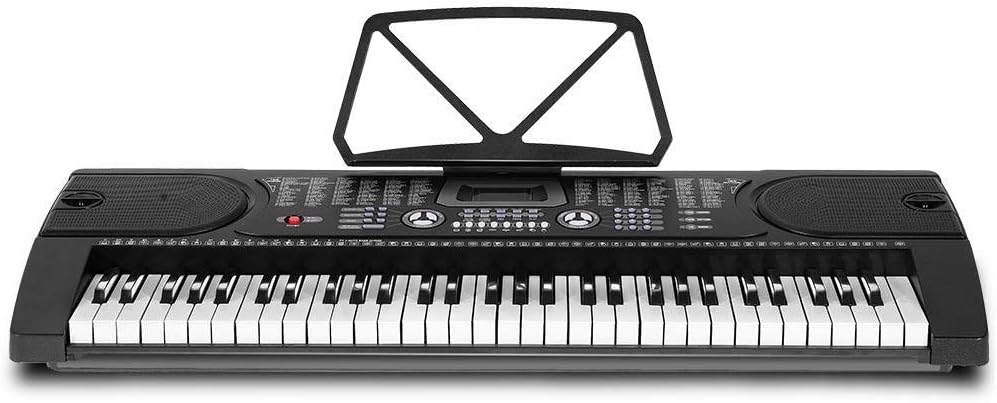
Рисунок 4.1: Зверху вниз view of the Alpha EK-60 keyboard, highlighting the control panel, integrated speakers, and the 61 standard piano keys.

Figure 4.2: Detail of the LED display for convenient settings adjustment and the battery compartment for portable use.

малюнок 4.3: View of the multiple jacks including Audio Input, Microphone Input, and Headphone Output for versatile connectivity.
Ключові характеристики:
- 61-Key Standard Piano Keyboard
- LED display for easy navigation
- 24 демонстраційних пісень
- 255 timbres (instrument sounds)
- 255 rhythms (accompaniment styles)
- 61 kinds of keyboard percussions
- 8 Panel Percussions
- Master volume, accompaniment volume, and tempo control
- Intelligent teaching function: one-key, follow and ensemble function
- Функція програмування ритму
- Auto chord and chord timbre option
- Функція запису та відтворення
- Sustain and vibrato effects
- Microphone input and speaker output
- Headphone jack for silent practice
- Battery powered option (6 x AA-size batteries, not included)
5. Налаштування
5.1 Збірка підставки
- Unpack all components of the adjustable stand.
- Connect the horizontal support bars to the vertical legs, ensuring they are securely fastened.
- Adjust the height of the stand to your preferred playing position using the adjustment knobs. The stand is adjustable from 59cm to 79cm in height.
- Place the keyboard securely on top of the assembled stand.
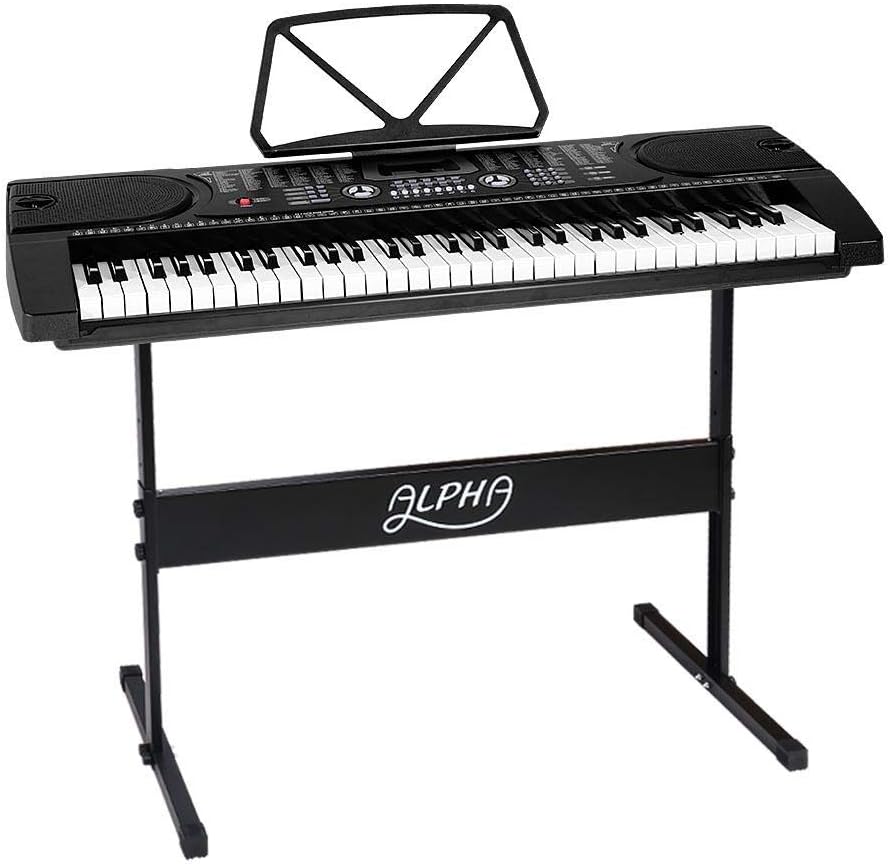
Figure 5.1: The Alpha EK-60 keyboard fully assembled on its adjustable stand, ready for use.
5.2 Живлення клавіатури
The Alpha EK-60 can be powered by the included AC adaptor or by batteries.
Використання адаптера змінного струму:
- Connect the DC plug of the power adaptor to the DC 9V input jack on the rear of the keyboard.
- Підключіть адаптер змінного струму до стандартної розетки.
Використання батарей:
- Знайдіть відсік для батареї на нижній стороні клавіатури.
- Відкрийте кришку батарейного відсіку.
- Insert 6 x AA-size batteries (not included), ensuring correct polarity (+/-).
- Надійно закрийте кришку батарейного відсіку.
Note: When using batteries, disconnect the AC adaptor. The keyboard will automatically switch to battery power if the adaptor is removed.
6. Інструкція з експлуатації
6.1 Основна операція
- Увімкнення/вимкнення живлення: Натисніть ПОТУЖНІСТЬ кнопку, щоб увімкнути або вимкнути клавіатуру.
- Регулювання гучності: Використовуйте ГОЛОВНИЙ ОБ'ЄМ ручку для регулювання загального рівня звуку.
- Контроль темпу: Використовуйте ТЕМП buttons to adjust the speed of rhythms and demo songs.
6.2 Вибір тембрів та ритмів
- Tones (Timbre): Натисніть ТІМБР button, then use the number pad or +/- buttons to select from 255 different instrument sounds. The selected timbre number will appear on the LED display.
- Ритми: Натисніть РИТМ button, then use the number pad or +/- buttons to select from 255 accompaniment rhythms. Press ПУСК/СТОП щоб розпочати або закінчити ритм.
6.3 Intelligent Teaching Function
The EK-60 features a 3-step intelligent teaching system to help you learn to play.
- Один ключ: Plays the melody of a demo song by pressing any key.
- Слідкуйте за: Waits for you to play the correct note before proceeding with the melody.
- Разом: Plays the accompaniment while you play the melody.
To use, select a demo song, then press the desired teaching mode button (ОДИН КЛЮЧ, СЛЕДУЙТЕ, або АНСАМБЛЬ).
6.4 Запис і відтворення
The keyboard allows you to record your performances.
- Натисніть REC button to start recording. The LED display will indicate recording mode.
- Зіграйте бажану мелодію.
- Натисніть ГРАТИ button to stop recording and play back your recorded performance.
6.5 Підключення
- Роз'єм для навушників: Підключіть навушники до НАВУШНИКИ домкрат для тихої практики.
- Вхід мікрофона: Підключіть мікрофон до ВХОД МІКРОФОНУ jack to sing along while playing.
- Аудіо вхід/вихід: Використовуйте АУДІО ВХОД to connect external audio devices (e.g., MP3 player) and the АУДІО ВИХІД to connect to external speakers or an ampліфірник.
7. Технічне обслуговування
Proper care will ensure the longevity of your Alpha EK-60 keyboard.
- Прибирання: Протріть клавіатуру м’якою сухою тканиною. Для стійкого бруду використовуйте злегкаamp cloth and then wipe dry immediately. Do not use abrasive cleaners, waxes, or solvents.
- Зберігання: When not in use for extended periods, store the keyboard in a cool, dry place away from direct sunlight and extreme temperatures. If using batteries, remove them before long-term storage to prevent leakage.
- Обробка: Уникайте падіння клавіатури та сильних ударів.
8. Вирішення проблем
If you encounter any issues with your keyboard, refer to the following table for common problems and solutions.
| проблема | Можлива причина | Рішення |
|---|---|---|
| Ні звуку | Volume is too low; Power is off; Headphones connected; Faulty power connection. | Increase master volume; Turn on power; Disconnect headphones; Check power adaptor or replace batteries. |
| Клавіші не відповідають | Keyboard is in a teaching mode; Internal malfunction. | Exit teaching mode; Power cycle the keyboard. If issue persists, contact support. |
| Rhythm/Demo song not playing | Rhythm/Demo song not selected; START/STOP button not pressed. | Select a rhythm/demo song; Press START/STOP. |
| Спотворений звук | Volume too high; External device connected incorrectly. | Reduce volume; Check connections of external devices. |
Якщо проблема не зникає після спроби цих рішень, зверніться до служби підтримки клієнтів.
9. Технічні характеристики
| Особливість | опис |
|---|---|
| Модель | ЕК-60 |
| Ключі | 61 Standard Piano Keys |
| Key Width | 1.9 см |
| Tones (Timbres) | 255 |
| Ритми | 255 |
| Демо-пісні | 24 |
| Максимальна поліфонія | 8 |
| Підключення | Audio Input, Audio Output, Headphone Jack (3.5mm), Microphone Input (3.5mm) |
| Джерело живлення | AC Adaptor (DC 9V) or 6 x AA-size batteries (not included) |
| Розміри (клавіатура) | 86 см (Д) x 32.5 см (Ш) |
| Dimensions (Overall with Stand) | 86cm (L) x 32.5cm (W) x 59-79cm (H) |
| вага | 6.2 кілограма |
| Колір | чорний |

Figure 9.1: Detailed dimensions of the Alpha EK-60 keyboard and its adjustable stand.
10. Гарантія та підтримка
10.1 Інформація про гарантію
The Alpha EK-60 keyboard comes with a Гарантія 1 рік from the date of purchase. This warranty covers manufacturing defects and ensures the product is free from defects in material and workmanship under normal use. It does not cover damage caused by misuse, accident, unauthorized modification, or normal wear and tear.
10.2 Підтримка клієнтів
For any queries, technical assistance, or warranty claims, please contact the seller or manufacturer directly. Please have your purchase receipt and product model number (EK-60) ready when contacting support.