
вступ
This instruction manual provides essential information for the safe and effective installation, operation, and maintenance of your Aexit Rotary Changeover Switch, Model modle. Please read this manual thoroughly before using the product and retain it for future reference.
Продукт закінченийview
The Aexit Rotary Changeover Switch is designed for ON-OFF position control in various electrical circuits. It features a robust design with 10 screw terminals, making it suitable for applications such as circuit control, master control, testing equipment control, and as a change-over switch for electric welding machinery and other industrial equipment.
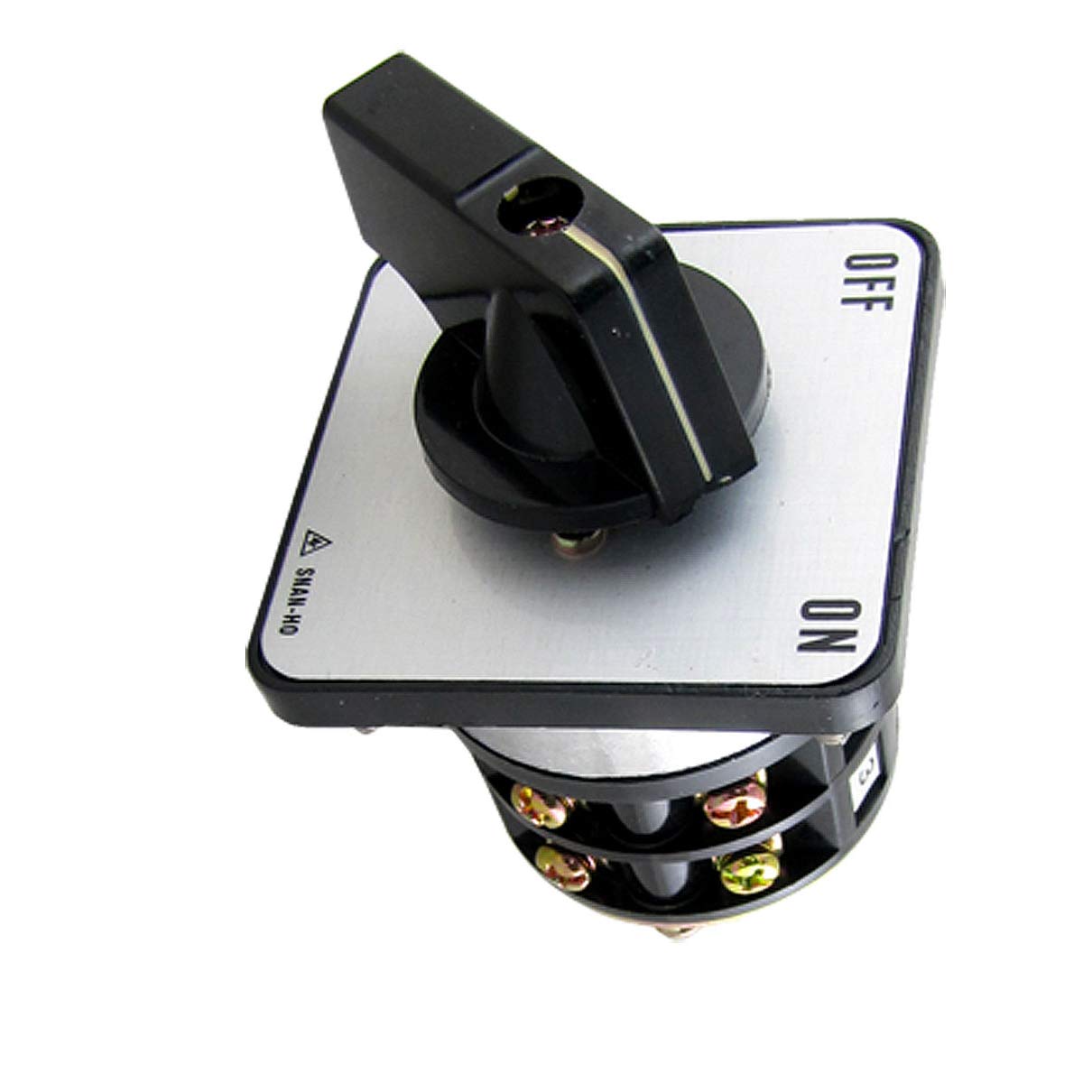
Зображення: спереду view of the Aexit Rotary Changeover Switch, showing the main body, rotary handle, and terminal block area.
Технічні характеристики
| Особливість | Деталь |
|---|---|
| Назва продукту | Перемикач |
| Номер моделі | модель |
| Terminals Quantity | 10 |
| Контактна особа | 2A |
| Робочий випtage (AC) | 250В, 600В |
| Current Rating (AC) | 10A (at 250V), 5A (at 600V) |
| Power Rating (AC) | 2.2kW (at 220V), 2.2kW (at 550V) |
| Режим роботи | УВІМКНЕНО ВИМКНЕНО |
| Тип перемикача | Ротарі |
| Тип приводу | Ротарі |
| Тип роз'єму | Гвинт |
| Розмір дна (Д x Ш) | 5 x 4.8 см (2 x 1.89 дюймів) |
| Plate Size (L x W x T) | 6.3 x 6.3 x 0.5 см (2.5 x 2.5 x 0.2 дюйма) |
| Handle Size (L x W x H) | 5 x 3.4 x 2.7 см (2 x 1.3 x 1 дюйма) |
| Screw Thread Diameter | 3.5 мм (0.137 дюйма) |
| Зовнішній матеріал | пластик |
| Вага нетто | 242г |
| Підрахунок одиниць | 1.0 Кол |
| Система вимірювання | Імператорська, метрична |
Налаштування та встановлення
Безпека перш за все: Always ensure that power to the circuit is disconnected before attempting any installation or wiring. Installation should only be performed by qualified personnel.
- Монтаж: Secure the switch in the desired location using appropriate fasteners through the mounting holes on the switch plate. Ensure the switch is firmly attached to a stable surface.
- Електропроводка: Identify the 10 screw terminals. Refer to your specific circuit diagram for correct wiring connections. Each terminal is designed to accept standard electrical wires. Tighten screws securely to prevent loose connections.
- Перевірка: After wiring, double-check all connections for correctness and tightness. Ensure no bare wires are exposed.
- Відновлення живлення: Після завершення та перевірки встановлення відновіть живлення кола.
Інструкція з експлуатації
The Aexit Rotary Changeover Switch operates with a simple ON-OFF mechanism. The switch handle allows for manual selection between the two states.
- Увімкнення: Rotate the handle to the 'ON' position. This will establish the electrical connection as per your circuit configuration.
- Вимкнення: Rotate the handle to the 'OFF' position. This will break the electrical connection, turning off the connected circuit or device.
- Індикатор: The position of the handle clearly indicates the current state (ON or OFF) of the switch.
Ensure the switch is operated smoothly and without excessive force. Avoid rapid or forceful switching that could damage the internal mechanism.
Технічне обслуговування
The Aexit Rotary Changeover Switch is designed for durability and requires minimal maintenance. Regular inspection can help ensure its longevity and reliable operation.
- Прибирання: Periodically clean the external plastic surfaces with a soft, dry cloth. Do not use abrasive cleaners or solvents, as these may damage the plastic.
- Перевірка підключення: Annually, or as required by your application, inspect the screw terminals to ensure all wire connections remain tight and free from corrosion. Завжди відключайте живлення перед виконанням цієї перевірки.
- Умови навколишнього середовища: Ensure the switch is operated within its specified environmental conditions to prevent premature wear or failure.
Усунення несправностей
This section addresses common issues you might encounter with the rotary changeover switch.
| проблема | Можлива причина | Рішення |
|---|---|---|
| Switch does not operate (no power to circuit) | No power supply to the switch; Loose or incorrect wiring; Internal damage to switch. | Check main power supply; Verify all wiring connections are secure and correct (power off first!); If wiring is correct and power is present, the switch may be faulty and require replacement. |
| Handle is stiff or difficult to turn | Accumulation of dirt or debris; Internal mechanical issue. | Clean the exterior of the switch; Do not force the handle. If stiffness persists, the switch may need replacement. |
| Запах перегріву або горілого | Overload; Loose connections; Incorrect voltagе/струм. | Негайно відключіть живлення. Check the load against the switch's specifications; Inspect wiring for loose connections; Ensure operating voltage and current are within specified limits. Replace switch if damaged. |
For issues not listed here or if troubleshooting steps do not resolve the problem, please contact Aexit customer support.
Гарантія та підтримка
Aexit products are manufactured to high-quality standards. For information regarding warranty coverage, please refer to the warranty card included with your purchase or visit the official Aexit website. For technical support or further assistance, please contact Aexit customer service through their official channels.