
вступ
This manual provides instructions for the setup, operation, and maintenance of your Zelotes T20 Ergonomic Vertical Mouse. Please read this manual thoroughly before using the product to ensure proper function and longevity.
Продукт закінченийview
The Zelotes T20 is an ergonomic vertical mouse designed to promote a natural hand and wrist posture, reducing strain during extended use. It features adjustable DPI settings and multiple programmable buttons for enhanced control.

Figure 1: Zelotes T20 Ergonomic Vertical Mouse. This image displays the overall design of the mouse, highlighting its vertical orientation and LED lighting.
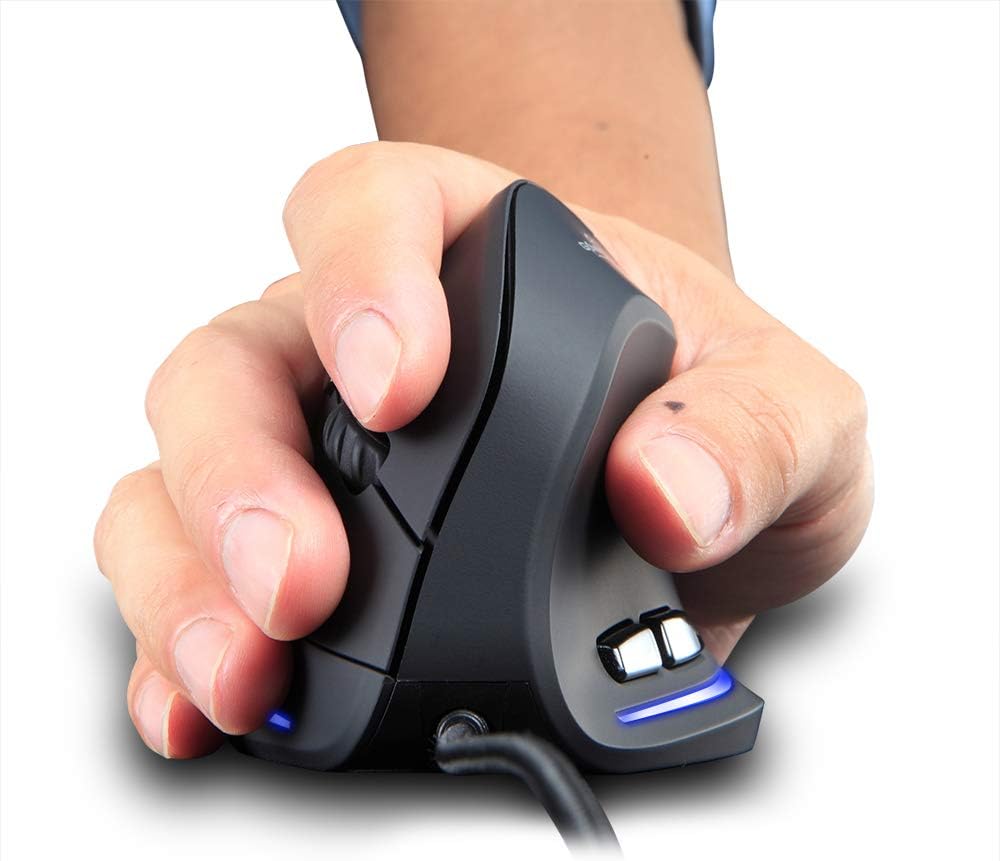
Figure 2: Proper hand placement on the Zelotes T20 mouse. This image illustrates how the vertical design allows for a natural handshake grip, intended to reduce wrist strain.

Figure 3: Ergonomic comparison. This diagram contrasts the natural wrist posture with a vertical mouse against the twisted posture often associated with traditional horizontal mice, emphasizing fatigue reduction.
Вміст упаковки
Перевірте наявність усіх елементів в упаковці:
- 1 x Zelotes Ergonomic Vertical Mouse
- 1 x Інструкція з експлуатації (цей документ)
Налаштування
- Підключіть мишку: Plug the USB cable of the Zelotes T20 mouse into an available USB port on your computer.
- Встановлення драйвера: The mouse is plug-and-play. Your operating system should automatically detect and install the necessary drivers. No additional software installation is typically required.
- Зняти захисну плівку: Before use, locate and remove the protective film from the "Bigfoot pads" on the underside of the mouse for optimal gliding performance.

Figure 4: Underside of the mouse. This image shows the Teflon material pads and indicates the location of the protective film that should be removed before initial use.
Інструкція з експлуатації
Функції кнопок
The Zelotes T20 mouse features 6 buttons for various functions:
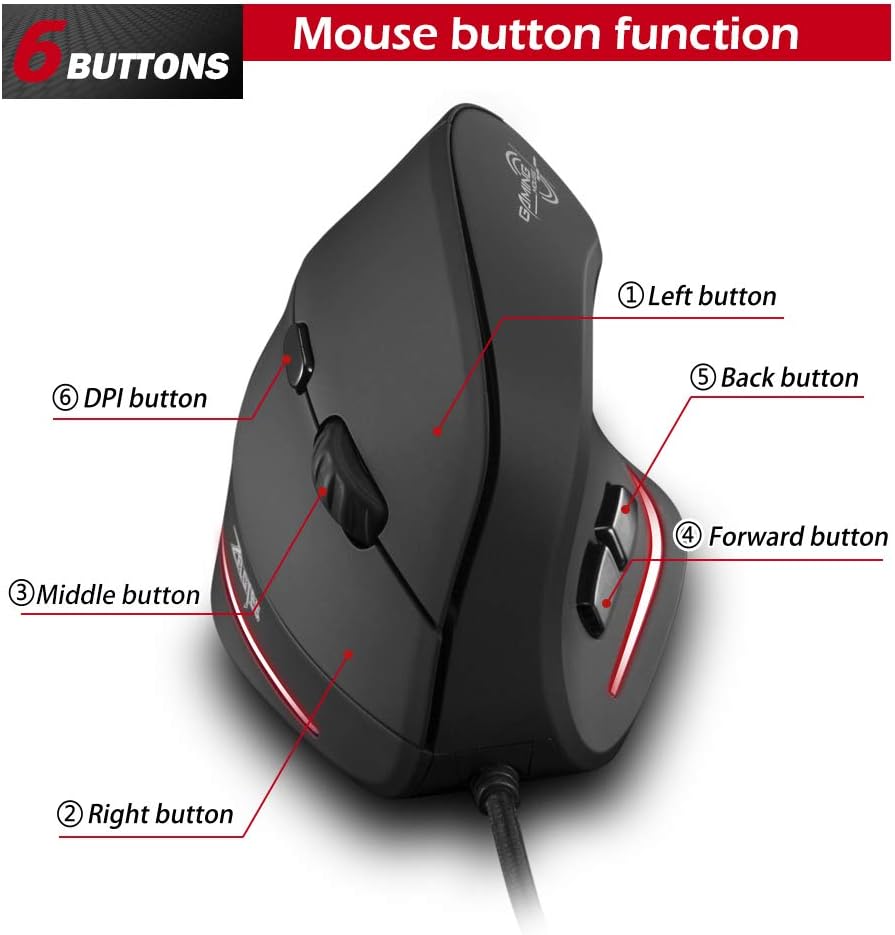
Figure 5: Mouse button layout. This diagram labels each of the six buttons: Left, Right, Middle (scroll wheel click), Forward, Back, and DPI adjustment button.
- Ліва кнопка: Стандартна функція клацання лівою кнопкою миші.
- Права кнопка: Стандартна функція клацання правою кнопкою миші.
- Середня кнопка (колесо прокручування): Clickable scroll wheel for middle-click functions.
- Кнопка вперед: Переміщується вперед web браузери або file дослідники.
- Кнопка Назад: Переміщується назад web браузери або file дослідники.
- Кнопка DPI: Налаштовує чутливість миші (DPI).
Налаштування чутливості (DPI)
The mouse offers four adjustable DPI settings to suit different tasks and preferences. Press the DPI button (Button 6 in Figure 5) to cycle through the settings. Each DPI level is indicated by a specific LED light color:
- 1200 DPI: Blue light hint
- 1600 DPI: Dark purple light hint
- 2400 DPI: Red light hint
- 3200 DPI: Light purple light hint
The light will stay on for approximately 3 seconds when switching DPI settings to indicate the current level.

Figure 6: DPI adjustment and LED indicators. This image illustrates the DPI button and the color coding for each of the four sensitivity settings.
Using Forward/Back Keys
The dedicated Forward and Back buttons (Buttons 4 and 5 in Figure 5) provide quick navigation. These buttons are designed to streamline browsing through web pages or folders, reducing the need for on-screen clicks.

Figure 7: Forward and Back navigation buttons. This image highlights the placement of the forward and back buttons, designed for convenient web і file навігація.
Технічне обслуговування
- Прибирання: Використовуйте м’яку суху тканину для очищення поверхні миші. Для стійкого бруду злегкаamp cloth can be used, ensuring no liquid enters the mouse.
- Технічне обслуговування датчика: Тримайте оптичний датчик на нижній стороні миші чистим та без пилу чи сміття, щоб забезпечити точне відстеження.
- Догляд за кабелем: Уникайте різких згинів або надмірного натягування USB-кабелю, щоб запобігти його пошкодженню.

Figure 8: Mouse surface texture. This image provides a close-up view of the mouse's surface, described as smooth for comfortable handling.
Усунення несправностей
- Миша не реагує:
- Переконайтеся, що USB-кабель надійно підключено до робочого USB-порту вашого комп’ютера.
- Спробуйте підключити мишу до іншого USB-порту.
- Перезавантажте комп'ютер.
- Неточне відстеження:
- Очистіть оптичний датчик на нижній стороні миші.
- Ensure you are using the mouse on a suitable surface (e.g., a mouse pad). Highly reflective or transparent surfaces may cause issues.
- Налаштуйте параметр DPI за допомогою кнопки DPI.
- Кнопки працюють неправильно:
- Перевірте, чи правильно підключено мишу.
- Перевірте мишу на іншому комп’ютері, щоб визначити, чи проблема пов’язана з мишею, чи з налаштуваннями комп’ютера.
Технічні характеристики
| Особливість | Деталь |
|---|---|
| Модель | T20 |
| Номер кнопки | 6 кнопки |
| Система відстеження | Оптичний |
| Довжина кабелю USB | 1.8м |
| Робочий випtagе/Поточний | 5 В/100 мА |
| Життя кнопки | 5 мільйони разів |
| Роликове життя | 1.2 million turns |
| Розміри продукту (Д x Ш x В) | 110 x 72 x 75 мм (4.33 x 2.83 x 2.95 дюймів) |
| Вага продукту | 160 ± 5 г (5.6 унції) |
| Роздільна здатність (DPI) | 1200-1600-2400-3200 |
| Коефіцієнт повернення (коефіцієнт опитування) | 125 Гц |
| Сумісність | Windows 2000/ME/XP (x64)/Vista/7/8/10, Mac OS X (over V10.4), Linux |

Figure 9: Product dimensions. This image provides detailed measurements of the mouse from various angles.
Гарантія та підтримка
Щоб отримати інформацію про гарантію або технічну підтримку, зверніться до офіційного представника виробника webсайт або зверніться до їхнього відділу обслуговування клієнтів. Зберігайте чек про покупку як підтвердження покупки.