
1. Вступ
The Zerone Sport Action DV Camera is a compact and portable device designed for capturing high-definition video during various outdoor activities. Featuring 1080P and 720P recording options, a 120-degree wide-angle lens, and an IPX-4 waterproof aluminum alloy shell, this camera is built for durability and ease of use. It includes a built-in microphone for audio recording and provides vibration feedback for operational status.
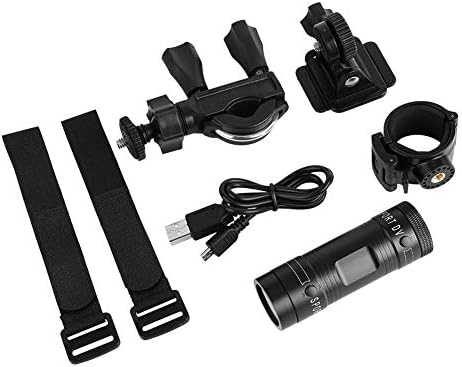
Image 1.1: The Zerone Sport Action DV Camera unit.
2. Інформація про безпеку
- Не піддавайте камеру впливу екстремальних температур або прямих сонячних променів протягом тривалого часу.
- While the camera features an IPX-4 waterproof rating, it is designed to withstand splashes and light rain. Do not submerge or soak the camera in water.
- Тримайте пристрій подалі від сильних магнітних полів.
- Використовуйте лише зазначений зарядний кабель та адаптер живлення, щоб запобігти пошкодженню.
- Не намагайтеся розбирати або модифікувати камеру, оскільки це призведе до анулювання гарантії та може призвести до пошкодження.
- Store the camera in a dry, cool place when not in use.
3. Вміст упаковки
Будь ласка, перевірте упаковку, щоб переконатися в наявності всіх елементів:
- Zerone Sport Action DV Camera Unit
- USB-кабель для зарядки
- Mounting Accessories (e.g., bike mount, helmet mount, strap mounts)
- Rechargeable Battery (may be pre-installed)
- Посібник користувача (цей документ)
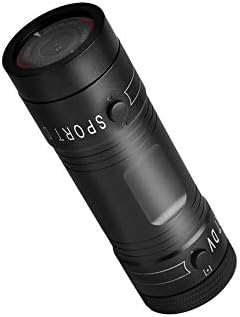
Image 3.1: Contents of the Zerone Sport Action DV Camera package, showing the camera, USB cable, and various mounting options.
4. Камера закінченаview
Ознайомтеся з компонентами та елементами керування камери.
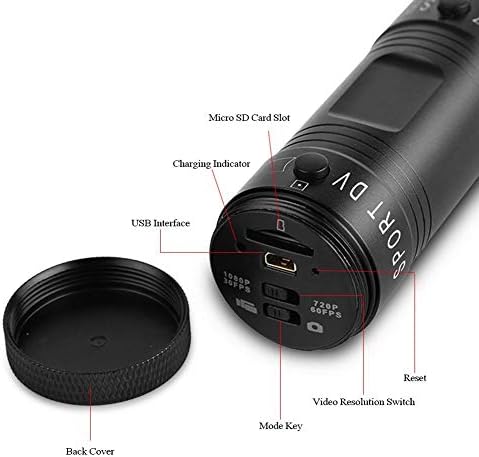
Зображення 4.1: Детальний опис view of the camera's rear end, highlighting the Micro SD card slot, USB interface, charging indicator, mode key, video resolution switch (1080P 30fps / 720P 60fps), and reset button.
- Слот для карти Micro SD: Insert your Micro SD card here. A card is required for operation.
- Індикатор зарядки: Displays charging status. A red light indicates charging; it turns off when fully charged.
- Інтерфейс USB: Для зарядки та підключення до комп'ютера.
- Клавіша режиму: Used to switch between recording modes (e.g., video, photo).
- Video Resolution Switch: Selects between 1080P 30fps and 720P 60fps recording resolutions.
- Кнопка скидання: Використовується для скидання налаштувань пристрою, якщо він перестає реагувати.
- Power Button (Front): Located on the front side of the camera.
- Record/Stop Button (Back): Located on the back side of the camera.
5. Налаштування
5.1 Заряджання батареї
- Підключіть камеру до джерела живлення USB (наприклад, комп’ютера, адаптера живлення) за допомогою наданого USB-кабелю.
- The червоне світло on the back of the camera will illuminate, indicating that it is charging.
- Після повного заряджання червоне світло згасне.
- Note: If the camera blinks red and blue when plugged in, it indicates that an SD card is not inserted. This is not a charging indicator.
5.2 Вставлення карти Micro SD
A Micro SD card (not included) is required for recording video and photos. The camera supports Micro SD cards up to a certain capacity (check product packaging for maximum supported size, typically 32GB or 64GB for similar devices).
- Відкрутіть задню кришку камери.
- Locate the Micro SD card slot (refer to Image 4.1).
- Обережно вставте карту Micro SD у гніздо до клацання. Переконайтеся, що карта правильно орієнтована.
- Replace the back cover, ensuring it is securely tightened to maintain water resistance.
5.3 Встановлення камери
The camera comes with various mounting accessories for different applications.
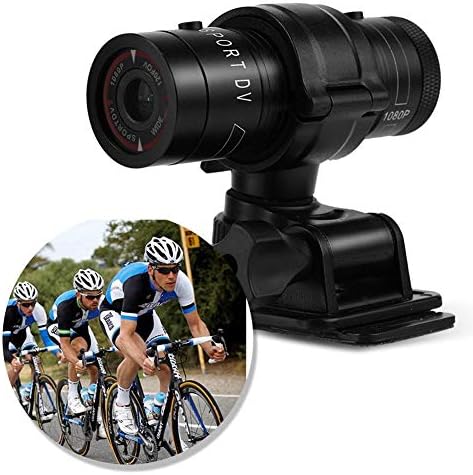
Image 5.1: The camera attached to a bicycle handlebar, demonstrating one of its mounting options.
- Кріплення для велосипеда: Використовуйте клamp mount to attach the camera securely to bicycle handlebars or other tubular structures.
- Кріплення для шолома: Utilize the adhesive or strap mounts to fix the camera to a helmet.
- Strap Mounts: For attaching to various gear or body parts.
Ensure all mounts are securely fastened before engaging in activities to prevent the camera from falling.
6. Робота з камерою
6.1 Увімкнення/вимкнення живлення
- Щоб увімкнути, натисніть і утримуйте Кнопка живлення (front switch) until the camera vibrates.
- Щоб вимкнути живлення, натисніть і утримуйте кнопку Кнопка живлення again until the camera vibrates once.
6.2 Selecting Video Resolution
Before recording, select your desired video resolution using the switch on the back of the camera (refer to Image 4.1).
- Пересуньте перемикач у положення "1080P 30fps" for Full HD video at 30 frames per second.
- Пересуньте перемикач у положення "720P 60fps" for HD video at 60 frames per second.
6.3 Запис відео
- Переконайтеся, що камеру ввімкнено.
- Натисніть Кнопка запису/зупинки (back switch) to start recording. The camera will vibrate three times to indicate recording has started.
- Щоб припинити запис, натисніть кнопку Кнопка запису/зупинки again. The camera will vibrate once to indicate recording has stopped.
6.4 Підключення до комп’ютера
Передавати files or access recorded content:
- Переконайтеся, що камеру вимкнено.
- Підключіть камеру до комп’ютера за допомогою USB-кабелю, що входить до комплекту.
- The camera will be recognized as a removable storage device.
- You can then access and transfer your video files.
7. Технічне обслуговування
- Прибирання: Використовуйте м’яку суху тканину для очищення корпусу камери. Для об’єктива використовуйте спеціальну тканину для очищення об’єктивів та розчин. Уникайте абразивних матеріалів.
- Зберігання: When not in use for extended periods, store the camera in a cool, dry place. Ensure the battery is partially charged (around 50%) to prolong its lifespan.
- Водонепроникність: Regularly check that the back cover is securely tightened to maintain the IPX-4 water resistance. Avoid exposing the USB port or SD card slot to moisture when the cover is open.
- Догляд за акумулятором: Avoid fully discharging the battery frequently. Recharge it when the low battery indicator appears.
8. Вирішення проблем
| проблема | Можлива причина | Рішення |
|---|---|---|
| Камера не вмикається. | Акумулятор розрядився. | Повністю зарядіть камеру. |
| Camera blinks red and blue, then turns off. | No Micro SD card inserted or card is faulty. | Insert a functional Micro SD card. Ensure it is properly seated. |
| Не вдається записати відео. | Немає карти Micro SD, карта переповнена або є помилка карти. | Insert a Micro SD card, delete old fileабо відформатуйте карту (це призведе до видалення всіх даних). |
| Погана якість відео. | Lens is dirty; low light conditions; incorrect resolution setting. | Clean the lens. Ensure adequate lighting. Select 1080P resolution for higher detail. |
| Камера не реагує. | Збій програмного забезпечення. | Use a thin object (like a paperclip) to press the Кнопка скидання (див. зображення 4.1). |
9. Технічні характеристики
| Особливість | Деталь |
|---|---|
| Бренд | Zerone |
| Номер моделі | Zeronefg3h149y2s |
| Роздільна здатність захоплення відео | 1080p (30fps), 720p (60fps) |
| Кут об'єктива | 120-degree A+ grade wide-angle |
| Рейтинг водонепроникності | IPX-4 (splash-proof) |
| Матеріал оболонки | Алюмінієвий сплав |
| Технологія фотосенсора | CMOS |
| Максимальна діафрагма | 1.8 міліметрів |
| Тип флеш-пам'яті | Micro SD (card not included) |
| Формат захоплення відео | AVI |
| Підтримуваний аудіоформат | AAC, MP3, PCM, FLAC, or Dolby Digital/AC-3 |
| Технологія підключення | USB |
| Вага товару | 10.8 унції (приблизно 306 грамів) |
| Розміри продукту | 11.81 x 6.3 x 5.91 дюймів (приблизно 30 x 16 x 15 см) |
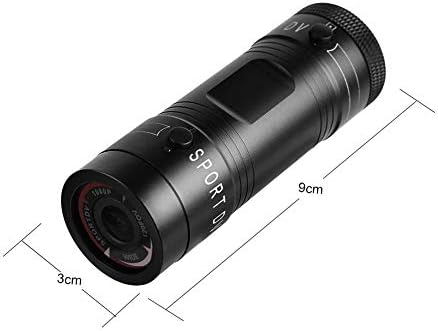
Image 9.1: Physical dimensions of the camera, showing a length of 9cm and a diameter of 3cm.
10. Гарантія та підтримка
Щоб отримати інформацію про гарантію та технічну підтримку, зверніться до документації, що надається разом із покупкою, або зверніться безпосередньо до продавця/виробника. Зберігайте чек про покупку для гарантійних претензій.
Manufacturer: Zerone
For further assistance, you may visit the Zerone Store on Amazon: Zerone Store