
вступ
This manual provides detailed instructions for the setup, operation, and maintenance of your TFA Dostmann Digital Radio-Controlled Alarm Clock, model 60.2547.54. Please read this manual thoroughly before using the device to ensure proper function and to understand all features.
Продукт закінченийview & Компоненти
The TFA Dostmann Digital Radio-Controlled Alarm Clock is designed to provide accurate time, date, and indoor climate information. It features a highly precise radio-controlled clock, two independent alarm times, and an automatic night light function.
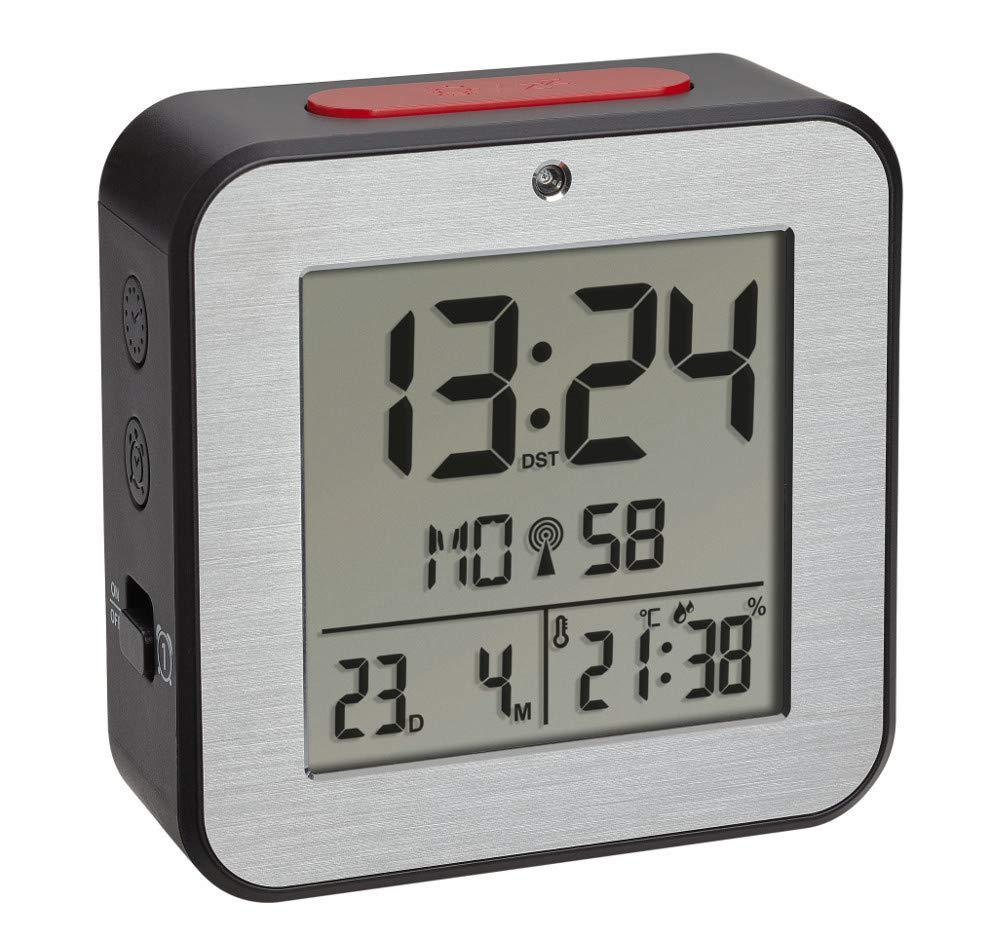


Установка батареї
- Знайдіть кришку батарейного відсіку на задній панелі будильника.
- Зніміть кришку, зсунувши або піднявши її.
- Insert two (2) 1.5 V AA batteries, ensuring correct polarity (+/-). Batteries are not included and must be purchased separately.
- Надійно закрийте кришку батарейного відсіку.
- The device will power on and begin searching for the radio-controlled time signal.
Початкове налаштування
Upon battery installation, the clock will automatically attempt to receive the radio-controlled time signal. This process may take several minutes. If the signal is not received or for manual adjustments, follow these steps:
Manual Time and Date Setting
- Press and hold the 'SET' button (location may vary, refer to device diagram if available) to enter setup mode.
- Використовуйте кнопки «+» або «-», щоб налаштувати миготливе значення (наприклад, година, хвилина, рік, місяць, день).
- Press 'SET' again to confirm the setting and move to the next parameter.
- Repeat until all desired settings (time, date, year) are configured.
Вибір мови
The display supports 7 languages for the day of the week: French, Spanish, Italian, Dutch, Danish, and English. During initial setup or in settings mode, select your preferred language using the '+' or '-' buttons.
Налаштування часового поясу
If you are in a region where the radio signal's standard time differs from your local time, you can adjust the time zone by +/- 12 hours. Access this setting in the setup mode and use the '+' or '-' buttons to set the offset.
Інструкція з експлуатації
Налаштування будильників (Будильник 1 та Будильник 2)
- Press the 'ALARM 1' or 'ALARM 2' button to display the current alarm time.
- Press and hold the respective 'ALARM' button until the alarm time flashes.
- Use the '+' or '-' buttons to adjust the hour, then press the 'ALARM' button to confirm and move to minutes.
- Adjust minutes with '+' or '-' and press 'ALARM' to confirm.
- To activate or deactivate an alarm, press the 'ALARM 1 ON/OFF' or 'ALARM 2 ON/OFF' switch (typically located on the side or back). An alarm icon will appear on the display when active.
Функція відкладення
When an alarm sounds, press the 'SNOOZE/LIGHT' button (usually a large button on top) to temporarily silence the alarm. The alarm will sound again after a few minutes (default snooze duration). To stop the alarm completely, press any other button or switch the alarm off using its dedicated ON/OFF switch.
Automatic Backlight and Light Sensor
The alarm clock features an automatic backlight that activates in low-light conditions. This function is controlled by a light sensor. To enable or disable the automatic backlight, locate the 'AUTO LIGHT' switch or setting (refer to your device's specific button layout).
Indoor Climate Display
The display continuously shows the indoor temperature in Celsius (°C) or Fahrenheit (°F) and the relative humidity (%). To switch between °C and °F, press the '°C/°F' button (if available) or cycle through display modes in the setup menu.
Технічне обслуговування
- Прибирання: Протирайте пристрій м’якою сухою тканиною. Не використовуйте абразивні засоби для чищення або розчинники.
- Заміна батареї: Replace batteries when the display dims or the device stops functioning. Always replace both batteries simultaneously with new ones of the same type. Dispose of used batteries responsibly.
- Зберігання: Якщо пристрій зберігається протягом тривалого часу, вийміть батарейки, щоб запобігти витіканню.
Усунення несправностей
| проблема | Можлива причина | Рішення |
|---|---|---|
| Дисплей порожній або тьмяний. | Батарейки низький заряд або неправильно вставлені. | Replace batteries with new 1.5 V AA batteries, ensuring correct polarity. |
| Час неправильний або не встановлюється автоматично. | Poor radio signal reception; device is out of range or obstructed. | Move the alarm clock to a location with better signal reception, away from electronic devices or metal objects. Perform manual time setting if necessary. |
| Сигналізація не звучить. | Будильник не активовано або гучність занадто низька. | Ensure the alarm's ON/OFF switch is in the 'ON' position. Check alarm time settings. |
| Показники температури/вологості здаються неточними. | Device is exposed to direct sunlight, heat sources, or drafts. | Place the alarm clock in a stable indoor environment, away from extreme temperature fluctuations. |
Технічні характеристики
- модель: 60.2547.54
- Бренд: ТФА Достман
- Тип дисплея: цифровий
- Джерело живлення: 2 батарейки типу АА 1.5 В (не входять в комплект)
- Розміри (Д x Ш x В): 82 x 33 x 82 мм
- вага: 110 грамів
- матеріал: Алюміній, Пластик
- Діапазон вимірювання температури: -9°C до +50°C (+14°F до +122°F)
- Діапазон вимірювання вологості: Від 20% до 95% відносної вологості
- Особливості: Radio-controlled time, Dual alarms, Snooze function, Automatic backlight, Indoor temperature and humidity display, 7-language weekday display, Time zone adjustment.
Інформація про гарантію
TFA Dostmann products are manufactured with quality and care. For specific warranty terms and conditions, please refer to the warranty card included in your product packaging or visit the official TFA Dostmann webсайт. Зберігайте чек про покупку для будь-яких гарантійних претензій.
Підтримка
If you encounter any issues not covered in this manual or require further assistance, please contact TFA Dostmann customer support. Contact details can typically be found on the official TFA Dostmann webсайті або на упаковці продукту.