
1. Вступ
This manual provides essential information for the safe and efficient operation of your lightmaXX Nano Beam FX show effect light. Please read it thoroughly before use and retain it for future reference.
2. Техніка безпеки
- Уважно прочитайте всі інструкції.
- Збережіть цей посібник для подальшого використання.
- Не піддавайте пристрій впливу дощу або вологи.
- Забезпечте належну вентиляцію.
- Від’єднайте прилад від електромережі перед чищенням або обслуговуванням.
- Use only specified power supply.
- Уникайте прямого впливу на очі джерела світла.
- Цей пристрій призначений лише для використання в приміщенні.
- Ensure the mounting bracket is securely fastened.
3. Вміст упаковки
Перевірте наявність усіх предметів та їх належний стан.
- lightmaXX Nano Beam FX Unit
- Кабель живлення
- Пульт дистанційного керування
- Інструкція з експлуатації (цей документ)

Image 1: lightmaXX Nano Beam FX unit, power cable, and remote control.
4. Продукт закінчивсяview
4.1 Передня панель
The front panel features multiple lenses for projecting various light effects.
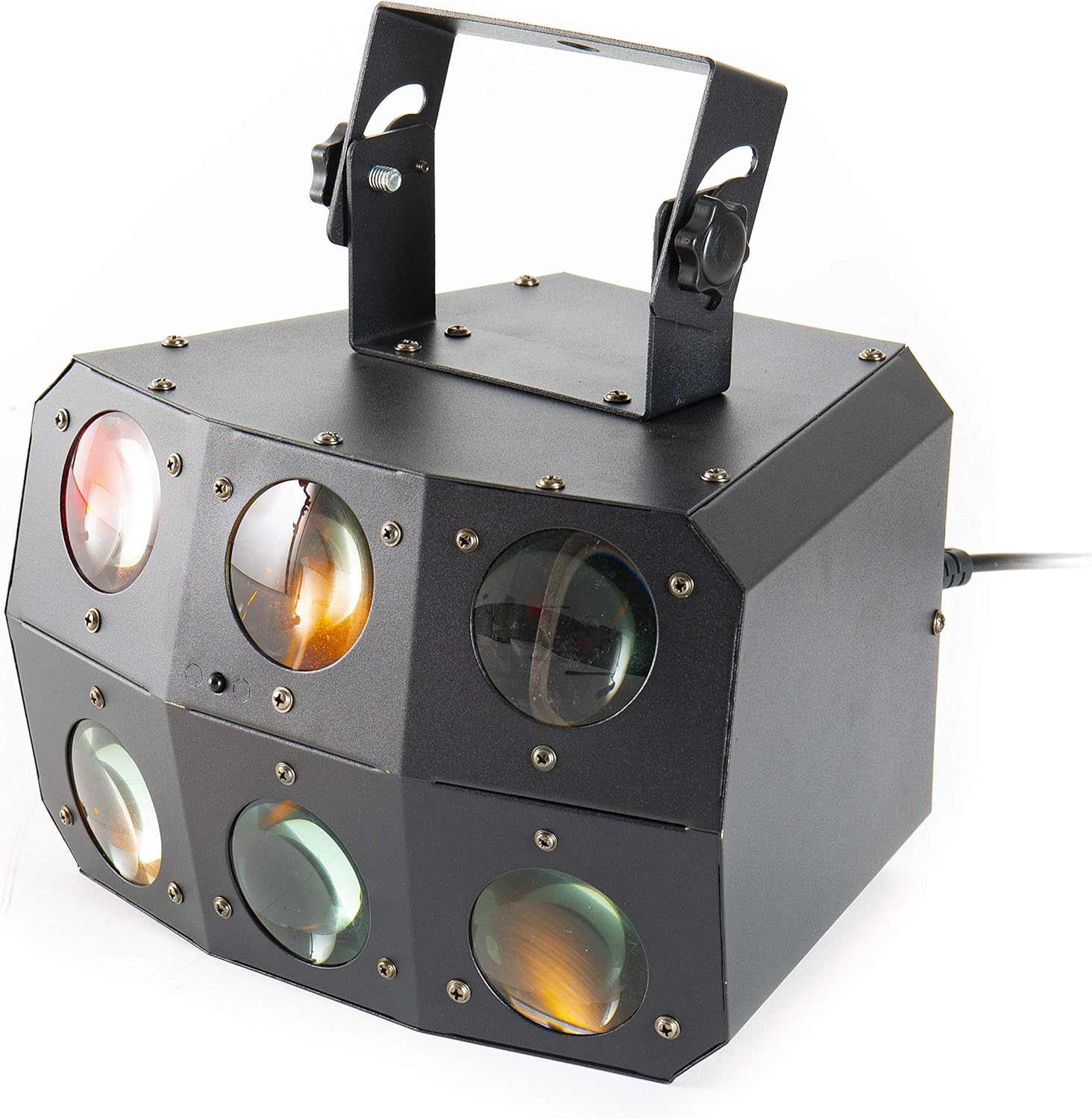
Зображення 2: Крупний план view of the front lenses.
4.2 Задня панель та з’єднання
The rear panel provides power input/output, DMX connections, and control interface.

Image 3: Rear panel with connections and control interface.
- ЖИВЛЕННЯ: Під’єднайте сюди кабель живлення, що додається.
- ВИХІД ЖИВЛЕННЯ: For daisy-chaining power to other units.
- DMX IN: Connect DMX controller or previous DMX device.
- Вхід DMX: Connect to the next DMX device in the chain.
- мікрофон: Built-in microphone for sound-activated modes.
- Дисплей і кнопки: For menu navigation and settings (MENU, UP, DOWN, ENTER).
- SAFETY ROPE: Attachment point for a safety cable.
4.3 Пульт дистанційного керування
The included remote control allows for convenient operation of the unit's functions.
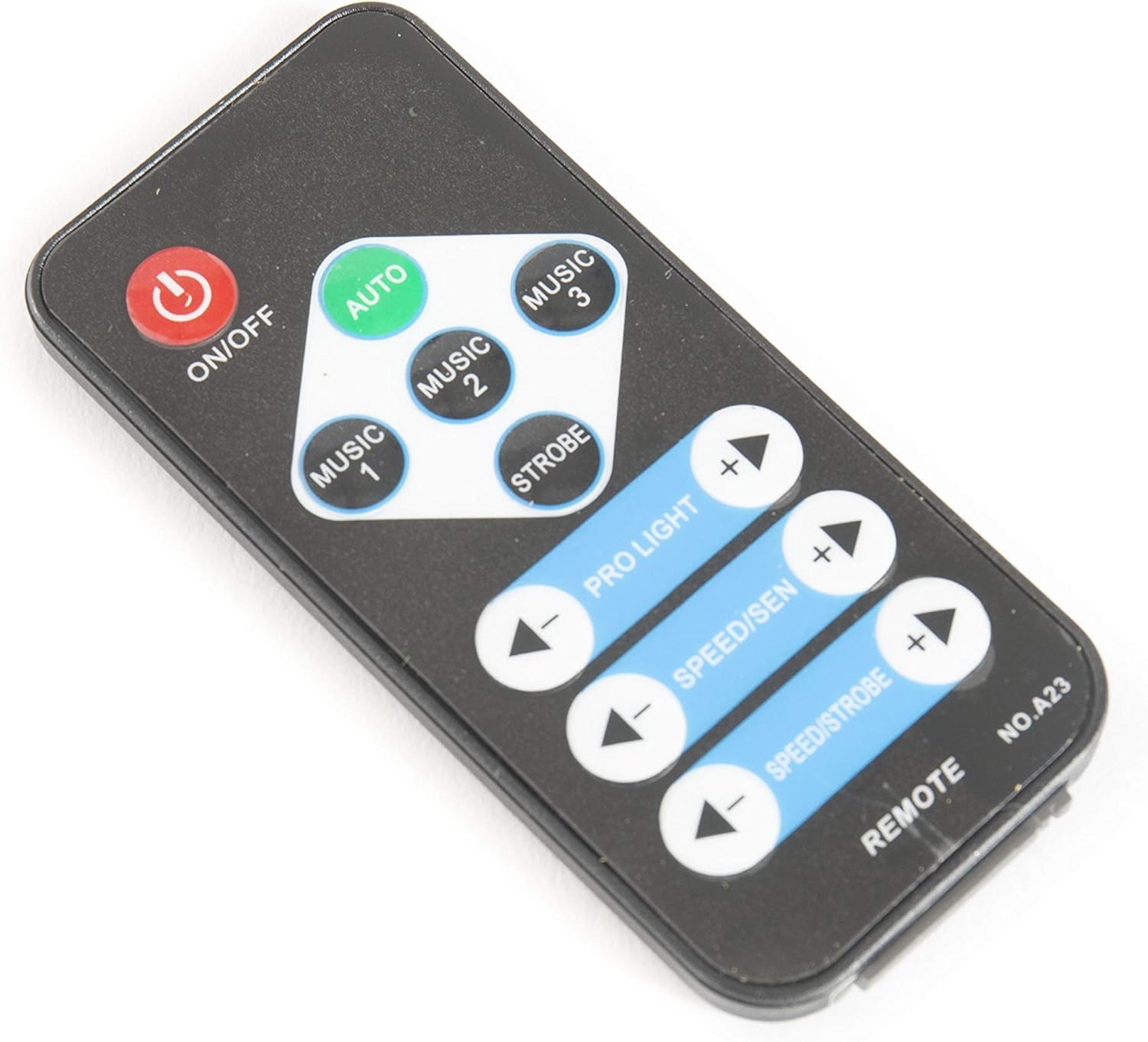
Image 4: Remote control for the Nano Beam FX.
- УВІМК./ВИМК.: Увімкнення або вимкнення пристрою.
- АВТО: Activates automatic program mode.
- MUSIC 1/2/3: Activates sound-activated modes with different sensitivities or patterns.
- СТРОБ: Activates strobe effect.
- PRO LIGHT: Adjusts light intensity or program selection.
- SPEED/SEN: Adjusts program speed or sound sensitivity.
5. Налаштування
5.1 Розпакування
Carefully remove the unit from its packaging. Inspect for any damage during transit. Retain packaging for future transport or storage.
5.2 Монтаж
The Nano Beam FX unit is equipped with a mounting bracket for secure installation.

Image 5: Adjustable mounting bracket.
- Attach the unit securely to a truss, ceiling, or wall using appropriate clamps and hardware (not included).
- Always use a safety cable (not included) attached to the SAFETY ROPE point on the rear panel, ensuring it can hold the weight of the unit.
- Adjust the angle of the unit using the knobs on the mounting bracket.
5.3 Підключення живлення
Connect the supplied power cable to the POWER IN socket on the rear panel and then to a suitable power outlet.
5.4 Підключення DMX (додатково)
For advanced control, connect the unit to a DMX controller.
- Connect a DMX cable from your DMX controller's output to the DMX IN socket of the Nano Beam FX.
- If connecting multiple DMX devices, connect from the DMX OUT of the first unit to the DMX IN of the next.
- Refer to the DMX channel chart (not provided in product data) for specific DMX control parameters.
6. Операційна
6.1 Увімкнення/вимкнення живлення
Натисніть УВІМК./ВИМК button on the remote control or ensure the unit is connected to power. The unit will power on automatically when connected to power.
6.2 Режими роботи
The Nano Beam FX offers several operating modes, selectable via the remote control or the rear panel display.
- Автоматичний режим: Натисніть АВТО button on the remote. The unit will cycle through its pre-programmed light shows automatically.
- МУЗИЧНИЙ РЕЖИМ: Прес МУЗИКА 1, МУЗИКА 2, або МУЗИКА 3 on the remote. The unit will react to sound picked up by its internal microphone. Different music modes may offer varying sensitivities or patterns.
- Режим стробоскопа: Натисніть STROBE button on the remote to activate a flashing light effect.
- Режим DMX: If connected to a DMX controller, the unit will respond to DMX signals. Use the rear panel display to set the DMX address.

Зображення 6: Наприкладample of light effects (blue and red).

Зображення 7: Наприкладample of light effects (green and yellow).

Зображення 8: Наприкладample of light effects (orange and red).
6.3 Adjustments via Remote Control
- PRO LIGHT: Використовуйте + і - buttons to cycle through different light programs or adjust intensity in certain modes.
- SPEED/SEN: Використовуйте + і - buttons to adjust the speed of automatic programs or the sensitivity of sound-activated modes.
7. Технічне обслуговування
7.1 Очищення
Disconnect the unit from power before cleaning. Use a soft, lint-free cloth to wipe the exterior. For lenses, use a specialized lens cleaner and cloth to avoid scratches. Do not use abrasive cleaners.
7.2 Зберігання
When not in use, store the unit in its original packaging or a suitable case in a dry, dust-free environment.
8. Вирішення проблем
| проблема | Можлива причина | Рішення |
|---|---|---|
| Пристрій не вмикається. | Немає живлення; несправний кабель. | Перевірте підключення кабелю живлення; спробуйте іншу розетку. |
| Не працює пульт дистанційного керування. | Dead battery; obstruction; out of range. | Replace remote battery; ensure clear line of sight; move closer to unit. |
| No light effects. | Unit in DMX mode without DMX signal; program not selected. | Select AUTO or MUSIC mode; check DMX connection and settings. |
| Sound-activated mode not responding. | Microphone sensitivity too low; no sound input. | Increase sensitivity using remote; ensure sound source is close to the unit. |
9. Технічні характеристики
| Особливість | Деталь |
|---|---|
| Модель | Nano Beam FX |
| Бренд | lightmaXX |
| Розміри продукту | 32 х 30 х 29 см |
| Вага товару | 3.5 кг |
| Джерело живлення | Провідний електричний |
| Джерело світла Wattage | 3 Вт (на одне джерело світла) |
| Кількість джерел світла | 24 |
| Довідка виробника | LIG0015648-000 |
| ASIN | B07JM9XVT4 |
10. Гарантія та підтримка
Щоб отримати інформацію про гарантію та технічну підтримку, зверніться до офіційного представника виробника webсайт або зверніться до продавця. Зберігайте чек про покупку для будь-яких гарантійних претензій.