
1. Вступ
This manual provides instructions for the installation, operation, and maintenance of your Excelvan WD-612 License Plate Backup Camera. This device is designed to enhance safety during reverse parking by providing a clear view площі позаду вашого автомобіля.
Ключові особливості:
- 1/4 CMOS Color Image Sensor: Delivers clear visual feedback.
- 170° в ширину Viewкут нахилу: Пропонує широкий view of the rear environment.
- Бездротове підключення: Simplifies installation by reducing cable runs.
- Рейтинг водонепроникності IP68: Забезпечує надійну роботу за різних погодних умов.
- 4 Infrared (IR) LEDs: Provides enhanced visibility in low-light or nighttime conditions.
- Adjustable Bracket and Camera: Allows for optimal positioning.

Image 1.1: The Excelvan WD-612 License Plate Backup Camera, showing its compact design integrated into a license plate frame.

Image 1.2: Illustration demonstrating the compatibility of the Excelvan WD-612 License Plate Backup Camera with various vehicle types, including sedans, SUVs, pickup trucks, and business cars.
2. Налаштування та встановлення
The Excelvan WD-612 is designed for straightforward installation. The wireless receivers and transmitters simplify the connection process.
2.1 Вміст упаковки
Перед початком встановлення переконайтеся, що всі компоненти присутні:
- 1 x License Plate Backup Camera
- 1 x 1.45m 2.4G Wireless Color Video Receiver
- 1 x 1.45m 2.4G Wireless Color Video Transmitter
- 1 x Посібник користувача (цей документ)
- 1 x Installation Note

Image 2.1: The main components of the Excelvan WD-612 system, including the license plate camera, wireless video receiver, and wireless video transmitter.
2.2 Етапи встановлення
- Встановити камеру: Secure the license plate backup camera to your vehicle's rear license plate area. The bracket and camera angle are adjustable to achieve the desired view.
- Підключіть живлення: Connect the camera's power cable to your vehicle's reverse light circuit. This ensures the camera activates automatically when the vehicle is put into reverse.
- Connect Wireless Transmitter: Connect the camera's video output to the wireless video transmitter.
- Підключення бездротового приймача: Inside the vehicle, connect the wireless video receiver to your display monitor's RCA video input.
- Увімкнення приймача: Connect the wireless receiver's power cable to a suitable 12V DC power source within the vehicle (e.g., accessory power).
- Система тестування: Engage reverse gear (with the engine running but foot on the brake) to verify the camera image appears on your monitor. Adjust the camera angle as needed.
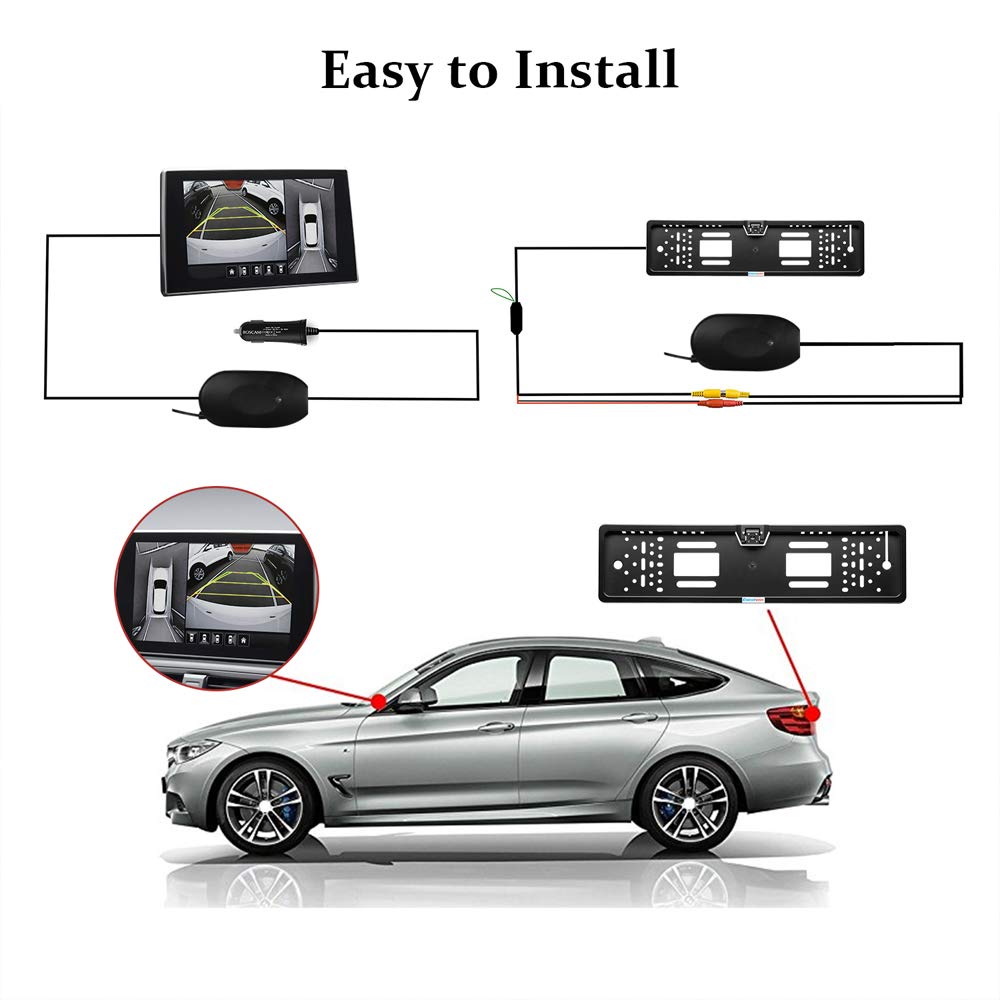
Image 2.2: A simplified diagram illustrating the connection points for the Excelvan WD-612 backup camera system, showing the camera, wireless transmitter, wireless receiver, and monitor.
Note: Wireless receivers and transmitters are designed for convenience, eliminating the need for long video cables running through the vehicle. However, a 6-meter RCA video cable is also provided for direct connection if preferred or if wireless interference is an issue.
3. Інструкція з експлуатації
The Excelvan WD-612 backup camera operates automatically when your vehicle is shifted into reverse gear, provided it is correctly installed and powered.
3.1 Reverse Parking Assistance
- When reverse gear is engaged, the camera will transmit a live video feed to your connected display monitor.
- The wide 170° viewing angle provides a comprehensive view of the area behind your vehicle, helping to identify obstacles and other vehicles.
- Dynamic parking guidelines may appear on the screen (if supported by your monitor) to assist with judging distance and trajectory.

Image 3.1: Visual comparison demonstrating the expanded field of view provided by a 170° wide-angle lens compared to a narrower 135° lens, highlighting improved situational awareness.

Image 3.2: Detail of the HD image lens and a representation of the clear rear view it provides on a connected display, including parking guidelines.
3.2 Нічне бачення
The camera is equipped with four infrared (IR) LEDs to provide illumination in low-light conditions. This feature automatically activates to ensure visibility even in dark environments, such as poorly lit parking lots or at night.

Image 3.3: Depiction of the camera's night vision functionality, showing a clear view with parking lines in a dark environment, aided by the built-in infrared LEDs.
4. Технічне обслуговування
To ensure the longevity and optimal performance of your Excelvan WD-612 backup camera, follow these maintenance guidelines:
- Регулярне прибирання: Periodically clean the camera lens and surrounding area with a soft, damp тканиною. Уникайте абразивних засобів для чищення або матеріалів, які можуть подряпати об’єктив.
- Перевірте підключення: Ensure all power and video connections remain secure. Loose connections can lead to intermittent signal loss.
- Огляньте на наявність пошкоджень: Regularly inspect the camera and wiring for any signs of physical damage, such as cracks, frayed wires, or corrosion. Address any damage promptly.
- Водонепроникна цілісність: While the camera is IP68 waterproof, avoid directing high-pressure water jets directly at the camera for extended periods, as this could potentially compromise seals over time.

Image 4.1: The Excelvan WD-612 camera operating effectively in rainy conditions, illustrating its IP68 waterproof capability.
5. Вирішення проблем
If you encounter issues with your Excelvan WD-612 backup camera, refer to the following common problems and solutions:
- Немає зображення на моніторі:
- Переконайтеся, що автомобіль знаходиться на задній передачі.
- Check all power connections to the camera and wireless receiver. Verify they are securely connected and receiving 12V DC power.
- Confirm the wireless transmitter and receiver are properly paired and functioning.
- Verify the video input on your monitor is correctly selected.
- If using the RCA cable, ensure it is securely connected at both ends.
- Poor Image Quality / Flickering:
- Очистіть об'єктив камери.
- Check for strong electromagnetic interference sources near the wireless transmitter/receiver.
- Ensure the wireless transmitter and receiver are not obstructed by large metal objects.
- Verify power supply is stable (12V DC).
- If using wireless, try switching to the wired RCA connection to rule out wireless interference.
- Image is Upside Down or Mirrored:
- Some monitors or cameras have settings to flip or mirror the image. Consult your monitor's manual or check for small wires on the camera that can be cut to change image orientation (refer to installation note if provided).
6. Технічні характеристики
Technical specifications for the Excelvan WD-612 License Plate Backup Camera:
| Особливість | Специфікація |
|---|---|
| Модель | WD-612 |
| Пристрій зображення | 1/4 CMOS Color Image Sensor |
| Picture Elements (PAL) | 795H x 596В |
| Picture Elements (NTSC) | 795H x 596В |
| Мінімальна освітленість | 0.1 Lux / F1.2 |
| Відеовихід | 1.0 В від піку до піку |
| роздільна здатність | 480 телевізійних ліній |
| SNR Макс | >48dB (AGC-off) |
| Pixel Dynamic Range | 60 дБ |
| Frame Rate (NTSC) | 60fps (@27MHZ) |
| Frame Rate (PAL) | 50fps (@27MHZ) |
| затвор | Електронний затвор |
| Angle Option | 120° - 170° |
| Показник водонепроникності | IP68 |
| Джерело живлення | 12 В постійного струму |
| Споживана потужність | МАКС 100 мА |
| Температура зберігання | від -30°C до +85°C |
| Робоча температура | від -30°C до +70°C |
| Розміри | 53.5см х 13.5см х 2.44см |
| вага | 0.42 кг |
7. Інформація про гарантію
The Excelvan WD-612 License Plate Backup Camera comes with a Гарантія 1 рік з дати покупки. Ця гарантія поширюється на виробничі дефекти та несправності за умов нормального використання. Будь ласка, збережіть чек про покупку для пред'явлення претензій по гарантії.
Гарантія не поширюється на пошкодження, викликані:
- Неправильний монтаж або експлуатація.
- Випадкове пошкодження, неправильне використання або зловживання.
- Несанкціонований ремонт або модифікація.
- Нормальний знос.
For warranty service, please contact your retailer or the Excelvan customer support channel.
8. Підтримка клієнтів
For further assistance, technical support, or inquiries regarding your Excelvan WD-612 License Plate Backup Camera, please refer to the contact information provided by your point of purchase or visit the official Excelvan webсайт для ресурсів підтримки.