
1. Вступ
Дякуємо за покупкуasing the Yenkee YKB 3200 Gaming Keyboard. This manual provides essential information for the proper setup, operation, and maintenance of your new keyboard. Please read this manual thoroughly before using the product to ensure optimal performance and longevity.
2. Інформація про безпеку
- Тримайте клавіатуру подалі від рідин та надмірної вологи.
- Не піддавайте клавіатуру впливу екстремальних температур.
- Уникайте падіння або сильних ударів клавіатури.
- Do not attempt to disassemble or repair the keyboard yourself. Refer all servicing to qualified personnel.
- Use only a dry, soft cloth for cleaning.
3. Вміст упаковки
Будь ласка, перевірте вміст упаковки після розпакування. Якщо будь-які елементи відсутні або пошкоджені, зверніться до продавця.
- Yenkee YKB 3200 Gaming Keyboard with integrated smartphone holder
- USB-кабель (додається)
4. Продукт закінчивсяview
The Yenkee YKB 3200 is a robust gaming keyboard designed for an enhanced gaming experience. It features a durable metal construction, responsive rubber dome keys, and dynamic rainbow backlighting.
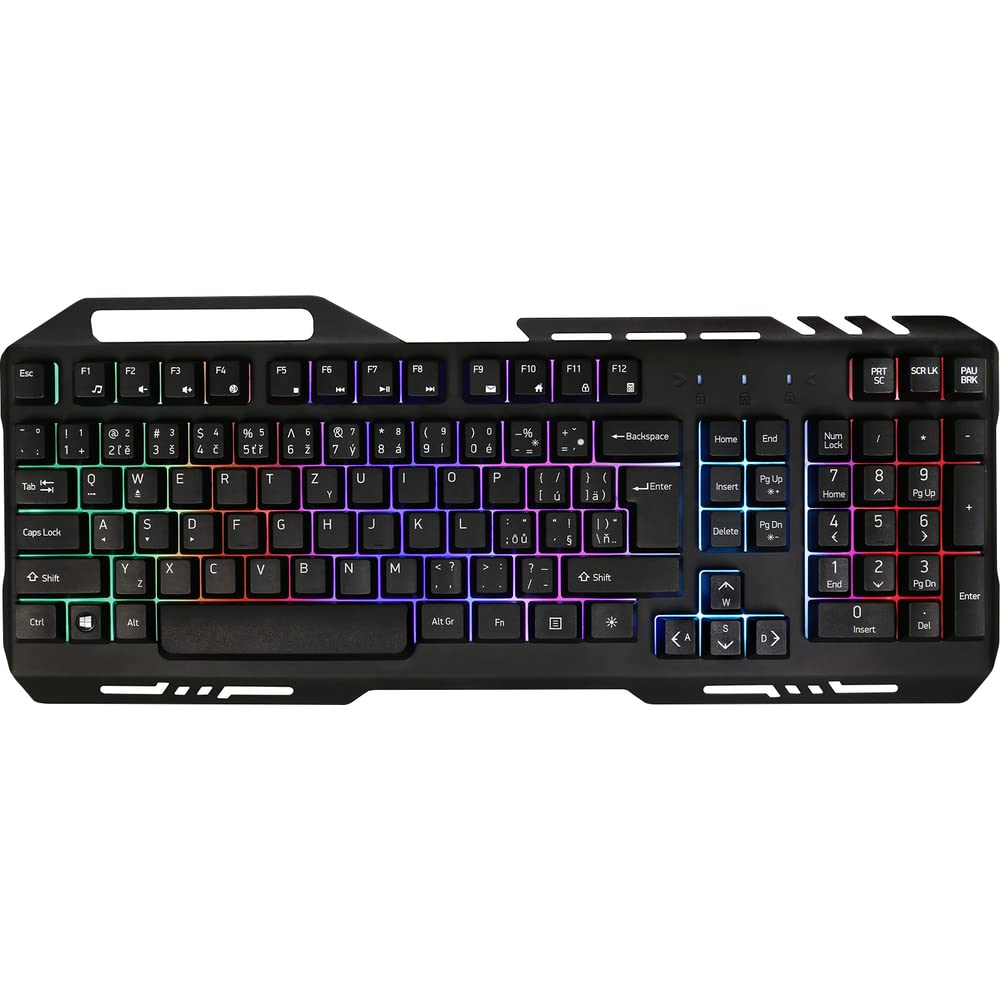
Image 1: Yenkee YKB 3200 Gaming Keyboard. This image displays the full keyboard with its metal frame and illuminated keys, highlighting the integrated smartphone holder at the top.
Ключові характеристики:
- Metal Keyboard Design: Provides enhanced durability and a premium feel.
- Вбудований тримач для смартфона: Conveniently located at the top of the keyboard for easy access to your mobile device.
- Durable Rubber Dome Keys: Offers a comfortable and responsive typing experience.
- Nine Rainbow Backlight Modes: Customizable lighting effects to suit your preference and gaming atmosphere.
- Підключення USB: Simple plug-and-play connection to your computer.
- 1.5m Cable Length: Забезпечує ample досягти для різних установок.
5. Налаштування
- Розпакуйте клавіатуру: Обережно вийміть клавіатуру з упаковки.
- Підключення до комп'ютера: Locate an available USB port on your computer (PC or laptop). Insert the USB connector of the keyboard into the USB port.
- Встановлення драйвера: The keyboard is plug-and-play and typically does not require additional driver installation. Your operating system should automatically detect and install the necessary drivers.
- Розміщення: Place the keyboard on a stable, flat surface. You can use the integrated smartphone holder to position your mobile device.
- Тест функціональності: Open a text editor or browser to test if the keys are responding correctly.
6. Інструкція з експлуатації
Контроль підсвічування:
The Yenkee YKB 3200 features nine distinct rainbow backlight modes. These modes can typically be cycled through using a dedicated function key combination.
- Зміна режиму: Look for a key labeled 'FN' (Function) and a key with a light bulb icon or 'Scroll Lock' / 'Pause Break'. Pressing FN + Light Bulb / Scroll Lock / Pause Break (depending on keyboard layout) will cycle through the available backlight modes.
- Регулювання яскравості: Some keyboards allow brightness adjustment using FN + Up/Down Arrow keys. Refer to your specific keyboard layout for exact key combinations.
- Turning Backlight On/Off: A long press of the backlight control key or a specific FN combination might turn the backlight on or off.
Мультимедійні та функціональні клавіші:
The keyboard may include additional function keys (F1-F12) that, when combined with the 'FN' key, provide multimedia control or quick access to applications. Common functions include:
- FN + F1-F12: Volume control, media playback, email, web browser, etc. (Specific functions vary by model).
7. Технічне обслуговування
Прибирання:
- Генеральне прибирання: Використовуйте м’яку, суху тканину без ворсу, щоб протерти поверхню клавіатури.
- Видалення пилу: Використовуйте стиснене повітря, щоб видалити пил та сміття між клавішами.
- Стійкі плями: Для стійких плям трохи dampen the cloth with water or a mild, non-abrasive cleaning solution. Ensure no liquid enters the keyboard.
Зберігання:
When not in use for extended periods, store the keyboard in a cool, dry place, away from direct sunlight and extreme temperatures.
8. Вирішення проблем
| проблема | Можлива причина | Рішення |
|---|---|---|
| Клавіатура не відповідає | Нещільне USB-з'єднання, несправний USB-порт, проблема з драйвером. | Переконайтеся, що USB-кабель надійно підключено. Спробуйте інший USB-порт. Перезавантажте комп’ютер. |
| Не працює підсвічування | Підсвічування вимкнено, налаштування низької яскравості. | Press the backlight control key combination (e.g., FN + Scroll Lock) to cycle modes or adjust brightness. |
| Клавіші залипають або не реагують | Dirt or debris under keys. | Clean the keyboard using compressed air and a soft cloth. |
9. Технічні характеристики
| Особливість | Специфікація |
|---|---|
| Бренд | Yenkee |
| Номер моделі | YKB 3200 |
| Технологія підключення | USB |
| Довжина кабелю | 1.5 метрів |
| Опис клавіатури | Ігри |
| Backlight Theme | Rainbow (9 modes) |
| Сумісні пристрої | Ноутбук, ПК |
| Розміри продукту | 45.2 х 20 х 3.5 см |
| Вага продукту | 841 г |
| Включені компоненти | USB cable (attached) |
10. Гарантія та підтримка
Yenkee products are designed and manufactured to the highest quality standards. For information regarding warranty terms and conditions, please refer to the warranty card included with your purchase or visit the official Yenkee website. For technical support or service inquiries, please contact your local retailer or the Yenkee customer support team.