
вступ
Thank you for choosing the LENRUE A38S Computer Speakers. This manual provides essential information for setting up, operating, and maintaining your speakers to ensure optimal performance. The A38S speakers are designed to deliver clear audio for your desktop, laptop, and tablet, featuring a plug-and-play design with USB power and 3.5mm auxiliary audio input, complemented by dynamic RGB lighting.
Налаштування
Follow these steps to connect your LENRUE A38S speakers to your device.
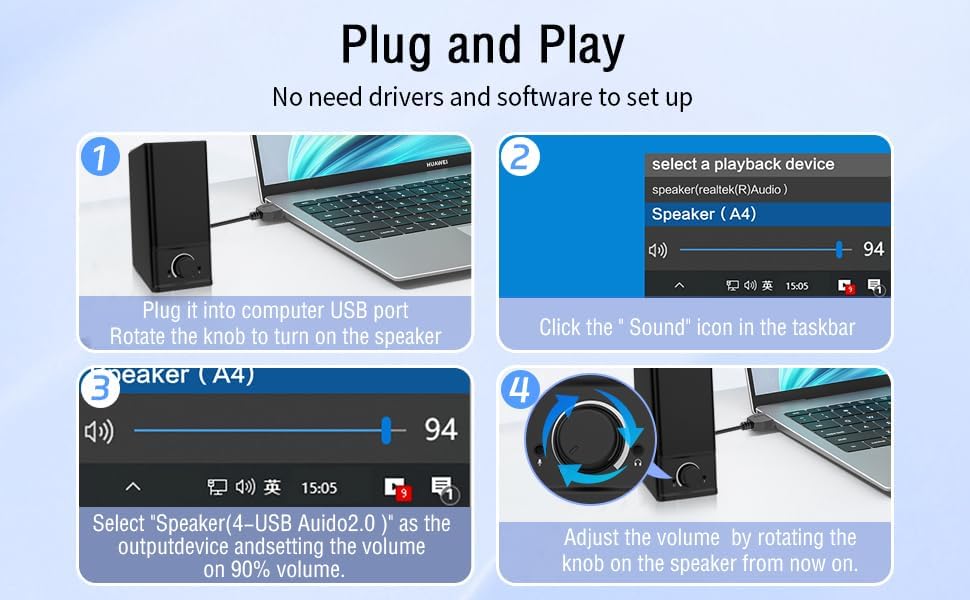
- Підключіть живлення: Insert the USB-A plug into an available USB port on your computer or a USB power adapter. If your device has a USB-C port, use the provided USB-A to Type-C adapter. The speakers are powered via USB and contain an internal battery for portable use.
- Підключення аудіо: Plug the 3.5mm audio jack into the headphone or audio output port of your computer, laptop, or tablet.
- Увімкнення: Rotate the main knob on the speaker clockwise to turn it on. The RGB lights will illuminate.
- Select Playback Device: On your computer, navigate to your sound settings and select "Speaker (4-USB Audio 2.0)" or a similar option as the output device. Adjust the volume to approximately 90% on your computer for optimal control via the speaker knob.
Операція
The LENRUE A38S speakers feature a multi-function knob for easy control.
- Увімкнення/вимкнення живлення: Rotate the knob clockwise to turn on the speakers. Rotate counter-clockwise until it clicks to turn off.
- Регулювання гучності: Поверніть ручку за годинниковою стрілкою, щоб збільшити гучність, і проти годинникової стрілки, щоб зменшити гучність.
- Режими освітлення RGB: Double-click the knob to cycle through the three dynamic RGB lighting modes.
- Turn Off RGB Lights: Triple-click the knob to turn off all RGB lighting.

Технічне обслуговування
Proper care ensures the longevity of your speakers.
- Прибирання: Use a soft, dry cloth to wipe the speaker's surface. Do not use liquid cleaners or abrasive materials.
- Зберігання: Зберігайте динаміки в прохолодному, сухому місці, подалі від прямих сонячних променів та екстремальних температур.
- Водонепроникність: The speakers are waterproof. However, avoid prolonged submersion or exposure to high-pressure water jets to prevent damage. Ensure all ports are dry before connecting cables.
Усунення несправностей
Якщо у вас виникли проблеми, зверніться до наступних поширених рішень:
| проблема | Рішення |
|---|---|
| Немає звуку з динаміків |
|
| Світильники RGB не працюють |
|
| Спотворений звук |
|
Технічні характеристики
Detailed technical specifications for the LENRUE A38S Computer Speakers.
- Назва моделі: A38S
- Тип динаміка: Коаксіальний
- Аудіовихід: Dual 5W drivers (10W RMS total), 18W Max Output
- Конфігурація каналу об'ємного звуку: 2.0 Стерео
- Підключення: USB (for power), 3.5mm Aux-in (for audio)
- Джерело живлення: USB Powered with internal Lithium Ion Battery
- Сумісні пристрої: Desktops, PCs, Laptops, Mac, Tablets, Phones, Projectors, PS4, MP3 players
- особливості: Dynamic RGB Lighting, Plug-n-Play, Waterproof
- Розміри продукту: 2.1 см (Г) x 16 см (Ш) x 2.5 см (В)
- Вага товару: 286 грамів (10.1 унції)
- Довжина кабелю: Approximately 47.3 inches (USB and 3.5mm audio)
- Включені компоненти: LENRUE A38S Speaker Unit, USB-A to Type-C Adapter, USB Power Cable, 3.5mm Audio Cable


Гарантія та підтримка
LENRUE is committed to providing quality products and customer satisfaction.
- Гарантія: Your LENRUE A38S speakers come with a 12-month worry-free replacement service from the date of purchase. This limited warranty covers manufacturing defects.
- Обслуговування клієнтів: We offer lifetime customer service for any questions or issues you may encounter. For support, please refer to the contact information provided with your purchase or visit the official LENRUE webсайт.