
1. Вступ
Thank you for choosing the KAIDI KD-904 Bluetooth Earphones. These wireless in-ear headphones are designed for comfort and stability, making them ideal for sports and daily use. Featuring Bluetooth connectivity and a built-in microphone, they allow for hands-free calls and high-quality audio playback. This manual provides essential information for the proper setup, operation, and maintenance of your earphones.
2. Вміст упаковки
- KAIDI KD-904 Bluetooth Earphones
- USB-кабель для зарядки
- Посібник користувача
3. Продукт закінчивсяview
The KAIDI KD-904 earphones feature an ergonomic design with ear hooks for a secure fit, especially during physical activity. The earbuds are magnetic, allowing them to clip together for convenient storage around your neck when not in use. An inline control module provides easy access to power, volume, and call functions.

Зображення: Крупний план view of a single KAIDI KD-904 earphone, highlighting the in-ear bud and the flexible ear hook designed for stability.

Зображення: Детальне view of the earbud housing with the 'KAIDI' brand logo, showing the design and finish of the earphone unit.
4. Налаштування
4.1 Заряджання навушників
- Connect the micro USB end of the charging cable to the charging port on the inline control module of the earphones.
- Підключіть кінець зарядного кабелю USB-A до джерела живлення USB (наприклад, USB-порту комп’ютера, настінного адаптера).
- The LED indicator on the control module will illuminate, typically red, during charging.
- Once fully charged (approximately 1-2 hours), the LED indicator will change color (e.g., blue) or turn off.
Note: Ensure the earphones are fully charged before first use for optimal battery life.
4.2 Створення пари Bluetooth
- Увімкнення: Press and hold the multi-function button (usually the center button on the inline control) for approximately 3-5 seconds until the LED indicator flashes blue and red alternately. This indicates the earphones are in pairing mode.
- Активувати Bluetooth: On your smartphone or other Bluetooth-enabled device, go to the Bluetooth settings and ensure Bluetooth is turned on.
- шукати Пристрої: Your device will scan for available Bluetooth devices. Look for "KD-904" or a similar name in the list.
- Підключити: Select "KD-904" from the list to initiate the connection. Once successfully paired, the LED indicator on the earphones will typically flash blue slowly or turn solid blue, and you may hear an audible confirmation.
- Повторне підключення: After initial pairing, the earphones will automatically attempt to connect to the last paired device when powered on, provided the device's Bluetooth is active and within range.
5. Інструкція з експлуатації
5.1 Основні функції
- Увімкнення: Натисніть і утримуйте багатофункціональну кнопку протягом 3 секунд.
- Вимкнення живлення: Натисніть і утримуйте багатофункціональну кнопку протягом 5 секунд.
- Відтворення/пауза: Короткочасне натискання багатофункціональної кнопки.
- Збільшення гучності: Коротко натисніть кнопку «+».
- Зменшення гучності: Коротко натисніть кнопку «-».
- Наступний трек: Довго натисніть кнопку «+».
- Попередній трек: Довго натискайте кнопку «-».
5.2 Керування викликами
- Відповісти на дзвінок: Short press the multi-function button when an incoming call rings.
- Завершити виклик: Короткочасно натисніть багатофункціональну кнопку під час дзвінка.
- Відхилити виклик: Long press the multi-function button when an incoming call rings.
- Повторний набір останнього номера: Двічі натисніть багатофункціональну кнопку.
6. Технічне обслуговування
- Прибирання: Use a soft, dry cloth to clean the earphones. Do not use abrasive cleaners or immerse in water.
- Зберігання: Store the earphones in a cool, dry place away from direct sunlight and extreme temperatures. The magnetic earbuds help prevent tangling during storage.
- Догляд за акумулятором: To prolong battery life, avoid completely discharging the earphones frequently. Charge them regularly, even if not in use for extended periods.
- Уникайте пошкоджень: Do not drop, disassemble, or modify the earphones. Keep away from sharp objects.
7. Вирішення проблем
| проблема | Можлива причина | Рішення |
|---|---|---|
| Навушники не вмикаються. | Низький заряд батареї. | Повністю зарядіть навушники. |
| Не вдається з’єднати пристрій. | Earphones not in pairing mode; Bluetooth off on device; device out of range. | Ensure earphones are in pairing mode (flashing red/blue). Turn on Bluetooth on your device. Move device closer to earphones (within 10 meters). Try re-pairing. |
| Немає звуку або гучність низька. | Гучність занадто низька; немає підключення; вибрано неправильний аудіовихід. | Increase volume on both earphones and connected device. Ensure earphones are successfully connected. Check audio output settings on your device. |
| Зарядка не працює. | Несправний кабель або джерело живлення. | Try a different USB charging cable and/or a different USB power source. |
8. Технічні характеристики
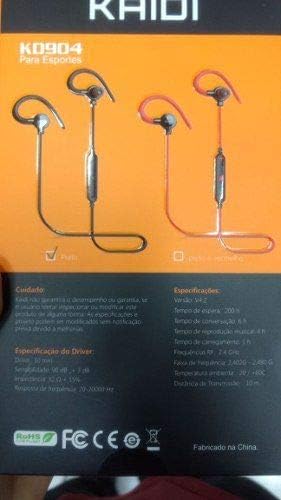
Image: Back of the KAIDI KD-904 product box, displaying detailed technical specifications and features in text.
- модель: КД-904
- Версія Bluetooth: V4.2
- Робочий діапазон: До 10 метрів (33 фути)
- Час відтворення музики: Приблизно 4 годин
- Час очікування: Приблизно 200 годин
- Час зарядки: Приблизно 1-2 годин
- Розмір драйвера: 10 мм
- Чутливість драйвера: 98 дБ
- АЧХ: 20 Гц - 20 кГц
- Підключення: Бездротовий Bluetooth
- Розташування вуха: In-ear (Intra-auricular)
- Особливе використання: Sports, Running
- Сумісні пристрої: Android, Samsung, iPhone
9. Гарантія та підтримка
For warranty information or technical support, please refer to the purchase documentation or contact your retailer. Keep your proof of purchase for any warranty claims. KAIDI is committed to providing quality products and support.