
PowMr SL03-30A
PowMr SL03-30A Solar Charge Controller User Manual
Model: SL03-30A
1. Вступ
The PowMr SL03-30A Solar Charge Controller is designed to manage the power flow from your solar panels to your battery bank, ensuring efficient charging and protecting your batteries from overcharge and over-discharge. This controller is suitable for 12V/24V systems and supports various battery types including Lithium and Lead-Acid batteries. It features an LCD display for monitoring system parameters and offers multiple protection functions to enhance system safety and longevity.
2. Ключові характеристики

Зображення: Оверview of the PowMr SL03-30A Solar Charge Controller's main features, including 12V/24V auto-detection, energy recording, temperature compensation, aluminum heat sink, eight electronic protections, compatibility with Lithium/Lead-acid batteries, and light & timer control.
- 12V/24V Auto-detection: Automatically identifies system voltage.
- Energy Recording/Current Display: Provides real-time monitoring of energy and current.
- Температурна компенсація: Adjusts charging parameters based on ambient temperature.
- Алюмінієвий радіатор: Ensures efficient heat dissipation for stable operation.
- Eight Electronic Protections: Comprehensive safety features including overcharge, over-discharge, short-circuit, and reverse current protection.
- Сумісність з акумулятором: Supports Lithium and Lead-Acid battery types (Flooded, GEL, AGM, LiFePO4).
- Light & Timer Control: Programmable load control functions.
- РК-дисплей: Clear interface for parameter viewing and adjustment.

Зображення: Внутрішнє view of the controller highlighting key components such as the copper coil for stable charge/discharge, a fuse for double protection, and MOSFETs made from good raw materials for current sensing.
3. Техніка безпеки
Please read all instructions carefully before installation and operation. Failure to follow these instructions may result in damage to the controller, battery, or solar panels, and may void the warranty.
- Ensure the battery is connected first to allow the controller to recognize the system voltage.
- Always connect the solar panels and load after the battery.
- Disconnect the solar panels and load before disconnecting the battery.
- Install the controller in a well-ventilated, dry, and cool environment, away from flammable materials.
- Avoid touching or short-circuiting wires or terminals.
- Використовуйте дроти відповідного калібру для всіх з'єднань, щоб запобігти перегріву.
- This device is for indoor use only. Avoid exposure to water or excessive humidity.
- Зберігати в недоступному для дітей місці.
4. Монтаж
4.1 Послідовність підключення
- Connect the battery to the charge controller. Ensure correct polarity (+ to + and - to -). The controller will display the battery voltage.
- Connect the solar panel to the charge controller. Ensure correct polarity. The controller will begin charging the battery.
- Connect the load to the charge controller. Ensure correct polarity.
Важливо: Always connect the battery first and disconnect it last. This sequence prevents damage to the controller from voltage сплески.
4.2 Монтаж
Mount the controller vertically on a wall or flat surface in a well-ventilated area, away from direct sunlight, high temperatures, and water. Ensure there is sufficient air circulation around the heat sink.

Image: The PowMr SL03-30A Solar Charge Controller showing its mounting holes on the sides, indicating how it can be affixed to a surface.
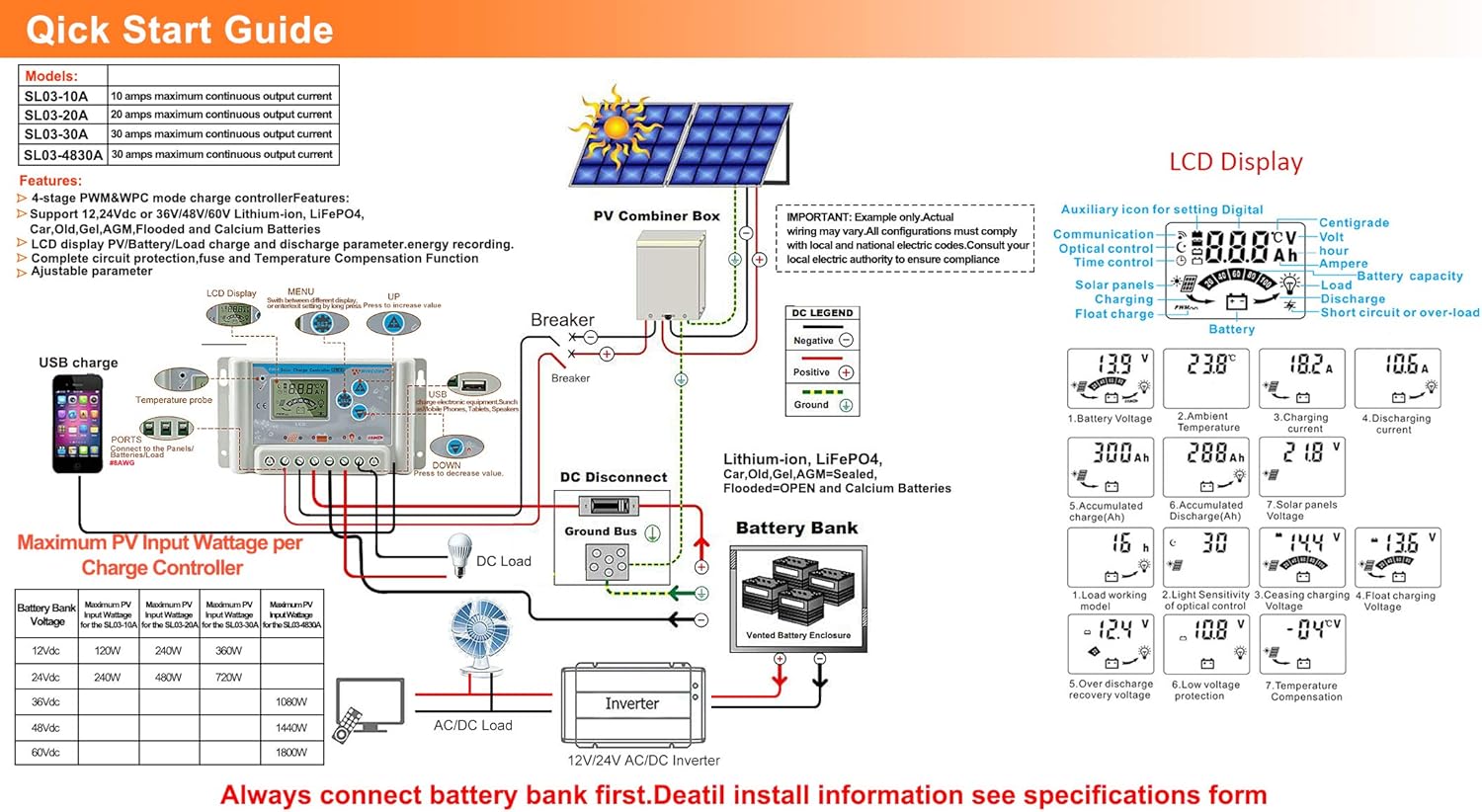
Image: A detailed wiring diagram for the solar charge controller, showing connections for PV combiner box, battery bank, DC load, and inverter. It also illustrates the LCD display and various parameters.
4.3 Video Guide: How to Connect the Controller
Video: This video demonstrates the correct wiring procedure for the PowMr SL03-30A Solar Charge Controller, showing how to connect the battery and solar panels. It also shows how to browse the interface and adjust settings.
5. Операція
5.1 РК-дисплей та кнопки
The controller features an LCD display and three buttons for operation: UP, DOWN, and SET.
- Кнопка ВВЕРХ: Navigates through display interfaces, increases parameter values.
- Кнопка ВНИЗ: Navigates through display interfaces, decreases parameter values.
- Кнопка SET: Enters/exits setting mode, confirms parameter changes.
5.2 Browsing Display Interfaces
Press the UP or DOWN button to cycle through various display interfaces, including battery voltage, charging current, accumulated discharge, and load status.
5.3 Налаштування параметрів
To enter the setting interface, long-press the SET button for 5 seconds. Use the UP and DOWN buttons to adjust values and the SET button to confirm and move to the next parameter. Long-press SET again to save changes and exit.
Регульовані параметри включають:
- Тип батареї: Select the correct battery type (e.g., Lead-Acid, Lithium).
- Режим контролю навантаження: Set timer for load operation (e.g., 24H for continuous, 16H for dusk-to-dawn).
- Обвинувачення Voltage: Adjust maximum charge voltage.
- Розрядний відсічний випtage: Встановіть мінімальну гучністьtage before load disconnection.
- Розрядка Повторне підключення Томtage: Встановіть гучністьtage at which the load reconnects.
Refer to the "Specifications" section for default and adjustable ranges for each parameter.
6. Функції захисту

Image: A circular diagram illustrating the eight electronic protection features of the PowMr SL03-30A Solar Charge Controller, including power off memory, short-circuit, over-charging, open-circuit, over-load, under-voltage discharge, over-heat, and dual MOSFET reverse current protection.
The PowMr SL03-30A controller incorporates multiple protection mechanisms to ensure the safety and longevity of your solar system:
- Захист від перезаряду: Запобігає пошкодженню акумулятора внаслідок надмірного заряджання.
- Захист від надмірного розряду: Disconnects the load when battery voltagе падає нижче безпечного рівня.
- Захист від короткого замикання: Автоматично вимикається у разі короткого замикання.
- Open-circuit Protection: Protects the system if the solar panel circuit is open.
- Захист від зворотної полярності: Prevents damage from incorrect battery or solar panel connections.
- Захист від перевантаження: Disconnects the load if current exceeds the rated limit.
- Захист від перегріву: Reduces power or shuts down if the controller's internal temperature is too high.
- Вимкнення пам'яті: Зберігає налаштування навіть після відключення живлення.
7. Технічні характеристики

Image: A comprehensive table detailing the specifications for PowMr SL03-10A, SL03-20A, SL03-30A, and SL03-40A models, including normal battery voltage, charge/discharge current, battery type, system recognize range, charging regulation, maximum PV open circuit voltage, and various protection parameters.
| Параметр | Value (SL03-30A) |
|---|---|
| Звичайний об’єм батареїtage | 12В / 24В Авто |
| Струм заряду | 30А |
| Струм розряду | 30А |
| Тип батареї | Lead-Acid Battery (Flooded, AGM, Gel, Calcium), LiFePO4 (Lithium) |
| System Recognize Range | Lead-Acid Battery: 8V-15V(12V System), 18V-30V(24V System) LiFePO4: 8V-15V(12V), 18V-30V(24V) |
| Charging Regulation | Bulk, Absorption, Float, Equalization |
| Макс. PV Open Circuit Voltage (Voc) | <=50 В |
| Max. PV Input Wattage (12 В/24 В) | 360 Вт/720 Вт |
| Stop-charge Voltage | Default 14.4V (12V), 28.8V (24V) (adjustable) |
| Float-charge Voltage | Default 13.6V (12V), 27.2V (24V) (adjustable) |
| Низька гучністьtage Reconnected | Default 12.4V (12V), 24.8V (24V) (adjustable) |
| Низька гучністьtage Відключення | Default 10.8V (12V), 21.6V (24V) (adjustable) |
| No Load Losses | <10 мА |
| Компенсація температури батареї | Automatic with optional NTC thermal probe (adjustable) |
| Робоча температура | від -20°C до +60°C |
| Outline Size (L*W*H) | 143*77*40 мм |
| Відстань між монтажними отворами | 134*55 мм |
| вага | 260г |
8. Вирішення проблем
This section provides solutions to common issues you might encounter with your PowMr SL03-30A Solar Charge Controller.
| проблема | Можлива причина | Рішення |
|---|---|---|
| Дисплей контролера вимкнений. | Акумулятор не підключено або заряд батареї низькийtage занадто низький. | Connect the battery correctly. Ensure battery voltage вище 8 В. |
| "LLL" or "HHH" displayed on screen. | No PV input or PV voltagзанадто низький/високий. | Ensure solar panels are connected and receiving sunlight. Check PV voltage. |
| Акумулятор не заряджається. | Solar panel not connected, insufficient sunlight, or incorrect wiring. | Check solar panel connections and ensure adequate sunlight. Verify wiring polarity. |
| Навантаження не працює. | Load disconnected, battery voltage too low (over-discharge protection), or load control settings. | Check load connections. Charge battery. Adjust load control timer (e.g., set to 24H for continuous). |
| Перегрів контролера. | Poor ventilation or excessive load/charging current. | Ensure proper ventilation around the controller. Reduce load or charging current if consistently overheating. |
9. Технічне обслуговування
Регулярне технічне обслуговування забезпечує оптимальну продуктивність та подовжує термін служби вашого контролера сонячного заряду.
- Чистота: Тримайте контролер чистим та без пилу та сміття. Використовуйте суху тканину для очищення.
- Підключення: Періодично перевіряйте всі з'єднання проводів на міцність та наявність корозії. Нещільні з'єднання можуть призвести до перегріву та погіршення роботи.
- Вентиляція: Ensure the ventilation openings are not blocked to allow for proper heat dissipation.
- Здоров'я акумулятора: Монітор об’єму акумулятораtage and health regularly. Replace batteries as needed.
- Умови навколишнього середовища: Ensure the controller is operating within its specified temperature and humidity ranges.
10. Гарантія та підтримка
For warranty information, technical support, or service inquiries, please contact PowMr customer service through the retailer where the product was purchased or visit the official PowMr website. Please have your model number (SL03-30A) and purchase date available when contacting support.
Для отримання додаткової інформації відвідайте Магазин PowMr.
Ask a question about this manual
Ask about setup, troubleshooting, compatibility, parts, safety, or missing instructions. Manuals+ will review the question and use this page’s manual context to help answer it.