
1. Вступ
Дякуємо за покупкуasing the GooDee Mini Projector GD-DE-9. This manual provides essential information for setting up, operating, and maintaining your projector. Please read it thoroughly before use to ensure optimal performance and safety.
The GooDee GD-DE-9 is a portable LED projector designed for home entertainment, gaming, and presentations. It features a native resolution of 800x480p, supports up to 1080p input, and offers multiple connectivity options including HDMI, VGA, USB, AV, and SD card. Its advanced cooling system ensures quiet operation, and the integrated 2W speaker provides clear audio.

Малюнок 1.1: Спереду view of the GooDee Mini Projector GD-DE-9.
2. Інформація про безпеку
Щоб запобігти пожежі, ураженню електричним струмом або травмам, будь ласка, дотримуйтесь наступних запобіжних заходів:
- Не відкривайте проектор casing. Звертайтеся до кваліфікованого сервісного персоналу з усіх питань технічного обслуговування.
- Не піддавайте проектор дії дощу або вологи, щоб запобігти займанню або ураженню електричним струмом.
- Забезпечте належну вентиляцію. Не блокуйте вентиляційні отвори.
- Використовуйте лише адаптер живлення, що постачається з проектором.
- Уникайте дивитися прямо в об’єктив проектора, коли lamp увімкнено.
- Поставте проектор на стійку рівну поверхню.
- Від’єднуйте проектор від розетки під час грози або якщо він не використовується протягом тривалого часу.
3. Вміст упаковки
Будь ласка, перевірте, чи всі предмети входять до вашої упаковки:
- GooDee Mini Projector GD-DE-9
- Адаптер живлення
- Пульт дистанційного керування
- Кабель HDMI
- AV-кабель
- Посібник користувача
4. Продукт закінчивсяview
4.1 Компоненти проектора

Малюнок 4.1: Сторона view з портами введення/виведення.
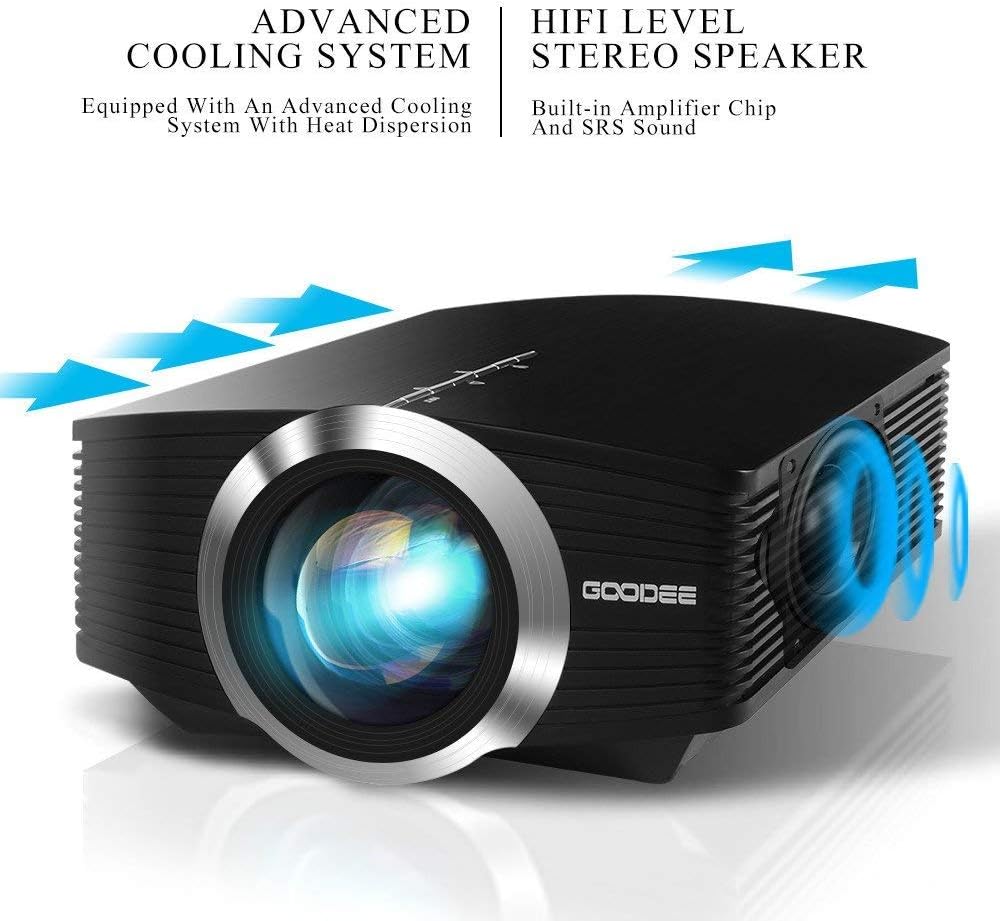
The projector features a direct light path optical technology for enhanced brightness and an advanced cooling system for quiet operation.

Figure 4.2: Advanced Cooling System and HIFI Stereo Speaker.
4.2 Пульт дистанційного керування
The remote control allows you to operate the projector from a distance. Insert two AAA batteries (not included) into the remote control before use.

Рисунок 4.3: Пульт дистанційного керування.
5. Налаштування
5.1 Розміщення та відстань проекції
The image size is adjusted by changing the projection distance. For optimal viewing, a projection distance between 1.5 to 4 meters is recommended, yielding screen sizes from 50 to 130 inches. The best projection size is typically 80-100 inches at a distance of 6.6-8 feet.

Figure 5.1: Projection Distance and Screen Size Chart.
Малюнок 5.2: Впрample Projector Placement.
5.2 Підключення живлення
Підключіть адаптер живлення до вхідного порту живлення проектора, а потім підключіть адаптер до розетки.
5.3 Підключення пристроїв введення
The projector supports various input sources including HDMI, VGA, USB, AV, and SD card. It can connect to PCs, laptops, DVD players, PS3/4, Xbox ONE, and smartphones/tablets (via MHL cable and adapter, not included).

Figure 5.3: Multimedia Connection Diagram.
To connect a smartphone or tablet, ensure your device supports MHL functionality. You will need an MHL cable and a suitable adapter (not included).

Figure 5.4: Connecting Smartphones/Tablets.
5.4 Focus Adjustment and Keystone Correction
Adjust the focus ring on the projector lens until the image is clear. Use the keystone correction feature to adjust the image if it appears trapezoidal. The projector supports a ±15° keystone correction.
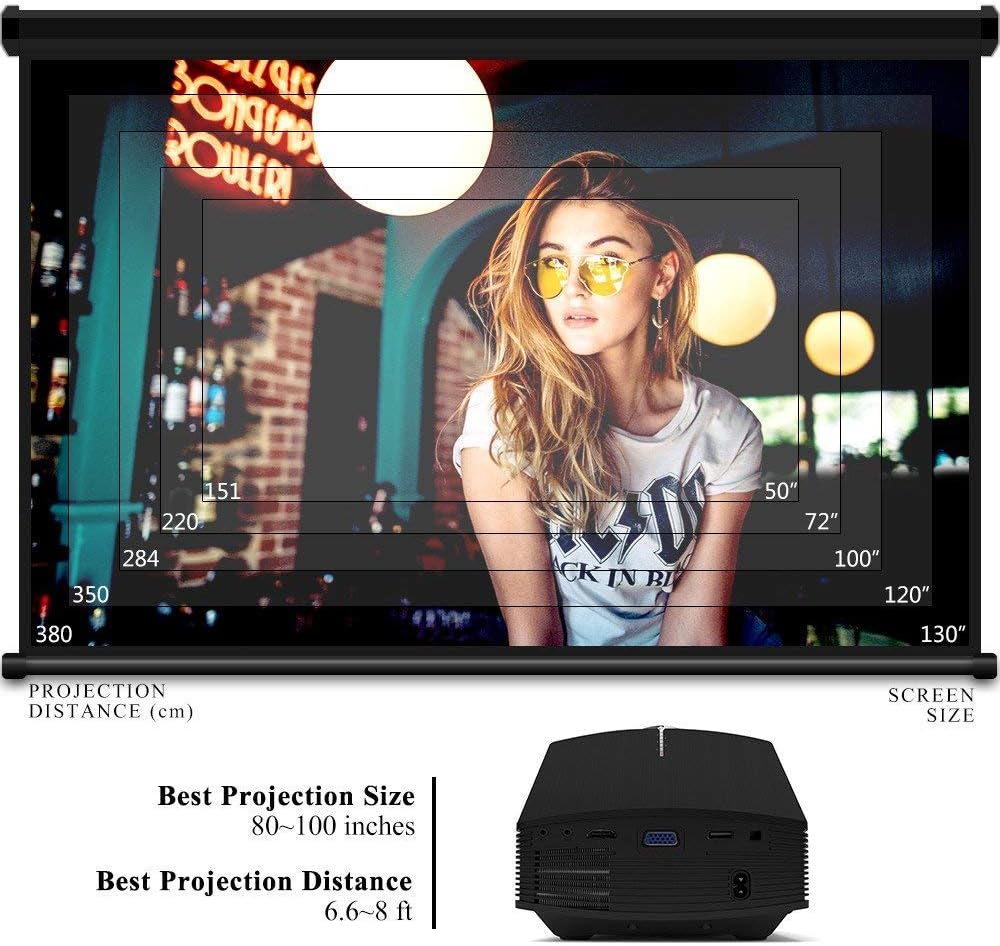
Figure 5.5: Focus and Keystone Adjustment.
6. Інструкція з експлуатації
6.1 Увімкнення/вимкнення живлення
Press the power button on the projector or the remote control to turn the projector on or off.
6.2 Вибір джерела
Press the 'Source' button on the projector or remote control to cycle through available input sources (HDMI, VGA, USB, AV, SD). Select the desired input source corresponding to your connected device.
6.3 Навігація по меню
Use the arrow buttons on the projector or remote control to navigate through the on-screen menu. Press 'OK' or 'Enter' to confirm selections. Use the 'Menu' button to access settings and 'Exit' or 'Return' to go back.
6.4 Аудіовихід
The projector has a built-in 2W speaker. For external audio, connect speakers or headphones to the 3.5mm audio output jack on the projector.
7. Технічне обслуговування
7.1 Очищення об'єктива
Use a soft, lint-free cloth or lens cleaning paper to gently wipe the projector lens. Do not use abrasive cleaners or solvents.
7.2 Очищення вентиляційних отворів
Regularly clean the air vents to ensure proper airflow and prevent overheating. Use a soft brush or compressed air to remove dust accumulation.
7.3 Зберігання
Коли проектор не використовується, зберігайте його в прохолодному, сухому місці, подалі від прямих сонячних променів та екстремальних температур. Використовуйте оригінальну упаковку або захисний футляр, щоб запобігти потраплянню пилу та пошкодженням.
8. Вирішення проблем
| проблема | Можлива причина | Рішення |
|---|---|---|
| Не відображається зображення | Incorrect input source selected; Cable not connected properly; Device not powered on. | Виберіть правильне джерело вхідного сигналу; перевірте всі кабельні з’єднання; переконайтеся, що пристрій-джерело увімкнено. |
| Зображення розмите | Фокус не налаштовано; проектор розташований занадто близько/далеко від екрана. | Відрегулюйте кільце фокусування; відрегулюйте відстань проекції. |
| Зображення має трапецієподібну форму | Проектор не перпендикулярний до екрану. | Налаштуйте корекцію трапецієподібного спотворення. |
| Ні звуку | Volume too low; Muted; External audio device not connected/configured. | Збільшити гучність; Увімкнути звук; Перевірити зовнішні аудіопідключення та налаштування. |
| Пульт не працює | Низький/розряджені батарейки; Перешкода між пультом дистанційного керування та проектором; Заблокований датчик пульта дистанційного керування. | Replace batteries; Remove obstructions; Ensure remote sensor is clear. |
9. Технічні характеристики
| Особливість | Деталь |
|---|---|
| Бренд | Гуді |
| Номер моделі | GD-DE-9 |
| Тип дисплея | ЖК |
| Рідна роздільна здатність | 800 x 480 пікселів |
| Підтримувана роздільна здатність | До 1080р |
| Яскравість | 3000 люменів (світлодіод) |
| Lamp життя | 30,000 години |
| Технологія підключення | HDMI, USB, VGA, AV, SD Card |
| Апаратний інтерфейс | HDMI, USB, VGA |
| Вбудований динамік | Стереодинамік потужністю 2 Вт |
| Відстань проекції | 1.5 - 4 meters (6.6 - 8 feet recommended) |
| Розмір екрана | 50 - 130 inches (80 - 100 inches recommended) |
| Корекція коректури | ±15° ручний |
| Форм-фактор | Портативний |
| Тип монтажу | Настільне кріплення |
| Колір | чорний |
| Розміри упаковки | 33 х 21.6 х 11.8 см |
| Вага товару | 1.48 кг |
| Рекомендоване використання | Ігри, Домашній кінотеатр |
| Сумісні пристрої | Smartphone, PC, Laptop, DVD Player, PS3/4, Xbox ONE, Fire TV Stick |
10. Гарантія та підтримка
GooDee offers a 3-year warranty for this projector. If you encounter any issues or are not completely satisfied with your purchase, please contact GooDee customer support. A refund or replacement is available within the first 2 months of purchase. Customer satisfaction is our top priority.
For support, please refer to the contact information provided on the GooDee official webсайт або ваша платформа для покупок.