
1. Вступ
This manual provides instructions for the proper setup, operation, and maintenance of your Acer B247Y 23.8-inch LED LCD Monitor. Please read this manual thoroughly before using your monitor to ensure optimal performance and to prevent damage.
The Acer B247Y is a 23.8-inch Full HD (1920 x 1080) monitor featuring an IPS panel for wide viewing angles, an anti-glare display, and a frameless design on three sides. It includes multiple connectivity options and an ergonomic stand for comfortable viewінж.
2. Вміст упаковки
Перевірте наявність усіх предметів у вашій упаковці. Якщо якісь предмети відсутні або пошкоджені, зверніться до продавця.
- Acer B247Y 23.8-inch LED LCD Monitor
- Підставка для монітора (основа та шия)
- Power Adapter (Internal) and Power Cable
- Кабель VGA
- Кабель DisplayPort 1.2
- Кабель HDMI
- Audio-in Cable (if included)
- Audio-out Cable (if included)
- Посібник користувача (цей документ)
3. Налаштування
3.1 Збірка підставки монітора
The monitor comes with a detachable foot stand. Follow these steps to assemble:
- Обережно вийміть компоненти монітора та підставки з упаковки.
- Прикріпіть шийку підставки до панелі монітора. Переконайтеся, що вона надійно зафіксувалася.
- Attach the stand base to the stand neck. Tighten any screws if provided, usually located on the underside of the base.
- Помістіть зібраний монітор на стійку, рівну поверхню.
Примітка: The monitor also supports VESA mount (100 x 100 mm) for wall or arm mounting. Refer to your VESA mount kit instructions for installation.
3.2 Підключення монітора
Підключіть монітор до комп’ютера або інших пристроїв за допомогою відповідних кабелів.
- Підключення відео:
- Connect one end of the DisplayPort cable to the DisplayPort output on your computer and the other end to the DisplayPort input on the monitor.
- Alternatively, connect an HDMI cable from your computer's HDMI output to the monitor's HDMI input.
- For older systems, connect a VGA cable from your computer's VGA output to the monitor's VGA input.
- Аудіоз'єднання:
- If using VGA or DisplayPort without audio, connect an audio cable from your computer's audio output to the monitor's audio-in port for integrated speakers.
- To connect external speakers or headphones, use the monitor's audio-out port.
- Підключення живлення:
- Підключіть кабель живлення до входу живлення монітора, а потім підключіть інший кінець до заземленої електричної розетки.

Figure 3.2.1: Acer B247Y Monitor with Stand. This image illustrates the overall appearance of the monitor when fully assembled on its stand.
4. Інструкція з експлуатації
4.1 Увімкнення/вимкнення
Натисніть кнопку живлення, яка зазвичай розташована внизу праворуч або ззаду монітора, щоб увімкнути або вимкнути монітор. Індикатор живлення світитиметься, коли монітор увімкнено.
4.2 Adjusting Monitor Settings (OSD)
The monitor features an On-Screen Display (OSD) menu for adjusting various settings. Use the control buttons (typically located near the power button) to navigate and select options within the OSD menu.
Звичайні налаштування екранного меню включають:
- зображення: Brightness, Contrast, Color Temperature, Gamma, Acer eColor Management modes (e.g., Dark Room, Eco).
- Аудіо: Volume control for integrated speakers or audio-out.
- введення: Select the active video input source (VGA, DisplayPort, HDMI).
- OSD: OSD timeout, language.
- Управління: Скинути до заводських налаштувань.
4.3 Ергономічні налаштування
The Acer B247Y monitor stand offers several ergonomic adjustments to optimize your viewдосвід роботи:
- Нахил: Adjust the screen angle from -5 degrees to 25 degrees (forward/backward).
- Поворотний: Rotate the monitor horizontally up to +/- 45 degrees.
- Регулювання висоти: Регулювання висоти екрана до 120 мм.
- Опорна точка: Поверніть екран на 90 градусів для портретної орієнтації viewінж.
5. Технічне обслуговування
Правильне обслуговування забезпечує довговічність та оптимальну роботу вашого монітора.
- Очищення екрану: Обережно протріть екран м’якою тканиною без ворсу. Для стійких плям, dampen the cloth with a small amount of water or a non-abrasive screen cleaner. Do not spray liquid directly onto the screen.
- Очищення Casing: Використовуйте м’яку суху тканину для очищення монітора casing. Уникайте використання сильних мийних засобів або абразивних засобів для чищення.
- Вентиляція: Переконайтеся, що вентиляційні отвори на моніторі не заблоковані, щоб запобігти перегріву.
- Вимкнення живлення: Завжди вимикайте монітор та від’єднуйте його від розетки перед чищенням або якщо він не використовується протягом тривалого часу.
6. Вирішення проблем
Якщо у вас виникли проблеми з монітором, зверніться до наступних поширених кроків усунення несправностей:
- No Power / Monitor Does Not Turn On:
- Ensure the power cable is securely connected to both the monitor and a working electrical outlet.
- Перевірте справність розетки, підключивши інший пристрій.
- Міцно натисніть кнопку живлення.
- No Image / "No Signal" Message:
- Check that the video cable (DisplayPort, HDMI, or VGA) is securely connected to both the monitor and your computer.
- Переконайтеся, що ваш комп’ютер увімкнено та не перебуває в режимі сну.
- Використовуйте екранне меню, щоб вручну вибрати правильне джерело вхідного сигналу.
- Спробуйте інший відеокабель або порт, якщо він є.
- Image is Distorted or Unclear:
- Ensure the display resolution on your computer is set to the monitor's native resolution (1920 x 1080).
- Adjust brightness, contrast, and other picture settings via the OSD menu.
- Перевірте наявність будь-яких фізичних пошкоджень екрана або кабелів.
- Немає звуку з динаміків:
- Increase the volume using the OSD menu or your computer's sound settings.
- Переконайтеся, що аудіокабель (якщо використовується) правильно підключено.
- Перевірте, чи в налаштуваннях звуку комп’ютера вибрано правильний аудіопристрій.
7. Технічні характеристики
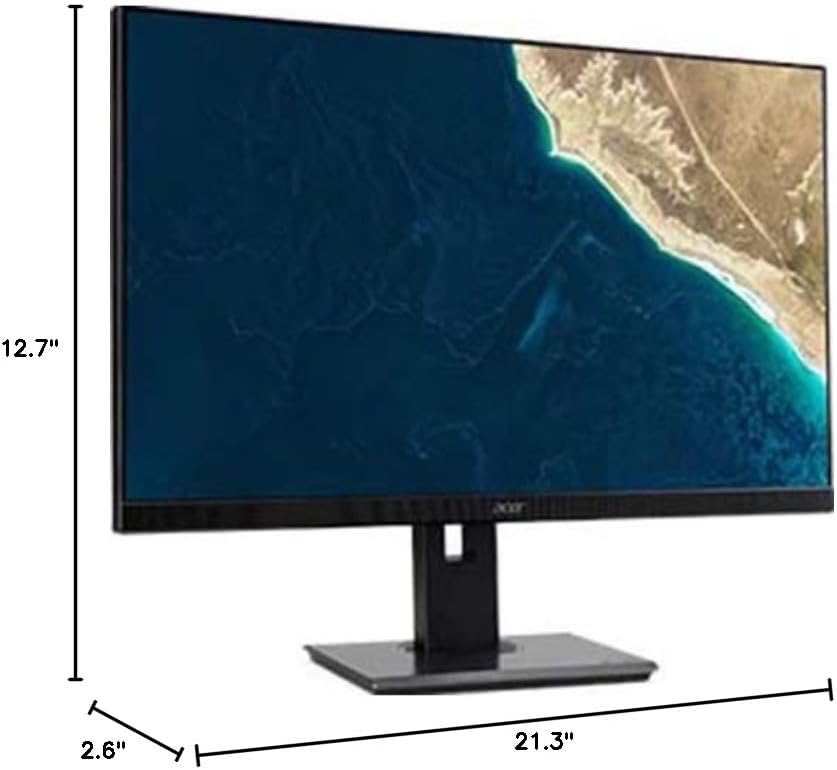
Figure 7.1.1: Acer B247Y Monitor Dimensions. This image shows the approximate height (12.7"), width (21.3"), and depth (2.6") of the monitor without the stand.
| Особливість | Специфікація |
|---|---|
| Номер моделі | B247Y |
| Розмір екрана | 23.8 дюйма (60.5 см) |
| Тип дисплея | LED LCD, IPS Panel, Anti-glare (AG) |
| Максимальна роздільна здатність | 1920 x 1080 (Full HD) |
| Співвідношення сторін | 16:9 |
| Частота оновлення | 75 Гц |
| Час відгуку | 4ms (gray-to-gray) |
| Яскравість (типова) | 250 кд/м² |
| Співвідношення рідної контрастності | 1,000:1 |
| Динамічний коефіцієнт контрастності | 100,000,000:1 |
| Viewкути (H/V) | 178° / 178° |
| Підключення | VGA, DisplayPort 1.2, HDMI, Audio-in, Audio-out |
| Інтегровані динаміки | 2 x 2.0 Вт |
| Ергономічні налаштування | Tilt (-5° to 25°), Swivel (+/- 45°), Height Adjustment (120mm), Pivot (90°) |
| VESA Mount Support | 100 х 100 мм |
| Розміри з підставкою (Ш x В x Г) | 21.3" x 14.9"~19.6" x 7.6" (54.0cm x 37.9cm~49.9cm x 19.3cm) |
| Вага з підставкою | 12.3 фунтів (5.6 кг) |
| Адаптер живлення | внутрішній |
| Колір | чорний |
8. Гарантія та підтримка
Your Acer B247Y monitor comes with a Limited Three-Year Warranty. Please retain your proof of purchase for warranty claims.
For technical support, service, or warranty inquiries, please refer to the official Acer support website or contact their customer service department. Contact information can typically be found on the Acer webсайті або в гарантійному талоні, що додається до вашого продукту.
Замок Кенсінгтон: The monitor supports a Kensington lock for security. Attach a compatible Kensington lock (sold separately) to the security slot on the monitor to deter theft.