
1. Вступ
The SMARTGEN HMC9000A Marine Engine Controller is an advanced digital, intelligent, and networked solution designed for genset automation and monitoring control systems. It enables automatic start/stop, data measurement, alarm protection, and "three remote" functions: remote control, remote measuring, and remote communication. Featuring a 4.3-inch TFT-LCD display with optional Chinese/English interfaces, the HMC9000A is reliable and user-friendly. Its powerful 32-bit ARM processor ensures precise parameter measurement, fixed value adjustment, and time setting, making it suitable for various diesel engine automation systems, including marine emergency units, main propulsion units, main generator units, and pumping units.
2. Інформація про безпеку
Please read and understand all safety instructions before installing, operating, or maintaining the HMC9000A controller. Failure to follow these instructions may result in personal injury, equipment damage, or improper operation.
- Перед встановленням або технічним обслуговуванням переконайтеся, що всі джерела живлення відключені.
- Монтаж та підключення електропроводки повинні виконуватися лише кваліфікованими фахівцями.
- Захищайте контролер від вологи, екстремальних температур та агресивного середовища.
- Не відкривайте контролер casing unless specifically instructed by the manufacturer.
- Use appropriate personal protective equipment (PPE) during installation and servicing.
3. Продукт закінчивсяview
The HMC9000A controller is built around a 32-bit ARM micro-processor, providing high performance and reliability. It features a clear 4.3-inch TFT-LCD display for easy monitoring and interaction.
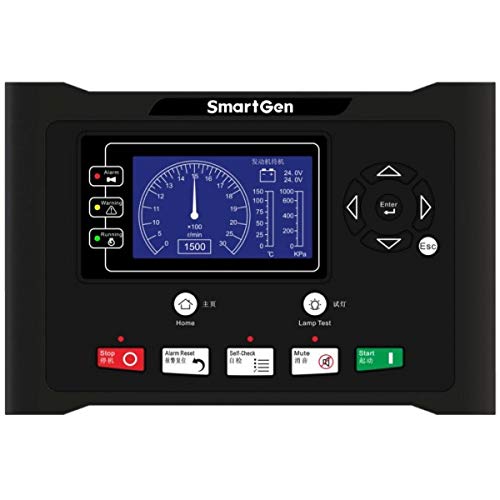
Малюнок 1: Спереду view of the SMARTGEN HMC9000A Marine Engine Controller, showing the 4.3-inch TFT-LCD display and control buttons.
Ключові характеристики:
- 32-bit ARM Micro-processor: For precision parameter measurement and control.
- 4.3-inch TFT-LCD Display: With backlight and optional Chinese/English interface.
- Автоматичний пуск/зупинка: For genset automation.
- Data Measurement: Comprehensive monitoring of engine parameters.
- Alarm Protection: Integrated system for engine safety.
- "Three Remote" Functions: Remote control, remote measuring, and remote communication.
- SAE J1939 Interface: For communication with ECU engines, reducing wiring complexity.
- Інтерфейс RS485: For communication and module expansion.
4. Налаштування та встановлення
The HMC9000A is designed for compact installation and simple connections. Follow these guidelines for proper setup:
4.1 Монтаж
Mount the controller in a secure, vibration-free location, protected from direct sunlight and excessive heat. Ensure adequate ventilation around the unit.
4.2 Електропроводка
All wiring should comply with local electrical codes and marine standards. Refer to the detailed wiring diagrams provided in the separate installation guide for specific connections.
- Джерело живлення: Connect the controller to a stable DC power source within the specified voltagе діапазон.
- Датчики двигуна: Connect engine sensors (e.g., oil pressure, water temperature, engine speed) to the designated input terminals. For ECU engines, the SAE J1939 interface can transmit these parameters, potentially eliminating the need for additional sensors and complex wiring.
- Актуатори: Connect start/stop solenoids, fuel solenoids, and other actuators to the appropriate output terminals.
- Інтерфейси зв'язку:
- SAE J1939: Connect to compatible ECU engines for data exchange.
- RS485: Use for PC communication, remote control modules, or other module expansions.
Переконайтеся, що всі з'єднання надійно закріплені та належним чином ізольовані, щоб запобігти коротким замиканням або перешкодам.
5. Інструкція з експлуатації
The HMC9000A controller is operated via its push-button interface and 4.3-inch LCD display.
5.1 Увімкнення/вимкнення
To power on the controller, ensure the DC power supply is connected and switched on. The controller will perform a self-test and display the main interface. To power off, disconnect the DC power supply.
5.2 Навігація інтерфейсом
Use the push-buttons on the front panel to navigate through menus, view parameters, and adjust settings. The LCD display provides clear visual feedback. The interface supports both Chinese and English languages, which can be selected in the system settings.
5.3 Автоматичний запуск/зупинка
The controller can be configured for automatic engine start and stop based on predefined conditions or remote commands. Refer to the system settings for configuring auto-start/stop parameters, including crank attempts, cool-down times, and protection delays.
5.4 Моніторинг даних
The HMC9000A continuously monitors various engine parameters, including:
- Швидкість двигуна (RPM)
- Температура води
- Тиск масла
- Температура масла
- Акумулятор Voltage
- Години роботи
- And other relevant parameters depending on connected sensors and ECU.
These values are displayed on the LCD and can be accessed through the monitoring menus.
5.5 Alarm Protection
The controller provides comprehensive alarm protection for the engine. When an abnormal condition is detected (e.g., low oil pressure, high water temperature), the controller will trigger an alarm, display the fault on the LCD, and may initiate an automatic shutdown sequence to protect the engine. Alarm thresholds can be configured in the settings.
5.6 функції дистанційного керування
The HMC9000A supports "three remote" functions:
- Пульт дистанційного керування: Allows remote start, stop, and other operational commands.
- Remote Measuring: Увімкнення дистанційного керування viewing of all monitored engine parameters.
- Віддалений зв'язок: Facilitates data exchange and configuration from a remote location, typically via the RS485 interface connected to a PC or a dedicated remote control module.
Configuration for remote functions is done through the communication interface or specific remote module settings.
5.7 Конфігурація параметрів
Most operational parameters, such as fixed values, time settings, and set values, can be configured directly from the front panel using the push-buttons. For more advanced configuration or bulk parameter adjustments, a PC can be connected via the communication interface (e.g., RS485) using SMARTGEN's proprietary software.
6. Технічне обслуговування
Regular maintenance ensures the longevity and reliable operation of your HMC9000A controller.
- Прибирання: Keep the controller's display and casinПротирайте м’якою сухою тканиною. Не використовуйте абразивні засоби для чищення або розчинники.
- Підключення: Періодично перевіряйте всі з'єднання проводів на міцність та наявність ознак корозії. За потреби підтягніть або очистіть.
- Оновлення програмного забезпечення: Перевірте SMARTGEN webсайт для отримання будь-яких доступних оновлень прошивки, щоб забезпечити оптимальну продуктивність і доступ до нових функцій.
- Екологічна перевірка: Переконайтеся, що температура та вологість робочого середовища залишаються в межах заданих діапазонів.
For any internal maintenance or repairs, contact SMARTGEN authorized service personnel.
7. Вирішення проблем
This section provides solutions to common issues you might encounter with the HMC9000A controller.
| проблема | Можлива причина | Рішення |
|---|---|---|
| Контролер не включається. | Немає живлення; неправильне підключення; перегорілий запобіжник. | Check DC power supply connection and voltage. Verify wiring. Check and replace fuses if necessary. |
| Engine fails to start automatically. | Auto-start function disabled; low fuel; engine fault; incorrect parameters. | Ensure auto-start is enabled. Check fuel level. Investigate engine fault codes. Verify start parameters. |
| Неправильні показання датчика. | Faulty sensor; loose connection; incorrect sensor type configured. | Check sensor wiring. Test sensor functionality. Verify sensor type in controller settings. |
| Communication error (J1939/RS485). | Incorrect wiring; incompatible device; software issue. | Check communication wiring (A/B lines, termination resistors). Ensure connected device is compatible. Update controller firmware or PC software. |
If the problem persists after attempting these solutions, please contact SMARTGEN technical support.
8. Технічні характеристики
- модель: HMC9000A
- Процесор: 32-bit ARM Micro-processor
- Дисплей: 4.3-inch TFT-LCD with backlight
- Interface Languages: Chinese, English (selectable)
- Інтерфейси зв'язку: RS485, SAE J1939
- Ключові функції: Automatic Start/Stop, Data Measurement, Alarm Protection, Remote Control, Remote Measuring, Remote Communication
- Конфігурація параметрів: Via front panel push-buttons or PC software
- Виробник: СМАРТДЖЕН
- Вага товару: 1.98 фунти (приблизно 0.9 кг)
9. Гарантія та підтримка
For warranty information, please refer to the warranty card included with your product or visit the official SMARTGEN website. Technical support is available through SMARTGEN's customer service channels. When contacting support, please have your product model (HMC9000A) and any relevant error messages or symptoms ready.
SMARTGEN Official Webсайт: www.smartgen.cn