
1. Вступ
This manual provides instructions for the safe and efficient operation of your RCF MS1033 Home CD Player. The MS1033 is a dual sound source unit, featuring two independent sections for simultaneous use. It includes a CD player with anti-shock mechanics and electronics, capable of playing audio tracks and MP3 files from CD, CD-R, and CD-R/W discs. Additionally, it features an MP3 player that supports USB flash drives and Secure Digital (SD) cards, including Multimedia Cards.
Будь ласка, уважно прочитайте цей посібник перед використанням пристрою та збережіть його для подальшого використання.
2. Важливі інструкції з техніки безпеки
- Не піддавайте цей прилад впливу дощу або вологи.
- Не блокуйте вентиляційні отвори.
- Не встановлюйте поблизу будь-яких джерел тепла, таких як радіатори, обігрівачі, печі або інші пристрої (включаючи ampліфікатори), які виробляють тепло.
- Захищайте шнур живлення від наступання або защемлення.
- Використовуйте лише насадки/аксесуари, зазначені виробником.
- Відключайте цей прилад від мережі під час грози або якщо він не використовується протягом тривалого часу.
- Звертайтеся до кваліфікованого сервісного персоналу.
3. Вміст упаковки
Перевірте наявність усіх елементів в упаковці:
- Домашній програвач компакт-дисків RCF MS1033
- Кабель живлення
- Посібник користувача (цей документ)
Note: The product specifications mention "Included components: cd/mps". This refers to the player unit itself and essential accessories.
4. Елементи керування та функції
Familiarize yourself with the various controls and features of your RCF MS1033.
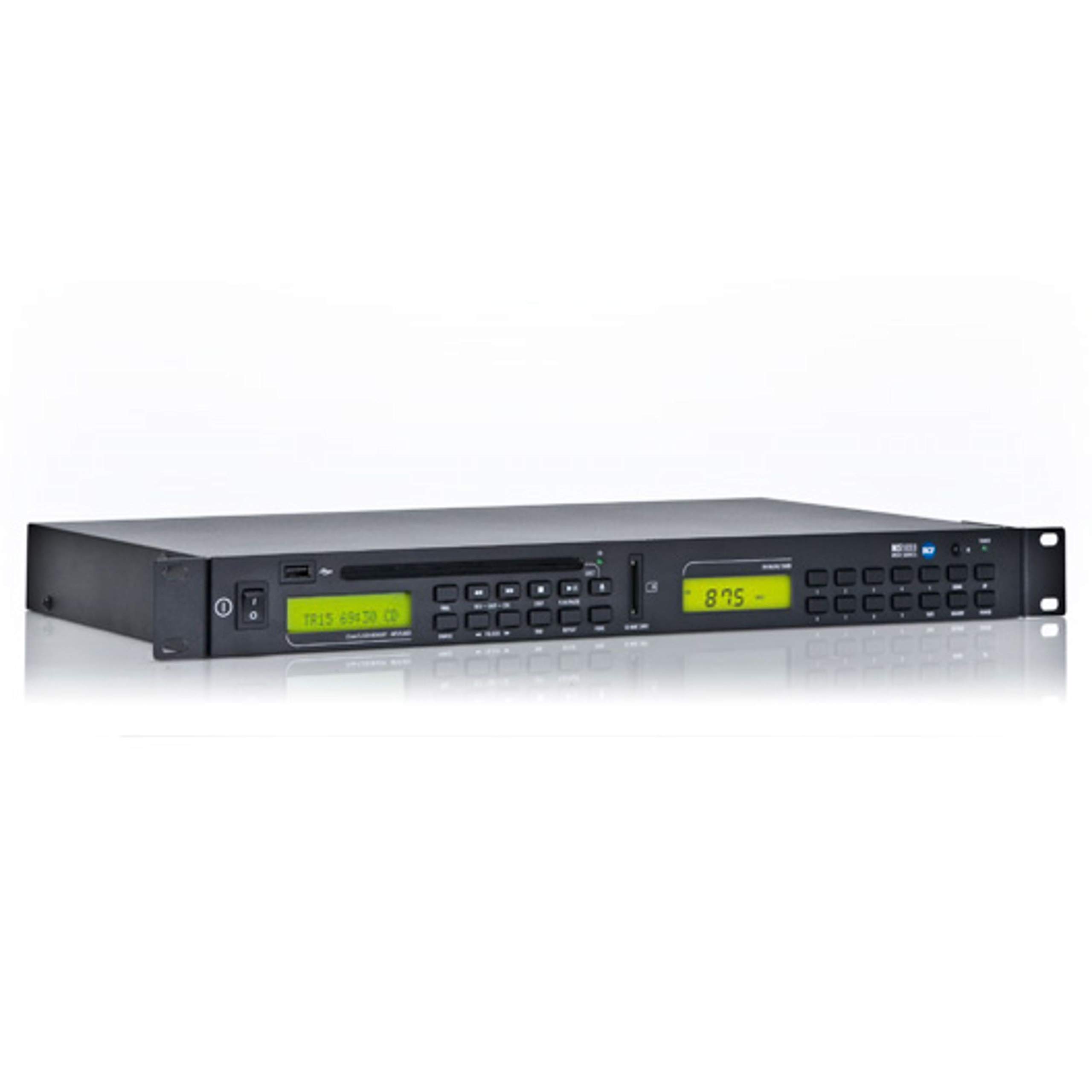
Figure 1: Front panel of the RCF MS1033 Home CD Player. This image displays the main unit with its CD tray, digital display, and various control buttons for playback and source selection.
4.1 Передня панель
- Лоток для CD: For inserting audio CDs, CD-R, and CD-R/W discs.
- Екран дисплея: Shows track information, playback status, and source selection.
- Порт USB: For connecting USB flash drives to play MP3 files.
- Слот для SD-карти: For inserting SD/MMC cards to play MP3 files.
- Кнопки управління: Play/Pause, Stop, Skip Forward/Backward, Folder Navigation, Source Select.
4.2 Задня панель
- Аудіовихід (RCA): Підключається до an ampліфікатор або приймач.
- Споживана потужність: Підключається до мережі змінного струму.
5. Налаштування
5.1 Розпакування
Обережно вийміть пристрій з упаковки. Зберігайте пакувальні матеріали для подальшого транспортування або зберігання.
5.2 Розміщення
Place the RCF MS1033 on a stable, flat surface. Ensure adequate ventilation around the unit. Avoid placing it near heat sources or in direct sunlight.
5.3 Підключення до живлення
- Ensure the unit's power switch (if present) is in the OFF position.
- Connect the power cable to the power input on the rear of the MS1033.
- Підключіть інший кінець кабелю живлення до відповідної розетки змінного струму.
5.4 Підключення до аудіосистеми
- Locate the RCA audio output jacks on the rear of the MS1033.
- Connect an RCA audio cable (not included) from these outputs to an available audio input on your amplifier or receiver (e.g., "CD IN", "AUX IN").
- Ensure the connections are secure and correctly matched (red to red, white to white).
6. Інструкція з експлуатації
6.1 Увімкнення/вимкнення
Press the Power button on the front panel or remote control (if included) to turn the unit ON or OFF.
6.2 Відтворення CD
- Press the "CD" source button (if available) or ensure the unit is in CD mode.
- Press the "Eject" button to open the CD tray.
- Place a CD (audio CD, CD-R, CD-R/W with audio or MP3 files) onto the tray with the label side facing up.
- Press the "Eject" button again or gently push the tray to close it.
- The unit will read the disc. Playback should start automatically or by pressing the "Play" button.
- Use "Play/Pause", "Stop", and "Skip" buttons to control playback.
6.3 Відтворення з USB/SD-карти
- Insert a USB flash drive into the USB port or an SD/MMC card into the SD card slot.
- Press the "USB/SD" source button (if available) or ensure the unit is in USB/SD mode.
- The unit will scan the device for MP3 files.
- Use the navigation buttons to browse folders and select tracks.
- Press "Play" to start playback.
6.4 Dual Sound Source Operation
The RCF MS1033 features two independent sections. This allows for simultaneous playback from different sources if your amplifier or mixer has multiple inputs. Consult your amplifier's manual for connecting and managing multiple audio inputs.
7. Технічне обслуговування
7.1 Очищення
Disconnect the power cord before cleaning. Use a soft, dry cloth to clean the exterior of the unit. Do not use liquid cleaners or aerosol cleaners.
7.2 Поводження з дисками
- Завжди тримайте диски за краї.
- Тримайте диски чистими та без подряпин.
- Зберігайте диски у футлярах, коли вони не використовуються.
7.3 USB/SD Card Care
- Always safely remove USB drives and SD cards from the unit when not in use or before powering off.
- Avoid exposing storage devices to extreme temperatures or moisture.
8. Вирішення проблем
| проблема | Можлива причина | Рішення |
|---|---|---|
| Немає живлення | Шнур живлення не підключено; розетка неактивна | Check power cord connection; Test power outlet with another device |
| Ні звуку | Аудіокабелі не підключені; вибрано неправильний вхід. ampліфтер; Ampоб'єм помпи занадто низький | Перевірте підключення аудіокабелю; виберіть правильний вхід на amplifier; Increase ampоб'єм ліфера |
| Диск не відтворюється | Диск вставлено неправильно; Диск брудний або подряпаний; Формат диска не підтримується | Reinsert disc correctly; Clean or replace disc; Ensure disc is CD, CD-R, CD-R/W with audio or MP3 files |
| USB/SD не відтворюється | Device not inserted correctly; Files are not MP3 format; Device not recognized | Reinsert USB/SD; Ensure files are MP3; Try a different USB/SD device |
9. Технічні характеристики
| Особливість | Деталь |
|---|---|
| Модель | MS1033 |
| Бренд | RCF |
| Розміри продукту | 6 x 8 x 7 дюймів |
| Вага товару | 8 фунта |
| Технологія підключення | USB |
| Особливість | Сумісний з CD-R/RW |
| Підтримувані формати дисків | CD, CD-R, CD-R/W (Audio tracks and MP3 files) |
| Підтримувані цифрові медіа | USB Flash Drives, SD Cards, Multimedia Cards (MP3 fileтільки s) |
10. Гарантія та підтримка
For warranty information and technical support, please refer to the official RCF website or contact your local RCF dealer. Keep your purchase receipt as proof of purchase.
Примітка: Конкретні гарантійні умови можуть відрізнятися залежно від регіону та продавця.