
вступ
This manual provides instructions for the installation, operation, and maintenance of your Audiovox ELEAUDAX80EXT Wireless Extension. This device is designed to expand the functionality of compatible Audiovox phone models, specifically the AX8001, AX8001E, and AX8101AM, by providing an additional wireless handset.
Вміст упаковки
Будь ласка, перевірте наявність усіх елементів в упаковці, перш ніж продовжувати налаштування.
- Audiovox ELEAUDAX80EXT Wireless Extension Unit
- Адаптер живлення (якщо є)
- Акумуляторна батарея (попередньо встановлена або окрема)
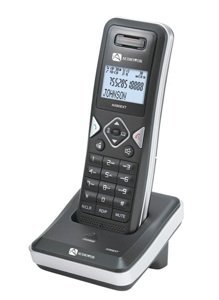
Image: The Audiovox ELEAUDAX80EXT Wireless Extension Unit. This image displays the compact design of the extension handset.
Налаштування
- Зарядіть батарею: If the battery is not pre-installed, insert it into the extension unit according to the markings. Place the extension unit on its charging cradle (if included) or connect the power adapter directly to the unit and a power outlet. Allow the unit to charge for at least 12-16 hours before initial use.
- Register the Extension:
- Ensure your main Audiovox phone base (AX8001, AX8001E, or AX8101AM) is powered on.
- On the main phone base, locate and press the "Register" or "Page" button. Hold it until the indicator light on the base begins to flash (refer to your main phone's manual for exact instructions).
- While the base is in registration mode, on the ELEAUDAX80EXT extension unit, navigate to the "Menu" and select "Register Handset" or a similar option. Follow the on-screen prompts.
- Once registration is successful, the extension unit will display a confirmation message, and the indicator light on the base will stop flashing.
- Тестове підключення: Make a test call from the extension unit to ensure proper functionality.
Інструкція з експлуатації
Здійснення дзвінка
- Візьміть слухавку або натисніть ПОГОВОРИТИ кнопку.
- Наберіть потрібний номер телефону.
- Натисніть ПОГОВОРИТИ button again or place the handset back on the cradle to end the call.
Відповідь на дзвінок
- Коли дзвонить телефон, підніміть слухавку або натисніть ПОГОВОРИТИ кнопку.
- Щоб завершити дзвінок, натисніть КІНЕЦЬ кнопку або покладіть слухавку назад на підставку.
Intercom Function (if supported by base unit)
- Натисніть ІНТЕРКОМ кнопку.
- Dial the number of the extension you wish to call (e.g., "2" for the second handset).
- Прес ПОГОВОРИТИ щоб розпочати дзвінок через внутрішній зв'язок.
Технічне обслуговування
- Прибирання: Протріть пристрій м'якою гумкою, damp тканина. Не використовуйте агресивні хімікати або абразивні засоби для чищення.
- Догляд за акумулятором: For optimal battery life, avoid fully discharging the battery frequently. Keep the unit on its charger when not in use.
- Зберігання: Якщо пристрій зберігатиметься протягом тривалого часу, вийміть акумулятор і зберігайте його в прохолодному сухому місці.
Усунення несправностей
| проблема | Рішення |
|---|---|
| Немає гудка / Неможливо здійснювати дзвінки |
|
| Телефон не заряджається |
|
| Погана якість дзвінків / Статичні перешкоди |
|
Технічні характеристики
- Номер моделі: ELEAUDAX80EXT
- Compatible Base Units: Audiovox AX8001, AX8001E, AX8101AM
- Розміри (Д x Ш x В): 20 х 40 х 30 міліметрів
- вага: 20 грамів
- UPC: 044476082719
Гарантія та підтримка
For specific warranty information and technical support, please refer to the documentation included with your original Audiovox phone system or visit the official Audiovox webсайт. Зберігайте чек про покупку як підтвердження покупки для гарантійних претензій.
For further assistance, please contact Audiovox customer service.