
1. Вступ
The Azpen Dockall D101 is a versatile device combining a Qi wireless charging dock station, a Bluetooth speaker, and a phone stand. It is designed to enhance your audio experience while conveniently charging your compatible smartphones and tablets.
2. Що в коробці
- 1 x DockAll Slim D101
- 1 x адаптер живлення постійного струму
- 1 х посібник користувача

Image: Box contents including the DockAll D101 unit, DC power adapter, and user manual.
3. Продукт закінчивсяview
The Dockall D101 features an innovative design that integrates multiple functionalities into one device for home and office use. Key components include:
- Бездротова зарядна панель Qi: Для сумісних пристроїв.
- Динамік Bluetooth: For audio streaming.
- Регульована підставка для телефону: Provides an upright viewкут.
- Кнопки управління: For power, volume, and playback.
- Слот MicroSD: Supports cards up to 64 GB.

Зображення: спереду view of the Azpen Dockall D101 with a smartphone placed on the charging pad, illustrating wireless charging capability.
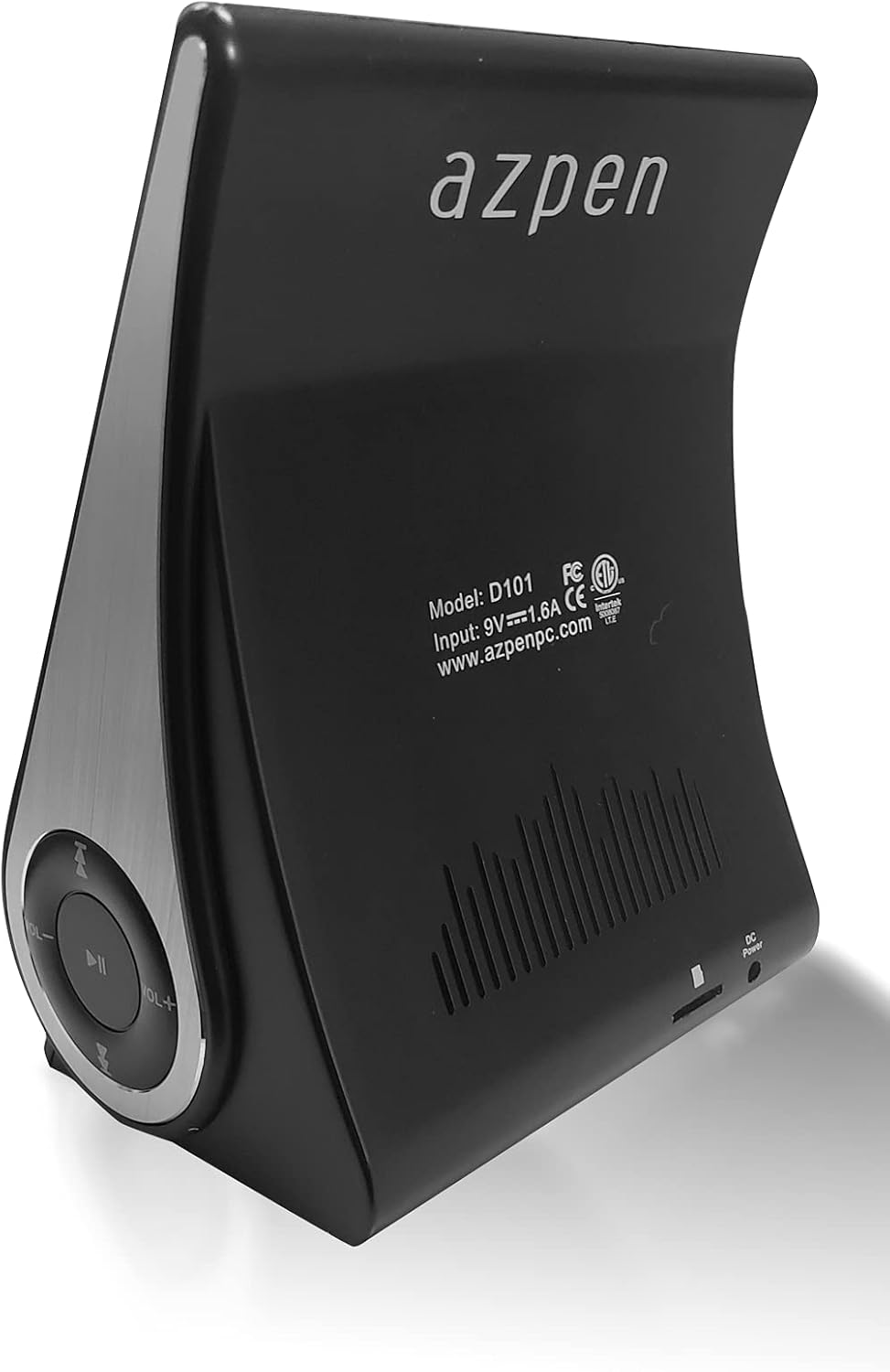
Зображення: Задня частина view of the Azpen Dockall D101, displaying the model number (D101), input specifications, and regulatory certifications.

Зображення: Side profile of the Azpen Dockall D101, highlighting the circular control panel with volume, playback, and phone call buttons.
4. Налаштування
- Підключення живлення: Connect the provided DC Power Adapter to the "DC Power" port on the back of the Dockall D101. Plug the adapter into a standard wall outlet.
- Позиціонування: Place the Dockall D101 on a stable, flat surface.
- Відрегулюйте підставку для телефону: Gently pull up the phone stand to your desired viewing angle. Ensure the stand is securely locked in place.
5. Інструкція з експлуатації
5.1 Увімкнення/вимкнення живлення
- To power on, press and hold the Power button (usually indicated by a circle with a vertical line) on the control panel until the device activates.
- To power off, press and hold the Power button again until the device shuts down.
5.2 Бездротова зарядка Qi
- Переконайтеся, що Dockall D101 увімкнено.
- Place your Qi-compatible smartphone or tablet onto the charging pad on the adjustable stand.
- Adjust the position of your device until the solid blue light appears, indicating that wireless charging has begun.
- The Dockall D101 supports fast Qi wireless charging (10W).
- Note: Charging may not work through metal cases or excessively thick phone cases (e.g., OtterBox Defender).
5.3 Функціональність Bluetooth-колонки
- Сполучення:
- Power on the Dockall D101.
- Увімкніть Bluetooth на своєму смартфоні або аудіопристрої.
- шукати "Dockall D101" (or similar name) in your device's Bluetooth settings and select it to pair.
- Звуковий сигнал підтвердження свідчитиме про успішне сполучення.
- Відтворення аудіо:
- Use the control buttons on the Dockall D101 to play/pause, skip tracks (forward/backward), and adjust volume.
- You can also control playback directly from your paired device.
- Дзвінки в режимі Hands-Free:
- When a call comes in, press the Phone button (usually indicated by a phone icon) to answer.
- Speak into the built-in microphone on the Dockall D101.
- Press the Phone button again to end the call.

Image: A smartphone positioned on the Dockall D101 stand, displaying a music player interface, highlighting the device's audio capabilities.
Відео: Оверview of the Azpen DockAll Mini, demonstrating its features and functionality. While the video showcases a "Mini" model, the core operations for charging and Bluetooth are similar to the D101.
6. Технічне обслуговування
- Прибирання: Use a soft, dry cloth to clean the surface of the Dockall D101. Do not use liquid cleaners or aerosols.
- Зберігання: Якщо пристрій не використовується протягом тривалого часу, зберігайте його в прохолодному, сухому місці, захищеному від прямих сонячних променів.
- Обробка: Уникайте падіння пристрою або впливу екстремальних температур чи вологи.
7. Вирішення проблем
| проблема | Можливе рішення |
|---|---|
| Пристрій не вмикається. | Ensure the DC Power Adapter is securely connected to both the device and a working power outlet. |
| Бездротова зарядка не працює. |
|
| Bluetooth не підключається. |
|
| Погана якість звуку. |
|
8. Технічні характеристики
- Назва моделі: D101
- Тип динаміка: Bluetooth динамік
- Особливості: Wireless Charger, Upright View Angle, Bluetooth Speaker, 3-in-1 Hub
- Рекомендоване використання: Для смартфонів або планшетів
- Сумісні пристрої: For iPhone 15/14/13/12/11, for Samsung Galaxy S24/S23/S22/S21/S20/S10
- колір: чорний
- Вага товару: 11.2 унції
- Водонепроникний: НЕПРАВДА
- Тип гарантії: Обмежений
- Кількість предметів: 1
- Метод контролю: Дотик
- Технологія бездротового зв'язку: Bluetooth
- Розмір динаміка: 5 Сантиметри
- Джерело живлення: Працює від батареї
- Тип аудіо драйвера: Динамічний драйвер
- UPC: 859592006828
- Виробник: Азпен
- Розміри продукту: 5.9 x 4.3 x 3.75 дюймів
- Максимальна вихідна потужність динаміка: 5 Вт
- Технологія підключення: Bluetooth
- Режим аудіовиходу: Мононуклеоз
- Тип монтажу: Док

Image: Diagram showing the dimensions of the Azpen Dockall D101, with measurements in centimeters.
9. Гарантія та підтримка
The Azpen Dockall D101 comes with a Limited Warranty. For specific details regarding warranty coverage and to access customer support, please refer to the warranty information provided in the original packaging or visit the official Azpen webсайт.
For further assistance, you may also contact Azpen customer service directly.