
1. Вступ
This manual provides essential instructions for the safe and effective operation of the Mustool MT866 Digital True RMS Clamp Meter. The MT866 is a versatile instrument designed for measuring AC/DC voltage, AC/DC current, frequency, temperature, capacitance, resistance, and continuity. It also features a live wire check function and non-contact voltage detection for enhanced safety. Please read this manual thoroughly before using the device.
2. Інформація про безпеку
Always adhere to the following safety precautions to prevent personal injury or damage to the meter:
- Не перевищуйте максимальні обмеження вхідного сигналу for any measurement function.
- Будьте вкрай обережні when working with live circuits. High voltages може бути небезпечним.
- Переконайтеся, що вимірювальні щупи у належному стані, without any damage to the insulation.
- Не використовуйте лічильник, якщо він виглядає пошкодженим or if the battery cover is not properly closed.
- Always disconnect the test leads from the circuit before changing the function dial.
- Use the correct function and range для кожного вимірювання.
- Тримайте пальці за захисними кожухами on the test probes during measurements.
- Уникайте використання глюкометра у вологих умовах or in the presence of explosive gases or dust.
- The meter is rated for CAT III 600V and CAT II 600V. Do not use it for measurements exceeding these categories.
3. Продукт закінчивсяview
The Mustool MT866 is a compact and feature-rich clamp meter. Familiarize yourself with its components:
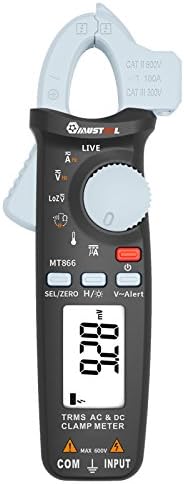
Малюнок 1: Спереду View of the Mustool MT866 Clamp Метр. This image displays the main components including the clamp jaw, LCD display, function dial, and control buttons.
3.1. Компоненти
- Clamp щелепа: Використовується для безконтактного вимірювання змінного/постійного струму.
- Clamp Важіль спуску: Відкриває clamp щелепа.
- Безконтактний випtage (NCV) Sensor: Виявляє AC voltage без прямого контакту.
- РК-дисплей: Відображає показники вимірювань, одиниці вимірювання та індикатори функцій.
- Диск функцій: Selects the desired measurement mode.
- SEL/ZERO Button: Selects sub-functions or zeros the DC current reading.
- H/💡 Button: Activates Data Hold or backlight.
- V~Alert Button: Activates the V~ alert function for live wire detection.
- Вхідні термінали (COM, INPUT): Для підключення вимірювальних щупів для об'ємуtagе., вимірювання опору, ємності, частоти та температури.
- Back Hook: For convenient hanging of the meter.
3.2. Індикатори дисплея
- ЕЙСІ ДІСІ: Indicates Alternating Current or Direct Current.
- V: Вольти (тtagд).
- A: Ampерес (Поточний).
- Ω: Ом (опір).
- F: Фаради (ємність).
- Гц: Герц (частота).
- °C/°F: Degrees Celsius/Fahrenheit (Temperature).
- НАЖИВО: Live wire detection indicator.
- LOZ: Низький імпеданс voltage режим вимірювання.
- H: Data Hold activated.
- Символ батареї: Індикатор низького заряду батареї.
4. Налаштування
4.1. Встановлення батареї
The Mustool MT866 requires batteries for operation (not included in the package). To install or replace batteries:
- Ensure the meter is turned off and all test leads are disconnected.
- Знайдіть кришку відсіку для батарейок на задній панелі глюкометра.
- Відкрутіть кріпильний(і) гвинт(и) та зніміть кришку.
- Insert new batteries, observing the correct polarity (+ and -).
- Встановіть кришку батарейного відсіку та закріпіть її гвинтом(ами).
4.2. Підключення вимірювальних щупів
Для більшості вимірювань (об'ємtage, resistance, capacitance, etc.), test leads are required.

Figure 2: Mustool MT866 with Test Leads. The black test lead is connected to the COM terminal, and the red test lead is connected to the INPUT terminal.
- Підключіть чорний вимірювальний дріт до COM (загальний) вхідний термінал.
- Підключіть червоний вимірювальний дріт до ВХІД термінал.
- Ensure connections are firm before taking any measurements.
5. Інструкція з експлуатації
Turn the function dial to the desired measurement mode. Use the SEL/ZERO button to switch between sub-functions (e.g., AC/DC, Resistance/Continuity/Diode).
5.1. AC/DC Voltage Вимірювання (В)
- Поверніть перемикач функцій у положення V положення.
- Використовуйте SEL/ZERO button to select AC (V~) or DC (V=) voltage.
- Підключіть вимірювальні щупи паралельно до кола або компонента, що тестується.
- Прочитайте томtage значення на дисплеї.
5.2. Low Impedance Voltage (LOZ) Measurement
- Поверніть перемикач функцій у положення ЛОЗ положення.
- This mode automatically detects AC or DC voltage with a low input impedance, which can help drain ghost voltages and provide more accurate readings in certain applications.
- Підключіть вимірювальні щупи паралельно до кола.
5.3. AC/DC Current Measurement (A) - Clamp
- Поверніть перемикач функцій у положення A положення.
- Використовуйте SEL/ZERO button to select AC (A~) or DC (A=) current.
- Натисніть клamp відпустіть важіль, щоб відкрити клamp щелепа.
- Укладіть лише один провідник кола всередині clamp щелепа.
- For DC current, press SEL/ZERO to zero the reading before measurement if necessary.
- Зчитайте поточне значення на дисплеї.
5.4. Resistance (Ω), Continuity, Diode Test
- Поверніть перемикач функцій у положення Ω положення.
- Використовуйте SEL/ZERO button to cycle between Resistance, Continuity, and Diode Test modes.
- Опір: Connect test leads across the component. Ensure the circuit is de-energized.
- Безперервність: If resistance is below approximately 30Ω, the buzzer will sound.
- Випробування діодів: Connect the red lead to the anode and black lead to the cathode. The display shows the forward voltagпадіння напруги. Поміняйте місцями дроти, щоб перевірити наявність розриву ланцюга.
5.5. Capacitance (µF) Measurement
- Поверніть перемикач функцій у положення мкФ положення.
- Discharge the capacitor completely before connecting the test leads.
- Підключіть вимірювальні щупи до клем конденсатора.
- Зчитайте значення ємності на дисплеї.
5.6. Frequency (Hz) Measurement
- Frequency can be measured from the jaw (when in AC current mode) or from the input terminals (when in AC voltagрежим e).
- When in ACV or ACA mode, press the SEL/ZERO button to cycle to the frequency measurement.
- Connect the test leads or clamp the conductor as appropriate for the primary measurement.
5.7. Temperature (°C/°F) Measurement

Figure 3: Mustool MT866 with Temperature Probe. The temperature probe is connected to the input terminals for temperature measurements.
- Поверніть перемикач функцій у положення ТЕМП положення.
- Connect the temperature test probe to the input terminals (red to INPUT, black to COM).
- Розмістіть кінчик температурного зонда на об'єкті, температуру якого потрібно виміряти, або поблизу нього.
- Read the temperature on the display. Use SEL/ZERO для перемикання між градусами Цельсія та Фаренгейта.
5.8. Live Wire Check (LIVE)
- Поверніть перемикач функцій у положення НАЖИВО положення.
- Insert the red test lead into the live wire socket. The display will show "LIVE" and an alarm will sound if a live wire is detected.
5.9. Безконтактний Voltage (V~Alert) Detection
- Натисніть V ~ Оповіщення кнопку, щоб активувати режим NCV.
- Move the top of the meter (where the NCV sensor is located) close to a conductor or outlet.
- Якщо змінний обtage is detected, the meter will beep and the LED indicator will flash, with the intensity increasinг як об'ємtagсила зростає.
5.10. µA HVAC Flame Rod Test
- Поверніть перемикач функцій у положення мкА положення.
- This function is specifically designed for measuring microamperes in HVAC flame rod applications (0-200.0µA).
- Connect the test leads in series with the flame rod circuit.
5.11. Data Hold (H) and Backlight (💡)
- Натисніть H/💡 button briefly to activate Data Hold, freezing the current reading on the display. Press again to release.
- Натисніть і утримуйте H/💡 щоб увімкнути або вимкнути підсвічування.
6. Технічне обслуговування
6.1. прибирання
- Протріть лічильник рекламоюamp тканини та м’якого миючого засобу. Не використовуйте абразиви або розчинники.
- Перед використанням переконайтеся, що глюкометр повністю сухий.
6.2. Заміна батареї
When the battery symbol appears on the display, replace the batteries as described in Section 4.1. Prompt battery replacement ensures accurate readings and proper device function.
6.3. Зберігання
- Якщо глюкометр не використовується протягом тривалого часу, вийміть батарейки, щоб запобігти витіканню.
- Зберігайте глюкометр у прохолодному, сухому місці, подалі від прямих сонячних променів та екстремальних температур.
7. Вирішення проблем
| проблема | Можлива причина | Рішення |
|---|---|---|
| Немає дисплея або дисплей тьмяний | Низький заряд або розряджені батареї; неправильне встановлення батарей. | Замініть батарейки; перевірте полярність батарейок. |
| Відображається "OL" або "OVER" | Вимірювання виходить за вибраний діапазон. | Select a higher range or check if the input is too high for the meter. |
| Неточні показання | Poor test lead connection; incorrect function/range selected; external interference. | Ensure firm connections; select appropriate function/range; move away from strong electromagnetic fields. |
| Немає звукового сигналу про безперервність | Circuit resistance too high; continuity mode not selected. | Ensure resistance is below 30Ω; press SEL/ZERO to select continuity mode. |
8. Технічні характеристики
The following are the general specifications for the Mustool MT866 Digital True RMS Clamp Лічильник:
- Макс. дисплей: 6000 відліків
- AC Current (ACA): 6A/60A/100A (±2.5%+5)
- Постійний струм (DCA): 6A/60A/100A (±2.5%+5)
- AC Voltagе (ACV): 6V/60V/600V (±1%+3)
- DC Voltagе (DCV): 6V/60V/600V (±1%+3)
- Low Impedance Voltage (LoZ ACV-DCV Auto Scan): 600.0V / 300kΩ input impedance
- Опір (Ом): 600Ω/6KΩ/60KΩ/600KΩ/6MΩ/60MΩ (±1%+3)
- Ємність: 600.0µF/6000µF (±4%+3)
- Частота (Гц): 60Hz/1000Hz (from jaw or input terminals)
- температура: -20 ~ 500 ° C / -4 ~ 932 ° F
- µA HVAC Flame Rod Test: 0~200.0 мкА
- Звуковий сигнал безперервності: Менше 30 Ом
- Стиль: цифровий
- Тип вимірювання: мультиметр
- Рейтинг безпеки: CAT III 600В, CAT II 600В
9. Вміст упаковки
The Mustool MT866 package typically includes the following items:
- 1 x Mustool MT866 Digital True RMS Clamp Meter (Batteries are not included)
- 1 x Pair Test Probe (Red and Black)
- 1 x 1M (Length) Temperature Test Probe
- 1 x Посібник користувача англійською мовою (цей документ)
10. Гарантія та підтримка
Щоб отримати інформацію про гарантію, технічну підтримку або запити щодо обслуговування, зверніться до документації, наданої під час покупки, або зверніться до продавця. Зберігайте чек про покупку як підтвердження покупки.