
1. Вступ
The EPEVER 20A MPPT Solar Charge Controller, model Tracer2210AN, is an advanced Maximum Power Point Tracking (MPPT) device designed for 12V/24V automatic work solar systems. It efficiently manages power flow from solar panels to batteries, ensuring optimal charging and extending battery life. This controller features high conversion efficiency, supports various battery types, and offers comprehensive protection functions. This manual provides essential information for the safe installation, operation, and maintenance of your solar charge controller.

Image 1.1: EPEVER 20A MPPT Solar Charge Controller (Tracer2210AN). This image shows the front view of the solar charge controller with its LCD display and control buttons.
2. Техніка безпеки
- Always connect the battery to the charge controller перший, then the solar panel, and finally the load. Disconnect in the reverse order: load, then solar panel, then battery.
- Забезпечте належну вентиляцію навколо контролера, щоб запобігти перегріву.
- Використовуйте дроти відповідного калібру для всіх з'єднань, щоб запобігти перегріву.tage drop and overheating. Refer to the specifications section for recommended cable sizes.
- Avoid short circuits at all terminals.
- Install the controller in a dry, well-ventilated area, away from direct sunlight and moisture.
- Не намагайтеся самостійно ремонтувати або модифікувати контролер. Зверніться до кваліфікованого персоналу для обслуговування.
- Під час встановлення використовуйте відповідні засоби індивідуального захисту (ЗІЗ), включаючи засоби захисту очей та ізотермічні рукавички.
3. Продукт закінчивсяview
The Tracer2210AN controller incorporates advanced features for efficient solar power management:
- Передова технологія MPPT: Ensures maximum power extraction from solar panels with tracking efficiency not less than 99.5% and a maximum conversion efficiency of 98%.
- Високоякісні компоненти: Utilizes international famous brands of ST and IR components for reliability and durability.
- Сумісність з акумулятором: Supports various battery types including lead-acid (sealed, gel, flooded) and lithium-ion (LiFePO4, Li(NiCoMn)O2), with user-defined settings.
- Температурна компенсація: Includes battery temperature compensation function for lead-acid batteries.
- Моніторинг у режимі реального часу: Provides real-time energy statistics and supports communication via RS-485 bus with Modbus protocol for monitoring and parameter setting via mobile APP or PC software (requires optional accessories like MT50, WiFi, or BLE adapters).
- Функції захисту: Features multiple safety protections including overheating power reduction.
3.1 Компоненти контролера

Зображення 3.1: спереду view of the EPEVER Tracer2210AN controller with labeled components. Key components include the LCD display, SELECT and ENTER buttons, remote temperature sensor port, solar panel terminals, battery terminals, load terminals, and an RJ45 communication port.

Зображення 3.2: Зверху та знизу views of the EPEVER Tracer2210AN controller. The top view shows the model information and certifications, while the bottom view displays the terminal connections and communication port.
4. Налаштування
4.1 Встановлення контролера
Mount the controller vertically on a wall or a stable surface. Ensure there is sufficient space around the controller for proper air circulation to dissipate heat. The dimensions of the controller are 220mm x 154mm x 52mm.

Image 4.1: EPEVER MPPT 20A Solar Charge Controller with its physical dimensions indicated. The controller measures 220mm in length, 154mm in width, and 52mm in height.
4.2 Підключення проводів
Follow the connection order carefully to avoid damage to the controller or other components. Always connect the battery first, then the solar panel, and finally the load. Disconnect in the reverse order.
- Підключіть батарею: Connect the positive and negative terminals of the battery to the corresponding battery terminals on the controller. Ensure correct polarity.
- Підключіть сонячну панель: Connect the positive and negative terminals of the solar panel to the corresponding PV terminals on the controller. Ensure correct polarity.
- Підключіть навантаження: Connect the positive and negative terminals of the DC load to the corresponding load terminals on the controller. Ensure correct polarity.
- Connect Remote Temperature Sensor (Optional): If using, connect the RTS300R47K3.81A temperature sensor to the designated port on the controller and attach the sensor to the battery for accurate temperature compensation.

Image 4.2: Connection diagram illustrating the proper wiring sequence for the EPEVER solar charge controller. It shows connections from the solar panel, battery (with fuse), and DC load, as well as an optional inverter for AC loads.
5. Інструкція з експлуатації
5.1 РК-дисплей та кнопки
The controller features an LCD display that shows system status, charging parameters, and error codes. The 'SELECT' and 'ENTER' buttons are used to navigate through menus and adjust settings.
5.2 Налаштування типу батареї
The controller supports various battery types. It is crucial to select the correct battery type for optimal charging and battery longevity. The default setting is 'Sealed' for lead-acid batteries.
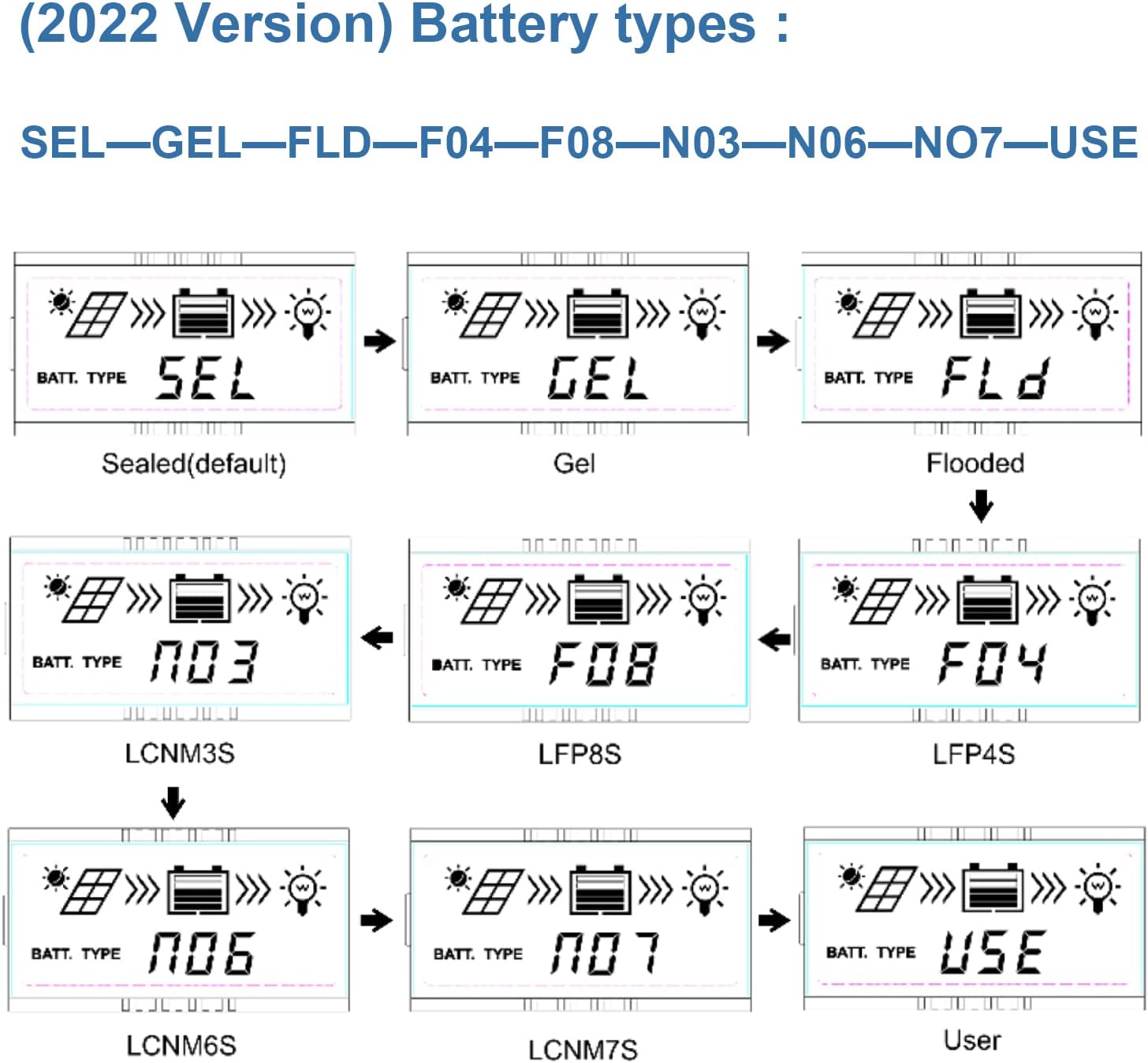
Image 5.1: LCD display showing various battery type selections. Options include Sealed (SEL), Gel (GEL), Flooded (FLD), LiFePO4 (LFP4S, LFP8S), Li(NiCoMn)O2 (LCNM3S, LCNM6S, LCNM7S), and User-defined (USE).
Щоб змінити тип батареї:
- Press the 'SELECT' button to cycle through the main display screens until you reach the battery type setting.
- Press and hold the 'ENTER' button to enter the setting modification mode.
- Use the 'SELECT' button to choose the desired battery type (e.g., GEL, FLD, LFP4S, USE).
- Press 'ENTER' again to confirm and save the selection.
5.3 Моніторинг та комунікація
The Tracer2210AN controller can be monitored and configured remotely using optional accessories:
- MT50 Remote Meter: Connects via RJ45 cable to display real-time data and modify parameters.
- WiFi/BLE Adapters (eBox-WIFI-01, eBox-BLE-01): Connects to the RS-485 port to enable wireless monitoring and control via a mobile application.
- PC Communication Cable (CC-RS485-USB-150U): Connects to a PC for monitoring and parameter setting using EPEVER PC software.
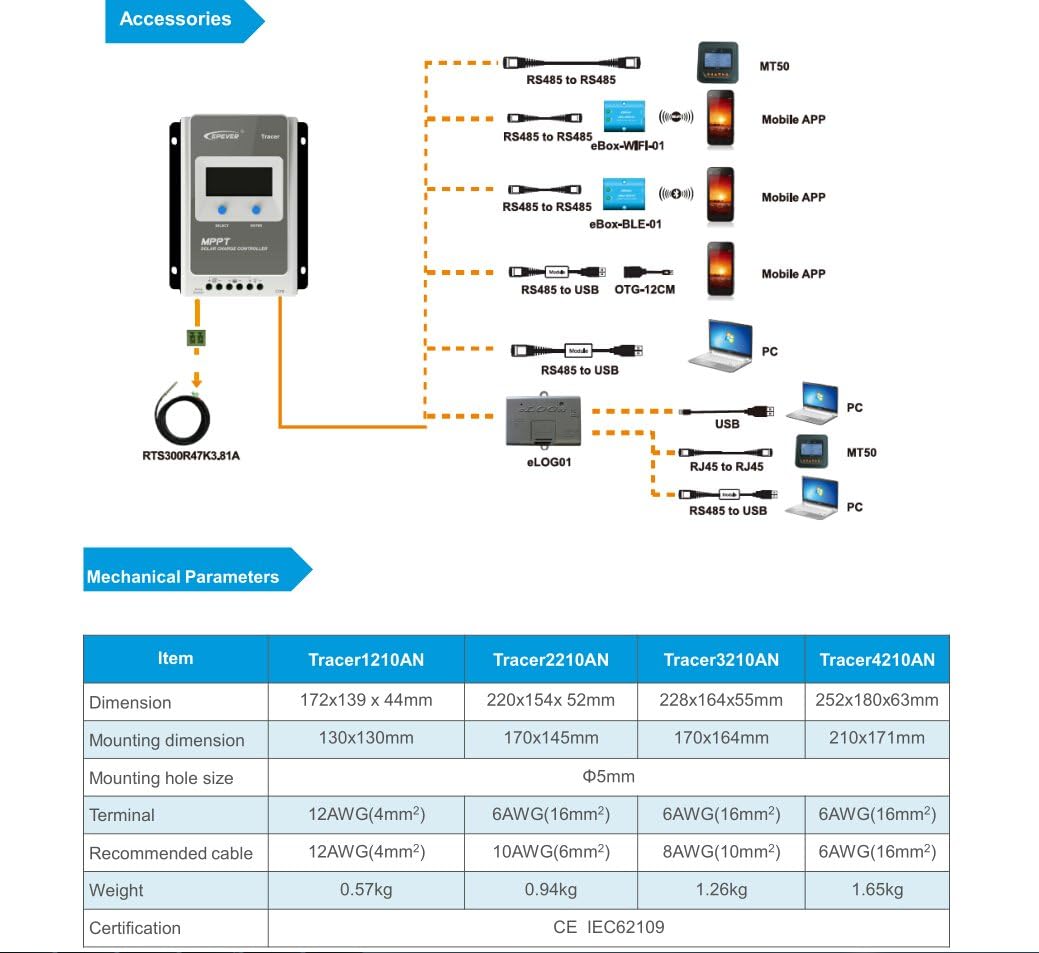
Image 5.2: Diagram showing the EPEVER solar charge controller and its compatible accessories. These include the RTS300R47K3.81A temperature sensor, MT50 remote meter, eBox-WIFI-01, eBox-BLE-01, OTG-12CM, and eLOG01 for various monitoring and communication options.

Image 5.3: The EPEVER Tracer2210AN solar charge controller connected to an MT50 remote meter, displaying system information. This setup allows for convenient monitoring and control.
6. Технічне обслуговування
Regular maintenance ensures the longevity and optimal performance of your EPEVER solar charge controller:
- Перевірте підключення: Періодично перевіряйте всі з'єднання проводів на міцність та наявність корозії. Нещільні з'єднання можуть спричинити вибух.tagпадіння та перегрів.
- Очистіть контролер: Тримайте контролер чистим та без пилу та сміття. Використовуйте суху тканину для протирання поверхні. Переконайтеся, що вентиляційні отвори не заблоковані.
- Огляньте на наявність пошкоджень: Check for any physical damage to the controller, cables, or terminals.
- Перевірка батареї: For lead-acid batteries, check electrolyte levels (if applicable) and terminal condition. Ensure lithium batteries are within their recommended operating parameters.
- Умови навколишнього середовища: Переконайтеся, що середовище встановлення залишається в межах зазначених робочих діапазонів температури та вологості.
7. Вирішення проблем
Якщо у вас виникли проблеми з контролером сонячного заряду, зверніться до наступних поширених кроків усунення несправностей:
- Без дисплея/живлення:
- Перевірте з'єднання акумулятора та переконайтеся, що акумулятор зарядженийtage знаходиться в межах робочого діапазону контролера.
- Verify that the battery fuse (if installed) is intact.
- Немає зарядки від сонячної панелі:
- Ensure solar panel connections are secure and correct polarity is observed.
- Check the solar panel's open-circuit voltage (Voc) and short-circuit current (Isc) to ensure it is producing power.
- Перевірте, чи об'єм сонячної панеліtage is within the controller's input voltagе діапазон.
- Check for shading on the solar panels.
- Навантаження не працює:
- Перевірте підключення навантаження та переконайтеся в правильній полярності.
- Verify that the battery has sufficient charge. The controller may disconnect the load if the battery voltage занадто низький.
- Check load settings on the controller to ensure the load output is enabled.
- Перегрів:
- Ensure the controller is installed in a well-ventilated area and its heat sinks are not obstructed.
- Reduce the load or solar input if operating in extreme temperatures.
For more detailed troubleshooting or specific error codes, please refer to the comprehensive manual provided by EPEVER or contact their customer support.
8. Технічні характеристики
The following table outlines the key electrical and mechanical parameters for the Tracer2210AN MPPT Solar Charge Controller:

Image 8.1: Table detailing the electrical parameters for Tracer series controllers, including the Tracer2210AN. This table provides specific values for system voltage, currents, power, and environmental conditions.
| Параметр | Value (Tracer2210AN) |
|---|---|
| Системний номінальний обсягtage | 12V/24V Auto Work |
| Номінальний струм заряду | 20А |
| Номінальний струм розряду | 20А |
| Макс. Вхідна потужність PV | 260W (12V Battery System) 520W (24V Battery System) |
| Макс. PV Open Circuit Voltage | 100V (at min. operating temp) 92V (at 25℃ ambient temp) |
| Акумулятор Voltage Дальність | 8-32В |
| MPP Voltage Дальність | V(BAT+2V) ~ 72V |
| Заземлення | Загальний негатив |
| Ефективність відстеження | ≥99.5% |
| Макс. Ефективність перетворення | 98% |
| Температура робочого середовища | -25℃ ~ +50℃ |
| Температурний діапазон зберігання | -20℃ ~ +70℃ |
| Відносна вологість | ≤95%, NC |
| Корпус | IP30 |
| Розміри (Д x Ш x В) | 220 x 154 x 52 мм |
| вага | 0.94 кг |
| Розмір терміналу | #6 AWG (16 мм²) |
| Рекомендований кабель | #10 AWG (6 мм²) |
9. Гарантія та підтримка
For warranty information, please refer to the documentation provided with your purchase or contact your authorized EPEVER dealer. EPEVER products typically come with a manufacturer's warranty covering defects in materials and workmanship.
For technical support, product inquiries, or service, please visit the official EPEVER website or contact an authorized EPEVER service center. Ensure you have your product model (Tracer2210AN) and serial number available when seeking support.