
Amazon Basics DLB111-US290
Підставка для одного комп'ютерного монітора Amazon Basics, посібник користувача
Model: DLB111-US290 | Brand: Amazon Basics
вступ
This user manual provides comprehensive instructions for the assembly, operation, and maintenance of your Amazon Basics Single Computer Monitor Stand. This desk-mounted arm is designed to enhance your workspace ergonomics and free up valuable desk space by securely holding a single computer monitor.
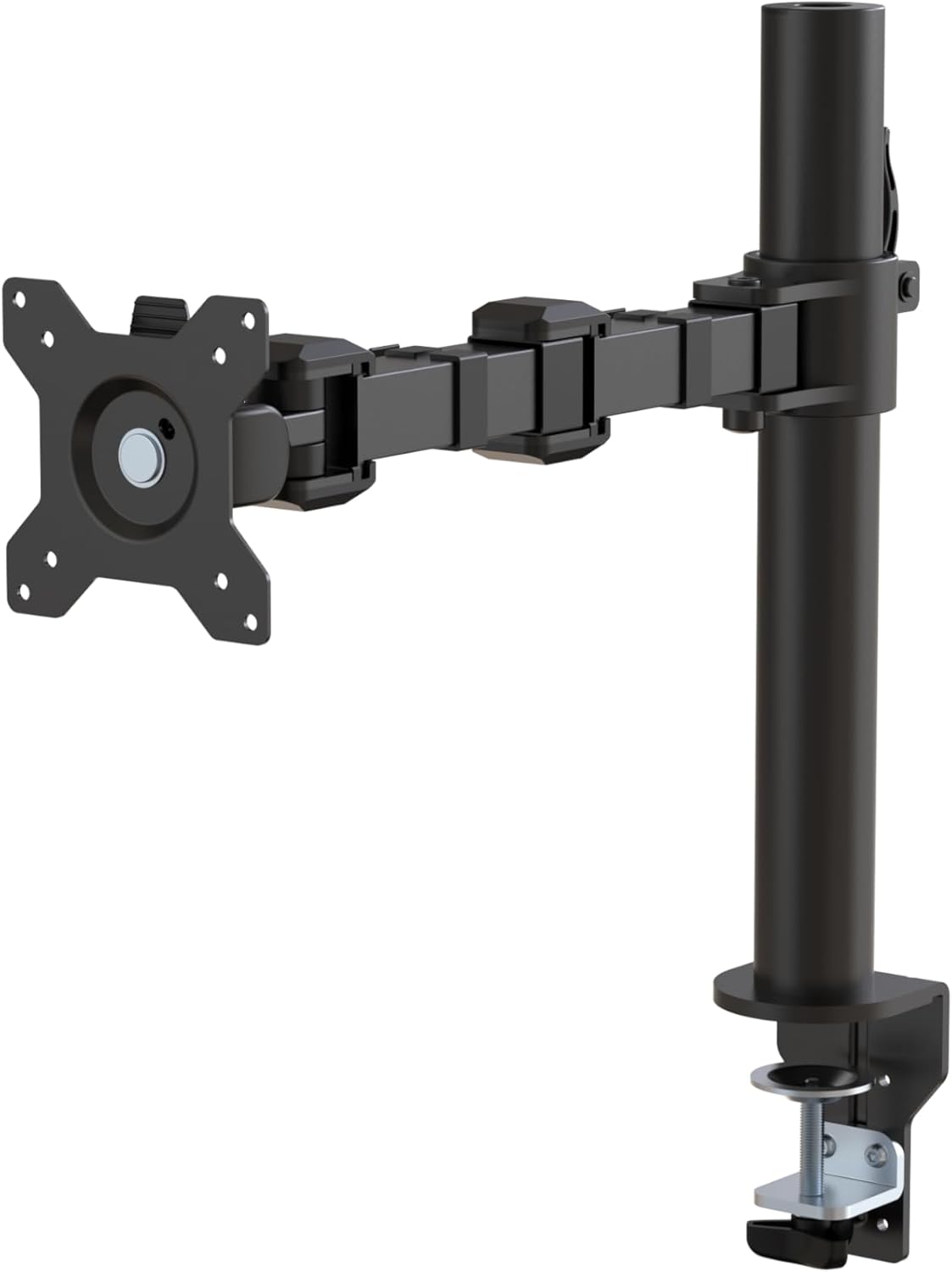
Малюнок 1: Закінченоview of the Amazon Basics Single Computer Monitor Stand.
Важлива інформація з безпеки
- Перед складанням і використанням уважно прочитайте всі інструкції.
- Не перевищуйте максимальну вантажопідйомність 22 фунтів (10 кг).
- Ensure your desk surface is stable and can support the combined weight of the monitor arm and your monitor.
- Verify that the desk thickness is between 0.8 to 3.9 inches (2 cm to 10 cm) for proper clamp установка.
- Use only the provided hardware. If any parts are missing or damaged, contact customer support.
- Не допускайте дітей і домашніх тварин під час збирання.
- Періодично перевіряйте всі гвинти та з'єднання, щоб переконатися, що вони надійно затягнуті та закріплені.
Вміст упаковки
Будь ласка, перевірте наявність усіх компонентів перед початком складання:
- Monitor Arm Assembly (Pre-assembled arm and VESA plate)
- Робочий стіл Клamp База
- Монтажний стовп
- Hardware Kit (Screws for VESA mounting, Allen keys)
- Кліпи для управління кабелем
- Посібник користувача
Інструкції з налаштування
Step 1: Attach Desk Clamp База
Розташуйте парту клamp base on your desk edge. Ensure the desk thickness is compatible (0.8 to 3.9 inches). Tighten the clamp screw securely until the base is firmly attached to the desk. Do not overtighten.

Figure 2: Securely attaching the desk clamp base to your desk.
Step 2: Install Mounting Pole
Insert the mounting pole into the hole on the desk clamp base. Secure it by tightening the set screw on the side of the clamp base using the provided Allen key.
Step 3: Attach Monitor Arm to Pole
Slide the monitor arm assembly onto the mounting pole. Adjust the height to your desired position and tighten the height adjustment screw on the arm collar to secure it.
Крок 4: Прикріпіть пластину VESA до монітора
The monitor arm features a detachable VESA plate. Remove the VESA plate from the arm by lifting it up. Align the VESA plate with the mounting holes on the back of your monitor (compatible with 100x100mm and 75x75mm VESA patterns). Use the appropriate screws from the hardware kit to secure the plate to your monitor. Ensure the screws are tightened firmly but do not overtighten.

Figure 3: The detachable VESA plate for easy monitor attachment.
Крок 5: Встановлення монітора на кронштейн
Carefully slide the monitor (with the attached VESA plate) onto the monitor arm. Ensure it clicks securely into place. You may need to adjust the tension screws on the arm joints to support the monitor's weight and allow for smooth movement.

Figure 4: Monitor securely mounted on the arm, viewред з фронту.

Figure 5: Top-down perspective of the monitor mounted, showcasing desk space optimization.
Крок 6: Організація кабелів
Utilize the integrated cable management system to route your monitor cables (power, video, etc.) along the arm and down the pole. This helps maintain a tidy workspace and prevents cable clutter.
Інструкція з експлуатації
The monitor arm offers a full range of motion to customize your viewдосвід роботи:
- Регулювання висоти: The horizontal arm can be adjusted from 7.9 to 14.2 inches high along the pole. Loosen the height adjustment screw on the arm collar, slide the arm to the desired height, and re-tighten.
- Нахил: Adjust the screen tilt from -15 to +85 degrees to reduce glare and optimize viewкути.
- Поворотний: Swivel the monitor left or right up to 180 degrees at various joints for collaborative viewing or screen sharing.
- Обертання: Rotate the monitor 360 degrees to switch between landscape and portrait modes without removing the monitor.

Figure 6: Visual representation of the flexible screen adjustment capabilities: Tilt (-85/+15 degrees), Swivel (±180 degrees), and Rotation (360 degrees).
Ергономічне розташування
Proper monitor positioning is crucial for ergonomic comfort and reducing strain. Adjust the monitor arm so that the top of your monitor screen is at or slightly below eye level when you are sitting upright. Your eyes should be approximately an arm's length away from the screen. Ensure your wrists are straight and your forearms are parallel to the floor when typing.

Figure 7: Comparison of correct and incorrect sitting postures, highlighting the importance of proper monitor height.
Технічне обслуговування
- Прибирання: Протріть кронштейн монітора м’якою тканиноюamp тканиною. Уникайте абразивних засобів для чищення або розчинників, які можуть пошкодити покриття.
- Перевірка герметичності: Періодично перевіряйте всі гвинти та з'єднання, особливо кріплення столу.amp and VESA plate screws, to ensure they are tight and secure. Re-tighten if necessary.
- Змащення: No lubrication is required for the moving parts.
Усунення несправностей
| проблема | Можлива причина | Рішення |
|---|---|---|
| Рука монітора провисає або не тримає положення. | Tension screws are too loose. | Tighten the tension screws on the arm joints using the provided Allen key until the arm holds the monitor's weight. |
| Монітор хитається на руці. | VESA plate screws are loose or desk clamp is not secure. | Ensure the VESA plate screws attaching the monitor are tight. Re-tighten the desk clamp гвинт. |
| Cannot adjust monitor height. | Height adjustment screw is too tight. | Loosen the height adjustment screw on the arm collar, adjust height, then re-tighten. |
Технічні характеристики
| Особливість | Деталь |
|---|---|
| Номер моделі | DLB111-US290 |
| Розміри продукту | 20 x 18.13 x 4.5 дюймів |
| Вага товару | 5.59 фунта |
| матеріал | легована сталь |
| Колір | чорний |
| Тип монтажу | Настільна клamp кріплення |
| Сумісний розмір екрана | від 13 до 30 дюймів |
| Максимальна вага | 22 фунта (10 кг) |
| Сумісність товщини столу | від 0.8 до 3.9 дюймів |
| Сумісність VESA | 75х75 мм, 100х100 мм |
| Діапазон регулювання висоти | 7.9 to 14.2 inches (horizontal arm) |
| Кут нахилу | -15 до + 85 градусів |
| Обертання | 360 градусів |
Гарантія та підтримка
This product is backed by an Amazon Basics limited 1-year warranty.
For detailed warranty information or technical support, please refer to the official documentation or contact Amazon Basics customer service.
- Інструкція користувача (PDF): Завантажити посібник користувача
- Гарантія (PDF): Завантажити інформацію про гарантію
Ask a question about this manual
Ask about setup, troubleshooting, compatibility, parts, safety, or missing instructions. Manuals+ will review the question and use this page’s manual context to help answer it.