
1. Вступ
Дякуємо за покупкуasing the CAIWEI A8AB-NEW Video Projector. This manual provides essential information for the safe and efficient operation of your device. Please read it thoroughly before use and retain it for future reference.
2. Техніка безпеки
- Не дивіться безпосередньо в об'єктив проектора, коли він увімкнений.amp увімкнено.
- Забезпечте належну вентиляцію навколо проектора, щоб запобігти перегріванню.
- Не піддавайте проектор впливу дощу або вологи.
- Використовуйте лише адаптер живлення, що постачається з проектором.
- Keep the projector away from flammable materials.
- Від’єднуйте проектор від мережі під час грози або якщо він не використовується протягом тривалого часу.
- Не намагайтеся ремонтувати проектор самостійно. Звертайтеся до кваліфікованого персоналу для проведення будь-яких робіт з обслуговування.
3. Вміст упаковки
Будь ласка, перевірте наявність усіх предметів після розпакування:
- CAIWEI A8AB-NEW Video Projector
- Кабель живлення
- Пульт дистанційного керування
- Кабель HDMI
- Кабель VGA
- AV-кабель
- Посібник користувача
4. Продукт закінчивсяview
Ознайомтеся з компонентами проектора:
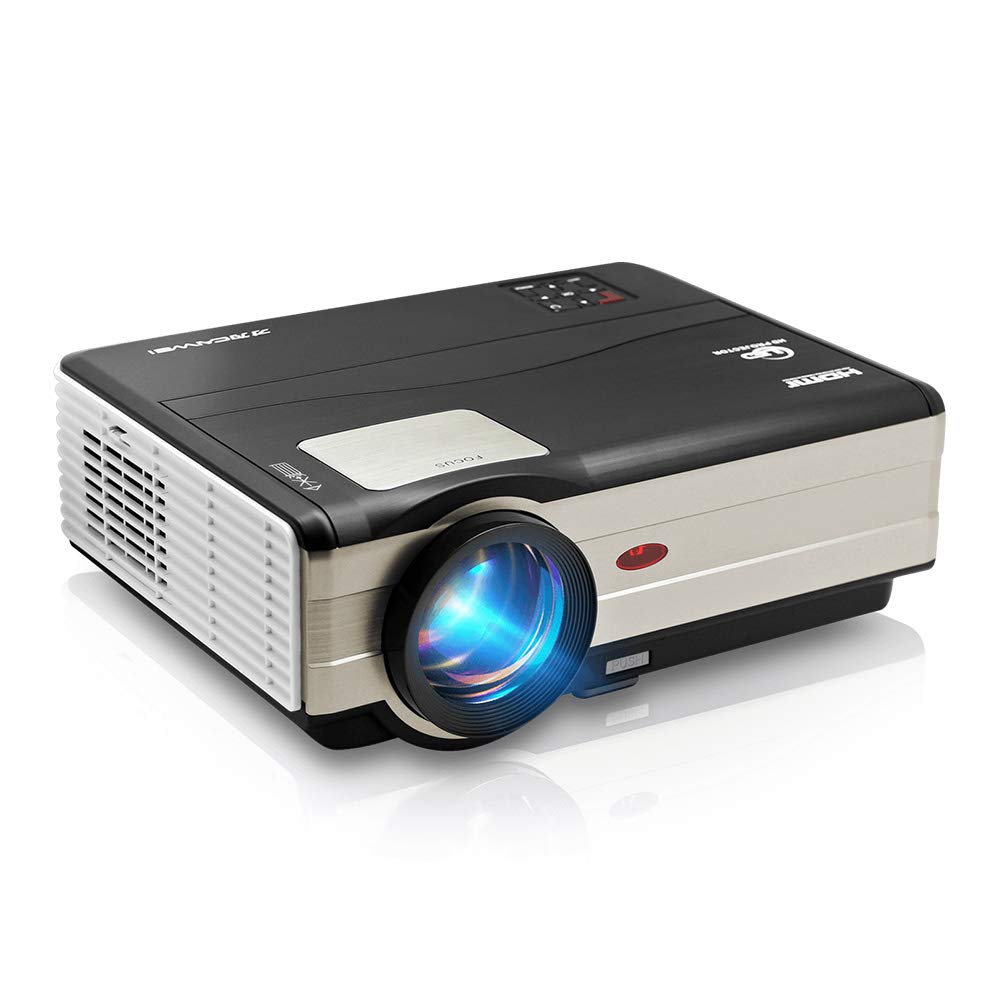
малюнок 1: Фронт view of the CAIWEI A8AB-NEW Video Projector, showing the lens and ventilation.
Передня панель
- Проекційний об'єктив: Випромінює зображення.
- Кільце фокусування: Регулює чіткість зображення.
- Корекція трапецеїдальних спотворень: Виправляє трапецієподібне спотворення зображення.
Задня панель
- Порт живлення: Підключається до кабелю живлення.
- Порти HDMI (x2): Connects to HDMI-enabled devices (e.g., Blu-ray player, game console).
- USB-порти (x2): Connects to USB storage devices or other USB peripherals.
- Порт VGA: Connects to computers or laptops with VGA output.
- AV-порт: Connects to older devices using composite video and stereo audio.
- Аудіовихід (3.5 мм): Підключається до зовнішніх динаміків або навушників.
5. Налаштування
5.1 Розміщення
Place the projector on a stable, flat surface or mount it to a ceiling. Ensure the projector is perpendicular to the projection screen or wall. The optimal projection distance varies, but generally, a larger distance yields a larger image.
5.2 Підключення живлення
- Підключіть кабель живлення до порту живлення проектора.
- Вставте інший кінець кабелю живлення в розетку.
- Засвітиться індикатор живлення.
5.3 Підключення пристроїв введення
Проектор підтримує різні джерела вхідного сигналу:
- HDMI: Connect an HDMI cable from your device (e.g., laptop, game console, streaming stick) to one of the projector's HDMI ports.
- USB: Вставте флеш-накопичувач USB у порт USB для відтворення медіафайлів files безпосередньо.
- VGA: Connect a VGA cable from your computer to the projector's VGA port.
- AV: Use the provided AV cable to connect to devices with composite video output.
- Бездротовий зв'язок (Wi-Fi): For screen mirroring from smartphones or tablets, navigate to the 'Wireless Display' or 'Screen Mirroring' option in the projector's menu and follow the on-screen instructions. Ensure your device and the projector are on the same Wi-Fi network.
- Bluetooth: To connect external Bluetooth speakers, go to the Bluetooth settings in the projector's menu, enable Bluetooth, and pair with your desired audio device.
5.4 Фокусування та корекція трапецієподібних спотворень
- Увімкніть проектор і виведіть зображення.
- Обертайте Кільце фокусування on the lens until the image appears sharp and clear.
- If the image is trapezoidal (wider at the top or bottom), adjust the Корекція коректури dial or setting until the image is rectangular.
6. Інструкція з експлуатації
6.1 Увімкнення/вимкнення живлення
- Увімкнення: Натисніть кнопку живлення на проекторе або пульті дистанційного керування.
- Вимкнення живлення: Знову натисніть кнопку живлення. Підтвердіть вимкнення, якщо буде запропоновано.
6.2 Навігація по меню
Use the navigation buttons (Up, Down, Left, Right, OK) on the projector or remote control to browse the on-screen menu. The 'Menu' button typically opens the main settings, and 'Exit' or 'Back' closes sub-menus.
6.3 Вибір джерела вхідного сигналу
Press the 'Source' or 'Input' button on the remote control or projector. A list of available input sources (HDMI1, HDMI2, USB1, USB2, VGA, AV, Wireless Display) will appear. Select the desired source using the navigation buttons and press 'OK'.
6.4 Параметри звуку
Access the audio settings through the main menu to adjust volume, select audio output (internal speaker, external via 3.5mm jack, or Bluetooth), and modify sound modes.
6.5 Wireless/Bluetooth Connection
Refer to section 5.3 for detailed instructions on connecting via Wi-Fi for screen mirroring or Bluetooth for audio output.
7. Технічне обслуговування
7.1 Очищення об'єктива
Use a soft, lint-free cloth specifically designed for optical lenses. Gently wipe the lens surface. Avoid using abrasive cleaners or excessive force, which can scratch the lens.
7.2 Cleaning the Air Filter/Vents
Regularly check the air intake and exhaust vents for dust accumulation. Use a soft brush or a can of compressed air to gently clean the vents. This helps maintain proper airflow and prevents overheating.
7.3 Зберігання
When not in use, store the projector in a cool, dry, and dust-free environment. Use the original packaging or a protective case to prevent damage.
8. Вирішення проблем
| проблема | Можлива причина | Рішення |
|---|---|---|
| На екрані немає зображення | Power not connected; Incorrect input source; Device not powered on. | Check power cable; Select correct input source; Ensure connected device is on. |
| Зображення розмите | Фокус не налаштовано; проектор занадто далеко/близько. | Відрегулюйте кільце фокусування; перемістіть проектор. |
| Зображення має трапецієподібну форму | Трапецеїчне спотворення не відрегульовано. | Налаштуйте корекцію трапецеїдальних спотворень. |
| Ні звуку | Volume too low; Muted; Incorrect audio output; Cable issue. | Increase volume; Unmute; Check audio settings; Verify cable connections. |
| Пульт не працює | Batteries dead; Obstruction; Out of range. | Replace batteries; Remove obstructions; Ensure line of sight to IR receiver. |
| Попередження про перегрів | Blocked vents; Poor ventilation. | Clear vents; Ensure adequate space around projector. |
9. Технічні характеристики
- модель: A8AB-NEW
- Бренд: КАЙВЕЙ
- Роздільна здатність дисплея: 1280 х 800
- Технологія підключення: Bluetooth, HDMI, USB, VGA, Wireless
- Особливості: Вбудований Wi-Fi, Портативний, Бездротовий
- Рекомендоване використання: Ігри, Домашній кінотеатр
- Вага товару: 6.1 фунта
- Розміри продукту: 11.2 x 14.7 x 5 дюймів
10. Гарантія та підтримка
CAIWEI products are designed for reliability and performance. For specific warranty details, please refer to the warranty card included with your purchase or contact CAIWEI customer support. If you encounter any issues not covered in this manual, please reach out to our support team for assistance.
Підтримка клієнтів: Please visit the official CAIWEI webсайт або зверніться до свого продавця для отримання інформації про підтримку.