
1. Вступ
Дякуємо за покупкуasing the Nobsound NS-01G Pro Bluetooth 5.0 Power Ampрятувальник. Цей компактний, але потужний amplifier is designed to deliver high-fidelity audio for your speakers, offering versatile input options including Bluetooth 5.0, AUX, and USB. This manual provides detailed instructions for setup, operation, maintenance, and troubleshooting to ensure you get the best performance from your device.
2. Продукт закінчивсяview
2.1 Основні характеристики
- Дизайн 2-в-1: Functions as both a Bluetooth receiver and a power ampліфірник.
- Бездротове підключення: Seamlessly connect to smartphones and other devices via Bluetooth 5.0.
- Висока вихідна потужність: Despite its mini size, it delivers up to 100W output power.
- Кілька входів: Supports AUX, USB, and Bluetooth audio inputs.
- Регулювання тембру: Features Bass, Middle, and Treble tone controls for sound customization.
2.2 Вміст упаковки
- 1 × Nobsound NS-01G Pro Ampлібератор
- 1 × адаптер живлення постійного струму 19 В
- 1 × USB-кабель
- 1 × кабель RCA
- 1 × 3.5 мм аудіокабель
- 1 × Посібник користувача

2.3 Розташування передньої панелі

2.4 Компонування задньої панелі
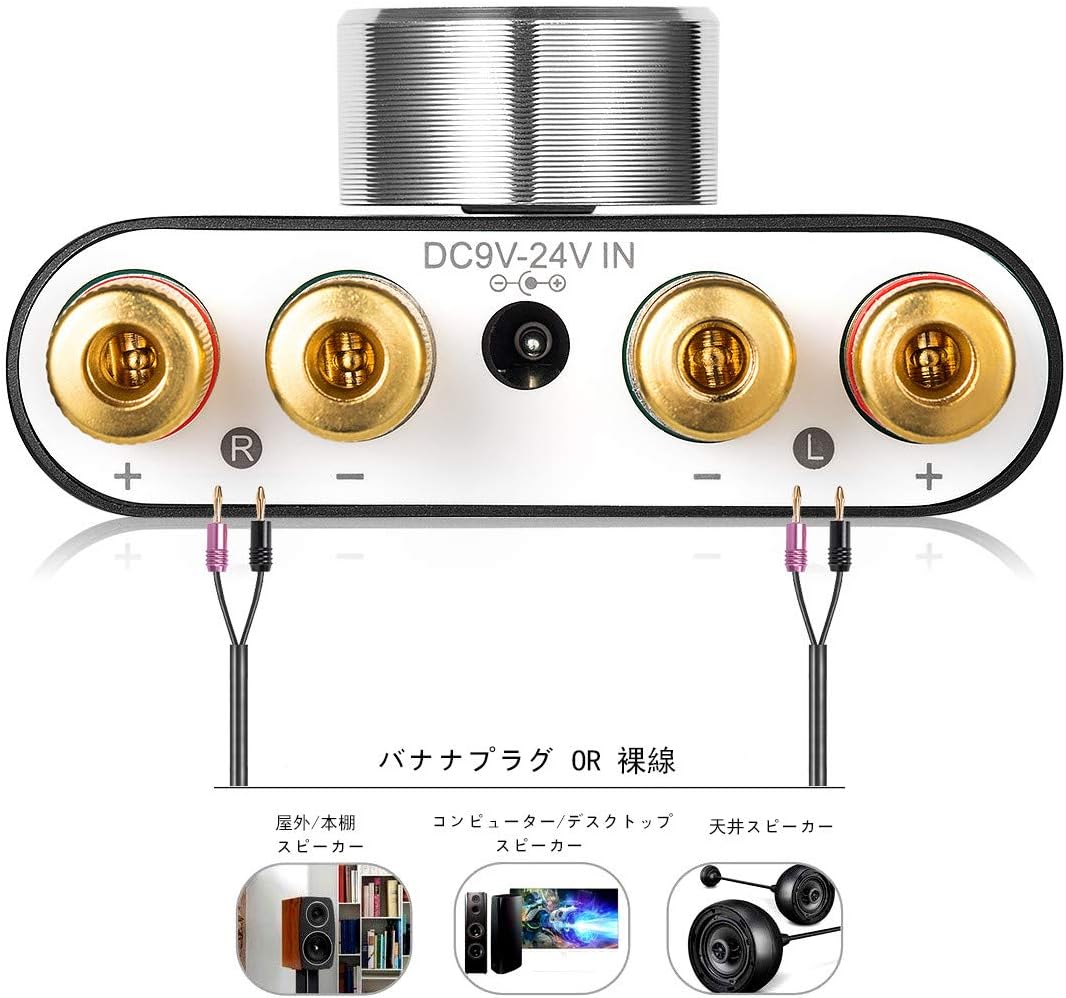
3. Інструкції з налаштування
3.1 Підключення динаміка
- Забезпечити ampживлення вимкнено.
- Connect your passive speakers to the speaker output terminals on the rear panel. Pay attention to polarity: connect the red (+) terminal on the amplifier to the red (+) terminal on the speaker, and the black (-) terminal on the amplifier to the black (-) terminal on the speaker.
3.2 Підключення джерела вхідного сигналу
The NS-01G Pro supports three input methods: AUX, USB, and Bluetooth.

3.2.1 Вхід AUX
- Connect your audio source (e.g., smartphone, CD player, TV) to the AUX input jack on the front panel using a 3.5mm audio cable.
3.2.2 USB-вхід
- Connect your computer to the USB sound input port on the front panel using a USB cable. No drivers are typically required for this plug-and-play connection.

3.2.3 Вхід Bluetooth
- Attach the Bluetooth antenna to the RF connector on the rear panel.
- Switch the input selector on the front panel to 'BT' mode.
- На мобільному пристрої ввімкніть Bluetooth і знайдіть
Пов'язані документиNS-01G Pro
RELATED DOCUMENTNobsound NS-01G PRO, NS-10G, NS-10G PRO, NS-20G Mini Bluetooth Ampпосібник користувача lifierВичерпний посібник користувача для цифрових навушників Nobsound NS-01G PRO, NS-10G, NS-10G PRO та NS-20G mini Bluetooth ampрятувальники. Дізнайтеся про функції, налаштування, експлуатацію, усунення несправностей та технічні характеристики.View document →RELATED DOCUMENTNobsound NS-01G Pro Mini Bluetooth Power Ampпосібник користувача lifierUser manual and troubleshooting guide for the Nobsound NS-01G Pro Mini Bluetooth Power Amplifier. Includes connection instructions, technical specifications, and support contact details.View document →RELATED DOCUMENT多款通用说明书-20240611-轮廓View document →RELATED DOCUMENTGFJ058NEWView document →RELATED DOCUMENTGFJ058NEWView document →RELATED DOCUMENTЦифровий Bluetooth-навушники Nobsound Q10 Mini Ampпосібник користувача lifierІнструкція користувача для цифрового зарядного пристрою Nobsound Q10 Mini Bluetooth Amplifier, що містить детальні інструкції щодо налаштування, експлуатації, режимів входу (Bluetooth, AUX, оптичний), підключення динаміків, поширені запитання щодо усунення несправностей та контактну інформацію.View document →RELATED DOCUMENTDOUK AUDIO Nobsound M1 PRO Power AmpПосібник користувача та поширені запитання lifierВичерпний посібник користувача та розділ поширених запитань щодо DOUK AUDIO Nobsound M1 PRO power ampрятувальник, що охоплює етапи експлуатації, технічні характеристики, усунення несправностей та контактну інформацію.View document →RELATED DOCUMENTNobsound HiFi 5.1-канальний Bluetooth Ampпосібник користувача lifierЦей посібник користувача містить інструкції та поради щодо усунення несправностей із системою Nobsound HiFi 5.1 Channel Bluetooth. Ampрятувальник, що охоплює налаштування, експлуатацію та поширені проблеми.View document →Ask a question about this manual
Ask about setup, troubleshooting, compatibility, parts, safety, or missing instructions. Manuals+ will review the question and use this page’s manual context to help answer it.


