
вступ
This manual provides instructions for the VINABTY AKB72915231 replacement remote control. This remote is designed to function as a direct replacement for various LG Hospitality and Healthcare Portal TV models. No programming is required; simply insert batteries for immediate use.
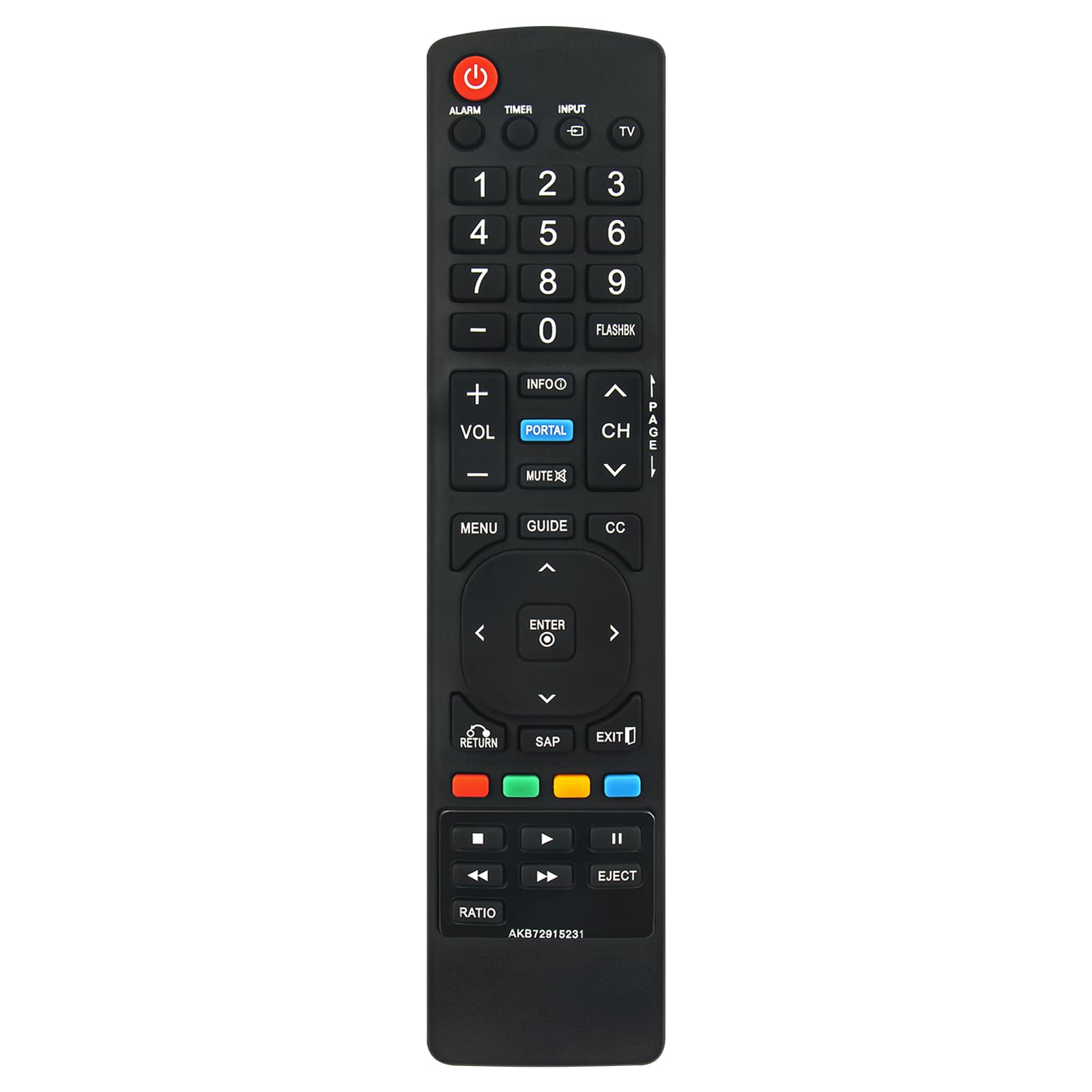
Малюнок 1: Закінченоview of the VINABTY AKB72915231 Replacement Remote Control.
Налаштування
1. Встановлення батареї
Для пульта дистанційного керування потрібні дві (2) батарейки типу AAA (не входять до комплекту). Щоб встановити батарейки, виконайте такі дії:
- Знайдіть батарейний відсік на задній панелі пульта дистанційного керування.
- Натисніть на засувку та посуньте кришку батарейного відсіку вниз, щоб відкрити її.
- Вставте дві батарейки типу AAA, переконавшись, що позитивний (+) та негативний (-) полюси правильно збігаються з позначками всередині відсіку.
- Посуньте кришку батарейного відсіку на місце, доки вона не зафіксується.

Малюнок 2: Задня частина view of the remote control, highlighting the battery compartment.

Figure 3: Correct insertion of AAA batteries into the remote control.
2. Початкове використання
This remote control is pre-programmed and does not require any setup or pairing. Once batteries are installed, it is ready for immediate use with compatible LG Hospitality and Healthcare Portal TV models.
Інструкція з експлуатації
The VINABTY AKB72915231 remote control provides full functionality for compatible LG TVs. Below is a general guide to its buttons and their functions.

Малюнок 4: Спереду view of the remote control, detailing button layout.
- Потужність (ЧЕРВОНИЙ кнопка): Вмикає або вимикає телевізор.
- Введення: Selects the input source (e.g., HDMI, AV).
- Цифрові кнопки (0-9): Directly selects TV channels.
- ГУЧНІСТЬ (+/-): регулює рівень гучності.
- CH (Сторінка вгору/вниз): Changes TV channels sequentially.
- Вимкнути звук: Вмикає або вимкнення звуку телевізора.
- МЕНЮ: Доступ до головного меню телевізора.
- ПОСІБНИК: Displays the electronic program guide (if available).
- ІНФО: Відображає інформацію про поточну програму або вхідний сигнал.
- PORTAL (СИНІЙ кнопка): Accesses the LG Hospitality Portal features.
- Навігаційна панель (Вгору/Вниз/Вліво/Вправо): Навігація по меню та опціях.
- ENTER (Center button): Підтверджує вибір у меню.
- ПОВЕРНЕННЯ: Повернення до попереднього екрана або меню.
- EXIT: Вихід з поточного меню або функції.
- Кольорові кнопки (червона, зелена, жовта, синя): Perform specific functions depending on the TV menu or application.
- Playback Controls (Play, Pause, Stop, Rewind, Fast Forward, Eject): Controls media playback on compatible devices or TV functions.
Технічне обслуговування
Очищення пульта дистанційного керування
Для очищення пульта дистанційного керування використовуйте м’яку суху тканину. Для стійкого бруду злегка протрітьampПротріть тканину водою або м’яким неабразивним засобом для чищення. Уникайте використання агресивних хімікатів або абразивних матеріалів, оскільки вони можуть пошкодити поверхню пульта дистанційного керування або внутрішні компоненти.
Заміна батареї
Replace batteries when the remote control's response becomes inconsistent or stops working. Always replace both batteries at the same time with new AAA alkaline batteries. Do not mix old and new batteries, or different types of batteries, as this can lead to leakage or malfunction.
Усунення несправностей
| проблема | Можлива причина | Рішення |
|---|---|---|
| Пульт не працює. | Батареї розряджені або встановлені неправильно. | Замініть батарейки новими батарейками типу AAA, дотримуючись правильної полярності (+/-). |
| Пульт дистанційного керування працює з перебоями. | Low battery power. Obstruction between remote and TV. | Replace batteries. Ensure a clear line of sight between the remote and the TV's IR receiver. |
| Певні кнопки не реагують. | Button malfunction or dirt under the button. | Clean the remote control. If the issue persists, the remote may require replacement. |
| Remote does not control TV functions. | Remote is not compatible with the TV model. | Verify your TV model is listed in the compatible models section of this manual or product description. |
Технічні характеристики

Рисунок 5: Розміри пульта дистанційного керування.
| Особливість | Деталь |
|---|---|
| Назва моделі | AKB72915231 |
| Бренд | ВІНАБТИ |
| Технологія підключення | Інфрачервоний (ІЧ) |
| Джерело живлення | 2 батареї AAA (не входять в комплект) |
| Максимальна дальність | Приблизно 33 футів (10 метра) |
| Розміри (Д x Ш x В) | 5 дюйма x 1.9 дюйма x 0.5 дюйма (12.7 см x 4.8 см x 1.3 см) |
| Compatible LG TV Models |
|
Інформація про гарантію
Please refer to the retailer or manufacturer's website for specific warranty terms and conditions. Typically, replacement remote controls come with a limited warranty covering manufacturing defects.
Підтримка клієнтів
For further assistance or inquiries regarding your VINABTY AKB72915231 replacement remote control, please contact the seller or manufacturer through the platform where the purchase was made. Provide your order details and the model number (AKB72915231) for efficient support.