
1. Вступ
The Flashpoint Zoom Li-Ion Mini R2 TTL Flash is a compact and powerful flash unit designed for use with select Sony mirrorless cameras, including models such as A7RIII, a7rII, a7R, a58, a99, ILCE6000L, a77II, RX10, and the a9. This flash features an integrated R2 radio transceiver, enabling wireless triggering and control. It can function as a master unit to command other Flashpoint and Godox R2-compatible slave units, offering versatile lighting solutions for various photographic scenarios.
2. Заходи безпеки
- Не розбирайте та не модифікуйте спалах. Ремонт повинен виконуватися лише уповноваженим сервісним персоналом.
- Тримайте спалах сухим. Не піддавайте його впливу дощу, вологи або високої вологості.
- Не торкайтеся лампи спалаху після спрацьовування, оскільки вона може бути гарячою.
- Зберігати в недоступному для дітей місці.
- Use only the specified battery and charger. Improper use can lead to fire, explosion, or electric shock.
- Уникайте прямого потрапляння спалаху в очі, особливо на близькій відстані, оскільки це може погіршити зір.
3. Продукт закінчивсяview
3.1 Вміст упаковки
- Flashpoint Zoom Li-Ion Mini Flash Unit
- Міні-підставка
- Справа захисту
- Diffuser (assumed from 'Dif' in product data)
3.2 Flash Components
Familiarize yourself with the main components of your Flashpoint Zoom Li-Ion Mini R2 TTL Flash.

малюнок 3.2.1: Фронт view of the Flashpoint Zoom Li-Ion Mini R2 TTL Flash, showing the flash head and main body.
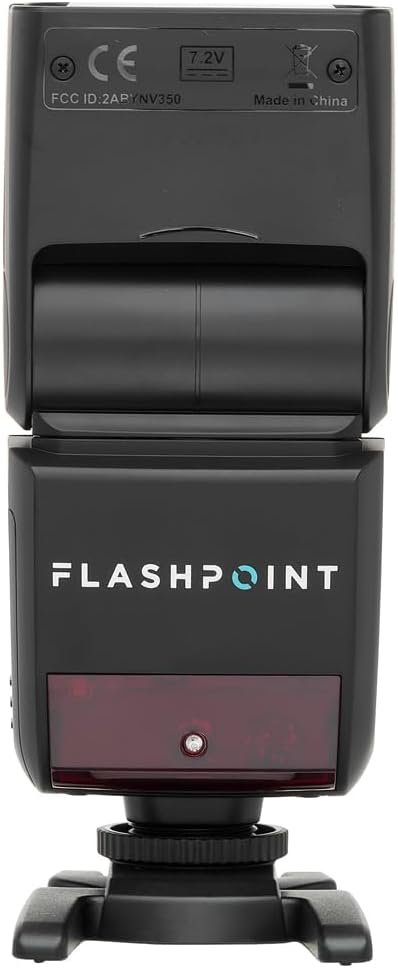
малюнок 3.2.2: Задня view of the flash, highlighting the LCD display and control buttons for mode, zoom, sync, and power.

малюнок 3.2.3: The flash unit with its built-in wide-angle diffuser panel extended from the flash head.
4. Налаштування
4.1 Встановлення батареї
- Знайдіть відсік для батарейок збоку спалаху.
- Slide the battery cover release latch and open the compartment.
- Insert the Li-Ion battery, ensuring correct polarity as indicated inside the compartment.
- Закривайте кришку батарейного відсіку, доки вона надійно не зафіксується.

малюнок 4.1.1: сторона view of the flash unit, indicating the battery compartment with a 'BATT.PUSH' label.
4.2 Монтаж на камеру
- Переконайтеся, що спалах вимкнено.
- Slide the flash's hot shoe foot into your Sony camera's hot shoe mount.
- Tighten the locking ring on the flash foot to secure it to the camera. Do not overtighten.
4.3 Увімкнення/вимкнення
Press and hold the power button (usually marked with a ⚡ or power symbol) on the rear control panel to turn the flash on or off.
5. Інструкція з експлуатації
5.1 Основні режими роботи
The Flashpoint Zoom Li-Ion Mini R2 TTL Flash supports various operating modes:
- Режим автоспалаху TTL: Автоматично встановлює потужність спалаху для правильної експозиції.
- Ручний (M) режим: Дозволяє ручне регулювання потужності спалаху.
- Мультирежим (стробоскопічний): Спрацьовує серію швидких спалахів під час однієї експозиції.
- Режими оптичного веденого пристрою S1/S2: Triggers the flash optically when another flash fires.
Використовуйте РЕЖИМ button on the control panel to cycle through these modes.

малюнок 5.1.1: Детальний view of the flash control panel, showing buttons for MODE, ZOOM, SYNC, SLAVE, GR/CH, and the SET dial.
5.2 R2 Wireless System
The integrated R2 radio transceiver provides wireless control. Set the flash to Master or Slave mode and configure the group (GR) and channel (CH) settings to match your R2-compatible transmitter or other R2 flashes. Refer to your R2 transmitter's manual for detailed wireless setup.
5.3 Регулювання головки спалаху
The flash head can be rotated and tilted to bounce light off ceilings or walls for softer illumination.
- Горизонтальне обертання: 0-270 градусів.
- Вертикальний нахил: -7 до 90 градусів.

малюнок 5.3.1: Illustration demonstrating the flexible rotation and tilt capabilities of the flash head.
5.4 Функція масштабування
The flash features an automatically zooming flashhead from 24-105mm. This adjusts the flash coverage to match the focal length of your lens. In manual mode, you can also adjust the zoom manually using the ZOOM кнопку.
6. Технічне обслуговування
- Прибирання: Використовуйте м’яку суху тканину для очищення спалаху. Для стійкого бруду використовуйте злегкаamp cloth with mild detergent, then wipe dry. Do not use organic solvents like thinner or benzene.
- Зберігання: Якщо спалах не використовується протягом тривалого часу, вийміть акумулятор і зберігайте його в прохолодному, сухому місці, бажано в захисному футлярі.
- Догляд за акумулятором: Recharge the Li-Ion battery regularly, even if not in use, to maintain its lifespan. Avoid fully discharging the battery.
7. Вирішення проблем
If you encounter issues with your Flashpoint Zoom Li-Ion Mini R2 TTL Flash, refer to the following common problems and solutions:
| проблема | Можлива причина / рішення |
|---|---|
| Спалах не спрацьовує. | Check if the flash is powered on. Ensure the battery is charged and correctly installed. Verify the flash is securely mounted on the camera hot shoe. Check camera flash settings. |
| Flash output is inconsistent or incorrect. | Ensure TTL mode is selected for automatic exposure, or adjust manual power settings. Check for obstructions between the flash and subject. Verify flash head zoom matches lens focal length. |
| Бездротове запуск не вдається. | Confirm that the flash and transmitter are set to the same R2 group and channel. Ensure both units are within range and have fresh batteries. Check for radio interference. |
| Difficulty mounting flash on camera hot shoe. | Ensure the locking ring is fully loosened. Some camera hot shoes may have tighter tolerances; apply firm, even pressure. If persistent, verify compatibility with your specific camera model. |
| Unable to update firmware via micro-USB port. | The micro-USB port may be recessed. Try using a micro-USB cable with a very slim connector housing. If issues persist, contact Flashpoint customer support for guidance on compatible cables or alternative update methods. |
8. Технічні характеристики
| Особливість | Специфікація |
|---|---|
| Ведучий номер | 82ft / 25m (at ISO 100) |
| Час переробки | від 0.1 до 1.7 секунд |
| Діапазон масштабування | 24-105 мм (автоматичний/ручний) |
| Bounce Head Rotation | Horizontal: 0 to 270 degrees |
| Bounce Head Tilt | Vertical: -7 to 90 degrees |
| Розміри (Д x Ш x В) | 8.4 x 7.2 x 2.8 дюймів |
| Вага товару | 1.87 фунта |
| Сумісні кріплення | Sony Alpha |
| Номер моделі | Zoom-Lion Mini |
| ASIN | B07CV42KFV |
9. Гарантія та підтримка
9.1 Інформація про гарантію
Flashpoint products typically come with a limited manufacturer's warranty. For specific details regarding the warranty period and terms for your Zoom Li-Ion Mini R2 TTL Flash, please refer to the warranty card included with your product or visit the official Flashpoint webсайт.
9.2 Підтримка клієнтів
For technical assistance, troubleshooting beyond this manual, or service inquiries, please contact Flashpoint customer support. Contact information can usually be found on the Flashpoint webсайті або в документації до вашого продукту.