
вступ
This manual provides detailed instructions for the safe and proper installation, operation, and maintenance of your SANUS Simplicity Full Motion TV Mount, Model SMF421-B3. Please read all instructions carefully before beginning installation to ensure correct assembly and to prevent injury or damage.
This mount is designed to securely hold televisions ranging from 26 inches to 55 inches in size, with a maximum weight capacity of 55 lbs (25 kg). It offers full motion capabilities, including tilt, swivel, and extension, allowing for optimal viewкути.
Інформація про безпеку
УВАГА: Failure to read and follow all instructions can result in personal injury, property damage, or voiding of warranty. Do not install this product if you do not understand these instructions or have doubts about the safety of the installation.
- Verify that the mounting surface can safely support the combined weight of the mount and the television.
- Не перевищуйте максимальну вантажопідйомність 25 кг (55 фунтів).
- Цей продукт призначений лише для використання в приміщенні.
- Use only the hardware provided by SANUS.
- If mounting to wood studs, ensure the studs are solid and located accurately.
- If mounting to concrete or concrete block, ensure the wall is solid and use appropriate anchors (not always included).
- Always use a qualified installer if you are unsure about your ability to install this product safely.
Вміст упаковки
Before installation, ensure all parts are present and undamaged. If any parts are missing or defective, contact SANUS customer service.

Image: All components of the SANUS Simplicity Full Motion TV Mount, including the wall plate, TV brackets, and various hardware, are laid out for inspection.
Типовий вміст упаковки включає:
- Збірка настінної пластини
- Кронштейни для телевізора (2)
- Mounting Hardware Kit (screws, washers, spacers for various TV types and wall types)
- Інструкція з експлуатації
Налаштування та встановлення
Необхідні інструменти (не включені):
- Шукач шпильок
- Свердліть відповідними свердлами (для дерева або цегли)
- Рівень
- Викрутка для головки Phillips
- Розетковий ключ
- Олівець
- Мірна стрічка
Крок 1. Прикріпіть кронштейни до телевізора
- Обережно покладіть телевізор екраном донизу на м’яку, чисту поверхню, щоб запобігти пошкодженню екрана.
- Визначте монтажні отвори VESA на задній панелі телевізора.
- Виберіть гвинти правильного діаметра та довжини з комплекту кріпильних елементів, які підходять до монтажних отворів вашого телевізора. За потреби використовуйте шайби та проставки, щоб забезпечити щільне прилягання без надмірного затягування.
- Attach the two TV bracket arms to the back of your TV using the selected screws. Ensure the arms are level and securely fastened. Do not overtighten.
Step 2: Install Wall Plate to Wall
- Determine the desired height for your TV. Mark the center of the desired TV location on the wall.
- Для встановлення дерев'яних стовпів: Use a stud finder to locate the center of two adjacent wood studs. Position the wall plate so that its mounting holes align with the center of the studs. Use a level to ensure the wall plate is perfectly horizontal. Mark the drill points. Drill pilot holes (refer to manual for specific drill bit size). Secure the wall plate to the studs using the provided lag bolts and washers.
- For Concrete/Concrete Block Installation: Position the wall plate at the desired height and use a level to ensure it is horizontal. Mark the drill points. Drill pilot holes (refer to manual for specific drill bit size and depth). Insert concrete anchors (if provided or purchased separately) into the pilot holes. Secure the wall plate to the wall using the provided lag bolts and washers.
- Ensure the wall plate is firmly and securely attached to the wall before proceeding.
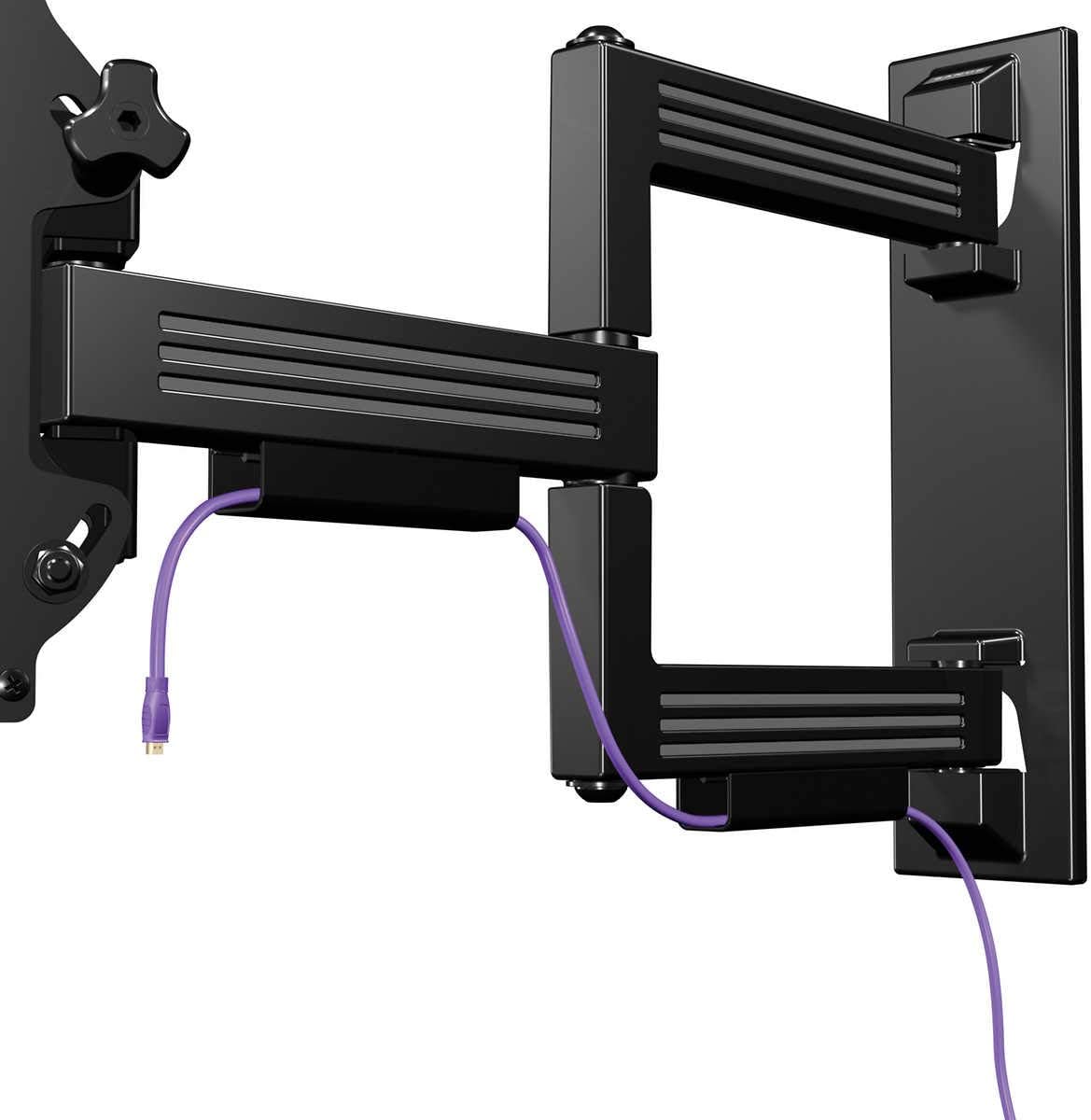
Image: The SANUS Simplicity Full Motion TV Mount is shown installed on a wall, extended, with a purple cable neatly routed through its integrated cable management channels.
Крок 3: Повісьте телевізор на настінну пластину
- With assistance, carefully lift the TV with the attached brackets and hook the brackets onto the wall plate.
- Переконайтеся, що телевізор надійно закріплений на настінній планці.
- Engage any safety locking mechanisms on the TV brackets to prevent accidental dislodgement. Refer to the specific instructions for your mount model for details on locking mechanisms.
Інструкція з експлуатації
Your SANUS Simplicity Full Motion TV Mount allows for flexible positioning of your television.
- Розширення: Обережно відтягніть телевізор від стіни, щоб витягнути кронштейн.
- Поворотний: Обережно поверніть телевізор ліворуч або праворуч, щоб досягти бажаного viewкут.
- Нахил: Loosen the tilt adjustment knobs (if applicable, refer to your specific model's design), adjust the TV to the desired vertical angle, and then retighten the knobs to secure the position. The mount supports up to 60 degrees of tilt.
- Управління кабелем: Utilize the integrated cable channels on the mount arm to route and conceal cables for a tidy appearance.
Always move the TV smoothly and avoid sudden, forceful movements. Do not hang or apply excessive weight to the TV or mount arm.
Технічне обслуговування
Регулярне технічне обслуговування забезпечує довговічність та безпечну роботу вашого телевізора.
- Періодичний огляд: Every 6-12 months, inspect all mounting hardware and connections to ensure they are secure. Tighten any loose screws or bolts.
- Прибирання: Clean the mount with a soft, dry cloth. Do not use abrasive cleaners or solvents, as these may damage the finish.
- Змащення: The moving parts of the mount are designed for smooth operation and generally do not require lubrication. If movement becomes stiff, consult SANUS customer support.
Усунення несправностей
| проблема | Можлива причина | Рішення |
|---|---|---|
| Телевізор нерівно розташований після встановлення. | Wall plate was not installed level. | Remove TV, adjust wall plate to be level, and re-mount TV. Some mounts have post-installation leveling adjustments; refer to your specific model's features. |
| Кріплення здається нещільним або хитким. | Mounting hardware is not fully tightened or wall support is inadequate. | Immediately remove TV. Re-check all wall plate fasteners and ensure they are securely tightened into solid studs or concrete. If the wall is damaged, consult a professional. |
| Difficulty moving the TV (swivel/tilt/extend). | Friction points may be too tight or mechanism needs adjustment. | Check for any adjustment screws or knobs on the mount that control tension. Loosen slightly if movement is too stiff. Do not over-loosen. |
Технічні характеристики
- модель: SMF421-B3
- Бренд: САНУС
- Тип монтажу: Настінне кріплення
- Тип руху: Swivel, Tilt, Extend
- матеріал: пластик
- колір: чорний
- Сумісні розміри телевізорів: 26" - 55"
- Максимальна вага: 55 фунти (25 кг)
- Подовження від стіни: До 21 дюйма
- Низькопрофесійнийfile Дизайн: 2.1" from wall when retracted
- Максимальний кут нахилу: 60 градусів
- UPC: 793795532121
Гарантія та підтримка
Гарантія: This SANUS product is covered by a 2-Year Manufacturer's Warranty. Please retain your proof of purchase for warranty claims. The warranty covers defects in materials and workmanship under normal use.
Підтримка клієнтів: For technical assistance, missing parts, or warranty inquiries, please contact SANUS customer service. Visit the official SANUS webсайт для отримання контактної інформації та додаткових ресурсів.
Інтернет-ресурси: For further information, installation videos, and FAQs, please visit the Sanus Store on Amazon or the official SANUS webсайт.


