
1. Вступ
Дякуємо за покупкуasing the Homtime D2qi Bluetooth Speaker with Wireless Charging and Alarm Clock. This device is designed to provide a versatile audio experience with convenient features for your daily life. Please read this manual carefully before use to ensure proper operation and to maximize the product's lifespan.
2. Інформація про безпеку
- Не піддавайте пристрій дії екстремальних температур, вологості або прямих сонячних променів.
- Зберігати подалі від води та інших рідин.
- Не розбирайте та не намагайтеся ремонтувати пристрій самостійно. Звертайтеся до кваліфікованого персоналу для проведення будь-яких технічних робіт.
- Use only the provided or recommended power adapter.
- Уникайте падіння та сильних ударів пристрою.
3. Вміст упаковки
Будь ласка, перевірте упаковку на наявність наступних предметів:
- Homtime D2qi Bluetooth Speaker
- Адаптер живлення
- Посібник користувача
4. Продукт закінчивсяview
The Homtime D2qi combines a high-quality Bluetooth speaker with a digital alarm clock and a convenient wireless charging pad. It features intuitive controls for easy operation.

Малюнок 4.1: Спереду view of the Homtime D2qi speaker with a smartphone placed on its top surface for wireless charging.

Figure 4.2: The Homtime D2qi speaker positioned on a book, showcasing its compact design and the digital clock display.

Figure 4.3: The Homtime D2qi speaker in a home setting, demonstrating wireless charging functionality.
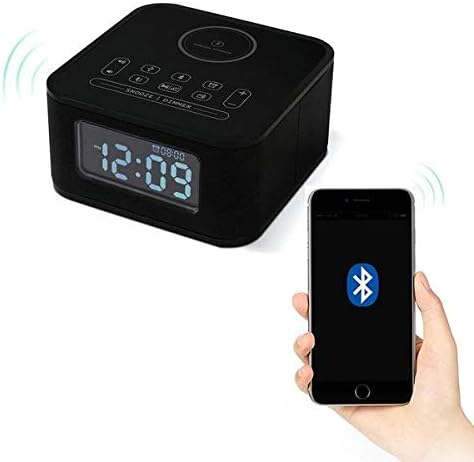
Figure 4.4: The Homtime D2qi speaker connected via Bluetooth to a smartphone.
5. Налаштування
5.1 Підключення живлення
- Connect the provided power adapter to the DC input port on the back of the Homtime D2qi.
- Підключіть адаптер живлення до стандартної розетки.
- Дисплей засвітиться, що сигналізує про те, що пристрій увімкнено.
5.2 Початкове налаштування часу
При першому ввімкненні або після відключення живленняtage, you may need to set the time. Refer to the 'Operating Instructions' section for detailed steps on setting the clock.
6. Інструкція з експлуатації
6.1 Підключення Bluetooth
- Натисніть кнопка Bluetooth on the top panel to enter Bluetooth pairing mode. The Bluetooth indicator will flash.
- На смартфоні або аудіопристрої увімкніть Bluetooth та знайдіть доступні пристрої.
- Select "Homtime D2qi" from the list.
- Після підключення індикатор Bluetooth перестане блимати та світитиметься постійно. Тепер ви можете відтворювати аудіо через динамік.
6.2 Бездротова зарядка
- Place your Qi-compatible smartphone centrally on the wireless charging pad located on the top surface of the speaker.
- Ensure the phone is properly aligned with the charging coil.
- The charging indicator on your phone will show that charging has begun.
6.3 Функція будильника
- Натисніть Тривожна кнопка для переходу в режим налаштування будильника
- Використовуйте кнопки +/- щоб налаштувати годину та хвилину.
- Натисніть Тривожна кнопка ще раз, щоб підтвердити кожне налаштування.
- Щоб увімкнути/вимкнути будильник, натисніть кнопку Тривожна кнопка briefly when not in setting mode.
- Щоб відкласти будильник, натисніть Кнопка Snooze/Dimmer коли лунає будильник.
6.4 Функція радіо
- Натисніть Кнопка режиму щоб перейти в режим FM-радіо.
- Натисніть і утримуйте Кнопка відтворення/паузи to auto-scan and save available stations.
- Використовуйте Кнопки Попередній/Далі для навігації між збереженими станціями.
6.5 Call Answering
При підключенні через Bluetooth, динамік можна використовувати для здійснення дзвінків у режимі hands-free.
- Щоб відповісти на вхідний дзвінок, натисніть Кнопка відтворення/паузи.
- Щоб завершити дзвінок, натисніть Кнопка відтворення/паузи знову.
7. Технічне обслуговування
- Протирайте пристрій м’якою сухою тканиною. Не використовуйте абразивні засоби для чищення або розчинники.
- Keep the charging pad free of dust and debris to ensure efficient wireless charging.
- Зберігайте пристрій у прохолодному, сухому місці, якщо він не використовується протягом тривалого часу.
8. Вирішення проблем
| проблема | Можлива причина | Рішення |
|---|---|---|
| Немає живлення | Адаптер живлення не підключений або несправна розетка. | Переконайтеся, що адаптер живлення надійно підключено до пристрою та до робочої розетки. |
| Немає звуку з динаміка | Bluetooth not connected; volume too low; incorrect mode. | Ensure Bluetooth is paired. Increase volume on both the speaker and your device. Check if the speaker is in the correct mode (Bluetooth/Radio). |
| Не працює бездротова зарядка | Phone not Qi-compatible; phone not aligned; phone case too thick. | Verify phone supports Qi wireless charging. Realign phone on the charging pad. Remove thick phone cases. |
| Buttons difficult to locate in the dark | Buttons are flush with the surface. | Familiarize yourself with button layout during daylight. Use the dimmer function to adjust display brightness. |
| Bluetooth disconnects automatically | Power saving feature; device out of range. | Reconnect Bluetooth manually. Keep devices within Bluetooth range (approx. 10 meters). |
9. Технічні характеристики
| Особливість | Деталь |
|---|---|
| Бренд | Домашній час |
| Номер моделі | D2qi |
| Колір | чорний |
| Тип динаміка | Колонки Bluetooth |
| Підключення | Бездротовий |
| Сумісні пристрої | Смартфони |
| Вихідна потужність | 5 - 10 Вт |
| Вага продукту | 0.5 кг |
| Розміри упаковки | 19.6 х 18.8 х 14.8 см |
| Апаратний інтерфейс | Audio/Video Port |
10. Гарантія та підтримка
Homtime products are manufactured to the highest quality standards. For warranty information and customer support, please refer to the warranty card included in your package or visit the official Homtime webсайт. Зберігайте чек про покупку як підтвердження покупки.