
Blackmagic Design CINECAMPOCHDMFT4K
Кишенькова кінокамера Blackmagic Design 4K (CINECAMPІнструкція з експлуатації OCHDMFT4K)
Comprehensive guide for setup, operation, and maintenance of your CINECAMPOCHDMFT4K.
Продукт закінченийview
The Blackmagic Design Pocket Cinema Camera 4K (model CINECAMPOCHDMFT4K) is a handheld digital film camera designed for professional video production. It features a 4/3" CMOS sensor, 13 stops of dynamic range, and dual native ISO up to 25,600, enabling high-quality video capture in various lighting conditions. The camera supports recording in industry-standard formats such as Apple ProRes and 12-bit Blackmagic RAW.
Ключові особливості:
- Incredible Image Quality: 4/3" image sensor with 4096 x 2160 native resolution, active MFT lens mount, 13 stops dynamic range, and dual native ISO up to 25,600.
- Кілька варіантів запису: Records to SD/UHS-II and CFast 2.0 cards, or external SSD via USB-C.
- Універсальний File Формати: Supports Apple ProRes (up to 4K) and 12-bit Blackmagic RAW. Includes DaVinci Resolve Studio activation key.
- Зручний дизайн: Lightweight carbon fiber polycarbonate composite body with a multifunction handgrip and a large, bright 5" LCD display.
- Широкі можливості підключення: Full-size HDMI, mini XLR with 48-volt phantom power, 3.5mm microphone and headphones connections, USB-C, and Bluetooth.
Вміст упаковки
The Blackmagic Design Pocket Cinema Camera 4K package includes:
- Blackmagic Design Pocket Cinema Camera 4K body
- DaVinci Resolve Studio activation key
- Lens turret dust cap
- 30W power supply with locking connector and international adapters
- LP-E6 battery
Посібник із налаштування
1. Встановлення батареї
The camera uses an LP-E6 battery. To install:
- Знайдіть відсік для батареї на нижній частині камери.
- Відкрийте кришку батарейного відсіку.
- Insert the LP-E6 battery, ensuring correct orientation.
- Надійно закрийте кришку батарейного відсіку.

Малюнок 1: Задня частина view of the camera, showing the battery compartment location.
2. Вставлення карти пам'яті
The camera supports SD/UHS-II and CFast 2.0 cards. To insert:
- Locate the memory card slots on the side of the camera.
- Відкрийте кришку гнізда для карти пам’яті.
- Insert the SD or CFast card into the appropriate slot until it clicks into place.
- Закрийте кришку гнізда для карти пам’яті.

Малюнок 2: Сторона view of the camera, illustrating the memory card slots.
3. Кріплення об'єктива
The camera features an active Micro Four Thirds (MFT) lens mount. To attach a lens:
- Remove the lens turret dust cap from the camera body.
- Зіставте червону точку на об'єктиві з червоною точкою на кріпленні об'єктива камери.
- Gently insert the lens into the mount and rotate it clockwise until it clicks into place.
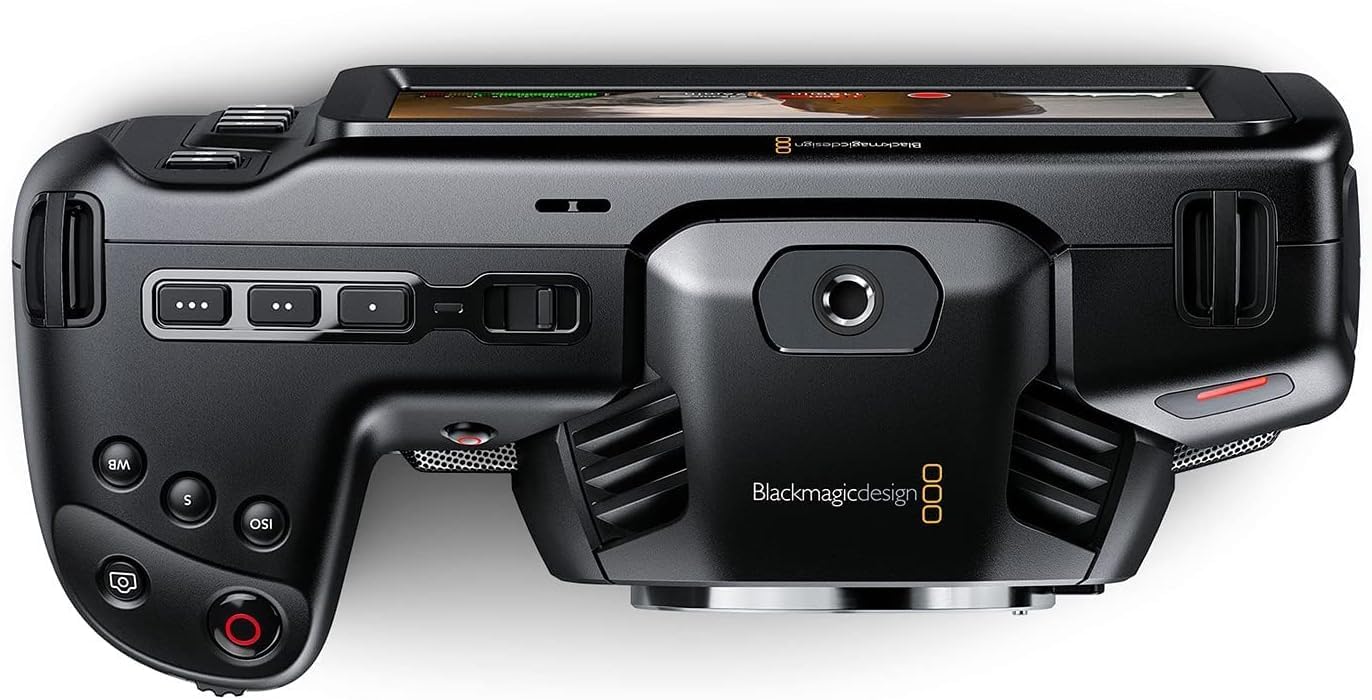
Малюнок 3: Спереду view of the camera, highlighting the MFT lens mount.
4. Підключення живлення
For extended operation, connect the included 30W power supply:
- Connect the appropriate international adapter to the power supply.
- Підключіть блок живлення до розетки.
- Connect the locking DC power connector to the 12V input port on the camera.

Малюнок 4: Сторона view of the camera, showing the 12V power input and other connectivity options.
Інструкція з експлуатації
1. Увімкнення/вимкнення живлення
To power on the camera, slide the "ON/OFF" switch located on the top left side of the camera body. To power off, slide the switch back to the "OFF" position.
2. Basic Controls and Touchscreen Interface
The camera features a large 5" touchscreen LCD for intuitive control. Physical buttons are also available for quick access to essential functions such as ISO, Shutter, White Balance, and Record.

Figure 5: Camera screen showing various recording settings and options.
3. Налаштування запису
Access recording settings via the touchscreen menu. You can select:
- Codec and Quality: Choose between Blackmagic RAW (Constant Bitrate, Constant Quality Q0, Q5) or Apple ProRes (422 HQ, 422, 422 LT, 422 Proxy).
- роздільна здатність: Options include 4K DCI (4096x2160), 4K 2.4:1 (4096x1720), Ultra HD (3840x2160), 2.8K Anamorphic (2880x2160), 2.6K 16:9 (2688x1512), and HD (1920x1080).
- Частота кадрів: Up to 60fps in 4K and 120fps in HD.

Малюнок 6: Детально view of the camera's menu for selecting recording codecs and resolutions.
4. Аудіо вхід
The camera offers versatile audio input options:
- Mini XLR: For professional microphones, with 48-volt phantom power support.
- Вхід 3.5 мм: For external microphones or line-level audio.
- Вбудовані стереомікрофони: For convenient on-camera audio capture.
- Гніздо для навушників 3.5 мм: Для аудіомоніторингу.
5. External Monitoring and Storage
Connect external monitors via the full-size HDMI port. For extended recording, use the USB-C port to connect external SSD media.
Технічне обслуговування
- Прибирання: Use a soft, dry cloth to clean the camera body. For the lens and sensor, use specialized cleaning kits and follow manufacturer guidelines.
- Зберігання: Store the camera in a dry, dust-free environment, ideally in a protective case when not in use. Remove batteries during long-term storage.
- Оновлення прошивки: Регулярно перевіряйте дизайн Blackmagic webсайт для оновлень прошивки, щоб забезпечити оптимальну продуктивність і доступ до нових функцій.
Усунення несправностей
If you encounter issues with your camera, consider the following general troubleshooting steps:
- Питання живлення: Ensure the battery is fully charged or the power adapter is securely connected. Check battery orientation.
- Проблеми запису: Verify that memory cards are correctly inserted and have sufficient free space. Check selected codec and resolution settings for compatibility with your workflow.
- Якість зображення: Ensure the lens is clean and properly attached. Check ISO settings for excessive noise in low light.
- програмне забезпечення: If using DaVinci Resolve Studio, ensure it is updated to the latest version.
For more detailed troubleshooting, refer to the comprehensive manual available on the Blackmagic Design support webсайт.
Технічні характеристики
| Розміри продукту | 7.01 x 3.37 x 3.78 дюймів |
| Вага товару | 1.53 фунта |
| Номер моделі товару | ЦИНЕКAMPOCHDMFT4K |
| Бренд | Blackmagic Design |
| Технологія фотосенсора | CCD |
| Роздільна здатність захоплення відео | 4K |
| Максимальна діафрагма | 2.8 міліметрів |
| Тип флеш-пам'яті | SD |
| Формат захоплення відео | Blackmagic RAW, ProRes 422 |
| Підтримуваний аудіоформат | AAC, MP3, PCM |
| Розмір екрана | 5 дюймів |
| Технологія підключення | USB |
| Акумулятори | Потрібні батареї 1 А (входять в комплект) |
Гарантія та підтримка
Щоб отримати інформацію про гарантію та технічну підтримку, зверніться до офіційного веб-сайту Blackmagic Design. webсайт або зверніться безпосередньо до служби підтримки клієнтів. Зберігайте чек про покупку як підтвердження покупки для гарантійних претензій.
Online resources and additional documentation can be found at: Blackmagic Design Support
Ask a question about this manual
Ask about setup, troubleshooting, compatibility, parts, safety, or missing instructions. Manuals+ will review the question and use this page’s manual context to help answer it.