вступ
Thank you for choosing the LAOPAO PS6100 Digital Stopwatch. This handheld, waterproof stopwatch features a large LCD display, 1/100 second precision timing, and multiple functions including a daily alarm, timer, and metronome. Designed for sports, training, and general timing needs, this manual provides detailed instructions for its operation and maintenance.

Image: The LAOPAO PS6100 Digital Stopwatch, a silver-colored device with a large LCD display and three control buttons on top, attached to a white lanyard.
Продукт закінченийview і функції кнопок
The LAOPAO PS6100 stopwatch features three primary control buttons and a clear LCD display. Understanding these controls is essential for proper operation.
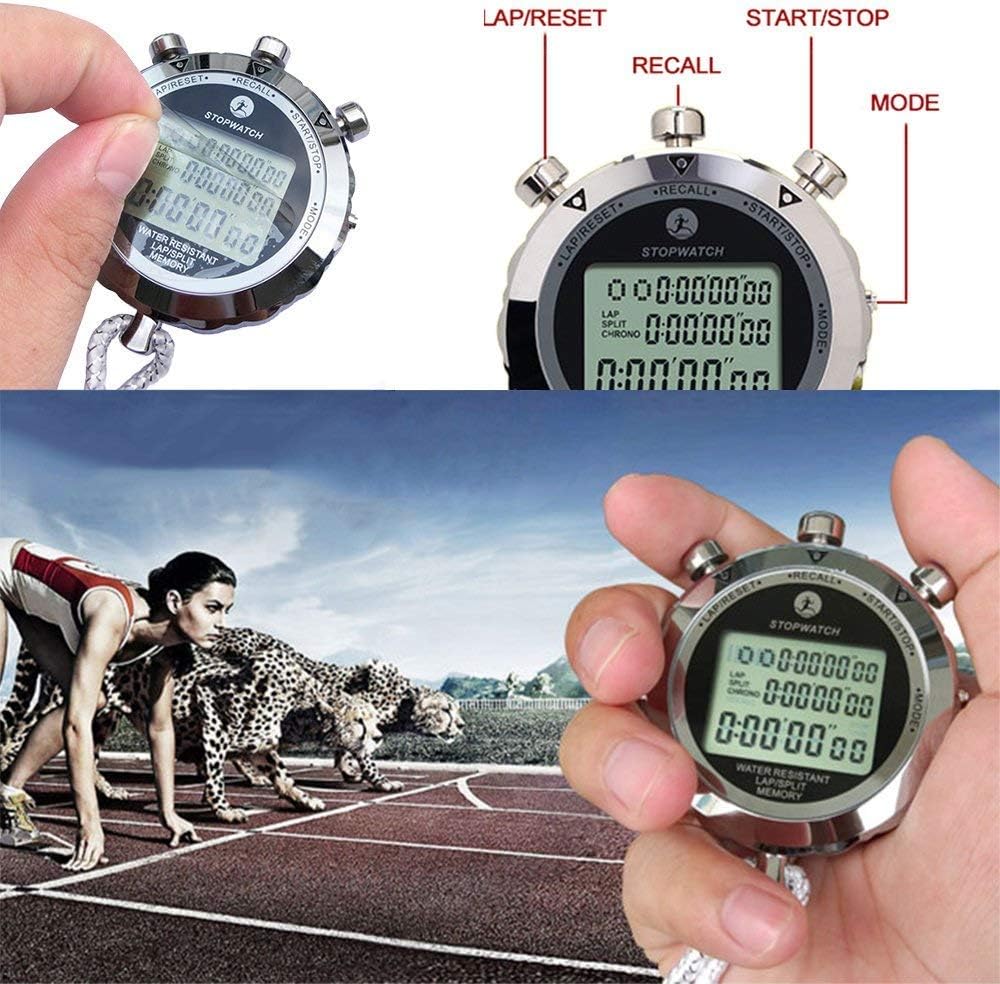
Image: Close-up of the LAOPAO PS6100 stopwatch highlighting the three buttons: "LAP/RESET" (left), "RECALL" (top center), and "START/STOP" (right). The "MODE" button is indicated on the right side of the stopwatch body.
- Кнопка START/STOP: Initiates and pauses timing in stopwatch mode. Used for setting values in other modes.
- LAP/RESET Button: Records lap times or resets the stopwatch. Used for adjusting values in other modes.
- Кнопка MODE: Cycles through different operational modes (Time, Stopwatch, Alarm, Timer, Metronome).
- Кнопка RECALL: Accesses stored lap/split times in stopwatch mode.
Налаштування
Установка батареї
The LAOPAO PS6100 stopwatch requires one Lithium-ion battery for operation. Ensure the battery is correctly installed according to the polarity markings inside the battery compartment. If the display is dim or unresponsive, replace the battery.
Початкове налаштування часу
Upon first use or after battery replacement, you may need to set the current time and date.
- Натисніть РЕЖИМ button repeatedly until the time display mode is shown (typically displaying hour, minute, second, day, month, and date).
- Натисніть і утримуйте КОЛІ/СКИДАННЯ button until the digits begin to flash, indicating setting mode.
- Використовуйте ПУСК/СТОП кнопку для налаштування миготливого значення (наприклад, секунди, хвилини, години).
- Використовуйте КОЛІ/СКИДАННЯ button to move to the next setting (e.g., from seconds to minutes, then hours, date, month, day of the week).
- Після того, як усі налаштування правильні, натисніть кнопку РЕЖИМ кнопку для виходу з режиму налаштування.
Інструкція з експлуатації
The stopwatch offers several modes for various timing and display needs. Use the РЕЖИМ кнопку для перемикання між ними.

Image: A composite image showing the different display modes of the LAOPAO PS6100 stopwatch: Clock, Alarm clock, Stopwatch, Timer, and Metronome (Pace).
1. Time Display Mode (Clock)
This mode displays the current time (hour, minute, second), day of the week, month, and date. It also supports 12-hour and 24-hour formats. To switch between 12/24-hour display, press the ПУСК/СТОП button while in time display mode.
2. Режим секундоміра (хронографа)
This mode is used for precise timing of events, accurate to 1/100th of a second. It supports split and lap timing.
- Прес РЕЖИМ until "STOPWATCH" or "CHRONO" is displayed.
- Прес ПУСК/СТОП щоб почати вимірювання часу.
- Для запису a час кола (time for a segment while the main timer continues), press КОЛІ/СКИДАННЯ. The lap time will be displayed briefly.
- Для запису a split time (time from the start to a specific point, pausing the display but not the timer), press КОЛІ/СКИДАННЯ. The split time will be displayed. Press КОЛІ/СКИДАННЯ знову, щоб повернутися до відліку часу.
- Прес ПУСК/СТОП ще раз, щоб призупинити секундомір.
- Під час паузи натисніть КОЛІ/СКИДАННЯ щоб скинути секундомір на нуль.
- To recall stored lap/split times, press the ПРИГАДАЙТЕ button while the stopwatch is paused and reset. Use ПУСК/СТОП і КОЛІ/СКИДАННЯ to navigate through stored records.
3. Daily Alarm Mode
Встановіть щоденний будильник, який звучатиме у певний час.
- Прес РЕЖИМ until "ALARM" is displayed.
- Натисніть і утримуйте КОЛІ/СКИДАННЯ доки цифри часу будильника не почнуть блимати.
- використання ПУСК/СТОП to adjust the flashing value (hours, then minutes).
- використання КОЛІ/СКИДАННЯ щоб перемикатися між налаштуваннями годин та хвилин.
- Прес РЕЖИМ для підтвердження та виходу з режиму налаштування.
- Щоб увімкнути/вимкнути будильник, натисніть ПУСК/СТОП while in alarm display mode (not setting mode). An alarm icon will appear/disappear.
4. Timer Mode (Countdown)
Use the timer for countdown functions.
- Прес РЕЖИМ until "TIMER" or "TR" is displayed.
- Натисніть і утримуйте КОЛІ/СКИДАННЯ доки цифри таймера не почнуть блимати.
- використання ПУСК/СТОП to adjust the flashing value (hours, minutes, seconds).
- використання КОЛІ/СКИДАННЯ to move between settings.
- Прес РЕЖИМ для підтвердження та виходу з режиму налаштування.
- Прес ПУСК/СТОП щоб розпочати зворотний відлік. Натисніть ще раз, щоб призупинити.
- When paused, press КОЛІ/СКИДАННЯ щоб скинути таймер до встановленого значення.
5. Metronome Mode (Pace)
The metronome function provides a rhythmic beat for training.
- Прес РЕЖИМ until "PACE" is displayed.
- Натисніть і утримуйте КОЛІ/СКИДАННЯ until the pace value flashes.
- використання ПУСК/СТОП to adjust the desired pace (beats per minute).
- Прес РЕЖИМ для підтвердження та виходу з режиму налаштування.
- Прес ПУСК/СТОП to start the metronome. Press again to stop.
Технічне обслуговування
To ensure the longevity and optimal performance of your LAOPAO PS6100 stopwatch, follow these maintenance guidelines:
- Прибирання: Wipe the stopwatch with a soft, dry cloth. For stubborn dirt, a slightly damp можна використовувати тканину, після чого негайно висушити. Уникайте агресивних хімікатів або абразивних засобів для чищення.
- Водонепроникність: The stopwatch is designed to be waterproof for daily use and sports activities. However, avoid prolonged submersion or operating buttons underwater to prevent water ingress.
- Зберігання: Store the stopwatch in a cool, dry place away from direct sunlight and extreme temperatures.
- Заміна батареї: If the display becomes dim or functions are erratic, replace the battery promptly. Refer to the "Battery Installation" section for guidance.
Усунення несправностей
If you encounter issues with your LAOPAO PS6100 stopwatch, refer to the following common problems and solutions:
- Немає дисплея або тьмяний дисплей:
- Check battery level. Replace the battery if necessary.
- Переконайтеся, що батарея встановлена з дотриманням правильної полярності.
- Кнопки не відповідають:
- Ensure the stopwatch is not in a locked mode (if applicable, though not specified for this model).
- Спробуйте скинути налаштування пристрою, вийнявши та знову вставивши акумулятор.
- Неправильний час/дата:
- Refer to the "Initial Time Setting" section to re-adjust the time and date.
- Пошкодження від води:
- While waterproof, extreme conditions or button presses underwater can cause issues. If water ingress is suspected, discontinue use and allow the device to dry completely in a dry, warm environment. Do not attempt to open the device.
Технічні характеристики
| Особливість | Деталь |
|---|---|
| Номер моделі | PS6100 |
| матеріал | Нержавіюча сталь |
| Розміри (продукт) | 6 x 1 x 4 см (приблизно) |
| Вага товару | 180 грамів |
| Тип дисплея | Великий LCD |
| Розмір дисплея | 3.6 Сантиметри |
| Точність хронометражу | 1/100 секунди |
| Водонепроникність | Yes (suitable for daily use and sports) |
| Потрібен акумулятор | 1 літій-іонний акумулятор |
| Функції | Clock, Stopwatch (Lap/Split), Daily Alarm, Timer, Metronome |
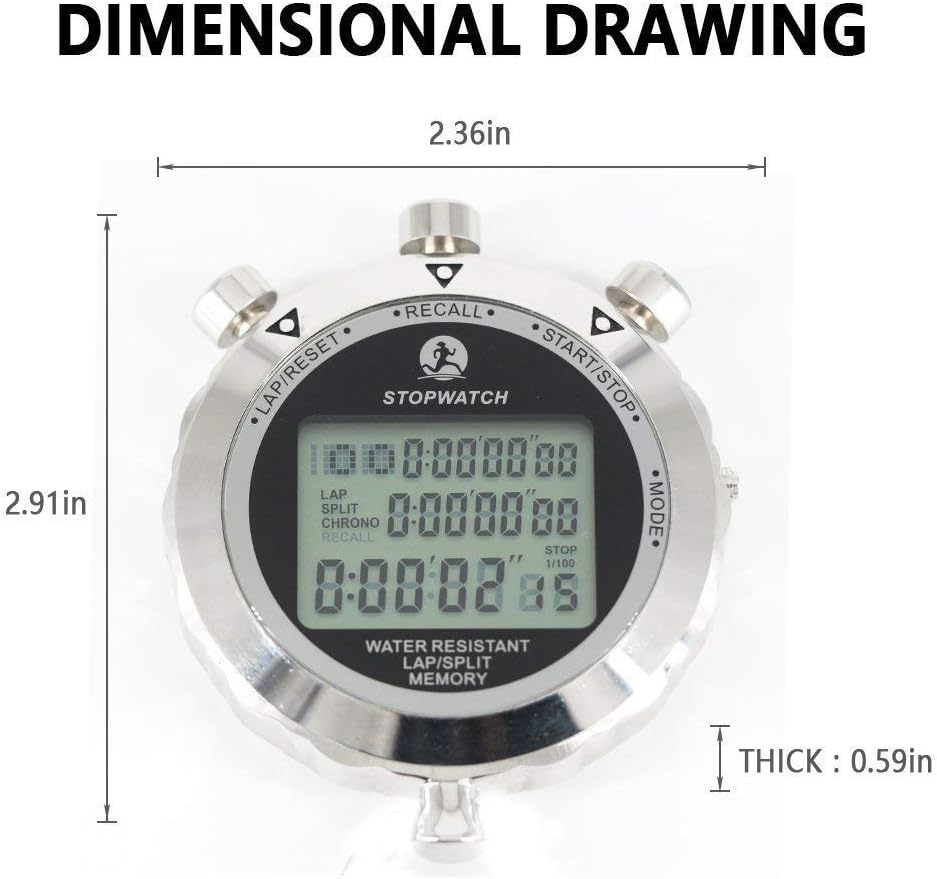
Image: A dimensional drawing of the LAOPAO PS6100 stopwatch, indicating its width as 2.36 inches, height as 2.91 inches, and thickness as 0.59 inches.
Гарантія та підтримка
Information regarding specific warranty terms or direct customer support contacts for the LAOPAO PS6100 Digital Stopwatch is not available in the provided product data. For warranty claims or technical assistance, please refer to the retailer or the official LAOPAO webсайт, якщо є.