
1. Вступ
Thank you for choosing the SECULINK F6-N80 4K POE Security Camera. This manual provides essential information for the proper installation, operation, and maintenance of your camera. Please read this manual thoroughly before use and retain it for future reference.
The SECULINK F6-N80 is a high-performance 8MP (4K) POE-compatible IP camera designed for both indoor and outdoor surveillance. It features advanced capabilities such as color night vision, intelligent human and vehicle detection, and robust IP66 weatherproofing, ensuring reliable security monitoring.
2. Інформація про безпеку
- Електрична безпека: Ensure all power connections comply with local electrical codes. Use only approved power adapters (DC 12V) or POE switches/NVRs that meet IEEE802.3af/at standards.
- Установка: Install the camera in a secure location where it cannot be easily tampered with. Ensure mounting surfaces are strong enough to support the camera's weight.
- Вода і вологість: Хоча камера захищена від атмосферних впливів за стандартом IP66, уникайте занурення її у воду або впливу струменів води під високим тиском.
- температура: Operate the camera within its specified temperature range (e.g., -22°F to 140°F / -30°C to 60°C).
- Прибирання: Від’єднайте живлення перед чищенням. Використовуйте м’яку суху тканину. Уникайте агресивних хімікатів.
3. Вміст упаковки
Будь ласка, перевірте вміст упаковки після отримання. Якщо будь-які предмети відсутні або пошкоджені, зверніться до продавця.
- SECULINK F6-N80 4K POE Security Camera
- Комплект монтажних гвинтів
- Водонепроникний роз'єм для кабелю Ethernet
- Quick Start Guide / Instruction Manual (this document)
4. Продукт закінчивсяview
The SECULINK F6-N80 camera is designed for robust surveillance with its 8MP resolution and POE capability. Its durable metal housing ensures longevity in various environments.

Figure 4.1: POE Functionality. This image shows a network video recorder (NVR) or switch with multiple POE ports connected to a security camera, illustrating how a single Ethernet cable provides both power and data.
Ключові характеристики:
- Роздільна здатність Super HD 8 МП: Captures video at 3840 x 2160 pixels for clear, detailed images.
- POE (Power over Ethernet): Simplifies installation by delivering power and data through a single Ethernet cable (IEEE802.3af/at compatible).
- IP66 Захист від атмосферних впливів: Constructed with a solid aluminum body, ensuring reliable operation outdoors in various weather conditions.
- Розширене нічне бачення: Features premium LEDs and a smart IR cut filter for clear visibility up to 30m, including advanced color night vision.
- Інтелектуальне виявлення: Supports human and vehicle motion detection to reduce false alarms.
- Вбудований мікрофон: Для аудіовходу.
- Стиснення відео H.265+: Optimizes bandwidth and storage efficiency for longer recording times.
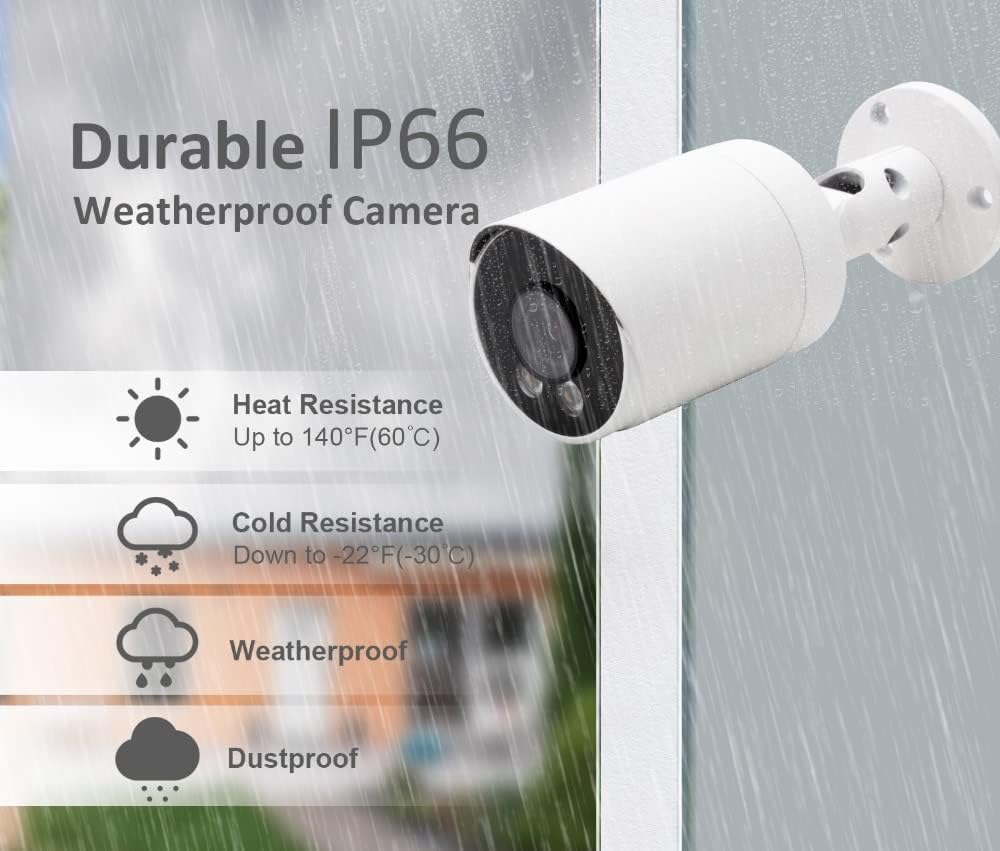
Figure 4.2: IP66 Weatherproof Rating. This image highlights the camera's durability against heat, cold, rain, and dust, making it suitable for outdoor installation.
5. Налаштування
5.1 Фізичне встановлення
- Виберіть місце розташування: Select a suitable location for installation, ensuring a clear field of view and proximity to your POE network device. The camera is designed for wall mounting.
- Монтаж: Use the provided mounting screw kit to securely attach the camera to the desired surface. Drill pilot holes if necessary.
- Відрегулювати кут: Послабте регулювальні гвинти на кронштейні камери, щоб встановити потрібне viewкут. Затягніть гвинти після встановлення кута.
5.2 POE Connection
The camera supports Power over Ethernet (POE), simplifying wiring by combining power and data transmission into a single Ethernet cable.
- Підключення кабелю Ethernet: Connect one end of an Ethernet cable to the camera's RJ45 port. Use the waterproof connector for outdoor installations to protect the connection.
- Connect to POE Device: Connect the other end of the Ethernet cable to a POE port on your POE-enabled NVR (Network Video Recorder) or POE switch. Ensure the POE device supports IEEE802.3af/at standards.
- Alternative Power (Optional): If not using POE, connect a DC 12V power adapter (not included) to the camera's power input port.
5.3 Конфігурація мережі
After physical connection, the camera will power on. You will need to configure it through your NVR or a dedicated mobile application/PC software.
- Підключення відеореєстратора: If connected to an NVR, the camera should be automatically detected or can be added manually through the NVR's interface. Refer to your NVR's manual for specific instructions.
- Software/App Setup: For direct access or advanced settings, download the manufacturer's recommended software or mobile application. Follow the in-app instructions to add and configure your camera. This typically involves scanning a QR code or manually entering the camera's IP address.
6. Інструкція з експлуатації
6.1 Viewживий канал
Access the live video feed through your connected NVR, PC software, or mobile application. This allows real-time monitoring of the camera's view.
6.2 Виявлення руху
The camera features programmable motion detection, including intelligent human and vehicle detection, to minimize false alarms.

Figure 6.1: Motion Detection Workflow. This image illustrates how the camera transitions from standby to recording mode upon detecting motion and returns to standby when motion ceases.
- Конфігурація: Access the camera settings via your NVR or application to configure motion detection zones, sensitivity levels, and detection types (human, vehicle, general motion).
- Сповіщення: Set up real-time alerts via email, push notifications to your smartphone, or an audible buzzer when motion is detected.
- Запис: Motion detection can trigger automatic recording, saving storage space by only recording relevant events.

Figure 6.2: Human and Vehicle Detection. This image shows the camera's ability to distinguish between human and vehicle movement, triggering specific alerts.

Figure 6.3: Intelligent Human Detection. This image demonstrates the camera's capability to accurately identify human activity while ignoring irrelevant movements like pets or shadows.
6.3 Нічне бачення
The camera provides clear visibility in low-light conditions and complete darkness.

Figure 6.4: Clear Night Vision. This image compares a scene with floodlights on (color) and off (black and white), showcasing the camera's effective night vision.
- ІЧ-фільтр: Automatically switches between day and night mode for optimal image quality.
- LED Illuminators: Built-in LEDs provide infrared light for black and white night vision up to 30m.
- Кольорове нічне бачення: In certain low-light conditions, the camera can provide color images using its advanced sensor and premium LEDs.
6.4 Запис і відтворення
The camera supports continuous recording, scheduled recording, and motion-triggered recording. Recordings are typically stored on an NVR or a compatible storage device.
- Стиснення H.265+: Utilizes advanced video compression to reduce file sizes without compromising video quality, extending storage capacity.
- Відтворення: Доступ до записаного footage through your NVR or application.
6.5 Аудіовхід
The built-in microphone captures audio from the camera's vicinity, which can be recorded along with video footage.
7. Технічне обслуговування
- Прибирання: Регулярно очищуйте об'єктив і корпус камери м'якою губкоюamp тканиною, щоб видалити пил і бруд. Уникайте абразивних засобів для чищення.
- Оновлення прошивки: Перевірте виробника website periodically for firmware updates. Keeping your camera's firmware updated ensures optimal performance and security.
- Перевірка кабелю: Periodically inspect all cables for wear or damage, especially for outdoor installations. Ensure waterproof connectors are sealed properly.
- Екологічні перевірки: Переконайтеся, що середовище, в якому знаходиться камера, залишається в межах зазначених робочих діапазонів температури та вологості.
8. Вирішення проблем
- Немає живлення:
- Verify the POE switch/NVR is powered on and the Ethernet cable is securely connected to a POE port.
- If using a DC 12V adapter, ensure it is properly connected and the power outlet is functional.
- Без відеопотоку:
- Check network connectivity. Ensure the camera and NVR/PC are on the same network.
- Verify the camera's IP address and network settings are correct.
- Restart the camera and the connected NVR/POE switch.
- Виявлення руху не працює:
- Ensure motion detection is enabled in the camera's settings.
- Adjust sensitivity levels and detection zones.
- Check if alert notifications (email, push) are correctly configured and enabled.
- Погана якість зображення:
- Очистіть об'єктив камери.
- Переконайтеся, що в полі зору камери немає перешкод view.
- Check network bandwidth if experiencing lag or pixelation.
9. Технічні характеристики
| Особливість | Специфікація |
|---|---|
| Номер моделі | F6-N80 |
| Датчик зображення | 8MP CMOS |
| Максимальна роздільна здатність | 3840 x 2160 (4K) |
| Частота кадрів | 20 кадрів/с |
| Об'єктив | 2.8mm F1.6 |
| Viewкут нахилу | 90-100 градусів |
| Нічне бачення | IR-Cut, LED, up to 30m range, Color Night Vision |
| Аудіо вхід | Вбудований мікрофон |
| Рейтинг погодостійкості | IP66 |
| Ethernet | RJ45 |
| POE стандарт | 802.3af/802.3at, 48V |
| Джерело живлення | POE or DC 12V (9 watts) |
| матеріал | метал |
| Форм-фактор | Куля |
| Спосіб встановлення | Screw-in, Wall Mount |
| Розміри (упаковка) | 17.53 х 8.13 х 7.62 см |
| Вага (продукт) | 386 г |
10. Гарантія та підтримка
For warranty information and technical support, please refer to the SECULINK official webсайт або зверніться до авторизованого дилера. Зберігайте чек про покупку як підтвердження покупки.