
вступ
Welcome to the user manual for your Mustool G600 Digital Portable Microscope. This guide provides detailed instructions to help you set up, operate, and maintain your device, ensuring optimal performance and longevity. Please read this manual thoroughly before using the microscope.
Продукт закінченийview
The Mustool G600 is a versatile digital portable microscope designed for detailed observation of tiny objects. It features a high-definition display and adjustable magnification, making it suitable for various applications.
Ключові характеристики
- 4.3-inch HD LCD display for clear viewінж.
- HD 3.6MP CCD sensor for high-resolution imaging.
- Adjustable magnification from 1x to 600x.
- Eight high-brightness LEDs for optimal illumination.
- Support for Micro SD card up to 64GB (not included) for storage.
- Built-in Li-ion battery providing approximately 6 hours of continuous working time.
- Auto turn-off function for power saving.
- Object distance: 15mm to infinity.
- Багатомовна підтримка.
компоненти

Figure 1: Mustool G600 Digital Portable Microscope in operation, showing a circuit board under its lens and the magnified image on the display.
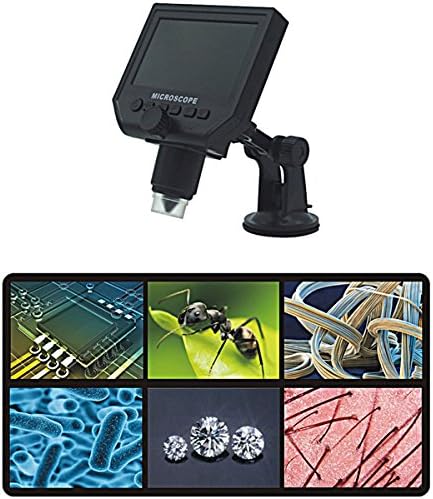
Figure 2: The Mustool G600 Digital Portable Microscope detached from its stand, showcasing the device's compact design and the adjustable stand.

Figure 3: The Mustool G600 Digital Portable Microscope display, illustrating various magnified views such as circuit components, an ant, textile fibers, bacteria, diamonds, and hair strands.

Малюнок 4: Спереду view of the Mustool G600 Digital Portable Microscope mounted on its suction cup stand, highlighting the 4.3-inch LCD screen and control buttons.

Малюнок 5: Сторона view of the Mustool G600 Digital Portable Microscope, illustrating the adjustable arm of the stand and the microscope's lens assembly.

Малюнок 6: Задня частина view of the Mustool G600 Digital Portable Microscope, showing the various ports for power, data, and Micro SD card insertion.
Вміст упаковки
Будь ласка, перевірте, чи всі перелічені нижче предмети входять до вашої упаковки. Якщо будь-які предмети відсутні або пошкоджені, зверніться до служби підтримки клієнтів.
- 1 x Mustool G600 LCD Digital Microscope
- 1 x EU Plug Power supply (Note: Adapter may vary by region)
- 1 x лінія передачі даних (USB-кабель)
- 1 x Multi-functional support (Stand)
- 1 x User’s manual (This document)
Налаштування
Зарядка батареї
Before first use, fully charge the microscope's built-in Li-ion battery.
- Connect the provided power supply to the microscope's charging port.
- Підключіть блок живлення до стандартної електричної розетки.
- Індикатор заряджання засвітиться. Після повного заряджання індикатор може змінити колір або згаснути.
- A full charge provides approximately 6 hours of continuous operation.
Складання підставки
The multi-functional support allows for stable positioning of the microscope.
- Attach the microscope unit to the adjustable arm of the stand. Ensure it is securely fastened.
- Place the suction cup base on a clean, flat, non-porous surface. Press down firmly on the suction cup lever to secure the stand.
- Adjust the arm and microscope angle as needed for your viewпредмет.
Inserting a Micro SD Card (Optional)
To save images and videos, insert a Micro SD card (up to 64GB, not included).
- Locate the Micro SD card slot on the side or back of the microscope unit.
- Gently insert the Micro SD card with the gold contacts facing down (or as indicated by the slot diagram) until it clicks into place.
- Щоб вийняти, обережно знову натисніть на карту, доки вона не вискочить.
Інструкція з експлуатації
Увімкнення/вимкнення
Натисніть і утримуйте потужність button (usually marked with a power symbol) for a few seconds to turn the microscope on or off. The LCD screen will illuminate.
Налаштування збільшення та фокусування
The microscope offers 1x to 600x continuous magnification.
- Place the object you wish to observe directly under the microscope lens.
- Поверніть великий Ручка фокусування (typically located on the side of the microscope body) to bring the image into sharp focus on the LCD screen.
- Adjust the distance between the lens and the object (object distance: 15mm to infinity) using the stand's adjustment mechanisms to achieve the desired magnification and clarity.
Регулювання яскравості світлодіода
The microscope is equipped with 8 adjustable high-brightness LEDs.
Знайдіть Контроль яскравості світлодіодів (often a small knob or button) on the microscope body. Rotate or press it to increase or decrease the illumination on your subject.
Зйомка зображень і відео
To capture still images or record videos, ensure a Micro SD card is inserted.
- Поки viewing your subject, press the Режим button to switch between photo mode, video mode, and playback mode.
- У режимі фотозйомки натисніть кнопку OK/Знімок кнопку, щоб зробити знімок.
- У режимі відео натисніть кнопку OK/Знімок button to start recording. Press it again to stop recording.
- захоплений fileзберігаються на карті Micro SD.
Навігація по меню
Використовуйте Меню button to access settings and options.
Використовуйте Вгору/Вниз or Ліворуч/Праворуч кнопки зі стрілками для навігації між пунктами меню.
Натисніть OK кнопку для підтвердження вибору.
Common settings include resolution (1080P, 720P, VGA), language, date/time, and auto-off timer.
Технічне обслуговування
прибирання
To ensure clear viewing and extend the life of your microscope:
- Gently wipe the LCD screen with a soft, lint-free cloth. For stubborn smudges, slightly dampпротріть тканину водою або засобом для чищення екранів.
- Use a soft brush or air blower to remove dust from the lens. For smudges on the lens, use a specialized lens cleaning solution and cloth.
- Clean the microscope body with a dry or slightly damp тканина. Не використовуйте абразивні засоби чи розчинники.
Зберігання
Коли мікроскоп не використовується, зберігайте його в прохолодному, сухому місці, подалі від прямих сонячних променів та екстремальних температур.
Keep the lens covered to prevent dust accumulation.
Догляд за акумулятором
Щоб продовжити термін служби акумулятора:
- Уникайте частого повного розряджання акумулятора.
- Якщо ви зберігатимете пристрій протягом тривалого часу, зарядіть акумулятор приблизно до 50% його ємності.
- Recharge the battery every few months if not in use to prevent deep discharge.
Усунення несправностей
| проблема | Можлива причина | Рішення |
|---|---|---|
| Мікроскоп не вмикається. | Акумулятор розрядився. | Зарядіть акумулятор за допомогою джерела живлення, що входить до комплекту постачання. |
| Зображення розмите. | Incorrect focus or object distance. | Adjust the focus knob and/or the distance between the lens and the object. |
| Екран занадто темний/яскравий. | Яскравість світлодіода не регулюється. | Adjust the LED brightness control. |
| Не вдається зберегти зображення/відео. | Не вставлено карту Micro SD або карта заповнена/пошкоджена. | Insert a Micro SD card, ensure it has sufficient space, or try formatting the card (this will erase all data). |
| Microscope turns off automatically. | Auto turn-off function is enabled or battery is low. | Charge the battery. Check menu settings to adjust or disable the auto turn-off timer. |
Якщо проблема не зникає після спроби цих рішень, зверніться до служби підтримки клієнтів.
Технічні характеристики
| Особливість | Деталь |
|---|---|
| Модель | Mustool G600 |
| Дисплей | 4.3-дюймовий РК-дисплей HD |
| піксель | HD 3.6MP CCD |
| роздільна здатність | 1080P, 720P, VGA |
| Збільшення | 1-600x (Continuous) |
| Відстань об'єкта | 15mm - infinity |
| Джерело світла | 8 Adjustable High Brightness LEDs |
| Підтримка зберігання | Micro SD card up to 64GB (Not included) |
| Джерело живлення | Вбудований літій-іонний акумулятор |
| Термін служби батареї | Approx. 6 hours continuous working |
| Автоматичне відключення | так |
| Підтримка мови | English, Spanish, Russian, Korean, Japanese, Thai, Hebrew, Portuguese, German, French, Italian, Turkish, Czech, Chinese |
| матеріал | Glass/Glass-like (Lens), Other components as per design |
| Колір | чорний |
| UPC | 783050248461 |
Гарантія та підтримка
The Mustool G600 Digital Portable Microscope comes with a standard manufacturer's warranty. Please refer to the warranty card included in your package for specific terms and conditions.
For technical support, troubleshooting assistance beyond this manual, or warranty claims, please contact Mustool customer service through the retailer where you purchased the product or visit the official Mustool webсайт.
Please have your product model (G600) and purchase information ready when contacting support.