
1. Вступ
Thank you for choosing the Hanwha Techwin Wisenet QND-6020R 2 Megapixel Network Camera. This manual provides essential information for the safe and efficient installation, operation, and maintenance of your new surveillance camera. Please read this manual thoroughly before using the product and retain it for future reference.
2. Інформація про безпеку
Дотримуйтесь наступних запобіжних заходів, щоб запобігти травмуванню або пошкодженню виробу:
- Джерело живлення: Use only the specified power adapter (AC/DC) for this device. Incorrect voltage може спричинити пожежу або ураження електричним струмом.
- Установка: Ensure the camera is securely mounted to prevent it from falling. Wall mounting is recommended.
- Вода і вологість: This camera has an IP65 waterproof rating, meaning it is protected against dust and low-pressure water jets. However, avoid submerging the camera in water or exposing it to high-pressure water.
- Прибирання: Від’єднайте живлення перед чищенням. Використовуйте м’яку суху тканину. Не використовуйте рідкі або аерозольні засоби для чищення.
- Робоча температура: Не використовуйте камеру поза межами зазначеного температурного діапазону.
- Обслуговування: Не намагайтеся самостійно обслуговувати цей виріб. Зверніть усі послуги до кваліфікованого обслуговуючого персоналу.
3. Вміст упаковки
Перевірте наявність усіх елементів в упаковці:
- Hanwha Techwin Wisenet QND-6020R Network Camera
- Монтажні гвинти та анкери
- Керівництво по установці
- Адаптер живлення (AC/DC)
4. Продукт закінчивсяview
The Hanwha Techwin Wisenet QND-6020R is a 2-megapixel network dome camera designed for reliable surveillance. It features advanced video compression (H.264, H.265, Motion JPEG), 1080p video capture, and a 3.60 mm lens. Key features include night vision up to 65.62 ft and motion detection capabilities.
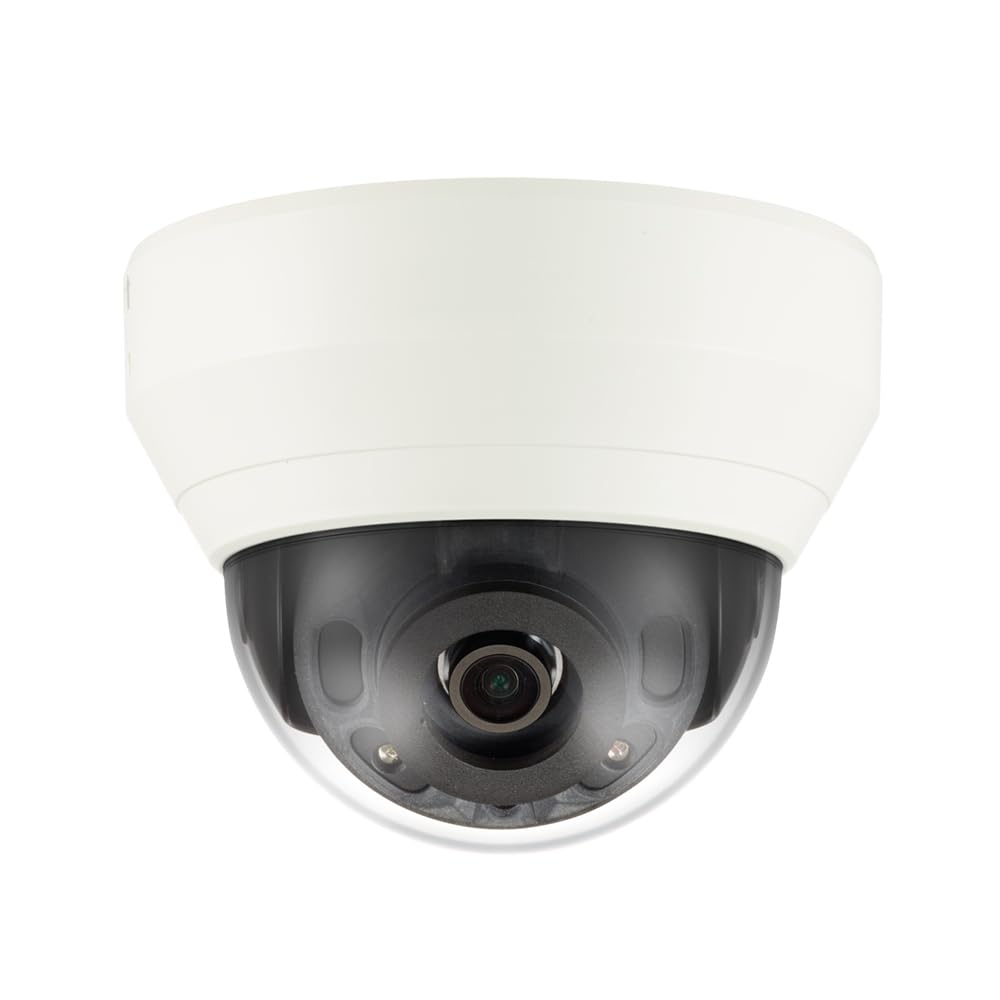
малюнок 4.1: Фронт view of the Hanwha Techwin Wisenet QND-6020R 2 Megapixel Network Dome Camera. This image shows the compact dome design, suitable for discreet surveillance installations. The camera features a dark housing and a clear dome covering the lens, indicating its robust construction for various environments.
5. Налаштування
5.1 Встановлення камери
- Виберіть розташування: Choose a suitable wall location for optimal surveillance coverage. Ensure the surface is strong enough to support the camera.
- Свердлити отвори: Use the provided mounting template (if applicable) to mark and drill pilot holes for the mounting screws.
- Закріпіть кріплення: Attach the camera's mounting base to the wall using the screws and anchors.
- Відрегулювати кут: Після встановлення відрегулюйте положення камери viewкут нахилу за потребою.
5.2 Живлення та підключення до мережі
- Підключення живлення: Connect the supplied AC/DC power adapter to the camera's power input port and then to a power outlet.
- Підключення до мережі (дротове): For a wired connection, connect an Ethernet cable from the camera's network port to your network router or switch.
- Мережеве з'єднання (Wi-Fi): For Wi-Fi connectivity, refer to the camera's initial setup wizard or the dedicated network configuration section in the full digital manual for pairing instructions. The camera supports Wi-Fi connectivity.
5.3 Початкова конфігурація
After connecting power and network, the camera will boot up. Access the camera's web interface via a browser using its IP address (refer to your network's DHCP client list or use the manufacturer's discovery tool). Follow the on-screen prompts to set up administrator credentials, network settings, and initial video configurations.
6. Інструкція з експлуатації
6.1 Живий View і Запис
Доступ до прямої трансляції з камери view через його web interface or a compatible network video recorder (NVR) / surveillance software. Configure recording schedules, motion-triggered recording, and continuous recording settings as desired. Video is captured at 1080p resolution in MP4 format.
6.2 Виявлення руху
The camera features a motion sensor. Configure motion detection zones and sensitivity settings within the camera's web interface. You can set up alerts (e.g., email notifications) to be triggered upon motion detection.
6.3 Нічне бачення
The QND-6020R is equipped with night vision capabilities, providing clear images in low-light conditions up to 65.62 ft. The camera automatically switches between day and night modes based on ambient light levels. Night vision is in color.
7. Технічне обслуговування
7.1 Очищення
Regularly clean the camera's lens and housing with a soft, dry cloth to ensure optimal image quality. Avoid using harsh chemicals or abrasive materials.
7.2 оновлень мікропрограми
Періодично перевіряйте Hanwha Techwin webсайт для оновлень прошивки. Підтримка прошивки вашої камери в актуальному стані забезпечує оптимальну продуктивність, безпеку та доступ до нових функцій.
8. Вирішення проблем
- Немає живлення: Переконайтеся, що адаптер живлення надійно підключено як до камери, так і до справної розетки. Переконайтеся, що розетка має живлення.
- Без відео/офлайн: Check network cable connections (if wired) or Wi-Fi signal strength (if wireless). Verify the camera's IP address and network settings. Restart the camera and your network router.
- Погана якість зображення: Очистіть об'єктив камери. Переконайтеся, що в полі зору камери немає перешкод. view. Check lighting conditions.
- Виявлення руху не працює: Review motion detection zone settings and sensitivity in the camera's web interface. Ensure the feature is enabled.
- Немає доступу Web Інтерфейс: Verify the camera's IP address. Ensure your computer is on the same network segment as the camera. Try a different web браузер.
9. Технічні характеристики
| Особливість | опис |
|---|---|
| Номер моделі | QND-6020R |
| Бренд | ХАНВА |
| Рекомендоване використання | Спостереження |
| Особливості | Датчик руху, нічне бачення |
| Джерело живлення | AC/DC |
| Протокол підключення | Wi-Fi |
| Тип контролера | H.264 |
| Тип кріплення | Настінне кріплення |
| Тип сповіщення | Лише рух |
| Рейтинг водонепроникності | IP65 |
| Бездротова технологія | Wi-Fi |
| Технологія фотосенсора | CMOS |
| Роздільна здатність захоплення відео | 1080p |
| Формат захоплення відео | MP4 |
| Нічне бачення | Нічний колір |
| Виробник | Hanwha Group |
10. Гарантія та підтримка
This Hanwha Techwin product is covered by a manufacturer's warranty provided by Hanwha Group. For detailed warranty terms and conditions, please refer to the warranty card included with your product or visit the official Hanwha Techwin website. For technical support, troubleshooting assistance, or service inquiries, please contact Hanwha Techwin customer support through their official channels.