
Sephia A11
Sephia A11 Portable Bluetooth Speaker
Посібник користувача
вступ
Thank you for choosing the Sephia A11 Portable Bluetooth Speaker. This manual provides essential information for setting up, operating, and maintaining your speaker to ensure optimal performance and longevity. The Sephia A11 offers versatile connectivity options, including Bluetooth, USB, Micro SD, and AUX input, delivering clear and powerful audio in a compact design.
Що в коробці
- Sephia A11 Bluetooth Speaker
- Зарядний кабель
- Кабель Aux
- Посібник користувача (цей документ)

Image: The Sephia A11 Portable Bluetooth Speaker, showcasinйого елегантний чорний дизайн та передня решітка радіатора.
Продукт закінченийview
Familiarize yourself with the buttons and ports on your Sephia A11 speaker.
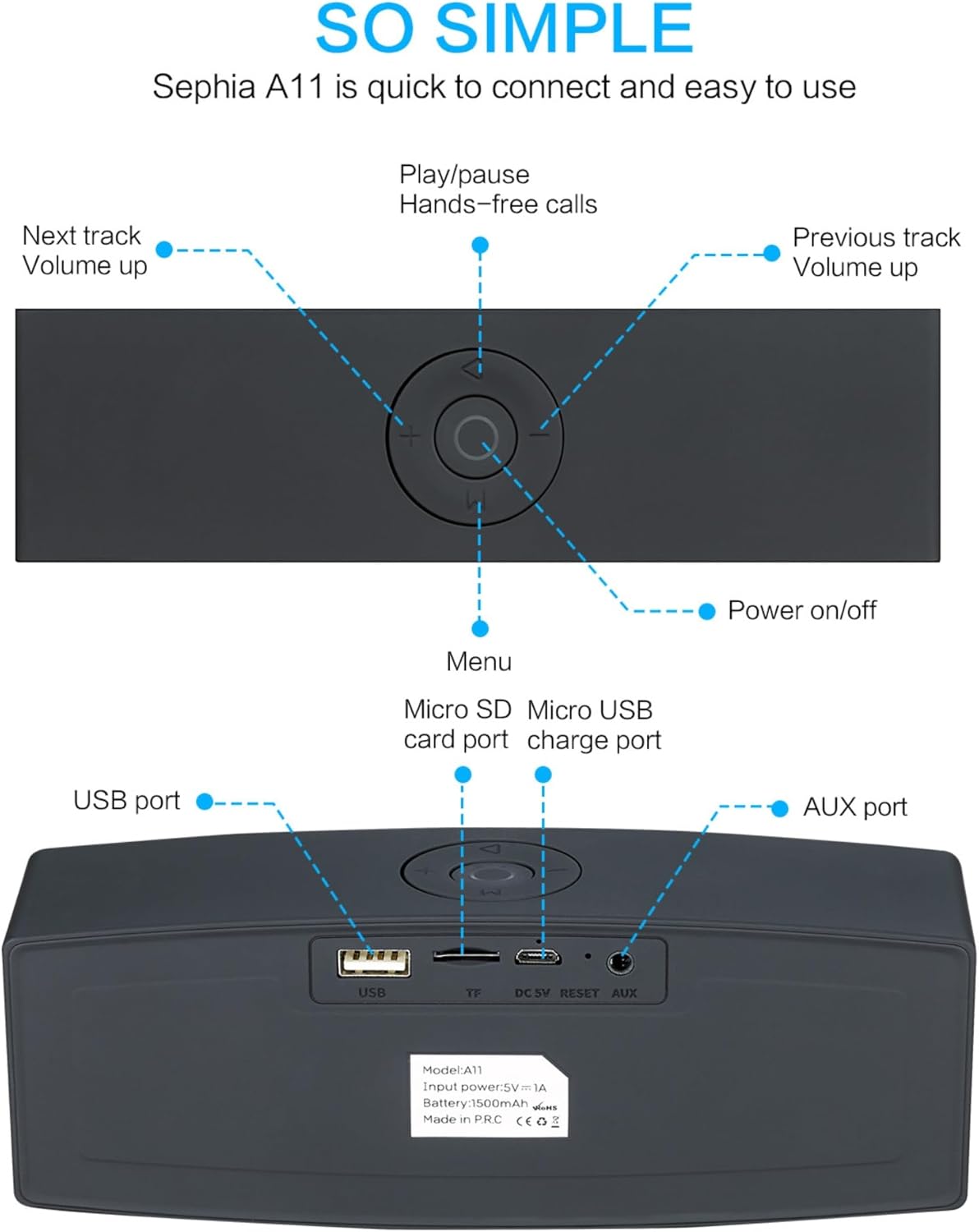
Image: Detailed diagram illustrating the top control panel and rear input/output ports of the Sephia A11 speaker.
Top Controls:
- Кнопка ввімкнення/вимкнення живлення: Натисніть і утримуйте, щоб увімкнути або вимкнути динамік.
- Кнопка відтворення/паузи: Press to play or pause audio. Also used for hands-free calls (answer/end).
- Кнопка попереднього треку / зменшення гучності (-): Коротке натискання для попереднього треку, довге натискання для зменшення гучності.
- Кнопка «Наступний трек» / «Збільшення гучності» (+): Коротке натискання для наступного треку, довге натискання для збільшення гучності.
- Кнопка меню (M): Press to switch between input modes (Bluetooth, USB, Micro SD, AUX).
Задні порти:
- Порт USB: Для відтворення аудіо з USB-накопичувача або заряджання зовнішніх пристроїв.
- Micro SD Card Slot (TF): Для відтворення аудіо з карти пам'яті Micro SD.
- Micro USB Charge Port (DC 5V): Для зарядки колонки.
- Кнопка скидання: Small pinhole for resetting the device if needed.
- Порт AUX: Для дротового аудіопідключення використовується 3.5-мм AUX-кабель, що входить до комплекту.
Налаштування
1. Заряджання динаміка
- Connect the supplied charging cable to the Micro USB Charge Port (DC 5V) on the rear of the speaker.
- Підключіть інший кінець зарядного кабелю до USB-адаптера живлення (не входить до комплекту) або USB-порту комп’ютера.
- The charging indicator light will illuminate. Once fully charged, the light will change or turn off (refer to specific model behavior if indicated by LED). A full charge provides up to 8 hours of playtime.
2. Увімкнення/вимкнення живлення
- To power on, press and hold the Power On/Off button on the top panel until you hear an audible prompt or see an indicator light.
- To power off, press and hold the Power On/Off button again until the speaker shuts down.
3. Підключення Bluetooth
- Ensure the speaker is powered on and in Bluetooth mode. If not, press the 'M' (Menu) button to switch to Bluetooth mode. The speaker will enter pairing mode, indicated by a flashing LED light and an audible prompt.
- На мобільному пристрої (смартфоні, планшеті, ноутбуці) увімкніть Bluetooth та знайдіть доступні пристрої.
- Select "Sephia A11" from the list of found devices.
- Once successfully paired, the speaker will provide an audible confirmation, and the LED indicator will stop flashing.
- The speaker has a Bluetooth range of up to 10 meters (33 feet).
4. Wired Connections (AUX, USB, Micro SD)
- Вхід AUX: Connect one end of the supplied 3.5mm AUX cable to the AUX port on the speaker and the other end to the audio output of your device (e.g., MP3 player, computer). The speaker will automatically switch to AUX mode or can be selected using the 'M' button.
- Відтворення через USB: Вставте USB-накопичувач із аудіо files into the USB port. The speaker will automatically detect and play the audio files.
- Відтворення картки Micro SD: Вставте карту Micro SD з аудіозаписом files into the Micro SD (TF) slot. The speaker will automatically detect and play the audio files.
Керування динаміком
Відтворення аудіо
- Відтворення/пауза: Press the Play/Pause button to toggle between playing and pausing audio.
- Регулювання гучності: Long press the '+' button to increase volume, and long press the '-' button to decrease volume.
- Наступний / попередній трек: Short press the '+' button for the next track, and short press the '-' button for the previous track.

Image: A hand demonstrating how to interact with the top control buttons of the Sephia A11 speaker.
Дзвінки в режимі "вільні руки".
- When a call comes in while connected via Bluetooth, press the Play/Pause button to answer the call.
- Знову натисніть кнопку відтворення/паузи, щоб завершити дзвінок.
- Вбудований мікрофон забезпечує чітке спілкування.
Технічне обслуговування
- Прибирання: Використовуйте м’яку суху тканину для очищення поверхні динаміка. Не використовуйте абразивні засоби для чищення, спирт або хімічні розчинники, оскільки вони можуть пошкодити покриття.
- Зберігання: Зберігайте динамік у прохолодному, сухому місці, подалі від прямих сонячних променів та екстремальних температур.
- Догляд за акумулятором: To prolong battery life, avoid fully discharging the speaker frequently. Charge the speaker regularly, even if not in use for extended periods.
- Водонепроникність: Цей динамік не є водонепроникним. Уникайте контакту з водою або надмірною вологістю.
Усунення несправностей
| проблема | Можлива причина | Рішення |
|---|---|---|
| Динамік не вмикається. | Низький заряд батареї; кнопка живлення утримувалася недостатньо довго. | Повністю зарядіть динамік. Натисніть і утримуйте кнопку живлення протягом 3-5 секунд. |
| Немає звуку з динаміка. | Занадто низька гучність; неправильний режим введення; пристрій не підключено належним чином. | Increase speaker and device volume. Press 'M' button to select correct input mode. Re-pair Bluetooth or re-connect AUX/USB/SD. |
| Не вдається з'єднати Bluetooth. | Гучномовець не в режимі сполучення; Пристрій занадто далеко; Перешкоди. | Ensure speaker is in Bluetooth pairing mode (flashing LED). Move speaker closer to device. Turn off other Bluetooth devices. Try forgetting "Sephia A11" on your device and re-pairing. |
| Погана якість звуку. | Low battery; Device volume too high (distortion); Interference. | Charge the speaker. Adjust volume on both speaker and device. Move away from sources of interference. |
Технічні характеристики
| Назва моделі | A11 |
| Розміри | 18 х 7 х 5 см |
| вага | 426 г |
| Технологія підключення | Bluetooth, USB, Micro SD, AUX |
| Вихідна потужність динаміка | 6 Watts (2 x 3W drivers) |
| АЧХ | 20 Гц - 20 кГц |
| Тип батареї | Літій-іонний |
| Час відтворення | До 8 годин |
| Діапазон Bluetooth | До 10 метрів (33 фути) |
| Особливості | Bass Boost, Portable, Hi-Res Audio, Built-in Microphone, Shockproof |

Image: Visual representation of the Sephia A11 speaker's dimensions.
Гарантія та підтримка
The Sephia A11 Portable Bluetooth Speaker comes with a Гарантія 12 місяців з дати покупки, що покриває виробничі дефекти. Будь ласка, збережіть підтвердження покупки для пред'явлення гарантійних претензій.
For technical support, warranty inquiries, or further assistance, please refer to the contact information provided with your purchase or visit the official Sephia webсайт.
Ask a question about this manual
Ask about setup, troubleshooting, compatibility, parts, safety, or missing instructions. Manuals+ will review the question and use this page’s manual context to help answer it.