
вступ
Thank you for choosing Symphonized Wireless Sport Earbuds. These headphones are designed to provide a high-fidelity audio experience with the convenience of wireless connectivity, ideal for sports, exercise, and daily use. This manual will guide you through the setup, operation, maintenance, and troubleshooting of your new earbuds.
Вміст упаковки
Будь ласка, перевірте наявність усіх предметів у вашій упаковці:
- Symphonized Wireless Sport Earbuds
- Additional Ear Tips (S/M/L)
- Зарядний кабель (USB)
- Посібник користувача
Продукт закінченийview


Ключові компоненти:
- Навушники: Left and right earpieces with integrated ear hooks.
- Neckband Cable: Connects the two earbuds and houses the battery and main controls.
- Панель керування: Located on one of the earbuds, typically includes Power/Multi-function button, Volume Up/Next Track, Volume Down/Previous Track.
- Мікрофон: Вбудований пристрій для дзвінків у режимі hands-free.
- Порт зарядки: Порт micro USB для зарядки.
Налаштування
1. Зарядка навушників
Before first use, fully charge your earbuds. Connect the provided USB charging cable to the charging port on the earbuds and the other end to a USB power source (e.g., computer USB port, wall adapter). The charging time is approximately 2 години для повного заряду.
An indicator light will typically show red during charging and turn blue or off when fully charged.
2. Підключення Bluetooth
Щоб підключити навушники до пристрою:
- Переконайтеся, що навушники вимкнені.
- Press and hold the Multi-function button (usually the power button) for approximately 5-7 seconds until the indicator light flashes red and blue alternately. This indicates pairing mode.
- На своєму пристрої (смартфоні, планшеті, ноутбуці) увімкніть Bluetooth та почніть пошук нових пристроїв.
- Select "Symphonized PWR" or a similar name from the list of available devices.
- Once connected, the indicator light on the earbuds will typically flash blue slowly or turn off. You will also hear an audible confirmation.
The earbuds use Bluetooth V4.1 technology and have a wireless range of up to 10 метрів (33 фути) in an open environment.

3. Носіння навушників
For optimal sound quality and comfort, choose the correct size ear tips from the included options (S/M/L). The ear hooks are designed to provide a secure fit, especially during physical activity.
- Select the ear tips that create a comfortable seal in your ear canal.
- Place the earbud into your ear, ensuring the ear hook goes over the top of your ear.
- Adjust the earbud and hook until it feels secure and comfortable.

Інструкція з експлуатації
Увімкнення/вимкнення живлення
- Увімкнення: Press and hold the Multi-function button for approximately 3 seconds until the indicator light flashes blue and you hear a power-on prompt.
- Вимкнення живлення: Press and hold the Multi-function button for approximately 3-5 seconds until the indicator light flashes red and you hear a power-off prompt.
Відтворення музики
- Відтворення/пауза: Коротко натисніть багатофункціональну кнопку.
- Збільшення гучності: Короткочасно натисніть кнопку «+».
- Зменшення гучності: Короткочасно натисніть кнопку «-».
- Наступний трек: Довго натискайте кнопку «+».
- Попередній трек: Довго натискайте кнопку «-».
Управління дзвінками
- Відповісти/закінчити виклик: Коротко натисніть багатофункціональну кнопку.
- Відхилити виклик: Тривале натискання багатофункціональної кнопки.
- Повторний набір останнього номера: Двічі натисніть багатофункціональну кнопку.
Голосовий помічник (Siri/Google Assistant)
If supported by your device, a quick triple-press of the Multi-function button may activate your device's voice assistant.
Технічне обслуговування та догляд
- Прибирання: Use a soft, dry cloth to clean the earbuds. Do not use harsh chemicals or abrasive materials. Regularly clean ear tips to prevent wax buildup.
- Зберігання: Store the earbuds in a cool, dry place away from extreme temperatures and direct sunlight.
- Водонепроникність: Навушники є Водостійкий, making them suitable for workouts and light rain. Do not submerge them in water or expose them to heavy downpours. Ensure the charging port cover is securely closed when not charging.
- Догляд за акумулятором: To prolong battery life, avoid fully discharging the battery frequently. Charge the earbuds regularly, even if not in use for extended periods.
Усунення несправностей
| проблема | Можлива причина | Рішення |
|---|---|---|
| Earbuds won't power on. | Низький заряд батареї. | Повністю зарядіть навушники. |
| Не вдається з’єднати пристрій. | Навушники не в режимі сполучення; Bluetooth вимкнено на пристрої; пристрій занадто далеко. | Ensure earbuds are in pairing mode (flashing red/blue). Turn on Bluetooth on your device. Move device closer to earbuds (within 10m). Forget previous pairings on your device and try again. |
| Немає звуку або гучність низька. | Volume too low on earbuds or device; earbuds not connected. | Increase volume on both earbuds and your device. Reconnect the earbuds to your device. |
| Періодичне з'єднання. | Перешкоди; пристрій занадто далеко; перешкоди. | Move closer to your device. Avoid environments with strong Wi-Fi or other Bluetooth signals. Remove obstacles between earbuds and device. |
Технічні характеристики
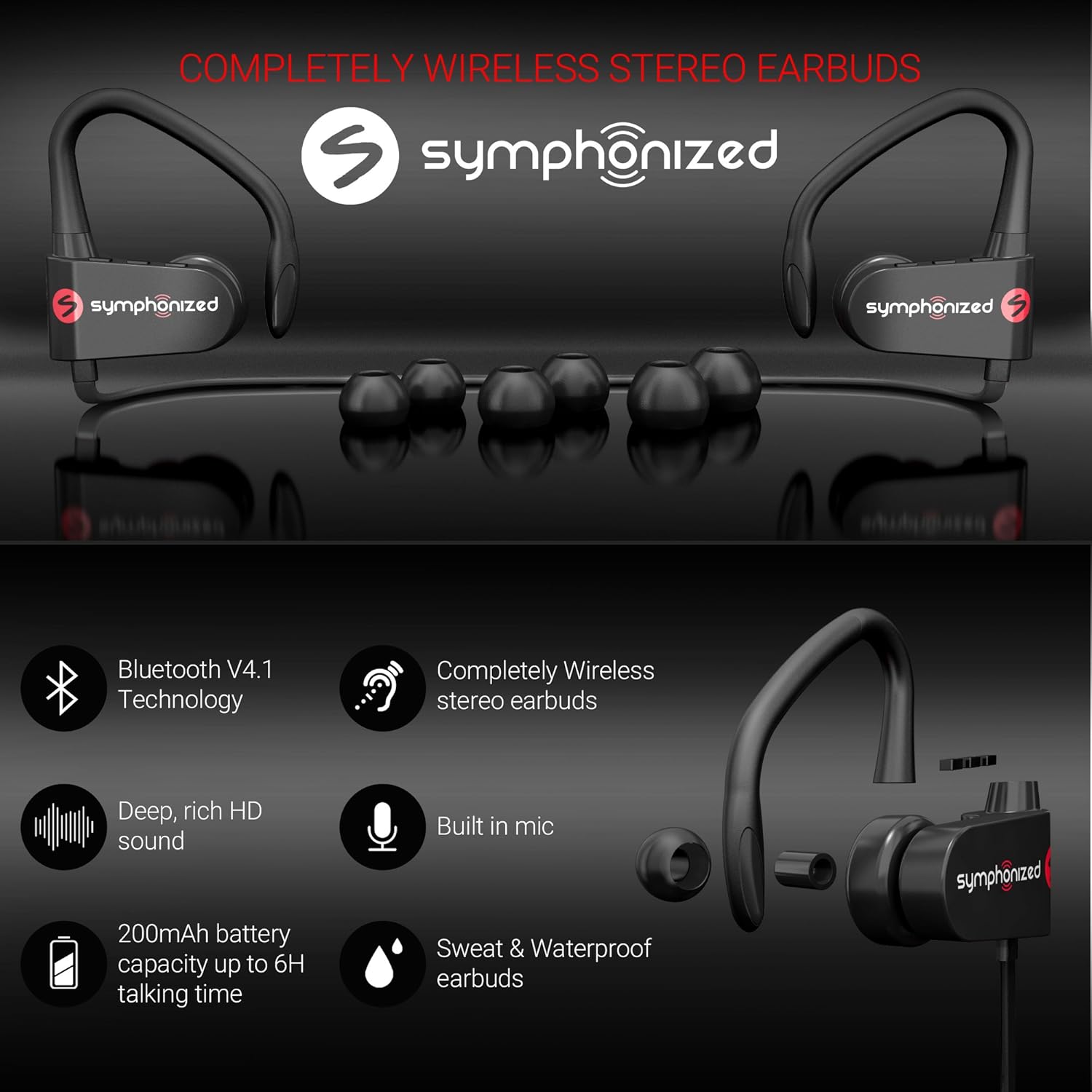
| Особливість | Деталь |
|---|---|
| Назва моделі | pwr_black |
| Технологія підключення | Бездротовий (Bluetooth) |
| Версія Bluetooth | 4.1 |
| Діапазон Bluetooth | 10 метрів |
| Термін служби батареї | До 6 годин (час відтворення) |
| Час зарядки | 2 години |
| Діапазон частот | 18 Гц-22 кГц |
| Рівень водонепроникності | Водостійкий |
| Тип управління | Регулювання гучності, сенсорне |
| Форма навушника | In-Ear with Ear Hooks |
| матеріал | Метал, силікон |
| Вага товару | 3.2 унції |
| UPC | 700600921889 |
Гарантія та підтримка
Symphonized products are designed for durability and performance. For information regarding product warranty, please refer to the documentation included with your purchase or visit the official Symphonized website. For customer support, troubleshooting assistance, or to inquire about returns, please contact Symphonized directly through their official channels.
You can visit the Symphonized brand store on Amazon for more information: Symphonized Store
Важливі зауваження
На основі наданих даних офіційних відео товару від продавця не було доступно для вбудовування.