
1. Вступ
This manual provides detailed instructions for the installation, operation, maintenance, and troubleshooting of your FSP 400W Micro ATX Power Supply (Model FSP400-60GHS(85)-R1). This power supply unit is designed for compact small form factor PC systems, offering 400 watts of power output with 80 Plus Bronze certification for high efficiency. It is compatible with Intel and AMD CPU systems and standard PC configurations.
Please read this manual thoroughly before installation and operation to ensure proper usage and to prevent damage to the unit or other components.
2. Інформація про безпеку
УВАГА: Power supplies contain high voltage components. Do not open the power supply casing. Усередині немає деталей, які може обслуговувати користувач. Відкриття кришкиasing will void the warranty and poses a risk of electric shock.
- Перед встановленням або технічним обслуговуванням переконайтеся, що блок живлення відключено від розетки змінного струму.
- Встановіть блок живлення в добре провітрюваному приміщенні.
- Не використовуйте блок живлення в умовах високої вологості або екстремальних температур.
- Використовуйте лише кабелі, що постачаються з блоком живлення.
- Перед увімкненням системи переконайтеся, що всі кабелі надійно підключені.
- This product is designed for use in personal computers. Do not use it for any other purpose.
3. Вміст упаковки
Перевірте, чи всі перелічені нижче предмети присутні у вашій упаковці:
- FSP 400W Micro ATX Power Supply (FSP400-60GHS(85)-R1)
- Шнур живлення змінного струму
- SFX to PS2 Bracket
- Посібник користувача
- Mounting Screws (typically included with PC cases, but sometimes with PSUs)

Figure 3.1: Package Contents. Shows the power supply unit, user manual, various power cables, an AC power cord, and an SFX to PS2 adapter bracket.
4. Продукт закінчивсяview
The FSP400-60GHS(85)-R1 is a compact power supply designed for small form factor systems. Key features include an 80mm cooling fan with thermal sensing technology and an energy-saving 1-watt standby mode.
4.1 Фізичне розташування

Рисунок 4.1: Кутовий view of the FSP 400W Micro ATX Power Supply, highlighting the fan grille, power switch, and AC power input.

Малюнок 4.2: Задня частина view of the power supply, detailing the main power switch and the AC power input socket.

Малюнок 4.3: Верх view of the power supply, showing the protective grille over the 80mm cooling fan.
4.2 Вихідні роз'єми
The power supply includes various connectors to power your system components:
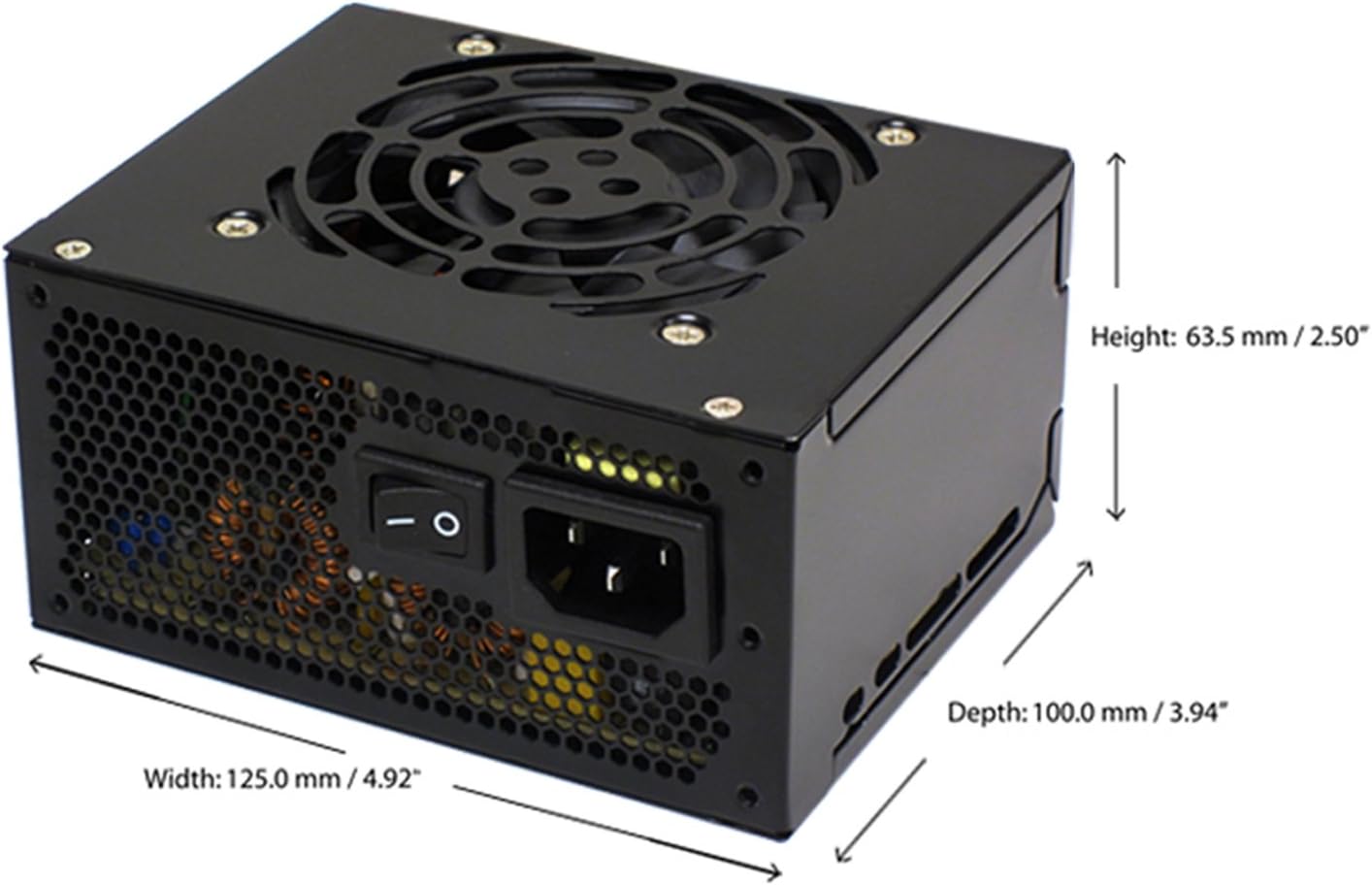
Figure 4.4: Diagram illustrating the types and quantities of output connectors available on the FSP400-60GHS(85)-R1 power supply.
- Main 24 Pin (1): For motherboard power.
- P4 | EPS 4+4 Pin (1): For CPU power.
- PCI-E 8 Pin (6+2) (1): Для відеокарт.
- Molex 4 Pin (3): For older peripherals and fans.
- Serial ATA 15 Pin (3): For SATA hard drives and SSDs.
- FDD 4 Pin (1): For floppy disk drives or other legacy devices.
5. Налаштування та встановлення
Before beginning installation, ensure your computer system is powered off and disconnected from the AC power outlet. It is recommended to wear an anti-static wrist strap to prevent electrostatic discharge (ESD) damage to components.
5.1 Installing the Power Supply
- Підготуйте справу: Open your computer case. Identify the power supply mounting area.
- Монтаж блоку живлення:
- For SFX cases: Insert the FSP400-60GHS(85)-R1 directly into the SFX power supply bay and secure it with screws.
- For standard ATX cases: Attach the included SFX to PS2 bracket to the power supply. Then, mount the power supply with the bracket into the ATX power supply bay and secure it with screws.

Figure 5.1: The FSP 400W Micro ATX Power Supply shown with the SFX to PS2 adapter bracket installed, ready for mounting in a standard ATX case.

Figure 5.2: Illustration demonstrating how the SFX power supply fits into a PS2 (ATX) case using the provided adapter bracket.
5.2 З'єднувальні кабелі
Connect the appropriate cables to your motherboard and components. Refer to your motherboard and component manuals for specific connection points.
- Живлення материнської плати: Connect the 24-pin ATX connector to the corresponding socket on your motherboard.
- Потужність ЦП: Connect the 4+4-pin EPS/ATX 12V connector to the CPU power socket on your motherboard.
- Потужність відеокарти: If your graphics card requires external power, connect the 6+2-pin PCI-E connector(s) to the graphics card.
- Пристрої зберігання даних: Connect SATA power connectors to your SATA hard drives, SSDs, and optical drives.
- Периферійні пристрої: Use Molex 4-pin connectors for case fans or other legacy peripherals as needed.
- Управління кабелем: Акуратно прокладіть кабелі, щоб забезпечити належну циркуляцію повітря всередині корпусу.
Once all internal connections are made, close your computer case.
5.3 Зовнішнє підключення
- Connect the AC power cord to the power supply's AC inlet.
- Plug the other end of the AC power cord into a grounded wall outlet or surge protector.
- Ensure the power switch on the back of the power supply is in the "OFF" (O) position before plugging it in.
6. Інструкція з експлуатації
6.1 Powering On Your System
- After all connections are secure, flip the power switch on the back of the power supply to the "ON" (I) position.
- Натисніть кнопку живлення на корпусі комп'ютера, щоб запустити систему.
6.2 Thermal Control System
The FSP400-60GHS(85)-R1 features an 80mm cooling fan with thermal sensing technology. This system automatically adjusts the fan speed based on the internal temperature of the power supply, optimizing cooling performance while minimizing noise.
6.3 Energy Saver Standby Mode
This power supply is designed with an energy-saving 1-watt standby mode, reducing power consumption when the system is in a low-power state or turned off but still connected to AC power.
7. Технічне обслуговування
Правильне обслуговування забезпечує довговічність та оптимальну роботу вашого блоку живлення.
- Прибирання: Periodically clean the exterior of the power supply and its fan grille to prevent dust buildup. Use a soft, dry cloth or compressed air. Ensure the power supply is disconnected from AC power before cleaning.
- Вентиляція: Ensure that the power supply's fan and ventilation openings are not obstructed. Good airflow is crucial for cooling.
- Цілісність кабелю: Regularly check all power cables for any signs of wear, fraying, or damage. Replace damaged cables immediately.
Do not attempt to open the power supply unit for internal cleaning or repair. This will void the warranty and can be dangerous.
8. Вирішення проблем
Якщо у вас виникли проблеми з блоком живлення, зверніться до наступних поширених проблем та способів їх вирішення:
8.1 Немає живлення системи
- Перевірте живлення змінного струму: Ensure the AC power cord is securely plugged into both the power supply and a working wall outlet.
- Вимикач живлення: Verify that the power switch on the back of the power supply is in the "ON" (I) position.
- Внутрішні з'єднання: Confirm that the 24-pin ATX and 4+4-pin EPS/ATX 12V connectors are firmly seated in the motherboard.
- Коротке замикання: Disconnect all peripheral power cables (SATA, Molex, PCI-E) and attempt to power on. If the system powers on, a short circuit may exist in one of the connected components or cables. Reconnect them one by one to identify the faulty component.
8.2 Нестабільність системи або випадкові вимкнення
- Перевантаження: Ensure your system's power requirements do not exceed the 400W capacity of the power supply.
- Вентиляція: Check for proper airflow within the case and ensure the power supply's fan is not obstructed. Overheating can cause instability.
- Кабельні з'єднання: Re-check all power connections to ensure they are secure. Loose connections can lead to intermittent power delivery.
8.3 Надмірний шум вентилятора
- Накопичення пилу: Clean the fan grille and fan blades with compressed air.
- Обструкція: Ensure no cables or foreign objects are interfering with the fan's rotation.
- Операційне середовище: High ambient temperatures can cause the thermal control system to increase fan speed. Ensure adequate room ventilation.
If troubleshooting steps do not resolve the issue, contact FSP customer support or your retailer for assistance.
9. Технічні характеристики
Detailed technical specifications for the FSP400-60GHS(85)-R1 power supply:
| Назва моделі | FSP 400W Micro ATX Power Supply |
| Номер моделі | FSP400-60GHS(85)-R1 |
| Бренд | FSP |
| Вихідна ватtage | 400 Вт |
| 80 Plus Certification | 80 плюс бронза |
| Форм-фактор | Micro ATX (SFX with PS2 bracket) |
| Спосіб охолодження | Air (80mm fan with thermal control) |
| Конструкція джерела живлення | Немодульний |
| Вхідний об'ємtage | 100 - 265 вольт (змінного струму) |
| Розміри (Д x Ш x В) | 4.9 x 3.9 x 2.5 дюйма (125.0 x 100.0 x 63.5 мм) |
| Вага товару | 2.31 фунта |
| Сумісні пристрої | Personal Computer (AMD/Intel CPU systems) |
| Роз'єми | Main 24 Pin (1), P4 | EPS 4+4 Pin (1), PCI-E 8 Pin (6+2) (1), Molex 4 Pin (3), Serial ATA 15 Pin (3), FDD 4 Pin (1) |
| Екологічна відповідність | RoHS, Lead-Free, Green Product (G.P) |

Figure 9.1: Physical dimensions of the FSP 400W Micro ATX Power Supply.

Figure 9.2: Illustrative diagram showing typical cable lengths for the power supply connectors.
10. Інформація про гарантію
The FSP 400W Micro ATX Power Supply (FSP400-60GHS(85)-R1) is covered by a 3-річна гарантія виробника. This warranty guarantees the quality and performance of the product for the specified period from the date of purchase.
The warranty covers defects in materials and workmanship under normal use. It does not cover damage resulting from improper installation, accidents, misuse, abuse, natural disasters, or unauthorized modifications or repairs. Opening the power supply casing призведе до анулювання гарантії.
For warranty claims or service, please retain your proof of purchase and contact FSP customer support.
11. Підтримка клієнтів
If you require further assistance, have questions, or need to report an issue that cannot be resolved using the troubleshooting guide, please contact FSP customer support.
- FSP Webсайт: Visit the official FSP webсайт з інформацією про продукт, поширеними запитаннями та ресурсами підтримки.
- Контактна інформація: Refer to the FSP website or your product packaging for the most current customer service contact details (phone, email, or support portal).
When contacting support, please have your product model number (FSP400-60GHS(85)-R1) and proof of purchase readily available.